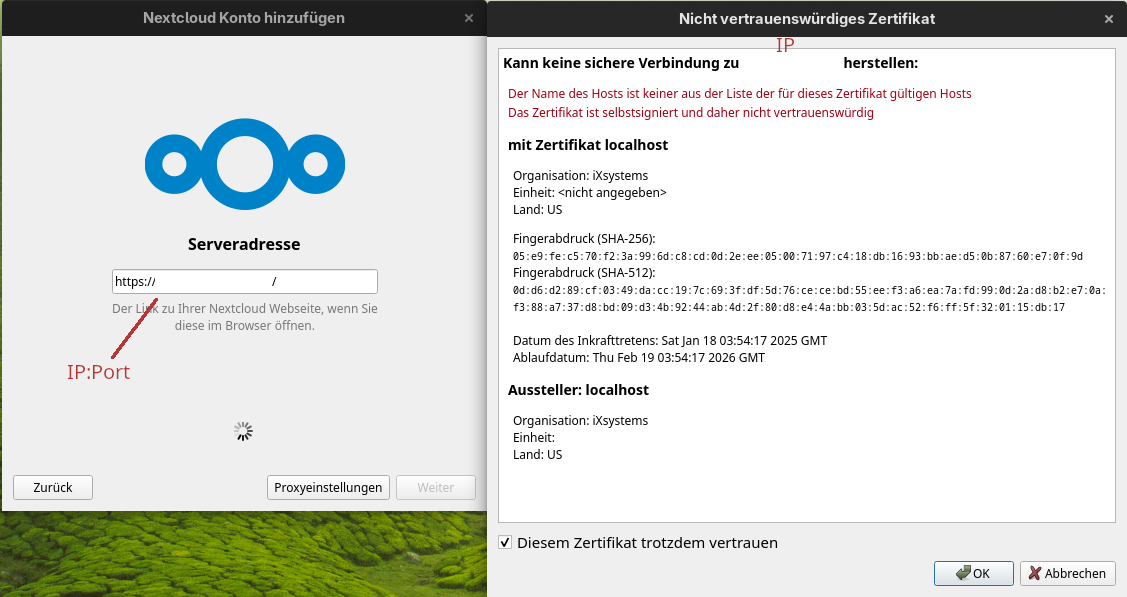
removed because of forum limitation for new users (4 links)
The Basics
- Nextcloud Server version (e.g., 29.x.x):
- 32.0.1
- Nexcloud Client Linux
- Nextcloud version 4.0.1daily
Git revision e81c242e131f207f0c18081004453a01af5bd51e
Using Qt 6.10.0, built against Qt 6.10.0
Using Qt platform plugin ‘xcb’
Using ‘OpenSSL 3.6.0 1 Oct 2025’
Running on CachyOS, x86_64
- Nextcloud version 4.0.1daily
- Operating system and version (e.g., Ubuntu 24.04):
-
TrueNAS 25.04.2.6
-
App Container
Name: nextcloudApp Version: v32.0.1
Version: v2.1.5
-
- Web server and version (e.g, Apache 2.4.25):
- nginx version: nginx/1.22.1
- Reverse proxy and version _(e.g. nginx 1.27.2)
- nginx: 1.29.3
- PHP version (e.g, 8.3):
- postgrsql: 17.6 (Debian 17.6.2)
- Is this the first time you’ve seen this error? (Yes / No):
Yes
- When did this problem seem to first start?
second last version or last OS system update
- Installation method (e.g. AlO, NCP, Bare Metal/Archive, etc.)
TrueNAS App container standard IX version
- Are you using CloudfIare, mod_security, or similar? (Yes / No)
No, only local (NAS/Nextcloud and PC are in the same LAN)
Summary of the issue you are facing:
Nextcloud (NC) server and client (Linux) are located in the same LAN. The NC server is running as docker container (standard IX) on a TrueNAS box (NAT, same IP but GUI has different ports). Both worked well since years. Connection problem starts two months ago.
Client decline connection to server due to “… server enforce strict transport security …”.
As far as I remember it has worked with hostname:port before, but now it is forcing me to IP:Port - what ends in the error see next section number 6 (error message in English: “Error accessing token endpoint: The server enforces strict transport security and only accepts trusted certificates.“). Side notice, in the NC GUI admin account is a menu point which usually show the correct endpoint to connect, this is empty in my installation, but I’m not sure that this was not the case before the problems starts.
Steps to replicate it (hint: details matter!):
-
removed, because of forum limitation for new users
-
removed, because of forum limitation for new users
-
removed, because of forum limitation for new users
-
“Error accessing token endpoint: The server enforces strict transport security and only accepts trusted certificates.“
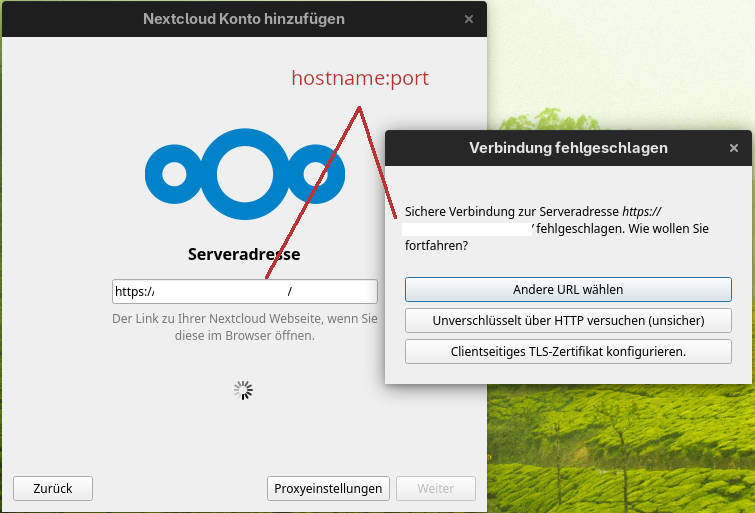
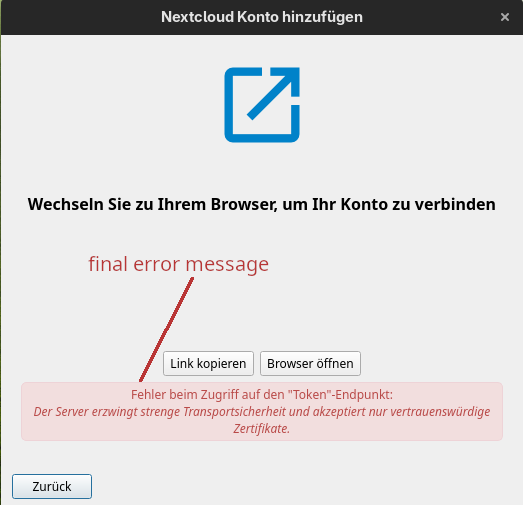
Log entries
Nextcloud
Please provide the log entries from your Nextcloud log that are generated during the time of problem (via the Copy raw option from Administration settings->Logging screen or from your nextcloud.log located in your data directory). Feel free to use a pastebin/gist service if necessary.
https://pastebin.com/tHTQzBGR
Web Browser
If the problem is related to the Web interface, open your browser inspector Console and Network tabs while refreshing (reloading) and reproducing the problem. Provide any relevant output/errors here that appear.
no errors
Web server / Reverse Proxy
The output of your Apache/nginx/system log in /var/log/____:
TrueNAS nginx error.log is linked to /dev/null :-/
Configuration
Nextcloud
The output of occ config:list system or similar is best, but, if not possible, the contents of your config.php file from /path/to/nextcloud is fine (make sure to remove any identifiable information!):
{
    "system": {
        "htaccess.RewriteBase": "\/",
        "memcache.local": "\\OC\\Memcache\\APCu",
        "apps_paths": [
            {
                "path": "\/var\/www\/html\/apps",
                "url": "\/apps",
                "writable": false
            },
            {
                "path": "\/var\/www\/html\/custom_apps",
                "url": "\/custom_apps",
                "writable": true
            }
        ],
        "memcache.distributed": "\\OC\\Memcache\\Redis",
        "memcache.locking": "\\OC\\Memcache\\Redis",
        "redis": {
            "host": "***REMOVED SENSITIVE VALUE***",
            "password": "***REMOVED SENSITIVE VALUE***",
            "port": 6379
        },
        "overwritehost": "nextcloud.bastion:4321",
        "overwriteprotocol": "https",
        "trusted_proxies": "***REMOVED SENSITIVE VALUE***",
        "upgrade.disable-web": true,
        "passwordsalt": "***REMOVED SENSITIVE VALUE***",
        "secret": "***REMOVED SENSITIVE VALUE***",
        "datadirectory": "***REMOVED SENSITIVE VALUE***",
        "dbtype": "pgsql",
        "version": "32.0.1.2",
        "overwrite.cli.url": "https:\/\/localhost",
        "dbname": "***REMOVED SENSITIVE VALUE***",
        "dbhost": "***REMOVED SENSITIVE VALUE***",
        "dbport": "",
        "dbtableprefix": "oc_",
        "dbuser": "***REMOVED SENSITIVE VALUE***",
        "dbpassword": "***REMOVED SENSITIVE VALUE***",
        "installed": true,
        "instanceid": "***REMOVED SENSITIVE VALUE***",
        "maintenance": false,
        "maintenance_window_start": 1,
        "mail_smtpmode": "smtp",
        "mail_smtpsecure": "ssl",
        "mail_sendmailmode": "smtp",
        "mail_from_address": "***REMOVED SENSITIVE VALUE***",
        "mail_domain": "***REMOVED SENSITIVE VALUE***",
        "mail_smtphost": "***REMOVED SENSITIVE VALUE***",
        "mail_smtpport": "465",
        "mail_smtpauth": 1,
        "mail_smtpname": "***REMOVED SENSITIVE VALUE***",
        "mail_smtppassword": "***REMOVED SENSITIVE VALUE***",
        "loglevel": 2,
        "files.chunked_upload.max_size": 524288000,
        "config_preset": 2,
        "trusted_domains": [
            "127.0.0.1",
            "192.168.33.200",
            "localhost",
            "nextcloud",
            "nextcloud.bastion",
            "nextcloud.bastion:4321",
            "nginx"
        ]
    }
}
Apps
The output of occ app:list (if possible).
Enabled:
- activity: 5.0.0-dev.0
- app_api: 32.0.0
- bruteforcesettings: 5.0.0-dev.0
- calendar: 6.0.3
- circles: 32.0.0
- cloud_federation_api: 1.16.0
- comments: 1.22.0
- contacts: 8.0.6
- contactsinteraction: 1.13.1
- dashboard: 7.12.0
- dav: 1.34.2
- deck: 1.16.0
- federatedfilesharing: 1.22.0
- federation: 1.22.0
- files: 2.4.0
- files_downloadlimit: 5.0.0-dev.0
- files_pdfviewer: 5.0.0-dev.0
- files_reminders: 1.5.0
- files_sharing: 1.24.0
- files_trashbin: 1.22.0
- files_versions: 1.25.0
- firstrunwizard: 5.0.0-dev.0
- guests: 4.6.0
- logreader: 5.0.0-dev.0
- lookup_server_connector: 1.20.0
- nextcloud_announcements: 4.0.0-dev.0
- notes: 4.12.3
- notifications: 5.0.0-dev.0
- oauth2: 1.20.0
- password_policy: 4.0.0-dev.0
- photos: 5.0.0-dev.1
- privacy: 4.0.0-dev.0
- profile: 1.1.0
- provisioning_api: 1.22.0
- recommendations: 5.0.0-dev.0
- related_resources: 3.0.0-dev.0
- serverinfo: 4.0.0-dev.0
- settings: 1.15.1
- sharebymail: 1.22.0
- support: 4.0.0-dev.0
- survey_client: 4.0.0-dev.0
- systemtags: 1.22.0
- text: 6.0.1
- theming: 2.7.0
- twofactor_backupcodes: 1.21.0
- updatenotification: 1.22.0
- user_status: 1.12.0
- viewer: 5.0.0-dev.0
- weather_status: 1.12.0
- webhook_listeners: 1.3.0
- workflowengine: 2.14.0
Disabled: - admin_audit: 1.22.0
- encryption: 2.20.0
- files_external: 1.24.0
- suspicious_login: 10.0.0-dev.0
- tasks: 0.16.1 (installed 0.16.1)
- twofactor_nextcloud_notification: 6.0.0-dev.0
- twofactor_totp: 14.0.0
- user_ldap: 1.23.0
Tips for increasing the likelihood of a response
- Use the
preformatted textformatting option in the editor for all log entries and configuration output. - If screenshots are useful, feel free to include them.
- If possible, also include key error output in text form so it can be searched for.
- Try to edit log output only minimally (if at all) so that it can be ran through analyzers / formatters by those trying to help you.
 Dein Log geht als schnurstracks in den Müll …