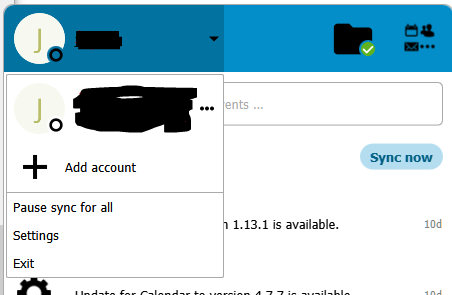
I want to add a user for the destop sync client. The user is of course present on the server. According to the documentation, there should be an “Add user” button in the systray:
You may configure multiple Nextcloud accounts in your desktop sync client. Simply click the Account > Add New button on any account tab to add a new account, and then follow the account creation wizard. The new account will appear as a new tab in the settings dialog, where you can adjust its settings at any time. Use Account > Remove to delete accounts.
But I don´t have that Add New button, when opening the systray. Only the user initially created is shown, with its activities.
The client is installed from the Tumbleweed repo, version info:
Nextcloud version 3.13.1git
Git revision d8d7b037d14eb29eac2f9d61844e0a7fcf24e36c
Using Qt 5.15.14, built against Qt 5.15.14
Using Qt platform plugin ‘xcb’
Using ‘OpenSSL 3.1.4 24 Oct 2023’
Running on openSUSE Tumbleweed, x86_64
Hmm, I just have seen that I was on version 3.13.0 and I updated to 3.13.1, but it is on Windows 10 and I don’t have this problem.
There seems to be an issue with the flatpacks: