Hi, is anyone having issues with the Windows client HUD on version 3.14?
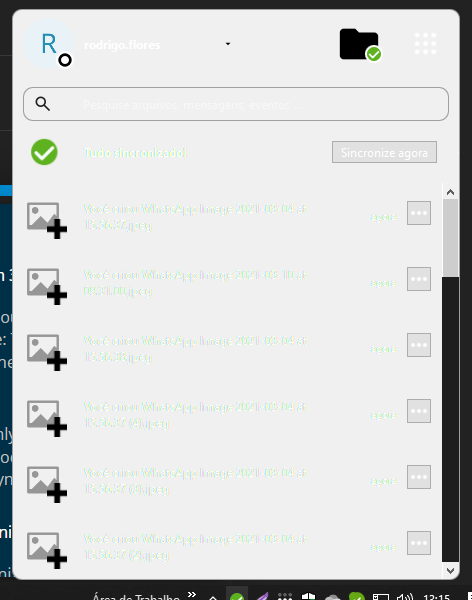
Nextcloud version: Client 3.14.0
Operating system and version: windows 10
The background of my nextcloud client is suddenly white:

I hope someone can help.
1 Like
hi @clankill3r @rcflores welcome to the forum. I merged both topics into one as duplicates. Please use search before posting - this saves work for volunteers helping you here.
Many users reported issues with 3.14.0 and some reported downgrade to 3.13.4 solving some of them. Please check if 3.13.4 works and report if the problem persists:
https://github.com/nextcloud-releases/desktop/releases/tag/v3.13.4
On my other computer the main dialogue is not opening so it’s hard to tell if that would have a white background as well.
In version 3.14.0.0 the console is not opening after installation, you need to close it and open it again… To resolve the reported problems rolled back to version 3.9.3.0, and all problems were resolved.
Download: https://github.com/nextcloud-releases/desktop/releases/download/v3.9.3/Nextcloud-3.9.3-x64.msi
It will be necessary to close the system before reinstalling, and remove Nextcloud with Revo Uninstaller, after removal, restart the computer and reinstall Nextcloud after restarting.
1 Like
- Bump! -
Hallo Allerseits.
Habe das selbe Problem nun mit 3.14.1 (aktuelle Version für Windows x64).
Issue is not fixed in version 3.14.1
Yes. It is a known issue:
and fixing is planed for the 3.14.2 milestone with release date planned for 17/10/2024
Sadly, this issue was not fixed in v3.14.2, but reverting to v3.13.3 did allow me to work around the problem.
2 Likes
Same issue. Of every possible component in Nextcloud, nothing so consistently screws you as the Windows client. At least it’s not deleting files… this time. Now I remember why I disabled checks for updates. Once again I’m extremely relieved I don’t have to support this, just suffer through it for my personal install.
Yeah, this is still an issue. How comes? i mean, i don’t want to be destructive, and It’s been a while since i put my fingers into programming myself.
but imho this looks like a very superficial and easy-to-fix bug.
setting the foreground-backgroudn colors in a consistent way (either using your own preference, e.g.: lightgray background and black foreground; or using the windows default for both. just don’t force the background to lightgray while the foreground color is set to windows default ).
anyway, i think it is great that many people put their time and energy into this app, and thanks for the upgrades, which i will still install, because i think not updating makes a system more insecure. i am just bothered that i cannot use dark mode in windows because of this annyoing little bug. but i have been using nextcloud for years cross-plattforms and am generally pleased.
Hello,
The update 3.15.0 fixed the bug for me. Running Nextcloud client on W10.
Cheers,
3 Likes
Can confirm 3.15.0 is also fixed for me on W10.
1 Like
Irritating! This issue came back with the current version update, after it had been already fixed before.
Nextcloud Desktop-Client Version 3.16.0 (Windows)
1 Like
Hi @ooopz,
It is not the same.
There is already a new issue opened:
Does that match with your observations?
ernolf
You are right, your linked issue at github describes it. It is not the same exactly, but a reversed variation
(Before, background-color was forced by programmer’s choice and foreground-color set by windows default; now it is the other way around: the foreground-color is forced by programmer’s choice while the background-color is set by windows-default. In the meantime, it had briefly been fixed so that both foreground and background colors were set by windows default;)
Hello,
we know about the issue and it was overlooked for the current release during the processing of the technical issues.
We will catch up and provide a fix for the next 3.16.2
This area is the pain since several releases now, as QT is giving us a hard time with backwards compatibility.
Sorry for the confusion. we are working on this