Support intro
Sorry to hear you’re facing problems. 
The community help forum (help.nextcloud.com) is for home and non-enterprise users. Support is provided by other community members on a best effort / “as available” basis. All of those responding are volunteering their time to help you.
If you’re using Nextcloud in a business/critical setting, paid and SLA-based support services can be accessed via portal.nextcloud.com where Nextcloud engineers can help ensure your business keeps running smoothly.
Getting help
In order to help you as efficiently (and quickly!) as possible, please fill in as much of the below requested information as you can.
Before clicking submit: Please check if your query is already addressed via the following resources:
- Official documentation (searchable and regularly updated)
- How to topics and FAQs
- Forum search
(Utilizing these existing resources is typically faster. It also helps reduce the load on our generous volunteers while elevating the signal to noise ratio of the forums otherwise arising from the same queries being posted repeatedly).
The Basics
- Nextcloud Server version (e.g., 29.x.x):
- Nextcloud AIO v13.2.1
- Operating system and version (e.g., Ubuntu 24.04):
Ubuntu Server 24.04
- Web server and version (e.g, Apache 2.4.25):
aio-apache:latest
- Reverse proxy and version _(e.g. nginx 1.27.2)
Caddy:alpine
- Is this the first time you’ve seen this error? (Yes / No):
Yes
- When did this problem seem to first start?
today while installing an upgrade
- Installation method (e.g. AlO, NCP, Bare Metal/Archive, etc.)
Docker/Nextcloud-AIO
- Are you using CloudfIare, mod_security, or similar? (Yes / No)
No
Summary of the issue you are facing:
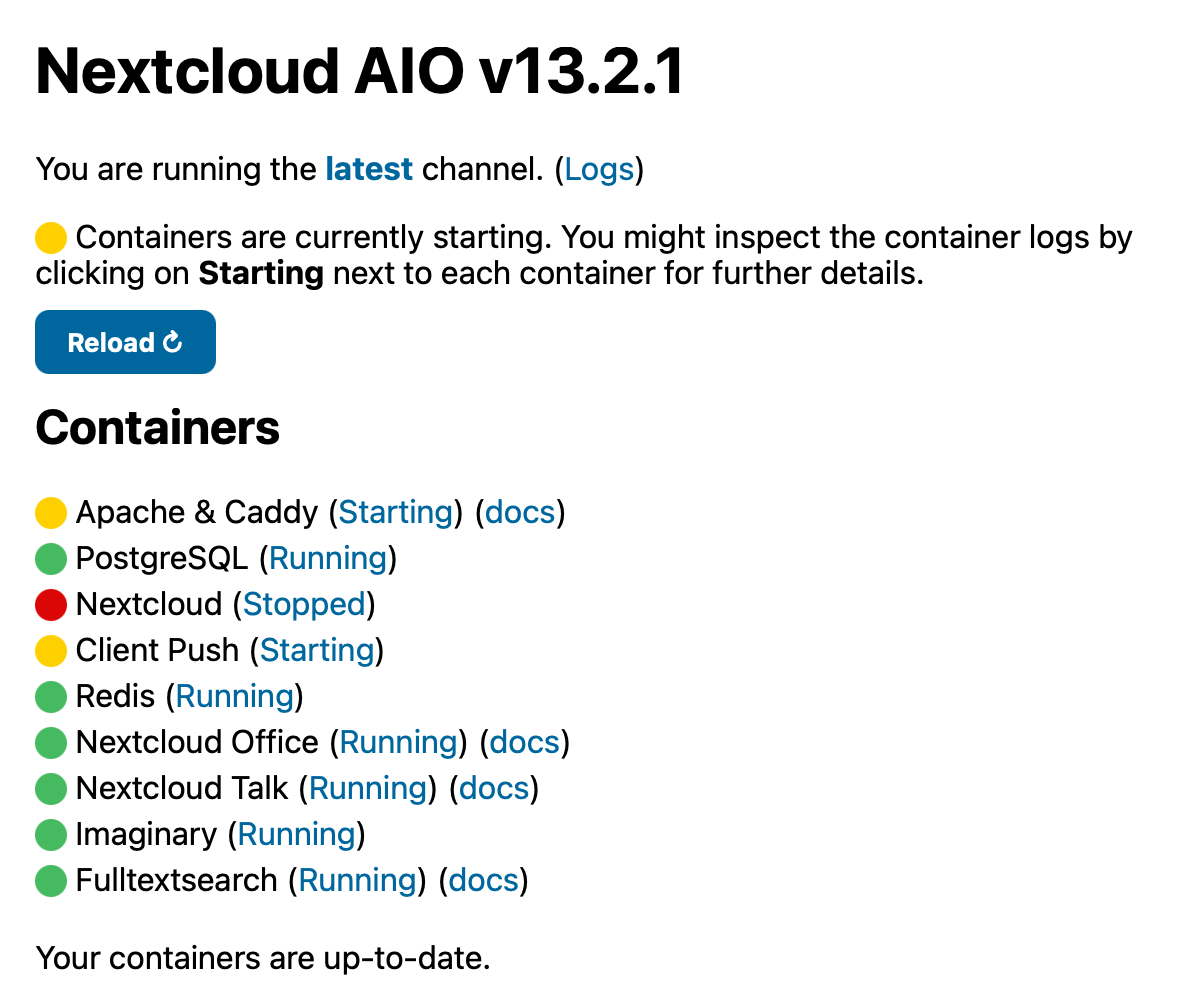
Upgrade failed. AIO Interface shows Nextcloud stopped, Containers “Apache & Caddy” as well as “Client Push” as “Starting”. I can’t seem to get out of this. Location for borg backup has not been set yet.
Log entries
Nextcloud
2026-06-10T08:53:53.050912341Z Upgrading Nextcloud from 33.0.3.2 to 33.0.5.1...
2026-06-10T08:53:53.382600926Z Nextcloud or one of the apps require upgrade - only a limited number of commands are available
2026-06-10T08:53:53.382630229Z You may use your browser or the occ upgrade command to do the upgrade
2026-06-10T08:53:53.390266093Z System config value integrity.check.disabled deleted
2026-06-10T08:53:53.636160957Z Setting log level to debug
2026-06-10T08:53:53.637062293Z Turned on maintenance mode
2026-06-10T08:53:53.886811132Z Updating database schema
2026-06-10T08:53:53.894968550Z Updated database
2026-06-10T08:53:56.120161397Z Starting code integrity check...
2026-06-10T08:55:00.748265364Z RedisException: Connection lost
2026-06-10T08:55:00.748289309Z Update failed
2026-06-10T08:55:00.748293395Z Maintenance mode is kept active
2026-06-10T08:55:00.748297092Z Resetting log level
2026-06-10T08:55:00.791988018Z Upgrade failed. Please restore from backup.
2026-06-10T08:55:10.955945862Z Posting notifications to users that are admins...
2026-06-10T08:58:44.092000897Z Done!
Configuration
Nextcloud
The contents of your config.php file from /var/lib/docker/volumes/nextcloud/nextcloud-aio-nextcloud/_data/config/config.php:
<?php
$CONFIG = array (
  'one-click-instance' => true,
  'one-click-instance.user-limit' => 100,
  'memcache.local' => '\\OC\\Memcache\\APCu',
  'apps_paths' =>
  array (
    0 =>
    array (
      'path' => '/var/www/html/apps',
      'url' => '/apps',
      'writable' => false,
    ),
    1 =>
    array (
      'path' => '/var/www/html/custom_apps',
      'url' => '/custom_apps',
      'writable' => true,
    ),
  ),
  'check_data_directory_permissions' => false,
  'memcache.distributed' => '\\OC\\Memcache\\Redis',
  'memcache.locking' => '\\OC\\Memcache\\Redis',
  'redis' =>
  array (
    'host' => 'nextcloud-aio-redis',
    'password' => '-',
    'port' => 6379,
    'timeout' => 3.0,
    'read_timeout' => 10.0,
  ),
  'overwritehost' => '-',
  'overwriteprotocol' => 'https',
  'passwordsalt' => '-',
  'secret' => '-',
  'trusted_domains' =>
  array (
    0 => 'localhost',
    1 => '-',
  ),
  'datadirectory' => '/mnt/ncdata',
  'dbtype' => 'pgsql',
  'version' => '33.0.3.2',
  'overwrite.cli.url' => '-',
  'dbname' => 'nextcloud_database',
  'dbhost' => 'nextcloud-aio-database:5432',
  'dbtableprefix' => 'oc_',
  'dbuser' => 'oc_nextcloud',
  'dbpassword' => '-',
  'installed' => true,
  'instanceid' => '-',
  'maintenance' => true,
  'updatechecker' => false,
  'loglevel' => 2,
  'log_type' => 'file',
  'logfile' => '/var/www/html/data/nextcloud.log',
  'log_rotate_size' => 10485760,
  'log.condition' =>
  array (
    'apps' =>
    array (
      0 => 'admin_audit',
    ),
  ),
  'preview_max_x' => 2048,
  'preview_max_y' => 2048,
  'jpeg_quality' => 60,
  'enabledPreviewProviders' =>
  array (
    1 => 'OC\\Preview\\Image',
    2 => 'OC\\Preview\\MarkDown',
    3 => 'OC\\Preview\\MP3',
    4 => 'OC\\Preview\\TXT',
    5 => 'OC\\Preview\\OpenDocument',
    6 => 'OC\\Preview\\Movie',
    7 => 'OC\\Preview\\Krita',
    0 => 'OC\\Preview\\Imaginary',
    23 => 'OC\\Preview\\ImaginaryPDF',
  ),
  'enable_previews' => true,
  'upgrade.disable-web' => true,
  'mail_smtpmode' => 'smtp',
  'trashbin_retention_obligation' => 'auto, 30',
  'versions_retention_obligation' => 'auto, 30',
  'activity_expire_days' => 30,
  'simpleSignUpLink.shown' => false,
  'share_folder' => '/Shared',
  'one-click-instance.link' => 'https://nextcloud.com/all-in-one/',
  'upgrade.cli-upgrade-link' => 'https://github.com/nextcloud/all-in-one/discussions/2726',
  'updatedirectory' => '/nc-updater',
  'maintenance_window_start' => 100,
  'allow_local_remote_servers' => true,
  'davstorage.request_timeout' => 3600,
  'documentation_url.server_logs' => 'https://github.com/nextcloud/all-in-one/discussions/5425',
  'htaccess.RewriteBase' => '/',
  'dbpersistent' => false,
  'auth.bruteforce.protection.enabled' => true,
  'ratelimit.protection.enabled' => true,
  'files_external_allow_create_new_local' => false,
  'trusted_proxies' =>
  array (
    0 => '127.0.0.1',
    1 => '::1',
    10 => '172.19.0.0/16',
  ),
  'preview_imaginary_url' => 'http://nextcloud-aio-imaginary:9000',
  'preview_imaginary_key' => '-',
  'mail_from_address' => '-',
  'mail_sendmailmode' => 'smtp',
  'mail_domain' => '-',
  'mail_smtpauth' => true,
  'mail_smtpname' => '-',
  'mail_smtppassword' => '-',
  'mail_smtphost' => '-',
  'default_phone_region' => 'DE',
  'defaultapp' => 'collectives,calendar,polls,spreed,files',
  'mail_smtpport' => '993',
  'mail_smtpsecure' => 'ssl',
  'serverid' => 445,
  'log_type_audit' => 'file',
  'logfile_audit' => '/var/www/html/data/audit.log',
  'update_channel' => 'stable',
);
I would be grateful for any help regarding the following steps:
- back up the database manually (since no borg backup options are currently visible)
- re-initialize the nextcloud upgrade process
- remove the error and get Nextcloud AIO to working condition again.
I have SSH access to the server.
Thank you in advance!
Kind regards