Nextcloud AIO showing "The initial Nextcloud installation failed" after Update

The Basics

  • Nextcloud Server version
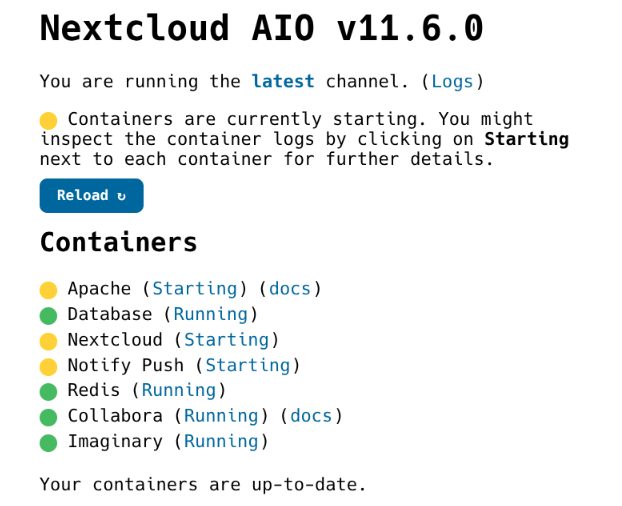
    • Nextcloud 29.x.x before triggering the update. AIO Frontend currently shows v11.6.0
  • Operating system and version
    • Debian 12
  • Web server and version
    • nginx/1.22.1
  • Reverse proxy and version
    • nginx/1.22.1
  • Is this the first time you’ve seen this error?
    • Yes
  • When did this problem seem to first start?
    • After Updating Nextcloud from 29.x.x (I did not write the exact version down before)
  • Installation method
    • AIO (Docker)
  • Are you using CloudfIare, mod_security, or similar?
    • No

Summary of the issue you are facing:

I tried updating Nextcloud using the AIO Admin page from 29.x.x. Before the Update I made sure that there were no issues showing up in the nextcloud admin overview.

Steps to replicate it (hint: details matter!):

  1. Log into AIO Frontend
  2. Follow update instructions on page
  3. Apache and Notify Push not starting (waiting for nextcloud to show up), Nextcloud is stuck in loop thinking it was an initial installation

Log entries

Nextcloud

Because Nextcloud container is broken, I can only provide the Docker containers logs.:

Compose config

services:
  nextcloud-aio-mastercontainer:
    image: nextcloud/all-in-one:latest
    init: true
    restart: always
    container_name: nextcloud-aio-mastercontainer
    volumes:
      - nextcloud_aio_mastercontainer:/mnt/docker-aio-config
      - /var/run/docker.sock:/var/run/docker.sock:ro
      - /opt/nextcloud/backup:/mnt/backup:rw
    ports:
      - 127.0.0.1:20000:8080
    environment:
      - APACHE_PORT=11000
      - APACHE_IP_BINDING=127.0.0.1
      - NEXTCLOUD_DATADIR=/opt/docker/nextcloud

volumes:
  nextcloud_aio_mastercontainer:
    name: nextcloud_aio_mastercontainer

Nextcloud Logs:

I did not try to reset AIO because I was stupid and didn’t create a Backup -_-
Please let me know how to provide any further logs if needed

I’ve had similar post-update hiccups with AIO and what consistently works for me is the routine I documented here:
:backhand_index_pointing_right: My AIO update routine (with recovery steps)https://help.nextcloud.com/t/nextcloud-aio-v10-1-1-apache-will-not-start/212805/19

Key point: I use Portainer as the primary health check to confirm that all containers (nextcloud, apache, db, redis, notify_push, etc.) come up with Status = Healthy. If anything is not healthy or stuck starting (often apache or notify_push after an update), I do this:

  1. Stop all containers from the AIO interface.
  2. In Portainer, delete all stopped containers except the nextcloud-aio-mastercontainer.
  3. If a specific container keeps failing or shows unhealthy, also delete its image in Portainer.
  4. Back in AIO, let it pull a fresh image and recreate that container.
  5. When everything is healthy, I clean up old unused images in Portainer.

This has repeatedly fixed cases where an image pulled during update was incomplete/corrupted and a container wouldn’t reach healthy state. The symptoms (“Apache and Notify Push not starting” and NC stuck thinking it’s an initial install) match exactly the situations where step 3–4 above resolved it for me.

One more thing: sometimes the update itself simply takes longer — especially right after a new release when a huge number of servers are updating in parallel and “Source Docker Hub” is under heavy load.
On top of that, a full Nextcloud AIO setup with all modules enabled means you’re looking at roughly 15 containers running side by side. That’s the second reason I always keep Portainer open: to see how many containers are already up and healthy, and which ones are still spinning up.

1 Like

Hi vawaver,

thanks a lot for your detailed instructions. I first tried deleting and then rebuilding all containers except the mastercontainer but that didn’t work, so I tried also deleting the nextcloud image which seems to be the one broken, but that also didn’t fix it.

I now get this nextcloud container log which seems to be identical to the previous one:

2025-09-04T15:27:47.564616546Z Connection to nextcloud-aio-database (172.20.0.5) 5432 port [tcp/postgresql] succeeded!
2025-09-04T15:27:49.617078851Z               now              
2025-09-04T15:27:49.617114940Z -------------------------------
2025-09-04T15:27:49.617118326Z  2025-09-04 17:27:49.616244+02
2025-09-04T15:27:49.617121824Z (1 row)
2025-09-04T15:27:49.617124469Z 
2025-09-04T15:27:49.644154209Z + '[' -f /dev-dri-group-was-added ']'
2025-09-04T15:27:49.644802647Z ++ find /dev -maxdepth 1 -mindepth 1 -name dri
2025-09-04T15:27:49.645647573Z + '[' -n '' ']'
2025-09-04T15:27:49.645663374Z + set +x
2025-09-04T15:27:49.662455828Z Enabling Imagick...
2025-09-04T15:27:51.462428244Z WARNING: opening from cache https://dl-cdn.alpinelinux.org/alpine/v3.22/main: No such file or directory
2025-09-04T15:27:51.462456528Z WARNING: opening from cache https://dl-cdn.alpinelinux.org/alpine/v3.22/community: No such file or directory
2025-09-04T15:27:51.524434812Z Connection to nextcloud-aio-redis (172.20.0.6) 6379 port [tcp/redis] succeeded!
2025-09-04T15:27:51.942574362Z The initial Nextcloud installation failed.
2025-09-04T15:27:51.942612906Z Please reset AIO properly and try again. For further clues what went wrong, check the logs above.
2025-09-04T15:27:51.942616462Z See https://github.com/nextcloud/all-in-one#how-to-properly-reset-the-instance
2025-09-04T15:27:52.454536385Z Connection to nextcloud-aio-database (172.20.0.5) 5432 port [tcp/postgresql] succeeded!
2025-09-04T15:27:54.483590712Z               now              
2025-09-04T15:27:54.483639906Z -------------------------------
2025-09-04T15:27:54.483644465Z  2025-09-04 17:27:54.482782+02
2025-09-04T15:27:54.483647531Z (1 row)
2025-09-04T15:27:54.483650476Z 
2025-09-04T15:27:54.492779901Z + '[' -f /dev-dri-group-was-added ']'
2025-09-04T15:27:54.493152457Z ++ find /dev -maxdepth 1 -mindepth 1 -name dri
2025-09-04T15:27:54.493970592Z + '[' -n '' ']'
2025-09-04T15:27:54.494025508Z + set +x
2025-09-04T15:27:54.518348839Z Connection to nextcloud-aio-redis (172.20.0.6) 6379 port [tcp/redis] succeeded!
2025-09-04T15:27:54.879369273Z The initial Nextcloud installation failed.
2025-09-04T15:27:54.879455208Z Please reset AIO properly and try again. For further clues what went wrong, check the logs above.
2025-09-04T15:27:54.879460047Z See https://github.com/nextcloud/all-in-one#how-to-properly-reset-the-instance
2025-09-04T15:27:55.440898065Z Connection to nextcloud-aio-database (172.20.0.5) 5432 port [tcp/postgresql] succeeded!
2025-09-04T15:27:57.466965446Z               now              
2025-09-04T15:27:57.467043225Z -------------------------------
2025-09-04T15:27:57.467046722Z  2025-09-04 17:27:57.466103+02
2025-09-04T15:27:57.467049597Z (1 row)
2025-09-04T15:27:57.467067783Z 
2025-09-04T15:27:57.477134982Z + '[' -f /dev-dri-group-was-added ']'
2025-09-04T15:27:57.477576992Z ++ find /dev -maxdepth 1 -mindepth 1 -name dri
2025-09-04T15:27:57.478203989Z + '[' -n '' ']'
2025-09-04T15:27:57.478219098Z + set +x
2025-09-04T15:27:57.499496826Z Connection to nextcloud-aio-redis (172.20.0.6) 6379 port [tcp/redis] succeeded!
2025-09-04T15:27:57.812313575Z The initial Nextcloud installation failed.
2025-09-04T15:27:57.812353332Z Please reset AIO properly and try again. For further clues what went wrong, check the logs above.
2025-09-04T15:27:57.812356788Z See https://github.com/nextcloud/all-in-one#how-to-properly-reset-the-instance
2025-09-04T15:27:58.448750369Z Connection to nextcloud-aio-database (172.20.0.5) 5432 port [tcp/postgresql] succeeded!
2025-09-04T15:28:00.474626104Z               now              
2025-09-04T15:28:00.474656743Z -------------------------------
2025-09-04T15:28:00.474660039Z  2025-09-04 17:28:00.473872+02
2025-09-04T15:28:00.474662844Z (1 row)
2025-09-04T15:28:00.474665539Z 
2025-09-04T15:28:00.484073930Z + '[' -f /dev-dri-group-was-added ']'
2025-09-04T15:28:00.484234770Z ++ find /dev -maxdepth 1 -mindepth 1 -name dri
2025-09-04T15:28:00.485029901Z + '[' -n '' ']'
2025-09-04T15:28:00.485046773Z + set +x
2025-09-04T15:28:00.504684315Z Connection to nextcloud-aio-redis (172.20.0.6) 6379 port [tcp/redis] succeeded!
2025-09-04T15:28:00.845544570Z The initial Nextcloud installation failed.
2025-09-04T15:28:00.845595859Z Please reset AIO properly and try again. For further clues what went wrong, check the logs above.
2025-09-04T15:28:00.845599505Z See https://github.com/nextcloud/all-in-one#how-to-properly-reset-the-instance
2025-09-04T15:28:01.932309447Z Connection to nextcloud-aio-database (172.20.0.5) 5432 port [tcp/postgresql] succeeded!
2025-09-04T15:28:03.957293854Z               now              
2025-09-04T15:28:03.957327428Z -------------------------------
2025-09-04T15:28:03.957331015Z  2025-09-04 17:28:03.956365+02
2025-09-04T15:28:03.957334472Z (1 row)
2025-09-04T15:28:03.957337458Z 
2025-09-04T15:28:03.968009470Z + '[' -f /dev-dri-group-was-added ']'
2025-09-04T15:28:03.968429389Z ++ find /dev -maxdepth 1 -mindepth 1 -name dri
2025-09-04T15:28:03.969284796Z + '[' -n '' ']'
2025-09-04T15:28:03.969344621Z + set +x
2025-09-04T15:28:03.992617381Z Connection to nextcloud-aio-redis (172.20.0.6) 6379 port [tcp/redis] succeeded!
2025-09-04T15:28:04.346956116Z The initial Nextcloud installation failed.
2025-09-04T15:28:04.346999720Z Please reset AIO properly and try again. For further clues what went wrong, check the logs above.
2025-09-04T15:28:04.347016142Z See https://github.com/nextcloud/all-in-one#how-to-properly-reset-the-instance
2025-09-04T15:28:06.233248561Z Connection to nextcloud-aio-database (172.20.0.5) 5432 port [tcp/postgresql] succeeded!
2025-09-04T15:28:08.268312464Z               now              
2025-09-04T15:28:08.268352821Z -------------------------------
2025-09-04T15:28:08.268358181Z  2025-09-04 17:28:08.263902+02
2025-09-04T15:28:08.268362400Z (1 row)
2025-09-04T15:28:08.268366558Z 
2025-09-04T15:28:08.276331861Z + '[' -f /dev-dri-group-was-added ']'
2025-09-04T15:28:08.276704438Z ++ find /dev -maxdepth 1 -mindepth 1 -name dri
2025-09-04T15:28:08.277553142Z + '[' -n '' ']'
2025-09-04T15:28:08.277574814Z + set +x
2025-09-04T15:28:08.306916546Z Connection to nextcloud-aio-redis (172.20.0.6) 6379 port [tcp/redis] succeeded!
2025-09-04T15:28:08.639932471Z The initial Nextcloud installation failed.
2025-09-04T15:28:08.640035098Z Please reset AIO properly and try again. For further clues what went wrong, check the logs above.
2025-09-04T15:28:08.640040318Z See https://github.com/nextcloud/all-in-one#how-to-properly-reset-the-instance
2025-09-04T15:28:12.064809996Z Connection to nextcloud-aio-database (172.20.0.5) 5432 port [tcp/postgresql] succeeded!
2025-09-04T15:28:14.092711876Z               now              
2025-09-04T15:28:14.092767764Z -------------------------------
2025-09-04T15:28:14.092779165Z  2025-09-04 17:28:14.091782+02
2025-09-04T15:28:14.092784787Z (1 row)
2025-09-04T15:28:14.092788694Z 
2025-09-04T15:28:14.103446490Z + '[' -f /dev-dri-group-was-added ']'
2025-09-04T15:28:14.103918058Z ++ find /dev -maxdepth 1 -mindepth 1 -name dri
2025-09-04T15:28:14.104868137Z + '[' -n '' ']'
2025-09-04T15:28:14.104892374Z + set +x
2025-09-04T15:28:14.132645138Z Connection to nextcloud-aio-redis (172.20.0.6) 6379 port [tcp/redis] succeeded!
2025-09-04T15:28:14.458653351Z The initial Nextcloud installation failed.
2025-09-04T15:28:14.458732573Z Please reset AIO properly and try again. For further clues what went wrong, check the logs above.
2025-09-04T15:28:14.458737072Z See https://github.com/nextcloud/all-in-one#how-to-properly-reset-the-instance

So you know what else could be the issue?

From your log I can see that the Nextcloud container actually starts, connects to Postgres and Redis, but then fails with “The initial Nextcloud installation failed.” This usually happens in two situations:

  1. Network access problem during startup – you have these warnings in the log:
WARNING: opening from cache https://dl-cdn.alpinelinux.org/alpine/v3.22/main: No such file or directory
WARNING: opening from cache https://dl-cdn.alpinelinux.org/alpine/v3.22/community: No such file or directory

If the container cannot reach the Alpine repositories, the init script will not be able to fetch everything it needs and the installation fails. Check if your host can reach dl-cdn.alpinelinux.org (ping, wget). If you are behind a firewall, proxy, or have DNS restrictions, that could block the connection and cause exactly this issue.

  1. Missing or corrupted data volume – the nextcloud_aio_nextcloud_data volume must exist and contain data. If it’s empty or not mapped correctly, AIO assumes it’s a fresh install and bootstrap fails.

In your docker-compose.yml you have:

volumes:
  nextcloud_aio_mastercontainer:
    name: nextcloud_aio_mastercontainer

I personally use:

volumes:
  nextcloud_aio_mastercontainer:
    external: true

The difference is that external: true guarantees Compose will always attach to the already existing volume and won’t try to create or remove it. With your current config the volume is explicitly named (so no random project prefix), but Compose still “manages” it — which means docker compose down -v could remove it.

So I’d recommend:

  • In Portainer → Volumes, verify that both nextcloud_aio_nextcloud_data and nextcloud_aio_mastercontainer exist and actually contain data.
  • If you want extra safety, switch to external: true in your Compose file.
  • Then stop all containers, delete the failing nextcloud container and its image, and let AIO recreate it.

@szaimen - could you confirm I am not mistaken?

1 Like

Thanks again,

I can confirm that http://dl-cdn.alpinelinux.org is reachable from the host. For outgoing traffic there are no firewall rules set for this VPS.

Also I added the external: true part to my docker-compose and restarted it, then stopped all containers except the mastercontainer, again deleted the nextcloud container and it’s image, but I still get the exact same error.

The volumes also look good to me:

root@nextcloud:/opt/nextcloud# docker volume inspect nextcloud_aio_mastercontainer
[
    {
        "CreatedAt": "2024-11-11T23:55:19+01:00",
        "Driver": "local",
        "Labels": {
            "com.docker.compose.project": "nextcloud",
            "com.docker.compose.version": "2.29.7",
            "com.docker.compose.volume": "nextcloud_aio_mastercontainer"
        },
        "Mountpoint": "/var/lib/docker/volumes/nextcloud_aio_mastercontainer/_data",
        "Name": "nextcloud_aio_mastercontainer",
        "Options": null,
        "Scope": "local"
    }
]

Though I am a bit confused why thw owner of these files is cmk-agent:

root@nextcloud:/opt/nextcloud# ls -lah /var/lib/docker/volumes/nextcloud_aio_database/_data
Total 136K
drwx------ 19 cmk-agent systemd-journal 4,0K  5. Sep 10:23 .
drwx-----x  3 root      root            4,0K 11. Nov 2024  ..
drwx------  7 cmk-agent systemd-journal 4,0K  4. Sep 09:59 base
drwx------  2 cmk-agent systemd-journal 4,0K  5. Sep 10:24 global
drwx------  2 cmk-agent systemd-journal 4,0K  4. Sep 09:59 pg_commit_ts
drwx------  2 cmk-agent systemd-journal 4,0K  4. Sep 09:59 pg_dynshmem
-rw-------  1 cmk-agent systemd-journal 5,7K  4. Sep 09:59 pg_hba.conf
-rw-------  1 cmk-agent systemd-journal 2,6K  4. Sep 09:59 pg_ident.conf
drwx------  4 cmk-agent systemd-journal 4,0K  5. Sep 10:28 pg_logical
drwx------  4 cmk-agent systemd-journal 4,0K  4. Sep 09:59 pg_multixact
drwx------  2 cmk-agent systemd-journal 4,0K  4. Sep 09:59 pg_notify
drwx------  2 cmk-agent systemd-journal 4,0K  4. Sep 09:59 pg_replslot
drwx------  2 cmk-agent systemd-journal 4,0K  4. Sep 09:59 pg_serial
drwx------  2 cmk-agent systemd-journal 4,0K  4. Sep 09:59 pg_snapshots
drwx------  2 cmk-agent systemd-journal 4,0K  5. Sep 10:23 pg_stat
drwx------  2 cmk-agent systemd-journal 4,0K  4. Sep 09:59 pg_stat_tmp
drwx------  2 cmk-agent systemd-journal 4,0K  4. Sep 09:59 pg_subtrans
drwx------  2 cmk-agent systemd-journal 4,0K  4. Sep 09:59 pg_tblspc
drwx------  2 cmk-agent systemd-journal 4,0K  4. Sep 09:59 pg_twophase
-rw-------  1 cmk-agent systemd-journal    3  4. Sep 09:59 PG_VERSION
drwx------  4 cmk-agent systemd-journal 4,0K  4. Sep 10:05 pg_wal
drwx------  2 cmk-agent systemd-journal 4,0K  4. Sep 09:59 pg_xact
-rw-------  1 cmk-agent systemd-journal   88  4. Sep 09:59 postgresql.auto.conf
-rw-------  1 cmk-agent systemd-journal  30K  5. Sep 10:23 postgresql.conf
-rw-------  1 cmk-agent systemd-journal   24  5. Sep 10:23 postmaster.opts
-rw-------  1 cmk-agent systemd-journal   95  5. Sep 10:23 postmaster.pid
root@nextcloud:/opt/nextcloud# docker volume inspect nextcloud_aio_nextcloud_data
[
    {
        "CreatedAt": "2024-11-11T23:59:47+01:00",
        "Driver": "local",
        "Labels": null,
        "Mountpoint": "/var/lib/docker/volumes/nextcloud_aio_nextcloud_data/_data",
        "Name": "nextcloud_aio_nextcloud_data",
        "Options": null,
        "Scope": "local"
    }
]
root@nextcloud:/opt/nextcloud# ls -lah /var/lib/docker/volumes/nextcloud_aio_nextcloud_data/_data
Total 110M
drwxr-x---  5 www-data root     4,0K 18. Aug 23:32 .
drwx-----x  3 root     root     4,0K 11. Nov 2024  ..
drwxr-xr-x  7 www-data www-data 4,0K 12. Dez 2024  admin
drwxr-xr-x 15 www-data www-data 4,0K  1. Aug 09:57 appdata_oclkf0wt0p63
-rw-r--r--  1 www-data www-data    0 12. Nov 2024  audit.log
-rw-r--r--  1 www-data www-data  542  6. Feb 2025  .htaccess
-rw-r--r--  1 www-data www-data    0  6. Feb 2025  index.html
drwxr-xr-x  6 www-data www-data 4,0K  1. Aug 09:56 testuser
-rw-r--r--  1 www-data www-data   52  6. Feb 2025  .ncdata
-rw-r-----  1 www-data www-data 110M 12. Nov 2024  nextcloud.log
This goes a bit beyond my knowledge. At this point the best would be if @szaimen could have a look at it, since he’s the most experienced person with Nextcloud AIO here.

Alternatively, you can open an issue directly on GitHub:
:backhand_index_pointing_right: https://github.com/nextcloud/all-in-one

That way the maintainers can check the details of your setup and logs more thoroughly.

1 Like

Hi, lets please keep the discussion in this thread.

Unfortunately it looks like the update failed somehow. The only recommended solution is to restore a backup via the AIO interface or via an external solution if you have this.

1 Like

Hi szaimen,

thanks for your response, in that case I think I’ll try to reinstall from scratch. Is there any way I can export / restore my Calenders (or other data if possible) manually from the nextcloud data volume to the new instance?

If you have your calendars locally synced, you could try to export them via applicable software. Unfortunately the calendars are usually stored inside the database.

As you can see: backups are very important and this is why there is a backup solution built directly into the AIO interface.

1 Like

This topic was automatically closed 8 days after the last reply. New replies are no longer allowed.