Nextcloud AIO problems with HARP AIO AppApi

Support intro

Sorry to hear you’re facing problems. :slightly_frowning_face:

The community help forum (help.nextcloud.com) is for home and non-enterprise users. Support is provided by other community members on a best effort / “as available” basis. All of those responding are volunteering their time to help you.

If you’re using Nextcloud in a business/critical setting, paid and SLA-based support services can be accessed via portal.nextcloud.com where Nextcloud engineers can help ensure your business keeps running smoothly.

Getting help

In order to help you as efficiently (and quickly!) as possible, please fill in as much of the below requested information as you can.

Before clicking submit: Please check if your query is already addressed via the following resources:

(Utilizing these existing resources is typically faster. It also helps reduce the load on our generous volunteers while elevating the signal to noise ratio of the forums otherwise arising from the same queries being posted repeatedly).

Some or all of the below information will be requested if it isn’t supplied; for fastest response please provide as much as you can. :heart:

The Basics

  • Nextcloud Server version (e.g., 29.x.x):
    • 32.0.2
  • Operating system and version (e.g., Ubuntu 24.04):
    • Ubuntu 24.04 LTS
  • Web server and version (e.g, Apache 2.4.25):
    • replace me
  • Reverse proxy and version _(e.g. nginx 1.27.2)
    • nginx 1.24.0
  • PHP version (e.g, 8.3):
    • 8.3.28
  • Is this the first time you’ve seen this error? (Yes / No):
    • YES
  • When did this problem seem to first start?
    • After i switched from the docker-socket-proxy to HARP AIO because of the error in Nextcloud saying that you should switch to a APP-Api Proxy with HARP
  • Installation method (e.g. AlO, NCP, Bare Metal/Archive, etc.)
    • AIO
  • Are you using CloudfIare, mod_security, or similar? (Yes / No)
    • NO

Summary of the issue you are facing:

I installed the Harp AIO container.
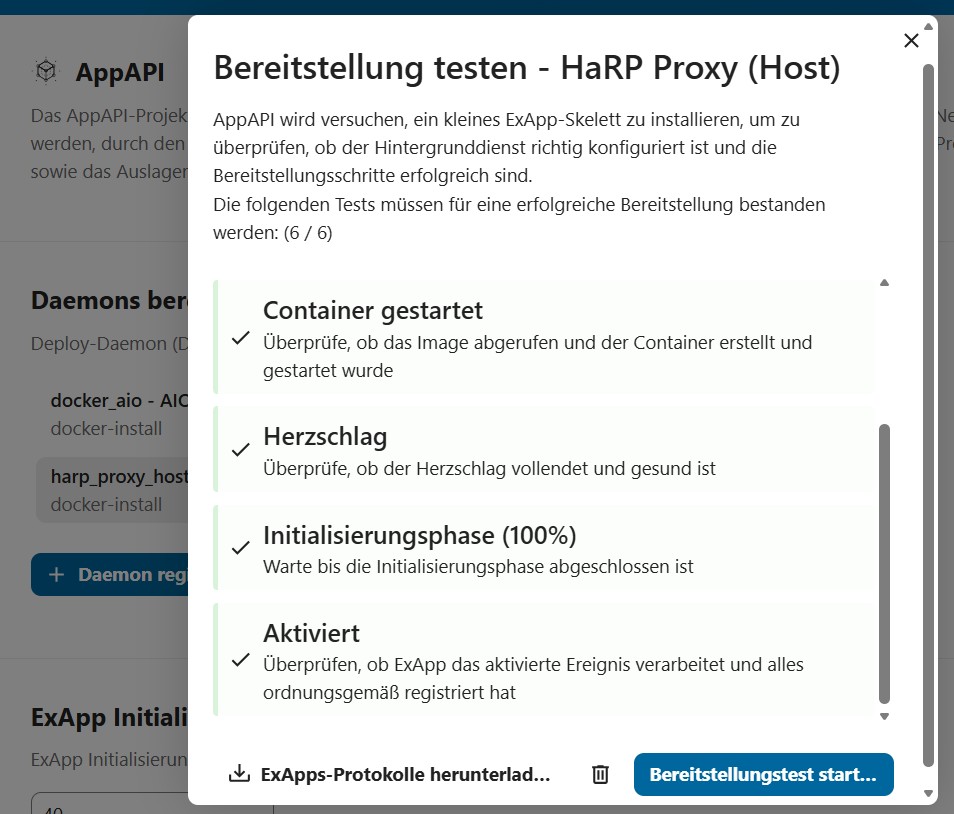
The Test connection works but the Test Deploy fails always. He isnt showing any progress in the window and returns a heartbeat error at the end.
I edited the nginx config. I dont know if this step was correct:

server {
listen 80;
server_name cloud.marvindorn.de;

location /.well-known/acme-challenge/ {
    root /var/www/html;
}

location / {
    return 301 https://$host$request_uri;
}

}

server {
listen 443 ssl http2;
server_name my.domain;

ssl_certificate /etc/letsencrypt/live/my.domain/fullchain.pem;
ssl_certificate_key /etc/letsencrypt/live/my.domain/privkey.pem;

include /etc/letsencrypt/options-ssl-nginx.conf;

location /exapps/ {
    proxy_pass http://127.0.0.1:11001/;
    proxy_set_header Host $host;
    proxy_set_header X-Real-IP $remote_addr;
    proxy_set_header X-Forwarded-For $proxy_add_x_forwarded_for;
    proxy_set_header X-Forwarded-Proto https;
    proxy_buffering off;
    client_max_body_size 10G;
}

location / {
    proxy_pass http://127.0.0.1:11000; # Nextcloud AIO intern
    proxy_set_header Host $host;
    proxy_set_header X-Real-IP $remote_addr;
    proxy_set_header X-Forwarded-For $proxy_add_x_forwarded_for;
    proxy_set_header X-Forwarded-Proto https;
    proxy_buffering off;
    client_max_body_size 10G;
}

# .well-known Weiterleitungen
location = /.well-known/carddav { return 301 /remote.php/dav/; }
location = /.well-known/caldav { return 301 /remote.php/dav/; }
location = /.well-known/webfinger { return 301 /index.php/.well-known/webfinger; }
location = /.well-known/nodeinfo { return 301 /index.php/.well-known/nodeinfo; }

}

Here ist the logs from the container:

INFO: /certs/frp directory created.
INFO: Generating self-signed certificates in /certs/frp

Certificate request self-signature ok
subject=CN=harp.nc
Certificate request self-signature ok
subject=CN=harp.client.nc
INFO: Certificate generation completed.
INFO: Creating /haproxy.cfg from haproxy.cfg.template

INFO: No /certs/cert.pem found, disabling HTTPS frontends

INFO: Final /haproxy.cfg:

SPDX-FileCopyrightText: 2025 Nextcloud GmbH and Nextcloud contributors

SPDX-License-Identifier: AGPL-3.0-or-later

###############################################################################

haproxy.cfg.template

This template is processed by envsubst in start.sh to replace variables:

HP_EXAPPS_ADDRESS,

HP_EXAPPS_HTTPS_ADDRESS,

HP_TIMEOUT_CONNECT,

HP_TIMEOUT_CLIENT,

HP_TIMEOUT_SERVER,

If /certs/cert.pem is not found, lines containing “HTTPS_FRONTEND” are

commented out automatically in start.sh.

###############################################################################

global
log stdout local0 warning
maxconn 8192
ca-base /etc/ssl/certs

defaults
log global
option httplog
option dontlognull
timeout connect 30s
timeout client 30s
timeout server 1800s

###############################################################################

FRONTEND: ex_apps (HTTP)

###############################################################################
frontend ex_apps
mode http
bind 0.0.0.0:8780

filter spoe engine exapps-spoe config /etc/haproxy/spoe-agent.conf
http-request silent-drop if { var(txn.exapps.bad_request) -m int eq 1 }
http-request return status 401 content-type text/plain string "401 Unauthorized" if { var(txn.exapps.unauthorized) -m int eq 1 }
http-request return status 403 content-type text/plain string "403 Forbidden" if { var(txn.exapps.forbidden) -m int eq 1 }
http-request return status 404 content-type text/plain string "404 Not Found" if { var(txn.exapps.not_found) -m int eq 1 }
use_backend %[var(txn.exapps.backend)]

###############################################################################

FRONTEND: ex_apps_https (only enabled if /certs/cert.pem exists)

###############################################################################
#HTTPS_FRONTEND frontend ex_apps_https
#HTTPS_FRONTEND mode http
#HTTPS_FRONTEND bind 0.0.0.0:8781 ssl crt /certs/cert.pem

#HTTPS_FRONTEND filter spoe engine exapps-spoe config /etc/haproxy/spoe-agent.conf
#HTTPS_FRONTEND http-request silent-drop if { var(txn.exapps.bad_request) -m int eq 1 }
#HTTPS_FRONTEND http-request return status 401 content-type text/plain string “401 Unauthorized” if { var(txn.exapps.unauthorized) -m int eq 1 }
#HTTPS_FRONTEND http-request return status 403 content-type text/plain string “403 Forbidden” if { var(txn.exapps.forbidden) -m int eq 1 }
#HTTPS_FRONTEND http-request return status 404 content-type text/plain string “404 Not Found” if { var(txn.exapps.not_found) -m int eq 1 }
#HTTPS_FRONTEND use_backend %[var(txn.exapps.backend)]

###############################################################################

BACKENDS: ex_apps & ex_apps_backend_w_bruteforce

###############################################################################
backend ex_apps_backend
mode http
server frp_server 0.0.0.0
http-request set-path %[var(txn.exapps.target_path)]
http-request set-dst var(txn.exapps.target_ip)
http-request set-dst-port var(txn.exapps.target_port)
http-request set-header EX-APP-ID %[var(txn.exapps.exapp_id)]
http-request set-header EX-APP-VERSION %[var(txn.exapps.exapp_version)]
http-request set-header AUTHORIZATION-APP-API %[var(txn.exapps.exapp_token)]
http-request set-header AA-VERSION “32” # TO-DO: temporary, remove it after we update all ExApps.

backend ex_apps_backend_w_bruteforce
mode http
server frp_server 0.0.0.0
http-request set-path %[var(txn.exapps.target_path)]
http-request set-dst var(txn.exapps.target_ip)
http-request set-dst-port var(txn.exapps.target_port)
http-request set-header EX-APP-ID %[var(txn.exapps.exapp_id)]
http-request set-header EX-APP-VERSION %[var(txn.exapps.exapp_version)]
http-request set-header AUTHORIZATION-APP-API %[var(txn.exapps.exapp_token)]
http-request set-header AA-VERSION “32” # TO-DO: temporary, remove it after we update all ExApps.
filter spoe engine exapps-bruteforce-protection-spoe config /etc/haproxy/spoe-agent.conf

###############################################################################

BACKEND: nextcloud_control (HTTP)

###############################################################################
backend nextcloud_control_backend
mode http
server nextcloud_control 127.0.0.1:8200
http-request set-path %[var(txn.exapps.target_path)]

###############################################################################

BACKEND: docker_engine (HTTP)

###############################################################################
backend docker_engine_backend
mode http
server frp_server 127.0.0.1
http-request set-dst-port var(txn.exapps.target_port)
http-request set-path %[var(txn.exapps.target_path)]

# docker system _ping
http-request allow if { path,url_dec -m reg -i ^(/v[\d\.]+)?/_ping$ } METH_GET
# docker inspect image
http-request allow if { path,url_dec -m reg -i ^(/v[\d\.]+)?/images/.*/json } METH_GET
# container inspect: GET containers/%s/json
http-request allow if { path,url_dec -m reg -i ^(/v[\d\.]+)?/containers/nc_app_[a-zA-Z0-9_.-]+/json } METH_GET
# container inspect: GET containers/%s/logs
http-request allow if { path,url_dec -m reg -i ^(/v[\d\.]+)?/containers/nc_app_[a-zA-Z0-9_.-]+/logs } METH_GET

# image pull: POST images/create?fromImage=%s
http-request allow if { path,url_dec -m reg -i ^(/v[\d\.]+)?/images/create } METH_POST
http-request deny

backend agents
mode tcp
timeout connect 5s
timeout server 3m
option spop-check
server agent1 127.0.0.1:9600 check
INFO: FRP server configuration generated at /frps.toml.
INFO: Detected /var/run/docker.sock, generating /frpc-docker.toml configuration file

INFO: Starting Python HaProxy Agent on 127.0.0.1:8200 and 127.0.0.1:9600

INFO: Waiting for HaRP Agent HTTP (GET http://127.0.0.1:8200/info) to be ready

INFO: Waiting for SPOA port 127.0.0.1:9600

INFO: Starting FRP server on 0.0.0.0:8782

INFO: Waiting for FRP server port 127.0.0.1:8782

INFO: Starting FRP client for Docker Engine

INFO: Starting HAProxy

[NOTICE] (1) : Initializing new worker (55)
2025-11-30 15:45:42.224 [I] [sub/root.go:142] start frpc service for config file [/frpc-docker.toml]
2025-11-30 15:45:42.224 [I] [client/service.go:295] try to connect to server

2025-11-30 15:45:42.245 [I] [client/service.go:287] [aac1e35443d61598] login to server success, get run id [aac1e35443d61598]
2025-11-30 15:45:42.246 [I] [proxy/proxy_manager.go:173] [aac1e35443d61598] proxy added: [bundled-deploy-daemon]
2025-11-30 15:45:42.249 [I] [client/control.go:168] [aac1e35443d61598] [bundled-deploy-daemon] start proxy success
[NOTICE] (1) : Loading success.
[NOTICE] (1) : Reloading HAProxy
[NOTICE] (1) : Initializing new worker (116)
<132>Nov 30 15:46:05 haproxy[55]: Proxy ex_apps stopped (cumulated conns: FE: 3, BE: 0).
<132>Nov 30 15:46:05 haproxy[55]: Proxy ex_apps_backend stopped (cumulated conns: FE: 0, BE: 0).
<132>Nov 30 15:46:05 haproxy[55]: Proxy ex_apps_backend_w_bruteforce stopped (cumulated conns: FE: 0, BE: 0).
<132>Nov 30 15:46:05 haproxy[55]: Proxy nextcloud_control_backend stopped (cumulated conns: FE: 0, BE: 0).
<132>Nov 30 15:46:05 haproxy[55]: Proxy docker_engine_backend stopped (cumulated conns: FE: 0, BE: 1).
<132>Nov 30 15:46:05 haproxy[55]: Proxy agents stopped (cumulated conns: FE: 0, BE: 1).
[NOTICE] (1) : Loading success.
[WARNING] (55) : Proxy ex_apps stopped (cumulated conns: FE: 3, BE: 0).
[WARNING] (55) : Proxy ex_apps_backend stopped (cumulated conns: FE: 0, BE: 0).
[WARNING] (55) : Proxy ex_apps_backend_w_bruteforce stopped (cumulated conns: FE: 0, BE: 0).
[WARNING] (55) : Proxy nextcloud_control_backend stopped (cumulated conns: FE: 0, BE: 0).
[WARNING] (55) : Proxy docker_engine_backend stopped (cumulated conns: FE: 0, BE: 1).
[WARNING] (55) : Proxy agents stopped (cumulated conns: FE: 0, BE: 1).
[NOTICE] (1) : haproxy version is 3.1.2-cda631a
[WARNING] (1) : Former worker (55) exited with code 0 (Exit)

After the docker run for the container he keeps me in the log screen of the container and if i leave with ctrl+c or by closing the ssh then he gets the last few messages. But even if i stay in the log screen then it isnt working aswell.

In the reverse proxy under exapps, you need to specify the internal IP address of your Nextcloud as well as the port of the AppApi-harp container.

Example:

location /exapps/ {

    proxy_pass http://<interne IP>:8780; # IP address of the Docker Server and Port-Number

    proxy_set_header Host $host;

    proxy_set_header X-Real-IP $remote_addr;

    proxy_set_header X-Forwarded-For $proxy_add_x_forwarded_for;

    proxy_set_header X-Forwarded-Proto $scheme;

}

Hi Thomas,

i configured this right now but it wont help. Do you see any problem?:

server {
listen 443 ssl http2;
server_name my address;

ssl_certificate /etc/letsencrypt/live/*my address*/fullchain.pem;
ssl_certificate_key /etc/letsencrypt/live/*my address*/privkey.pem;

include /etc/letsencrypt/options-ssl-nginx.conf;

location /exapps/ {
    proxy_pass http://127.0.0.1:11001/;
    proxy_set_header Host $host;
    proxy_set_header X-Real-IP $remote_addr;
    proxy_set_header X-Forwarded-For $proxy_add_x_forwarded_for;
    proxy_set_header X-Forwarded-Proto https;
    proxy_buffering off;
    client_max_body_size 10G;
}

location / {
    proxy_pass http://127.0.0.1:11000; # Nextcloud AIO intern
    proxy_set_header Host $host;
    proxy_set_header X-Real-IP $remote_addr;
    proxy_set_header X-Forwarded-For $proxy_add_x_forwarded_for;
    proxy_set_header X-Forwarded-Proto https;
    proxy_buffering off;
    client_max_body_size 10G;
}

# .well-known Weiterleitungen
location = /.well-known/carddav { return 301 /remote.php/dav/; }
location = /.well-known/caldav { return 301 /remote.php/dav/; }
location = /.well-known/webfinger { return 301 /index.php/.well-known/webfinger; }
location = /.well-known/nodeinfo { return 301 /index.php/.well-known/nodeinfo; }

}

It also didnt work with 8780

Hi, I hope my English translation is good enough for you to understand me.

Okay, the port issue depends on your installation. Since you’re using AIO, the port is automatically set there. So just ignore my 8xxx port.

I suspect you’re having the same problem as everyone else: the current Docker issue.

The following will help:

Create the file daemon.json

nano /etc/docker/daemon.json

and add the following to it

{

“min-api-version”: “1.24”

}

After this restart docker

systemctl restart docker

Or reboot the System. If you use Ubuntu then Do it all as sudo.

I hope it helps and work.

If you want to read: GitHub

Hi,

thanks for the response. I actually had to fix this when i first installed Nextcloud AIO a few weeks ago. I added the file for safety now.

Funny thing: My AppAPI container just vanished after i rebooted docker. Dont know why thought :D. Does anyone have a good manual for installing the appapi container and connect it to my Nextcloud AIO? Its hard with the manuals found in the documentation because they are always so diffrent to a real system.

Best Regards

This ist my way, everytime.

Retrieve Docker container NEXTCLOUD AppAPI-HaRP

docker run \

-e HP_SHARED_KEY=“PASSWORT” \

-e NC_INSTANCE_URL=“http://DOMAIN” \

-e HP_EXAPPS_ADDRESS=“INTERNE-IP:8780” \

-v /var/run/docker.sock:/var/run/docker.sock \

-v `pwd`/certs:/certs \

–name appapi-harp -h appapi-harp \

–restart unless-stopped \

–network host \

-d ghcr.io/nextcloud/nextcloud-appapi-harp:release

-- if necessary, in case of connection errors —

Add the following to Nginx Proxy Manager under ADVANCED

location /exapps/ {

    proxy_pass http://<interne IP>:8780; # interne IP-Adresse des Docker-Server

    proxy_set_header Host $host;

    proxy_set_header X-Real-IP $remote_addr;

    proxy_set_header X-Forwarded-For $proxy_add_x_forwarded_for;

    proxy_set_header X-Forwarded-Proto $scheme;

}

This works with Nextcloud AIO and also when I manually install it as a web version.

Docker can always be updated; the only important thing is to create the daemon.json file mentioned above. Then there shouldn’t be any problems.

is the ‘pwd’ in the second -v correct or is a placeholder for informations i have to enter?

Yes that is correct :+1: no place holder

The installation is done, but im still getting errors. Now when i want to check the connection of the proxy. Do i have to configure something additional?

Your Nginx proxy setup is slightly wrong. There is a known bug in the documentation. location/exapps/ should look like this:

location /exapps/ {
        proxy_pass internal_IP_address:8780/exapps/;
        proxy_set_header Host $host;
        proxy_set_header X-Real-IP $remote_addr;
        proxy_set_header X-Forwarded-For $proxy_add_x_forwarded_for;
        proxy_set_header X-Forwarded-Proto $scheme;
    }

Note the /exapps/ after port in proxy_pass directive.

Hi,

thanks i edittet the config again. Same error persists now i dont even can register the appapi daemon.
Im so confused. The registration did work when i wrote this thread.

image

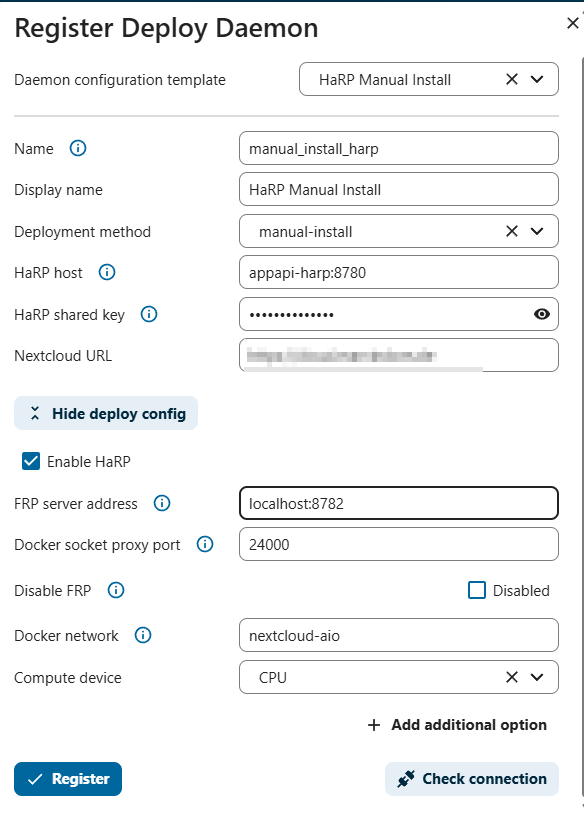
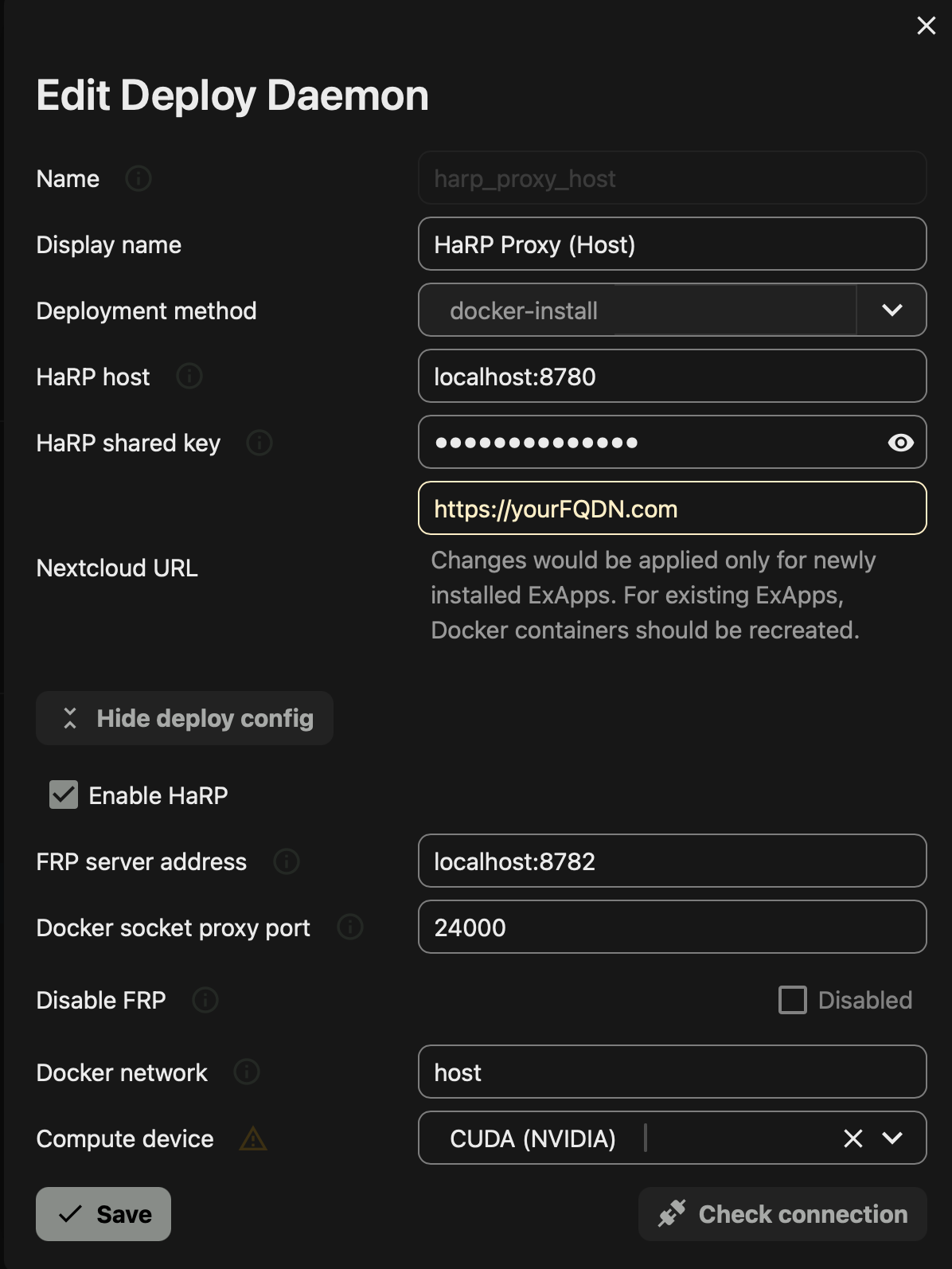
Something is configured wrong - your instance should connect internally using http://appapi-harp:8780 directly. Your Nginx configuration works from outside, so in case anything looks for https://yourFQDN.com/exapps/ directory, this setting in Nginx proxy allows for communication. However what I can see in your error log is that the NC instance wants to connect to HARP proxy using the docker name (appapi-harp) on port 8780 - but it adds /exapps/ to the URL, which I believe will not work.
In your AppAPI daemon settings make sure your configuration looks like this:

Hi,

I can’t say whether it has to be as says.

I’ve never seen it that way, and as I understand it, it doesn’t make sense. Because the exApps run under the web address HTTPS://YOUR-DOMAIN/exApps/. And in Proxy Manager, it is specified that this address and everything that comes after it is forwarded to your Docker server and the specified port. And this port refers to your appapi-harp container in the Docker server. If you specify the value proxy_pass http://YOUR-INTERNAL-IP:8780/exApps; here in Nginx, it won’t work – because you/the system is looking for a Docker container and it doesn’t run in a directory. That’s why I say that this can’t work. If I am wrong, please correct me.

I will now list everything again exactly as it works for me. If you have the same settings, there should be no problems.

Installation Nextcloud with App AppAPI – that’s clear. If Nextcloud AIO is used, there is of course no need to install Docker.

Docker installation

Docker installation with all components – preferably the latest version:
sudo curl -fsSL https://get.docker.com | sh

if required or desired
sudo usermod -aG docker $USER

Docker - Fix API version problem

Due to the current problems with Docker

create the daemon.json file
sudo nano /etc/docker/daemon.json

with the following content
{
"min-api-version": "1.24"
}

Create container app API-HaRP

Create, retrieve, and start Docker containers using the Docker Run command

! NC_INSTANCE_URL is only HTTP and that is correct !

sudo docker run \
-e HP_SHARED_KEY="PASSWORD" \
-e NC_INSTANCE_URL="HTTP:/YOUR-DOMAIN" \
-e HP_EXAPPS_ADDRESS="YOUR-INTERNAL-IP:8780" \
-v /var/run/docker.sock:/var/run/docker.sock \
-v pwd/certs:/certs \
--name appapi-harp -h appapi-harp \
--restart unless-stopped \
--network host \
-d ghcr.io/nextcloud/nextcloud-appapi-harp:release

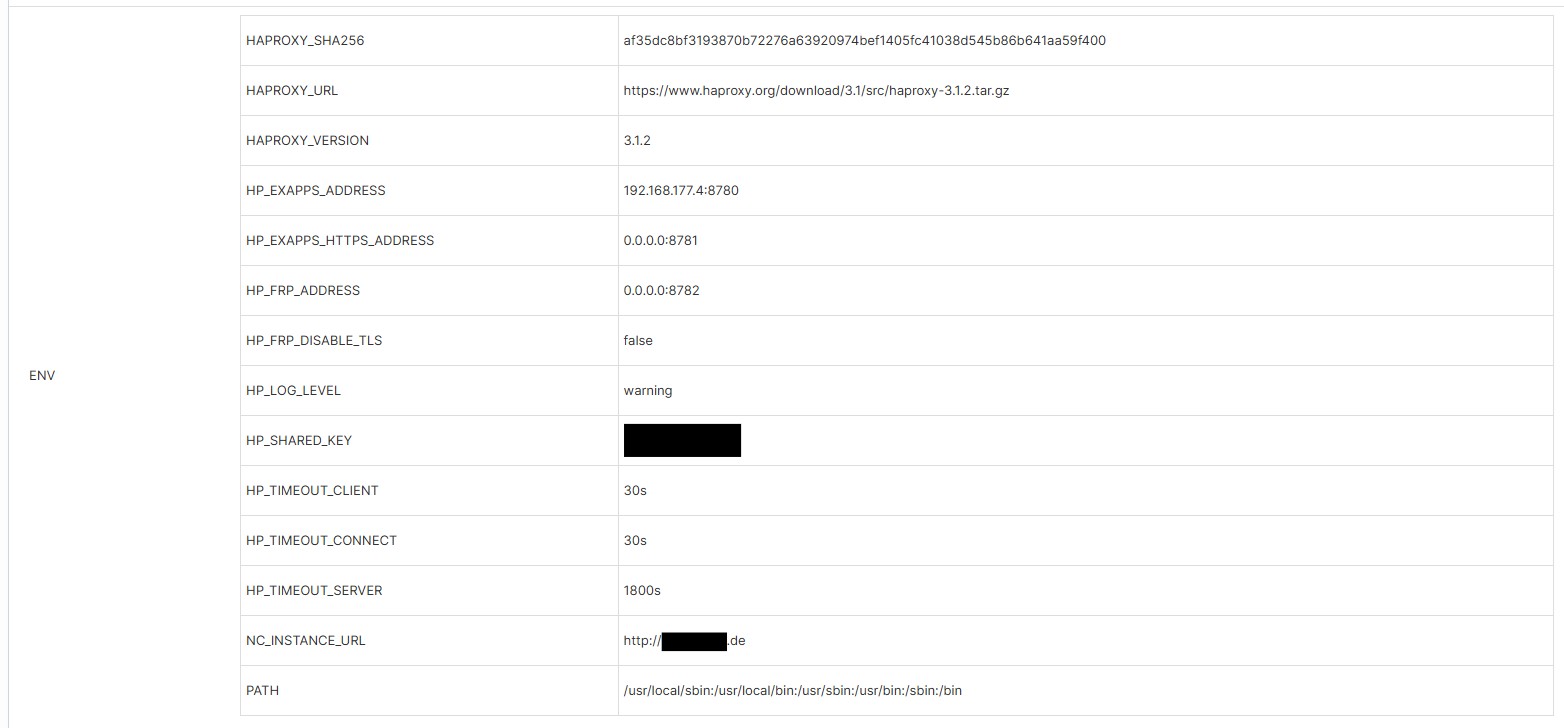
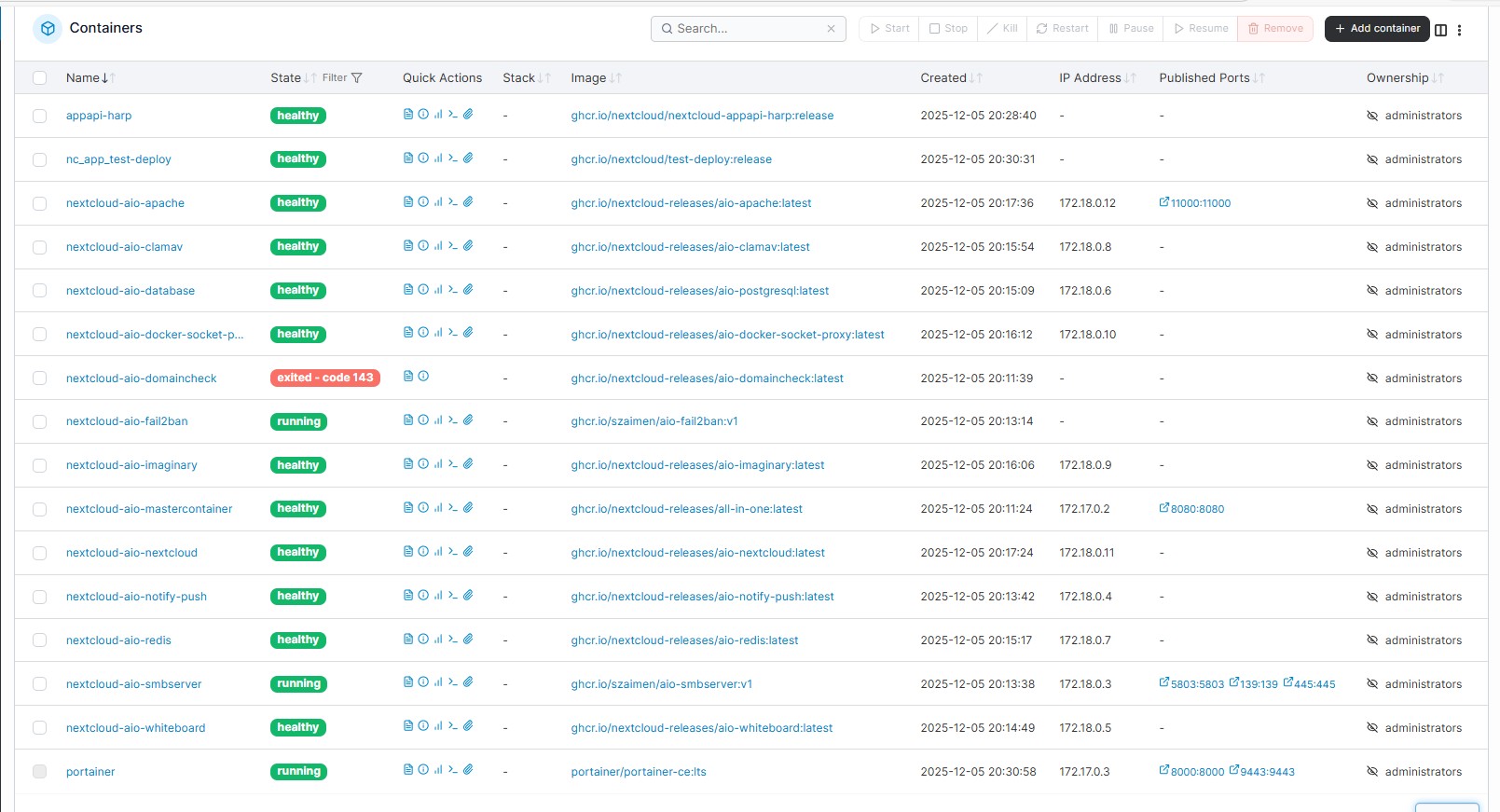
This results in the following container in Portainer, for example:

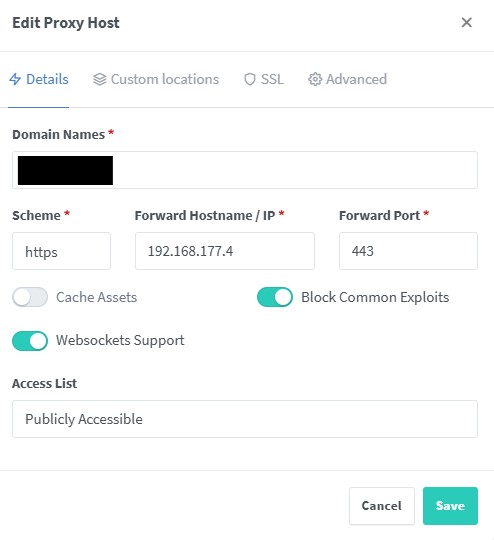
NGINX Proxy Manager configuration

If used, add the following configuration in NGINX Proxy Manager under Advanced: location /exapps/ {
proxy_pass ``http://YOUR-INTERNAL-IP:8780``;
proxy_set_header Host $host;proxy_set_header X-Real-IP $remote_addr;
proxy_set_header X-Forwarded-For $proxy_add_x_forwarded_for;
proxy_set_header X-Forwarded-Proto $scheme;
}

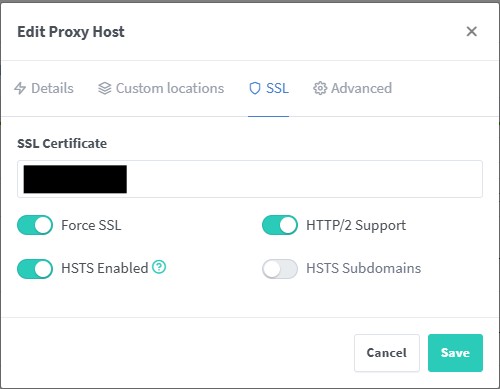
Also, activate or deactivate the following items in the web server configuration in NGINX:

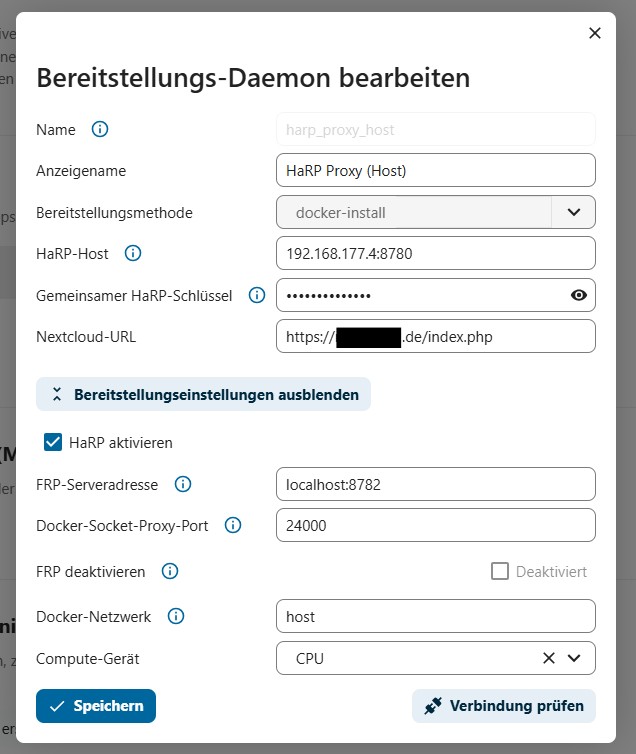
Nextcloud AppAPI - Daemon configuration

In Nextcloud, go to the administration area on the left, click on AppAPI, then on the + Register Daemon button.

Apply the following configuration.

Important points are:

HaRP host: YOUR-INTERNAL-IP:8780
Shared HaRP key: YOUR HP_SHARED_KEY
Nextcloud URL: HTTPS://YOUR-DOMAIN/index.php

I have already set up several servers with Nextcloud and they are all running smoothly.

The specified ports can of course be changed as desired, but please always adjust all commands accordingly.

Final Pictures - Installation Server + AIO + configuration + all others = \~30 minutes

If you still encounter problems, please let us know.

Deutsche Version
ob das so sein muss wie sagt - kann ich nicht sagen.

So habe ich es noch nie gesehen und nach meinem VerstÀndnis macht es auch keinen Sinn. Denn die exApps laufen unter der Web-Adresse HTTPS://YOUR-DOMAIN/exApps/. Und im Proxy Manager wird festgelegt, dass diese Adresse und alles was dahinter kommt auf deinen Docker-Server und dem angegebenen Port weitergeleitet wird. Und dieser Port verweist im Docker-Server auf deinen Container appapi-harp. Wenn man hier im Nginx den Wert proxy_pass http://YOUR-INTERNAL-IP:8780/exApps; angibt wird es nicht funktionieren - denn du/das System sucht ja einen Docker-Container und dieser lÀuft nicht in einem Verzeichnis. Daher sage ich, dass dies nicht funktionieren kann. Sollte ich falsch liegen bitte ich um Berichtigung.

Ich liste jetzt einfach nochmal komplett alles auf wie es bei mir lÀuft. Wenn es bei dir auch genauso eingestellt ist sollte es keinerlei Probleme geben.

Installation Nextcloud mit App AppAPI - das ist klar. Wenn Nextcloud AIO genutzt wird entfĂ€llt natĂŒrlich die Installation von Docker.

Docker Installation

Docker Installation mit allen Komponenten - am besten auch aktuellste Version:
sudo curl -fsSL https://get.docker.com | sh
falls benötigt oder gewĂŒnscht
sudo usermod -aG docker $USER

Docker - API-Versionsproblem beheben

Aufgrund der aktuellen Probleme mit Docker - Erstellen der daemon.json - Datei
sudo nano /etc/docker/daemon.json
mit folgendem Inhalt
{
"min-api-version": "1.24"
}

Container AppAPI-HaRP erstellen

Docker Container per Docker Run Befehl erstellen, abrufen, starten
! NC_INSTANCE_URL is only HTTP an that is right !
sudo docker run \
-e HP_SHARED_KEY="PASSWORD" \
-e NC_INSTANCE_URL="HTTP://YOUR-DOMAIN" \
-e HP_EXAPPS_ADDRESS="YOUR-INTERNAL-IP:8780" \
-v /var/run/docker.sock:/var/run/docker.sock \
-v `pwd`/certs:/certs \
--name appapi-harp -h appapi-harp \
--restart unless-stopped \
--network host \
-d ghcr.io/nextcloud/nextcloud-appapi-harp:release

Dies ergibt z.B. bei Portainer folgenden Container:

NGINX Proxy Manager Konfiguration

Wenn genutzt - folgende Konfiguration im NGINX Proxy Manager im Punkt Advanced einfĂŒgen
location /exapps/ {
proxy_pass http://YOUR-INTERNAL-IP:8780;
proxy_set_header Host $host;
proxy_set_header X-Real-IP $remote_addr;
proxy_set_header X-Forwarded-For $proxy_add_x_forwarded_for;
proxy_set_header X-Forwarded-Proto $scheme;
}

Außerdem in der Konfiguration des Webservers im NGINX folgende Punkte entsprechend aktivieren bzw. deaktivieren:

Nextcloud AppAPI - Daemon Konfiguration

In Nextcloud im Administrationsbereich links auf den Punkt AppAPI, dann auf die SchaltflÀche + Daemon registrieren

Folgende Konfiguration anwenden

Wichtige Punkte sind:

HaRP-Host : YOUR-INTERNAL-IP:8780
Gemeinsamer HaRP-SchlĂŒssel : YOUR HP_SHARED_KEY
Nextcloud-URL : HTTPS://YOUR-DOMAIN/index.php

So habe ich bereits mehrfach Server mit Nextcloud aufgesetzt und alle laufen einwandfrei.

Die angegebenen PORTs können natĂŒrlich beliebig ausgewechselt werden, dann jedoch bitte immer alle Befehle anpassen.

Sollte es doch noch Probleme geben, dann einfach melden.

Bilder Endprodukt - Installation Server + AIO + Konfiguration + alles andere = \~30 Minuten

Hello,

sorry for the late response. Had little time and other important topics.

It still isnt working. Weird enough whatever i did now Collabora and Notes are working again on my server but the AppApi TestDeploy still fails.
The logs says heartbeat error and before that the test-deploy app is disabled, but i think the error happens before all of this.
I think that he fails to pull the image. That’s just my guess.

When i have time i will look further into this. If anyone has a suggestion please tell me.

:slight_smile:

No problem at all, there are always more important things than AppApi-harp :grin:. Especially since there’s currently no reason to use it, as there are a maximum of 3 apps that rely on it.

Let’s try something different. Maybe that will help us track down the error.

You’re using Nextcloud AIO, right? The setup includes the option to use/activate AppApi-DSP. This happens automatically and is configured correctly.

Have you already used this? If not, could you please enable it? You can also run a test there. The same test container is used for this. The connection will then run through Docker Socket Proxy, but if it works, it will rule out errors in your Docker server. That would bring us one step closer.

Hi,

when i set up AIO i also installed the DSP. After configuring the new APPApi Connector i removed the DSP Connector but i think the container is still there. I never tried to use it :D. I just saw the warning to move to harp and then started xD.

He askes for a password when i want to recreate the connector, but i dont think that i ever set a password for dsp. Atleast i cant remember.

You can find out the password in several ways:

In the AIO setup, a password option should be displayed for the container.

Or

If you are using Portainer, you need to open the AppApi-DSP container once. You will see the password there.