a lot of admins simply update their apps and don’t think much about new features or fixes. Therefor I decided to make this special announcement
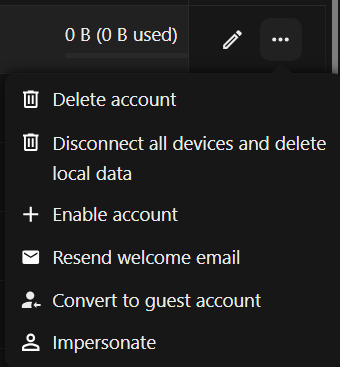
As of version 4.9.0 of the guests app, published 2026-08-05, it is now possible—under certain conditions—to convert standard user accounts into guest accounts; additionally, guest accounts can now be created using a custom user ID.
Here are the details of the changes:
Converting a standard user to a guest user
Prerequisites:
Backend database (no LDAP)
The user must not have logged in previously
(these limitations are purely due to technical constraints)
Here is the use case enabled by this change:
Users who registered themselves via the Registration app—choosing their own user ID, verifying their email, and setting a password—can now be converted into guests by an administrator. Since conversion is only possible if the user has never logged in, it is important to enable the “Require administrator approval” option in the Registration app’s admin tab:
The user can then log in using their own credentials to access the account, which now holds guest status. Consequently, they see only the content that has been shared with them.
Enable normal user-ID for guests
Since the Registration app allows for a custom user ID, I have lifted the strict requirement that guests must log in using their email address and have enabled the use of a custom user ID instead. Users who prefer not to allow this should enable the “Force email as login name” option in the Registration app.
Guest accounts using a user ID as the login name can now also be created via occ:
user@box~$ occ guests:add --help
Description:
  Add a new guest account

Usage:
  guests:add [options] [--] <created-by> <email>

Arguments:
  created-by                         User ID who is set as creator
  email                              Email address

Options:
      --uid=UID                      Login name (user ID) for the guest. If omitted, the email address is used (hashed when the privacy setting is enabled).
      --generate-password            Do not set an initial password
      --password-from-env            Read password from environment variable OC_PASS
      --display-name[=DISPLAY-NAME]  User name used in the web UI (can contain any characters) [default: ""]
      --language[=LANGUAGE]          Language [default: ""]
  -h, --help                         Display help for the given command. When no command is given display help for the list command
  -q, --quiet                        Do not output any message
  -V, --version                      Display this application version
      --ansi|--no-ansi               Force (or disable --no-ansi) ANSI output
  -n, --no-interaction               Do not ask any interactive question
      --no-warnings                  Skip global warnings, show command output only
  -v|vv|vvv, --verbose               Increase the verbosity of messages: 1 for normal output, 2 for more verbose output and 3 for debug
The option “use a hash of the email as user ID for improved privacy” in the Admin Tab of the Guests App:
remains unaffected by this change. However, it only works with the email address; a standard user ID is never hashed.
Nothing changes for users added as guests via the standard invitation method from the sharing menu. They must continue to log in using their email address.
Once a guest account has been created, the user ID cannot be subsequently changed after the user has logged in at least once, i.e. existing guests cannot switch from the email as the login name to a freely selectable user ID. To do this you would have to create a new guest account and delete the old one. However, you should pay close attention to ensuring that the same shares that were shared with the old account are also shared with the new account with the same rights.
Default guest quota
Since the default guest quota became preset-dependent, new guest accounts no longer get 0 B automatically. The guest_quota config key has a lexicon default that comes from the Quick presets configuration (Administration → Quick presets), where it is shown as “set default disk quota assigned to guest account at its creation”. Its value depends on the selected preset: the Default preset uses 0 B, while organization or family presets use a non-zero quota such as 1 GB or 10 GB. So depending on the preset, freshly created guests can silently receive a non-zero quota instead of the classic 0 B.
This change caught many admins completely off guard because it was not properly documented. You literally had to read it from the code to see exactly what was happening and what the intention behind it was.
I have also fixed that in v 4.8.0, published 2026-07-06. Admins can now completely determine for themselves which default quota a guest account gets, completely independent of what was selected in “Administration → Quick Presets”.
Here some links for more Background information about the how and why: