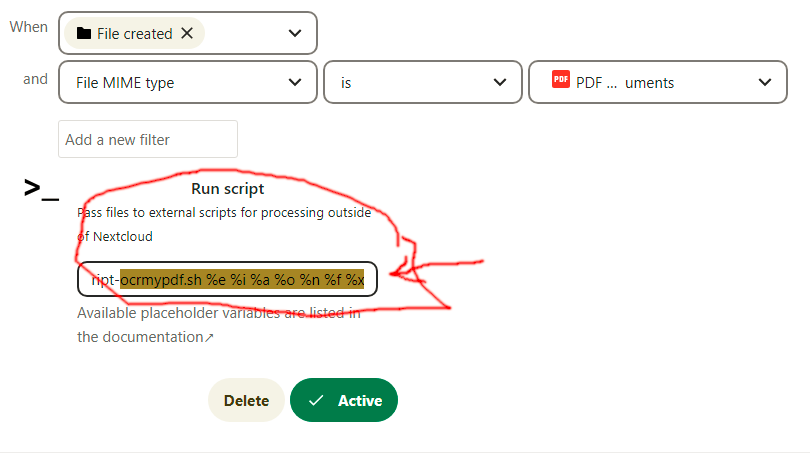
How should I enter the file name and which variables should I give to the script so that it works?
I have read the other posts about workflow_script, I can’t find a solution there. I have tried different variables that I found in the answers, but it does not work.
I receive the payslip from my work as a PDF document with a password. Now I want the password to be removed when uploading to Nextcloud. I have written a script for this. This works when I pass the corresponding file to the script. Now I want to automate it in Nextcloud and integrate the script via workflow_script (Script external).
But I can’t get along with the variables for the filename and when executing the script.
The documents have a recognisable name with an changing date (Name_YYYYMM) and the extension pdf.
Hi there.
In the projects README.md are the placeholders listed. See there
To your specific question I can tell you %f is most likely what you want, the absolute path to the locally available file.
%fis the locally available file for the script (absolute path)
%nis the relative path in Nextcloud (relative to datadirectory)
%xis the former relative path in Nextcloud (only on rename or copy, relative to datadirectory)
Here is, what I use for my scripts.
I call my scripts with script.sh %e %i %a %o %n %f %x so I have all the info to handle. In the script.sh I start with setting variables from the arguments.
#!/bin/bash
# log last call for checking
echo $(date --utc) ${*} > ${0}.last_call
# get arguments
ncEvent=${1}
ncFileID=${2}
ncActor=${3}
ncOwner=${4}
ncPath=${5}
ncLocal=${6}
ncOldPath=${7}
# do the work
Hope it helps.
EDIT: I remembered the quotation marks in the call and edited the post.
EDIT2: I just checked my configuration and there are no quotation marks, so I removed them (a little confused) *8)
You would have something like lohnschein_entsperren %f in yours.
The webserver will then execute the command in the background.
Not really. In your script it will be available as command line argument. Your path %f will be in variable $1 the first argument, when using bash script.
But, you should be aware of some obstacles.
The script entered must be executable.
The script is executed by the webserver. Under the user account running the webserver.
After manipulating your file on the file system. You need to rescan the files of the nextcloud instance. (typically by running occ files:scan)
And what about the file name of the PDF? In the forum I saw many different spellings with placeholders and variables like “/filename.pdf" or " /…pdf$/i*”. I tried all of them I found without understanding exactly what the variable symbols do. Didn’t work either - which was no surprise.
I always have a PDF. It has a static beginning of the file name “Lohnscheine” and then follows a variable number sequence for which I need a wildcard. How should I enter this in "Filename - is - "?
IS checks the string and I don’t know about wildcards. MATCHES uses regular expression matching using the PHP function preg_match().
Use regular expression Filename matches /^Lohnscheine.+\.pdf$/i
explanation for the matching rule / the slashes enclose the rule ^Lohnscheine matches name starting with Lohnscheine .+ the DOT matches ANY character including dot and the PLUS tells it must be
one ore more \.pdf$ matches dot pdf at the end of text i after the closing slash indicates to match case insensitive
Wow, thank you very much for your explanations. It finally works. I would never have thought that the variables came from PHP. But I’m not a specialist either.