The Basics
- Nextcloud Server version (e.g., 29.x.x):
- NC35
- Operating system and version (e.g., Ubuntu 24.04):
- docker community How to docker-compose with notify_push (2024)
- Web server and version (e.g, Apache 2.4.25):
- Apache and Nginx
- Reverse proxy and version _(e.g. nginx 1.27.2)
- traefik v3
- PHP version (e.g, 8.3):
- 8.5.12
- Is this the first time you’ve seen this error? (Yes / No):
- yes
- When did this problem seem to first start?
- don’t know
- Installation method (e.g. AlO, NCP, Bare Metal/Archive, etc.)
- community docker
- Are you using CloudfIare, mod_security, or similar? (Yes / No)
- no
Summary of the issue you are facing:
Client is Debian 13 Trixie, KDE:
- pdf viewer doesn’t work in firefox
- chromium works fine
Steps to replicate it (hint: details matter!):
- enter “files”
- click on a pdf file
in firefox only navigation elements of the pdf viewer are displayed
in chromium pdf contents are displayed as expected
I can repro it on 3 installation, with both Apache and Nginx as webserver.
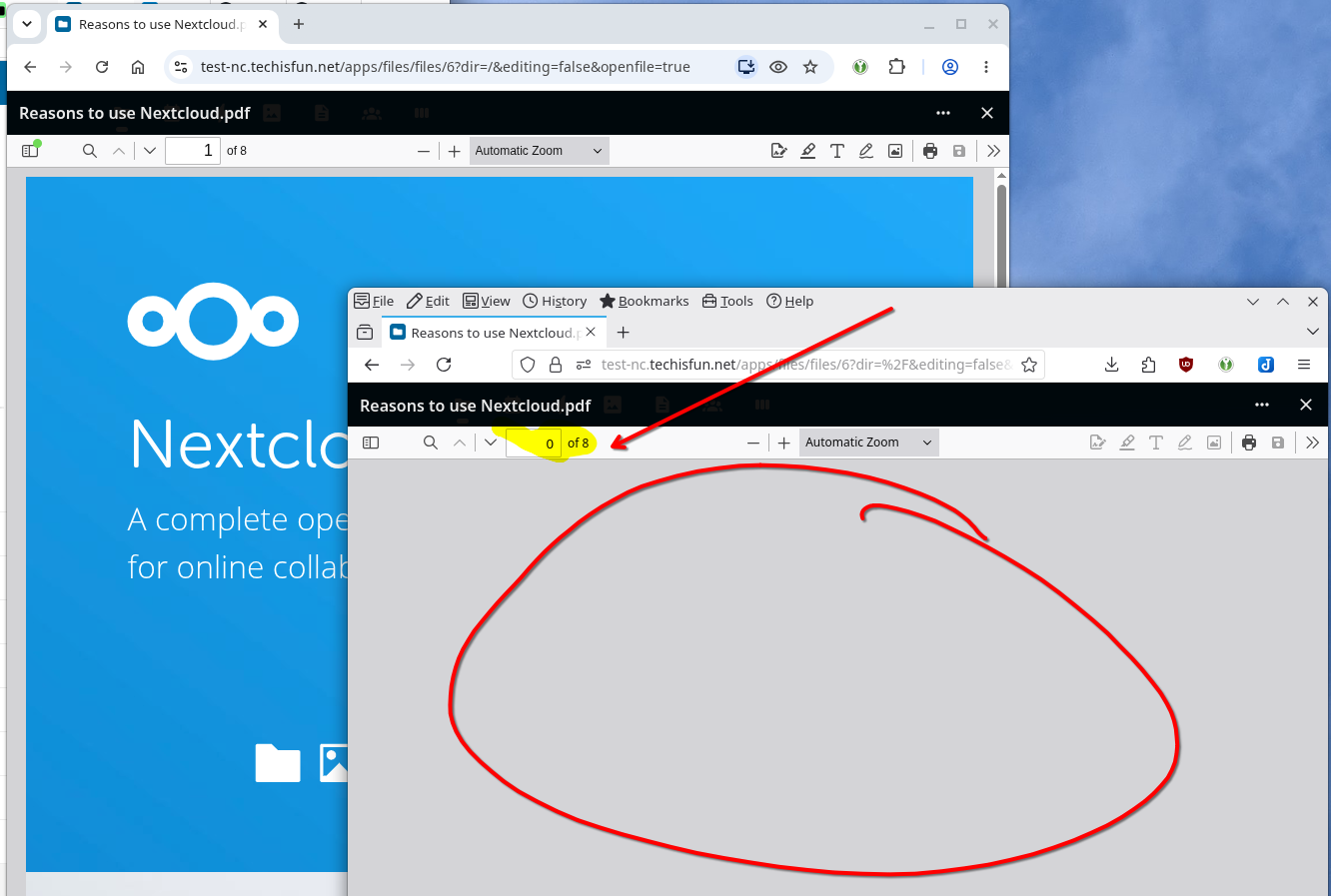
interesting enough, preview looks good

there is a similar bug report [Bug]: PDF viewer broken due to .json and .ftl rewrite rules · Issue #63512 · nextcloud/server · GitHub but im my case {cloud}/apps/files_pdfviewer/js/pdfjs/web/locale/locale.json?v=7.0.0-dev.0 returns a list of ftl files
ideas are welcome..
Log entries
Web Browser
If the problem is related to the Web interface, open your browser inspector Console and Network tabs while refreshing (reloading) and reproducing the problem. Provide any relevant output/errors here that appear.
many errors appear both in chromium and FF
Configuration
Nextcloud
The output of occ config:list system or similar is best, but, if not possible, the contents of your config.php file from /path/to/nextcloud is fine (make sure to remove any identifiable information!):
PASTE HERE
Apps
The output of occ app:list (if possible).
{
    "system": {
        "htaccess.RewriteBase": "\\/",
        "memcache.local": "\\\\OC\\\\Memcache\\\\APCu",
        "apps_paths": \[
            {
                "path": "\\/var\\/www\\/html\\/apps",
                "url": "\\/apps",
                "writable": false
            },
            {
                "path": "\\/var\\/www\\/html\\/custom_apps",
                "url": "\\/custom_apps",
                "writable": true
            }
        \],
        "memcache.distributed": "\\\\OC\\\\Memcache\\\\Redis",
        "memcache.locking": "\\\\OC\\\\Memcache\\\\Redis",
        "redis": {
            "host": "\*\*\*REMOVED SENSITIVE VALUE\*\*\*",
            "password": "\*\*\*REMOVED SENSITIVE VALUE\*\*\*",
            "port": 6379
        },
        "overwritehost": "test-nc.techisfun.net",
        "overwriteprotocol": "https",
        "trusted_proxies": "\*\*\*REMOVED SENSITIVE VALUE\*\*\*",
        "upgrade.disable-web": true,
        "passwordsalt": "\*\*\*REMOVED SENSITIVE VALUE\*\*\*",
        "secret": "\*\*\*REMOVED SENSITIVE VALUE\*\*\*",
        "trusted_domains": \[
            "localhost",
            "test-nc.techisfun.net"
        \],
        "datadirectory": "\*\*\*REMOVED SENSITIVE VALUE\*\*\*",
        "dbtype": "pgsql",
        "version": "35.0.2.2",
        "overwrite.cli.url": "https:\\/\\/localhost",
        "dbname": "\*\*\*REMOVED SENSITIVE VALUE\*\*\*",
        "dbhost": "\*\*\*REMOVED SENSITIVE VALUE\*\*\*",
        "dbport": "",
        "dbtableprefix": "oc\_",
        "dbuser": "\*\*\*REMOVED SENSITIVE VALUE\*\*\*",
        "dbpassword": "\*\*\*REMOVED SENSITIVE VALUE\*\*\*",
        "installed": true,
        "instanceid": "\*\*\*REMOVED SENSITIVE VALUE\*\*\*",
        "maintenance_window_start": 1,
        "default_phone_region": "CH",
        "enabledPreviewProviders": \[
            "OC\\\\Preview\\\\MP3",
            "OC\\\\Preview\\\\TXT",
            "OC\\\\Preview\\\\MarkDown",
            "OC\\\\Preview\\\\OpenDocument",
            "OC\\\\Preview\\\\Krita",
            "OC\\\\Preview\\\\Imaginary",
            "OC\\\\Preview\\\\JPEG",
            "OC\\\\Preview\\\\PNG",
            "OC\\\\Preview\\\\BMP"
        \],
        "preview_imaginary_url": "\*\*\*REMOVED SENSITIVE VALUE\*\*\*",
        "preview_concurrency_all": "12",
        "preview_concurrency_new": "8",
        "maintenance": false,
        "loglevel": 2,
        "defaultapp": "files"
    }
}