The community help forum (help.nextcloud.com) is for home and non-enterprise users. Support is provided by other community members on a best effort / “as available” basis. All of those responding are volunteering their time to help you.
If you’re using Nextcloud in a business/critical setting, paid and SLA-based support services can be accessed via portal.nextcloud.com where Nextcloud engineers can help ensure your business keeps running smoothly.
Getting help
In order to help you as efficiently (and quickly!) as possible, please fill in as much of the below requested information as you can.
Before clicking submit: Please check if your query is already addressed via the following resources:
(Utilizing these existing resources is typically faster. It also helps reduce the load on our generous volunteers while elevating the signal to noise ratio of the forums otherwise arising from the same queries being posted repeatedly).
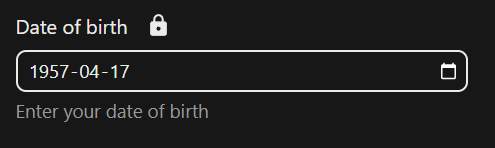
I open NC dashboard. Head over to Personal Settings. Select and modify date of birth. If I select April 18 1957 from the popup calendar the date always reverts back to April 17 1957.
@peterbatah
Did you tried with other fields like phone number ?
Can you try in private mode and with another browser too, to rule out browser cache and local storage impact ?
Good morning @artlog1 Thank you so much for your prompt response. I have my locale set to English (Canada) but have also tried English and English (USA). Phone number works fine. I also noticed that if I select “Today” in the popup calendar it will return the prior day instead. Example choosing today = October 15 will result in 2025-14-2025. Very bizarre
My best guess is that your server and your client system don’t have the same time. That can be atimezone problem or a time problem, in VM system such things may happen.
Can you check time on your VM and its timezone ?
@peterbatah
no this is fine.
and logs of nextcloud, what hour do they show ?
( can be tail -f /var/www/nextcloud/data/nextcloud.log or it depends on install )
Your time and assistance is greatly appreciated @artlog1 I can see that you would like to see this issue resolved as well. I am using Brave browser but tried both Firefox and Edge and got the same results. This is quite a mystery. And, thanks for the bug link.
Forgot to submit the log. I cleared it before verifying it again as it was quite lenghty. The time does not look right here either. I also do not understand why I am seeing the login failed message when I am logged in without issue. Très bizarre