Tested on two instances of NC 31.0.8, one self-hosted and one commercial (Hetzner Storage Share), same behavior.
I am connecting to a Hetzner S3 bucket external storage, using an SSE-C key to encrypt data at rest.
Any copy/move operation directly in the NC web interface is failing. This is very easy to test:
In an external storage folder, create two folders, “Folder1“ and “Folder2“
In “Folder2“, create a text file with some content - “New text file.md“
Using the web interface, move “Folder2“ inside “Folder1“, either via drag ’n drop or the “Move or copy“ option in the three-dot menu for “Folder2“
NC shows a pop up saying “completed successfully“
As a result, “Folder2“ is now moved under “Folder1“ but it is empty and “New text file.md“ is gone.
Remove the SSE-C key from the S3 external storage mount and repeat the same procedure and it succeeds without any issue.
The “Enable multipart copy“ option checked/unchecked in the external storage configuration doesn’t change the behaviour.
I understand full well why this might be happening - if SSE-C is used, there can’t be a server-side move/copy but it has to run though the client. If the client (in this case the NC server) can’t do that there should at least be an error and no change on the storage.
Is there a place to “officially“ report this and learn whether this might be worked on already?
Adding to this, I now found that if I enable “Enable Path Style“ in the configuration options for the storage, move/copy works even with SSE-C enabled, but on new files only. Since the storage worked fine in all other aspects before without that option, I am wary of any other side effects. Information on this and its possible implications seems to be sparse.
Remove the SSE-C key from the S3 external storage mount and repeat the same procedure and it succeeds without any issue. […] I understand full well why this might be happening - if SSE-C is used, there can’t be a server-side move/copy but it has to run though the client. If the client (in this case the NC server) can’t do that there should at least be an error and no change on the storage.
No, S3 SSE-C supports copying objects. However from the looks of it, your particular S3 provider doesn’t currently (https://docs.hetzner.com/storage/object-storage/supported-actions). (Aside: Not really sure what they’re comment is on the CopyObject about; that’s… odd).
Adding to this, I now found that if I enable “Enable Path Style“ in the configuration options for the storage, move/copy works even with SSE-C enabled, but on new files only. Since the storage worked fine in all other aspects before without that option, I am wary of any other side effects.
Path style is a S3 standard thing and not Nextcloud specific. Your S3 storage provider will tell you whether you need it enabled or not. And in some cases it can be either way, but whether to toggle it on will depend on what endpoint URL you enter.
No, S3 SSE-C supports copying objects. However from the looks of it, your particular S3 provider doesn’t currently
Yes, that’s what I meant, I had read about Hetzner not supporting copying SSE-C encrypted objects.
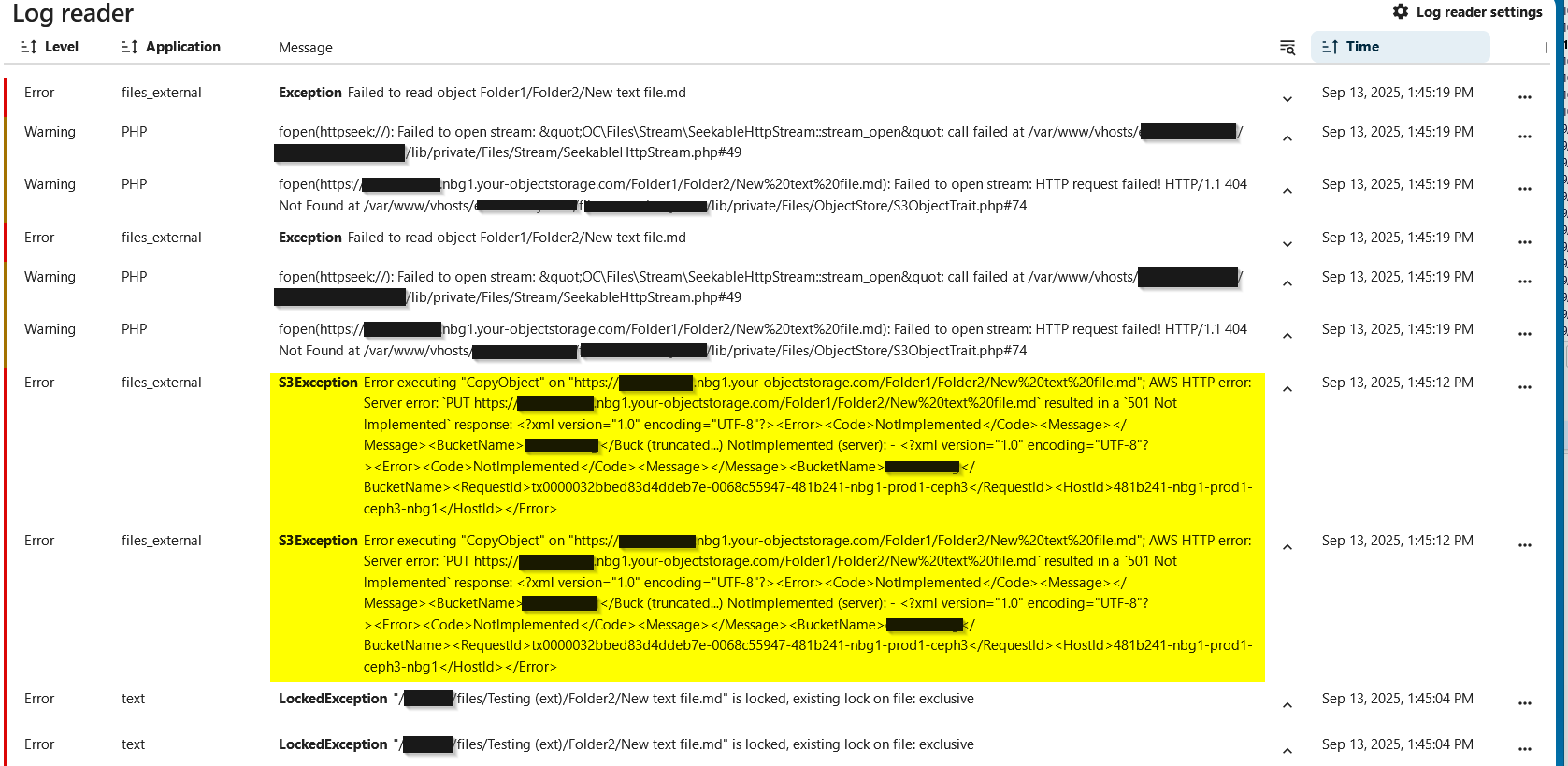
In fact, when I use rclone on the S3 storage attempting to move or copy I receive plenty of 501 errors like this one:
2025/09/12 06:52:30 Failed to copy: NotImplemented: status code: 501, request id: tx000000206e46a1ce0885e-0068c3c32e-41835e8-nbg1-prod1-ceph3, host id:
So even if the S3 implementation is lacking, the fact that unlike rclone NC would report success and silently (in case of the move) drop all files is a severe bug.
Sure, here below what happens when I do exactly what I described in my original post. During this, the NC web interface reports success for the move and afterwards, “New text file.md“ is gone. What I found in addition is that if I navigate very quickly to Folder1/Folder2/, the file appears there for a split second before it disappears.