NC Connector Support-Thread: Thunderbird Add-on, Outlook Add-in and Nextcloud-Backend

Addon

Hello everyone,

I would like to use this thread as a central support and discussion point for the NC Connector ecosystem.

NC Connector brings secure file sharing, Talk meetings, and attachment automation directly into Thunderbird and Outlook. This keeps important team workflows where they are needed most: in the email and calendar client.

What NC Connector covers

  • File sharing with password, expiration date, and optional separate password delivery
  • Create and update Talk meetings directly from calendar events
  • Attachment automation with clear rules instead of manual individual steps
  • Consistent sharing and invitation blocks directly in the familiar workflow with your own Branding.
  • Centrally managed E-Mail Signatures

NC Connector currently consists of three parts:

  1. NC Connector for Thunderbird

    • Thunderbird ESR add-on
  2. NC Connector for Outlook Classic

    • COM add-in for Outlook Classic
  3. NC Connector Backend

    • Nextcloud app / server backend
    • Backend requires add-on version >= 3.0.0
    • central policies, seat management, templates, and organization-wide control
    • intended for managed environments and team rollouts

Useful links

If you’d like to support the project, we’d really appreciate:

Thanks a lot for your support.

I just enabled a new tag “nc-connector” to help you tagging all your nc-connector postings…
in the end it might turnout that it’ll be way easier to find any related topics quickly

Hi everyone,

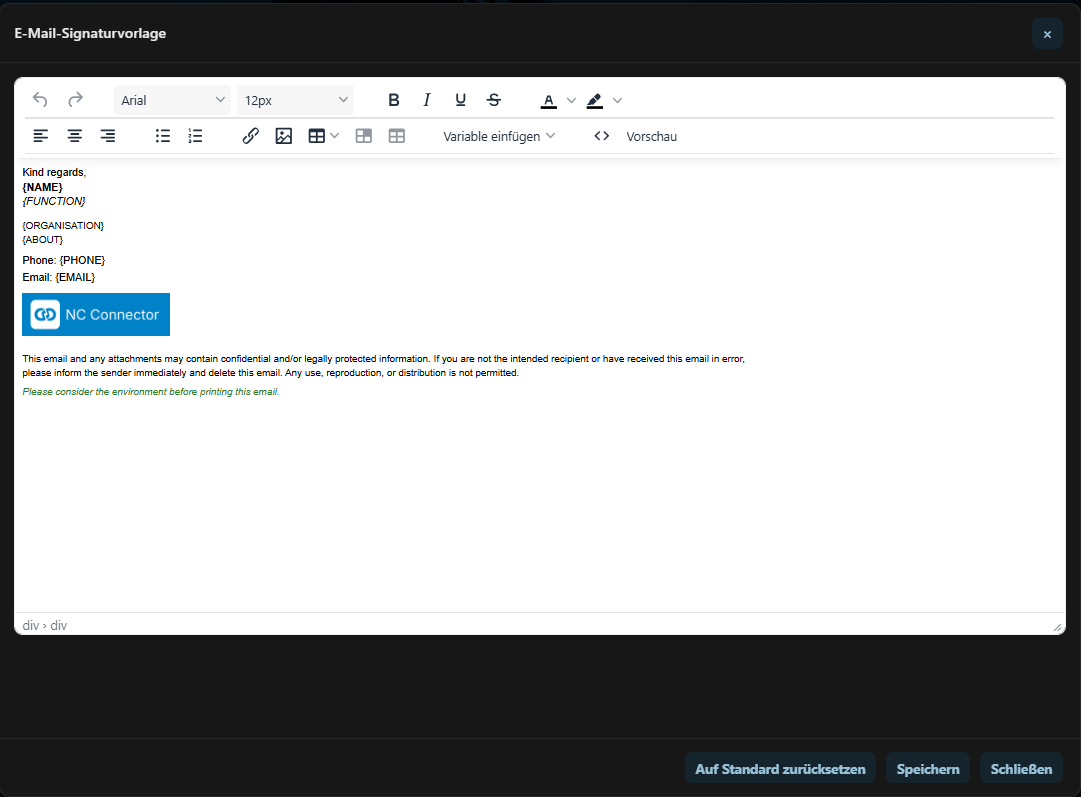
I wanted to share a new feature I added to NC Connector: centrally managed email signatures.

The idea behind it is simple: in many teams, signatures are still maintained manually on every client. That works for one user, but it gets annoying when you have several users, layout changes, legal text, phone numbers, job titles, departments, different sender identities and so on.

With the new signature feature, the signature template can be managed centrally in the NC Connector Backend, which is a Nextcloud app.

An admin defines an HTML signature template in Nextcloud. The backend then renders that template for the assigned Seat user and sends the finished signature HTML to the supported mail clients.

NC Connector centrally managed email signature settings

The template can contain placeholders like:

  • “{NAME}”
  • “{EMAIL}”
  • “{PHONE}”
  • “{PHONE_MOBILE}”
  • “{ABOUT}”
  • “{FUNCTION}”
  • “{ORGANISATION}”
  • “{CUSTOM1}”
  • “{CUSTOM2}”

Most values come from the Nextcloud user profile, for example name, email address, phone, about text, function and organisation.

There are also a few signature-specific user override fields in the backend:

  • Signature email address
  • Mobile phone
  • Custom 1
  • Custom 2

This is useful when the Nextcloud profile does not exactly match the mailbox identity used in Thunderbird or Outlook Classic. For example, the backend can use a custom signature email address so the client only applies the central signature to the matching sender identity.

The backend renders the signature before returning it to the client. Profile values are escaped, missing values are removed cleanly, and multiline “about” text is converted into line breaks.

The admin can also decide whether the central signature should be added:

  • when composing a new message
  • when replying
  • when forwarding

If central signatures are disabled for composing, the dependent reply/forward/template values are not sent to the client.

The goal is not to make signatures more complicated. Quite the opposite: the goal is to avoid touching every client manually whenever a signature layout or legal text changes.

For small setups this may not matter much. But for teams or organizations using Thunderbird or Outlook Classic with Nextcloud, it can make signature handling much easier to keep consistent.

I have added optional support for the Nextcloud Secrets app as a separate password-delivery method for password-protected public shares.

The idea is simple: when NC Connector creates a password-protected file share, the share password no longer has to be inserted as plain text into the same email or into a separate follow-up email. Instead, NC Connector can create a secret via the Nextcloud Secrets app and insert the secret link into the message.

So the recipient receives:

  • the public share link
  • a separate Nextcloud Secrets link to retrieve the password

This is optional and only used when the Secrets app is installed and enabled. Otherwise NC Connector falls back to the existing password delivery flow.

The main reason for this change is that email is not really a good channel for sending secrets in plain text, even if the password is sent in a separate message.

Thanks to @theCalcaholic for maintaining the Nextcloud Secrets app. It fits this use case very nicely.