The Basics
- Nextcloud Server version (e.g., 29.x.x): 35.0.2
- Operating system and version: NextcloudPi v1.58.0
- Web server and version (e.g, Apache 2.4.25): Apache/2.4.68 (Debian)
- PHP version (e.g, 8.3): PHP 8.4.25
- Is this the first time you’ve seen this error? No
- When did this problem seem to first start? After updating to NC 35.0.2
- Installation method: NextcloudPi-Image
- Are you using CloudfIare, mod_security, or similar? No
Summary of the issue you are facing:
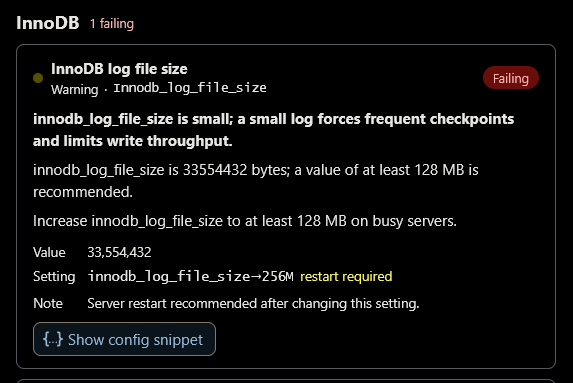
In the Overview in the Administration Settings in the NC browser backend, after successfully updating to NC 35.0.2 this warning shows up: " Database configuration | 1 database check is failing." Unfortunately I cannot get rid of this error, because adding a code snippet to /etc/mysql/my.cnf does not work (or I am doing it wrong).
But one by one: Clicking on Show the findings... at the end of the error in the Overview shows this:
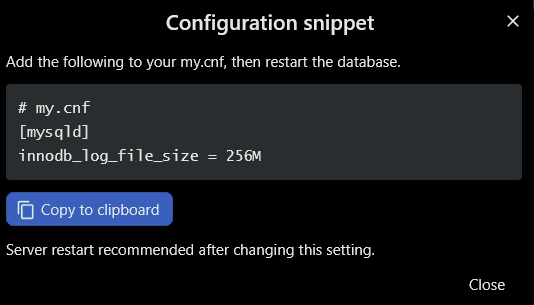
The configuration snippet is this:
So I opened /etc/mysql/my.cnf and added the code snippet (copied from clipboard) just above the line # Import all .cnf files from configuration directory, wrote out and closed the file. Then I restarted the server by using the command systemctl restart mysql. But by that the error did not go away. So I rebooted the Raspberry Pi, but after this the error still persisted.
As I do not know how to get rid of this error, I would kindly like to ask you for your help. Thanks in advance!
Hi @fromagecloud, that warning usually means the snippet isn’t being read by MariaDB, most often because it’s missing the [mysqld] header or another file loaded later overrides it. Instead of editing my.cnf, create a new file such as /etc/mysql/mariadb.conf.d/99-nextcloud.cnf containing a line [mysqld] followed by the exact innodb_log_file_size line from the Nextcloud findings, then restart with sudo systemctl restart mariadb (or mysql). To check whether it took effect, run sudo mysql -e “SHOW VARIABLES LIKE ‘innodb_log_file_size’;” and compare it with the value Nextcloud asks for. If it still shows the old value, run mariadbd --print-defaults (or mysqld --print-defaults) to see which config file is winning, since later files override earlier ones. Then reload Settings > Administration > Overview and the check should clear.
One caution: on older MariaDB versions a changed log file size can need a clean shutdown first, so take a database backup before restarting.
Thank you so much for your quick, kind and helpful comment, @Novastart! That did the trick, the error disappeared.
Only I slightly deviated from your suggestion: Instead of creating a new *.cnf file I added the code snippet at the end of /etc/mysql/my.cnf. Now it does not get overwritten by another cnf file.
(Had I thought through before, that the code snipping would get overwritten when added before the lines after # Import all .cnf files from configuration directory, I had done it just so.)
Thanks so much for suggesting the “SHOW VARIABLES LIKE [...] and --print defaults commands! It did not know, but they helped alot.
Have a nice day!