The Basics
- Nextcloud Server version (e.g., 29.x.x):
25.0.13
- Operating system and version (e.g., Ubuntu 24.04):
Ubuntu Server 20.04
- Web server and version (e.g, Apache 2.4.25):
Apache 2.4.41
- Reverse proxy and version _(e.g. nginx 1.27.2)
- Not sure, maybe none
- PHP version (e.g, 8.3):
PHP 7.4.3
- Is this the first time you’ve seen this error? (Yes / No):
NA
- When did this problem seem to first start?
NA
- Installation method (e.g. AlO, NCP, Bare Metal/Archive, etc.)
Bare Metal
- Are you using CloudfIare, mod_security, or similar? (Yes / No)
No (?)
Goal
I am trying to migrate all my data from my existing native nextcloud instance, to a new AIO docker container.
Milestones
- Set up new server (referred to as beta) with ubuntu 26.04
- Copied the nextcloud directory and data form current server (referred to as alpha)
- Install docker on beta
- Get the AIO container set up on beta ** ISSUES
- Find the container’s volumes and copy the files from alpha into them
- Hope that works
- Replicate process on alpha
Context
I have an older instance of Nextcloud running as a bare metal installation on a ubuntu 20.04 server. It is currently working fine, but I am looking to make long-overdue upgrades. The built-in updater utility claims I am up to date. I suspect that is because Ubuntu Server 20.04 is EOL and no longer getting Nextcloud deployments.
After some research, I can see that releases are now done through the All In One (AIO) Docker images. I only have passing familiarity with docker. To be fair, I am not super familiar with systems administration in general. A friend helped me set up my nextcloud server ~5 years ago.
To avoid breaking my current server, I have set up a secondary computer where I am attempting to figure out the migration process. I am calling this secondary server “beta” and my primary server as “alpha”.
What I have tried so far
I have found a hand full of resources online, but none seem to cover my situation exactly. The two best are Migrating to Nextcloud Docker–this blog post is about moving their exact setup into docker containers. I want to both update and use AIO. The second resource I found was all-in-one/migration.md – this wants me to ensure that my old instance and the AIO are running the same version. I can’t update the old instance and I am not sure how/if I can downgrade the AIO.
I have copied my nextcloud directory and nextcloud data directory over to my beta server running ubuntu 26.04. I have installed docker and confirmed it is working. I have begun following instructions on all-in-one/README.md to set up the AIO container. My hope is that once I have it up and running I can find a way to import my datadirectory, database, etc into the container.
Summary of the issue you are facing:
I ran the AIO docker container with the run command provided in the all-in-one/README.md. This executed correctly and I was able to connect at https://IP:8080, however I got stuck when I arrived at this page.
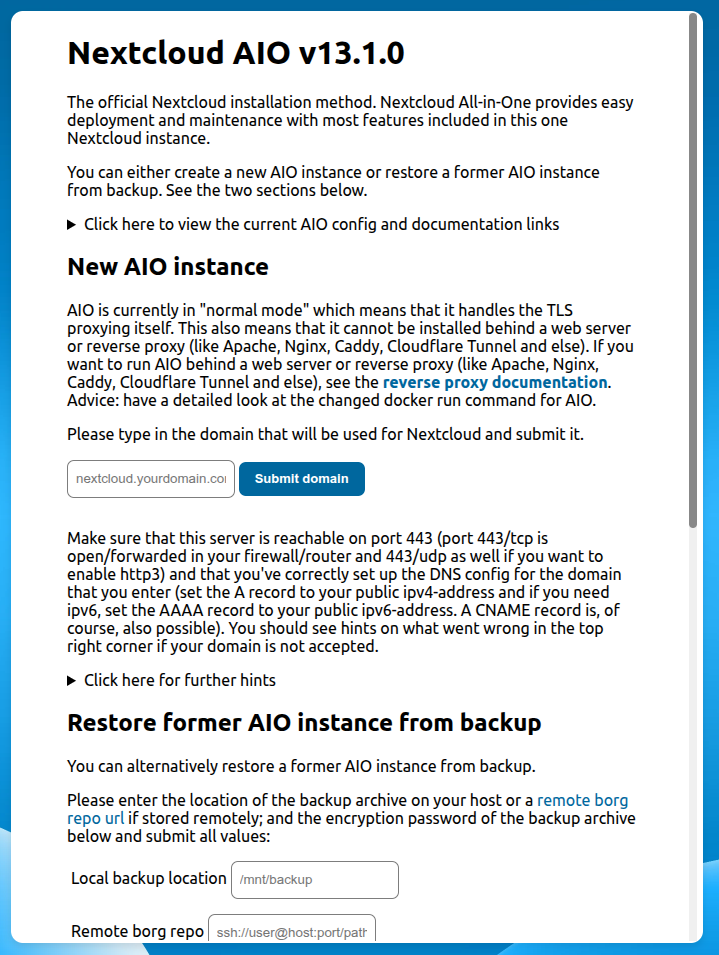
I entered the domain I currently use and I got the following error
The domain is not reachable on Port 443 from within this container. Have you opened port 443/tcp in your router/firewall? If yes is the problem most likely that the router or firewall forbids local access to your domain. Or in other words: NAT loopback (Hairpinning) does not seem to work in your network. You can work around that by setting up a local DNS server and utilizing Split-Brain-DNS and configuring the daemon.json file of your docker daemon to use the local DNS server.
In my mind this could have two possible sources.
- This could be related to an ongoing issue I have had where I am unable to connect to my server from the same local network
- Its because my router is configured to forward traffic to the alpha server and not beta
I have two main questions
- Can anyone help me resolve this “domain not reachable” issue?
- Can anyone comment on my overall migration strategy? Is it possible, am I doomed?
