I’m willing to switch to Nextcloud coming from Microsoft Office 365 and I am collaborating with partners that will continue using Microsoft. Therefore I have to ensure that I do not corrupt the files provided by the partner when opening them on NextCloud applications. I have found three major topics that prevent me from changing to Nextcloud because the following Microsoft-Office features do not work in NextCloud apps:
MS Word allows integrating Excel-tables or Powerpoint-slides into Word documents allowing to modify the content in Excel (Formula) / PowerPoint (Graphics), adding an object like that does not work.
MS PowerPoint allows to define a transparency on graphics/icons that are integrated. This is not possible in NextCloud presentations and when opening the Office file the transparency is lost.
The NextCloud Presentations allow combining two or more forms (similar to “Grouping” in MS PowerPoint), but the combined forms cannot be “ungrouped” afterwards which prevents changes after grouping. Furthermore overlapping areas are modified / disappear.
Are these bugs or functions that are planned to be integrated or am I doing something wrong?
I think for the “official” version, we are going to use more and more the Euro-office.
A few people might be able to give you more details. If not, it can be worth checking with the respective solutions directly as well: for Euro-Office Euro-Office · GitHub
Right now M$-compatibility is still a problem with only office and hence EuroOffice. But in the long run you can be sure that devs will work hard on bringing that feature(s) to EuroOffice as well.
How much of your desired things would work under collabora? I can’t tell. It seems to be pretty specific. In general compatibility with docx etc is better with collabora (Libre office).
So why not just downloading either Libre office or Collabora and trying them for free? So you would know if the features you need would work…
What variant of Nextcloud Office did you test? There are two major packages which require the respective server as well (both servers are available as Docker images):
The “old” Nextcloud Office based on Collabora which is LibreOffice on the server:
The “new” Nextcloud Office based on Euro Office which is a fork of OnlyOffice and should work better with Microsoft formats, since it is using that natively compared to Collabora which uses Open Document formats and not OOXML internally:
I have Nextcloud instances with both office version which are usually always up to date (currently Nextcloud 35.0.1 and the latest stable version of the office servers). If you want to try out which works better for you, please send me a personal message and I can give you a test account if you want to try this out. The servers are located in Germany.
I think it’s the other way around: not Euro Office has limited compatibility with Microsoft OOXML but Collabora, since Collabora is based on LibreOffice which uses Open Document as “native” Format while Euro Office is based on OOXML and supports Open Document only as import/export format (even though you can configure the integration app to use Open Document formats as default and not OOXML).
I’ve checked with the Euro-Office based Nextcloud Office (the newer one @awelzel mentions), both in the editor and in its source code. Here is what I’ve found:
1. Embedding Excel tables in a Word document
Partly available. In the document and presentation editors, go to Insert → Table → Insert Spreadsheet. That embeds a spreadsheet you can edit later by double-clicking it. I have not tested whether a table that was embedded in Word itself stays editable after opening. There is no equivalent for embedding PowerPoint slides.
2. Transparency on pictures and icons
There are two kinds, and they behave differently:
Pictures that are transparent themselves (PNG with an alpha channel, SVG) and the picture’s opacity setting work.
Workaround for now: use pictures with real transparency (PNG or SVG) instead of letting PowerPoint make a colour transparent.
3. Ungrouping shapes
Ungrouping is available in the presentation editor: right-click the group → Arrange → Ungroup, or the Arrange button on the Home tab. I have not tried to reproduce the problem with overlapping areas changing, but that probably depends on the file. If you can share a small sample file where it happens, it would be worth opening an issue for it in the same repository (Issues · Euro-Office/sdkjs · GitHub), since that is where the rendering is handled.
In general, Nextcloud Office powered by Euro-Office works with the Office formats natively (OOXML), so compatibility problems are usually bugs that can be fixed, but of course more borderline use-cases can complicate things. Reports with a sample file would definitely help.
Thanks a lot for your comments, especially @bargib - I was not aware that grouping is another function under “arrange”, that does work for me. Thanks for reporting the transparency issue, looking forward to having it solved.
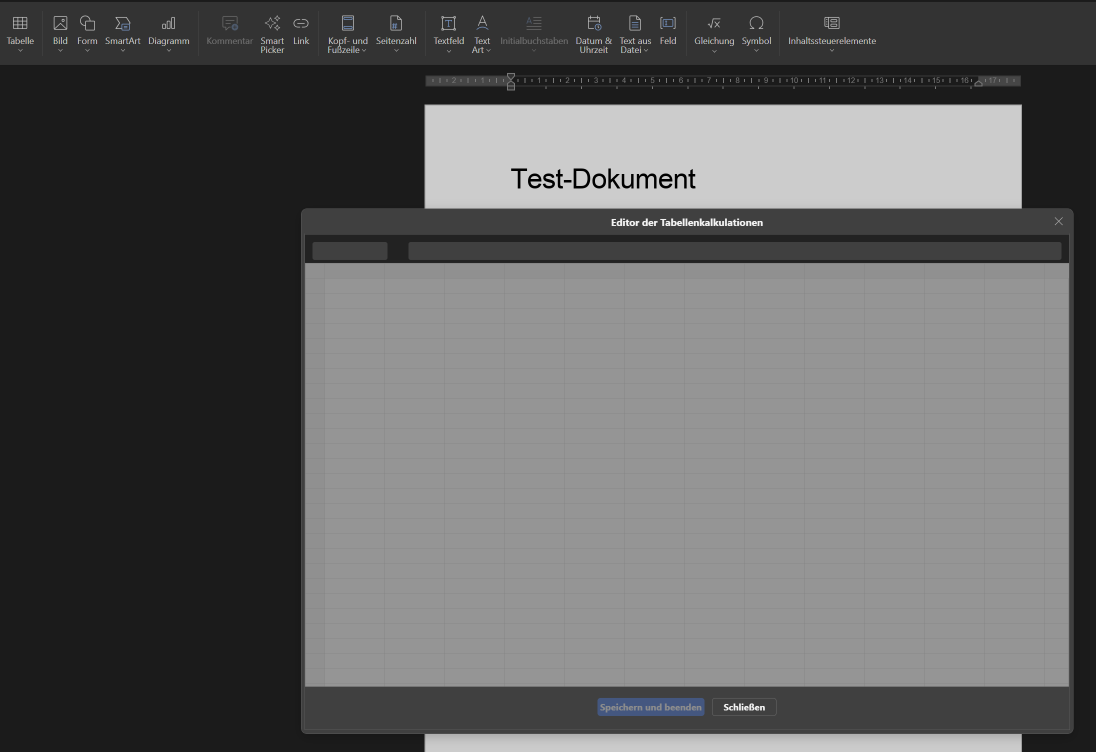
Embedding or opening the excel table does not work, at least not in the online version. A window pops up and indicates a table but cannot be edited, the window “flashes” between bright and dim and I can only click on “close” (“Schließen”), but not on “save and close” (“Speichern und beenden”). I have noticed though that a table that was inserted in MS Word does stay “alive”, but I also fail to edit it in the online version.
Embedding the PowerPoint slide is a really handy function because it prevents having multiple files to be saved together with the word document, I would really appreciate if that function would be implemented one day. At least the PowerPoint Slide that was inserted in MS word stays “alive” and can be edited in MS Word/PowerPoint later, so the documents at least don’t get corrupted.
@bernd.kautt I tried both cases on my current Euro-Office build (main from 9 October):
Insert → Table → Insert Spreadsheet in a document: the spreadsheet editor opens, I can type, Save & Exit works, and a double-click opens it again for editing.
A Word file with an Excel table embedded in Word: the table shows in the document, a double-click opens it with the data, a formula recalculates after a change, and after saving, the file opens in Word again with the table still an Excel object and the new values in it.
So in the current version both should work. What you describe sounds like an older version. The first few seconds after the window opens, it is dim and empty and only Close is available while the spreadsheet editor loads. In versions before 9.3.5 it could stay like that: the embedded spreadsheet editor failed to load, especially when the office server runs under a subpath such as example.com/office/ (Euro-Office/DocumentServer#376, fixed in 9.3.5 by Euro-Office/web-apps#277).
Could you check:
which version you have (Help → About in the editor), and
whether the window still stays dim if you wait 10–15 seconds?
Embedding PowerPoint slides in a Word document is not available in Euro-Office. If you’d like to see it, a feature request at Issues · Euro-Office/web-apps · GitHub is the best place for it.
The window does not change, even when waiting longer. I’m working with IONOS cloud who provide the web access, I’ll contact them to use the latest release - thanks a lot for your help.
 )
)