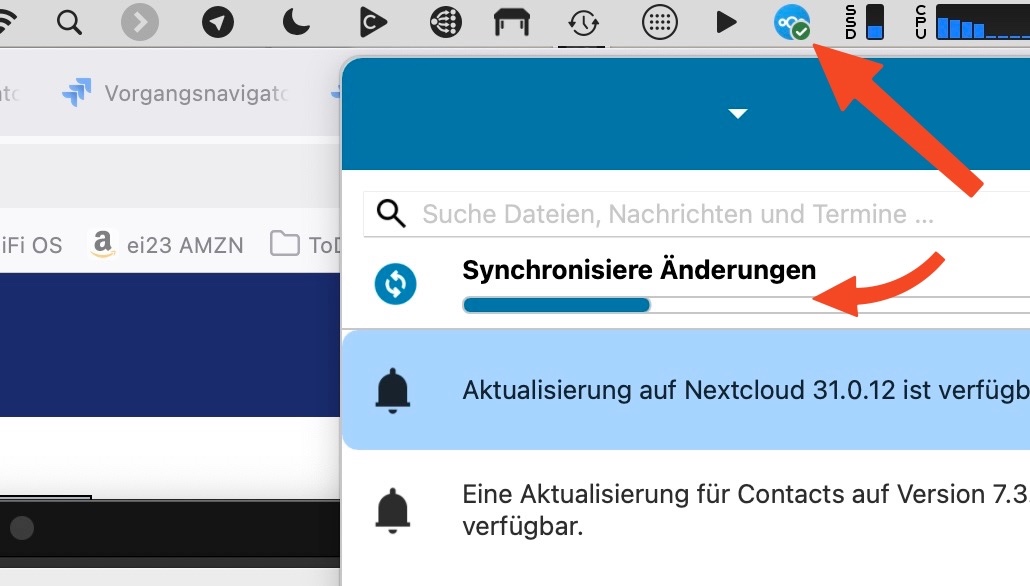
A coworker of mine can reliably reproduce this on his Mac. I have not been able to reproduce it on mine.
Nexcloud desktop client 4.0.6
Mac OS Tahoe
Open text file (YAML) in editor, save. Synchronisation starts.
Progress bar is visible in the Nextcloud client. Save again while it’s still active. Synchronisation freezes. The menu bar icon shows “done”, while the progress bar does not progress.
The “Sync now” button never appears. There is no way out of this state but to quit and restart the client.
We narrowed it down to a single specific file written by a single specific application. That’s why I cannot reproduce it with a text editor or even MS Office or similar.
Again, any idea what to look for? I checked the source code but my Java skills are very limited so I cannot judge if the application is doing anything unusual when saving.
But it is only a problem when this application is open I suppose?
If both applications handle the file at the same time, this could be a problem. I don’t know the details how this works and where it might cause problems with other software (and who is to blame).
The Nextcloud client should not stall, best case it just discovers that the file is written again, and it skips the current upload and comes back later. And for the NC client to handle such situations better, I think the bug tracker can be a good place.
Well the problem appears on the client and the file didn’t reach the server yet. For a bug report, the corresponding client logfiles would be helpful.