I’m new here and just getting started with programming apps.
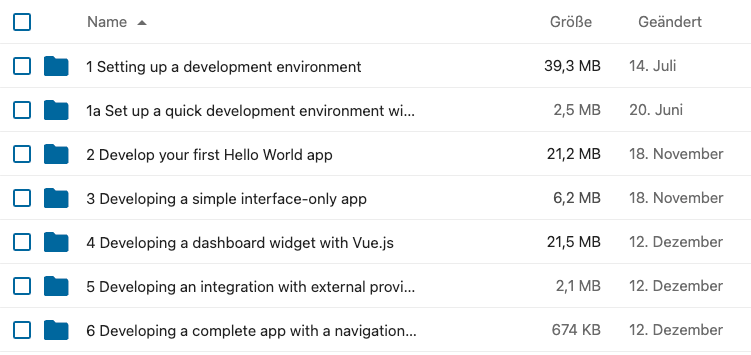
I’m looking for a table-like component to display my data. Something like a file overview with headers would be okay (see attached picture). With basic features like sorting or filtering would be awesome.
you started a topic in development category. This category is intended for active developers of the core or apps in the Nextcloud ecosystem.
From the description in your topic, it is not clear if you are seeking help and advice about a concrete problem you have or you want to actually develop the corresponding solution.
Please specify explicitly the required information to help you best. These are:
What you want to achieve
What you have done so far
What is failing
What you expect from the forum community
Without additional information the community members cannot help you in an efficient manner. Please keep in mind that the help here in the forum are mostly based on work of volunteers and thus it is just fair to reduce the burden on them.
If you accidentally posted in the category, just give a hint and a moderator can move the corresponding category.
thank you for your reply. You are right — I may have accidentally posted in the wrong category.
To clarify my intention:
My institute uses Nextcloud for file storage. As an IT supporter with some full-stack development experience, I would like to improve efficiency and automation by developing a custom solution within the Nextcloud ecosystem.
What I want to achieve
A table-like component for displaying data
Custom group-by functionality (not necessarily configurable from the frontend)
Custom display logic, for example:
Masking sensitive data (e.g. ***) for users without sufficient permissions
Replacing certain values with links or other UI elements
What I have done so far
Followed the official app development tutorials up to “Developing a complete app with a navigation bar and database”
Tested standard HTML \<table\> elements, but the styling and usability are not optimal
Reviewed existing Tables apps in the Nextcloud App Store
What is failing
I am unsure whether there is an existing recommended table component or UI pattern within the Nextcloud ecosystem that would better suit this use case
What I expect from the community
Guidance on existing components, best practices, or recommendations, so I don’t reinvent the wheel unnecessarily
If this topic fits better in another category, please feel free to move it.
The frontend Vue components that are officially used are documented as you have already seen. Apart from that, there are no resources that I know of.
As you have seen, the tables app handles visual tables in many flavors. You could have a look at their code and see if there can be something reused. Tables are very specific and hard to implement responsively, so they are (as far as I am concerned) sort of discouraged.
If you look for advice on how to make it look nicely integrated into the rest of NC, there is a weekly feedback round on a talk chat, where you can post UI (design) question anytime. Maybe it makes sense to design a kind of “standard table” for NC and make this part of the official components. Such effort will start in the design group AFAIK.
Nice to hear from a new dev college entering the NC universe!
Hi, building such a component might become a big waste of energy. In your app, you should use your own component.
I understand this can be a difficult bet on future, but maybe Nextcloud could envisage (as they choose VueJS) to choose an upper framework with the purpose of using better components.
Thanks for your advise. I’ll try the suggestions and make the appearance consistent.
Actually the Nextcloud files list table (with Name, Size, and Last modified as Headers) would actually be a good compromise. Unfortunately, it doesn’t seem to be offered in @nextcloud/vue for reuse in custom apps, which is a bit of a pity.