In the area of webservers I am really a beginner, sorry.
Let me try to answer anyhow: If your suggestion targets to the ports in the router: My Fritzbox now is 1:1 mapping 22 to 22, 80 to 80 and 443 to 443, all to the local IP of my server, see here:
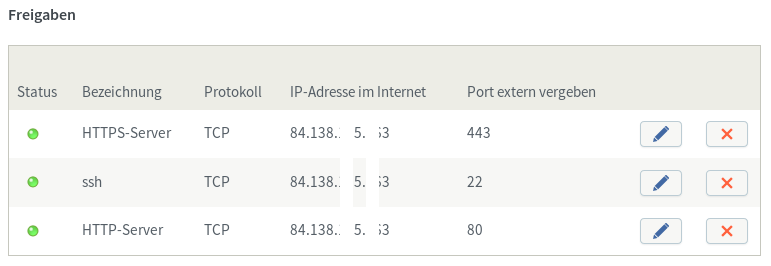
In terms of VirtualHost I tried 2 Alternatives without success, both (one only active at a time) placed in
/etc/httpd/conf.d/http_my.conf
Alternative 1 (direct) < currently active
<VirtualHost *:80>
ServerAdmin webmaster@my.domain.tld
DocumentRoot "/var/www/nextcloud"
ServerName my.domain.tld
ErrorLog  logs/http_error_log
CustomLog logs/http_access_log common
</VirtualHost>
Alternative 2 (redirect) < currently commented with #
<VirtualHost *:80>
ServerAdmin webmaster@localhost
Redirect permanent / https://my.domain.tld/
ErrorLog logs/http_error_log
CustomLog logs/http_access_log combined
</VirtualHost>
Alternative 2 was recommended to me here:
I would prefer Alternative 2, but I fear that Letsencrypt might have problems with ending up with a https, that’s why I tried with Alternative 1.
Even without http_my.conf http://my.domain.tld ends up in https://my.domain.tld in the browser.
This is perfectly fine for Nextcloud - but for Letsencrypt / certbot ???
I’m confused …