The community help forum (help.nextcloud.com) is for home and non-enterprise users. Support is provided by other community members on a best effort / “as available” basis. All of those responding are volunteering their time to help you.
If you’re using Nextcloud in a business/critical setting, paid and SLA-based support services can be accessed via portal.nextcloud.com where Nextcloud engineers can help ensure your business keeps running smoothly.
Getting help
In order to help you as efficiently (and quickly!) as possible, please fill in as much of the below requested information as you can.
Before clicking submit: Please check if your query is already addressed via the following resources:
(Utilizing these existing resources is typically faster. It also helps reduce the load on our generous volunteers while elevating the signal to noise ratio of the forums otherwise arising from the same queries being posted repeatedly).
Some or all of the below information will be requested if it isn’t supplied; for fastest response please provide as much as you can.
The Basics
Nextcloud Server version (e.g., 29.x.x):
33.0.8
Operating system and version (e.g., Ubuntu 24.04):
Debian 13 Linux 6.12.101
Installation method (e.g. AlO, NCP, Bare Metal/Archive, etc.)
AIO
Summary of the issue you are facing:
Cannot get acme challange pass for the apache docker container to obtain a cetrificate from letsencrypt but mastercontainer has no issues obtaining a cetrificate.
Steps to replicate it (hint: details matter!):
start mastercontainer
log into webinterface
start containers
Log entries
letsencrypt timeout during connect issues
Thing is i get a valid certificate from letsencrypt for the webinterface on port 8443 so i temporarly solved this by copying over the certificate to the apache instance but thats still not really helpfull if i cannot actually solve this since it will just run out in 7 days.
From what i have found this is supposedly a firewall issue however port 80 is forwarded and the mastercontainer itself manages to grab the certificate without any issues and if this is just an issue with the firewall i would expect the mastercontainer to run into the same issue
I already checked if that would be the cases with dig and can’t see anything unusual except the normal A record.
Firewall is just a normal NAT that maps the port 1:1 from the internal ip to the external ip.
There exists a webpage filter firewall between the host and the internet however if that was the issue the mastercontainer should be unable to get a certificate as well
Also no cloudflare proxy etc
Can you post your docker compose setup that shows the networking and ports configuration for the entire stack?
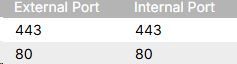
And perhaps explain how you have forwarded the ports, are they forwarded 1:1 or do some ports change when they are forwarded? (for instance: 443 → 9443)
And what is the webpage firewall you mentioned - it does not tell me what it is or how it works; could you clarify that so I know I am not missing something?
Finally, pretend you are a letsencrypt service; can you manually reach the container from the public internet on the required ports? If you cannot reach it, letsencrypt will have the same issue. Hint; use netcat; nc -zv [PUBLIC host] [port] to test connectivity, externally - not from same network
# TLS options tls { issuer acme { profile tlsserver # Disable HTTP challenge because that would require port 80, which we don't get (it's exposed to the mastercontainer). # This container by default only exposes port 443 if not configured otherwise via APACHE_PORT. disable_http_challenge }
the acme challange should be disabled in the apache container anyways if thats the case how is the apache server supposed to get a certificate?
I can’t give you a docker compose yaml since its not setup as a composer (since it uses a master container)
But i can give you a docker ps output that includes the ports
CONTAINER ID IMAGE COMMAND CREATED STATUS PORTS NAMES 6247871ee3bb ``ghcr.io/nextcloud-releases/aio-apache:latest`` "/start.sh /usr/bin/…" 2 days ago Up 2 days (healthy) 80/tcp, 0.0.0.0:443->443/tcp, 0.0.0.0:443->443/udp nextcloud-aio-apache 884f8add605e ``ghcr.io/nextcloud-releases/aio-nextcloud:latest`` "/start.sh /usr/bin/…" 2 days ago Up 2 days (healthy) 9000/tcp nextcloud-aio-nextcloud 19faeded5ba5 ``ghcr.io/nextcloud-releases/aio-imaginary:latest`` "/start.sh" 2 days ago Up 2 days (healthy) nextcloud-aio-imaginary b3ef40f333c5 ``ghcr.io/nextcloud-releases/aio-redis:latest`` "/start.sh" 2 days ago Up 2 days (healthy) 6379/tcp nextcloud-aio-redis 5df06c7e5d0d ``ghcr.io/nextcloud-releases/aio-postgresql:latest`` "/start.sh" 2 days ago Up 2 days (healthy) 5432/tcp nextcloud-aio-database 559b1db16078 ``ghcr.io/nextcloud-releases/aio-whiteboard:latest`` "/start.sh" 2 days ago Up 2 days (healthy) 3002/tcp nextcloud-aio-whiteboard 0f8004300c46 ``ghcr.io/nextcloud-releases/aio-notify-push:latest`` "/start.sh" 2 days ago Up 2 days (healthy) nextcloud-aio-notify-push c31aa1ecbc75 ``ghcr.io/nextcloud-releases/all-in-one:latest`` "/start.sh" 2 days ago Up 2 days (healthy) 0.0.0.0:80->80/tcp, [::]:80->80/tcp, 0.0.0.0:8080->8080/tcp, [::]:8080->8080/tcp, 0.0.0.0:8443->8443/tcp, [::]:8443->8443/tcp, 9000/tcp nextcloud-aio-mastercontainer
There is a content filter active on the firewall that might filter out some websites but if that was the issue the mastercontainer would be unable to do anything either
This btw also shows that apache (or something else inside the container) does in fact listen to port 80 but said port is not fowarded outside the docker bridge network
The config does not disable ACME, it disables HTTP-01 - Apache container relies on TLS-ALPN-01 which basically is acme challenge over HTTPS. That is why HTTP is explicitly disabled in that configuration, because that is the default unless you override it (over port 80).
You can also see that it is using TLS-ALPN-01 in the logs:
The docker ps output shows that port 443 is mapped to the host port 443, which should be correct, too. And it does not need to expose port 80 in this case.
You did not test the connectivity as I asked you - Are you able to reach port 443?
Since letsencrypt says it times out, something is not answering, and you need to figure out what is between the container and letsencrypt that might block it. Geo-blocking? Etc..
Also finally, worth verifying that the DNS you are using is public, and that it points to the right public IP where nextcloud is hosted If it resolves the wrong IP, you will also not get anywhere. Double check to be sure