At one time, on a deployment I administrate, I had tinkered with LDAP, but I have since abandoned the trials.
Presently, the following warning is included in the application diagnostics:
LDAP Connection: There is an inactive LDAP configuration: s01
Navigating to Administration / LDAP/AD integration, I indeed find, in the uppermost listing, an entry called “s01”, and I find that it is indeed inactive. However, every invocation of Delete configuration merely generates a confirmation dialog box, though resulting in no deletion, even as the prompt is affirmed.
The entry remains in the listing, and the warning remains in the diagnostics.
Seemingly, I am stuck with an unused, unwanted, and problematic LDAP configuration, while finding no means of a resolution.
Naturally, I would like to purge the configuration entry, as should resolve the diagnostic warning.
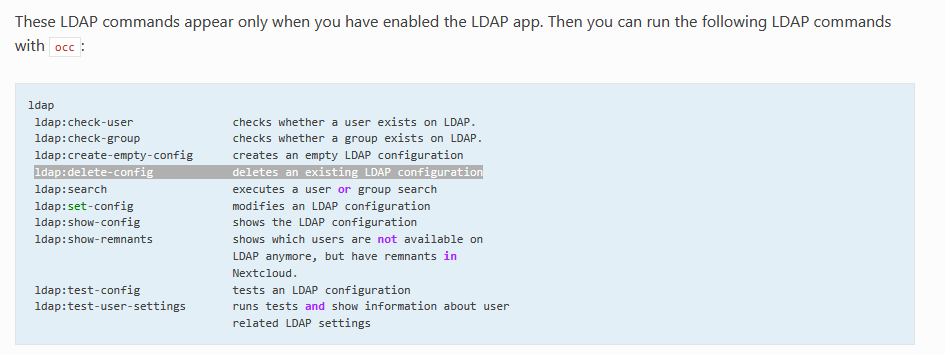
have you tried to remove that unused config via OCC console?
OCC is more verbose and could hint reasons for failed deletion… or even delete that config:
occ ldap:delete-config s01
one reason could be remnants left in Nextcloud… if you remove those remnants, then you should be able remove the unused config:
As a further observation, simply visiting LDAP/AP integration has lead to the immediate creation of yet a new LDAP configuration, which also has needed to be removed through the command line.
Well, does it create any actual problems? I don’t know the app in detail or how it works under the hood, but to me this looks like a simple warning (or, more accurately, a reminder) that there is an inactive configuration, which might actually be useful to know in some cases.
Then maybe just leave it alone and remove the app if you don’t need it. If the warning goes away after that, everything’s fine, right?
I’d say there would only be a real problem worth filing a bug report if the warning persists after you’ve either removed the app or configured it properly, with no inactive configurations left.
First of all, something I hadn’t in mind was that the LDAP app is a shipped app, so you can’t actually remove it; you can only disable it.
So far, so good. I enabled it on a test instance with Nextcloud 35.0.2, and simply enabling it for the first time didn’t produce any warning for me. However, as soon as you go to “Administration Settings → LDAP/AD Integration”, an initial configuration is created, and you then get the warning in the security and setup warnings.
And yes, at this point, it’s a bit of a chicken and egg situation. Apparently, you can’t delete this initial empty configuration through the UI. Even when you click “Delete configuration”, the warning doesn’t go away.
However, during my tests, the warning disappeard again when I disabled the app. So, from that perspective, I don’t really see an actual problem here. I mean, why would you want to keep the app enabled if you’re not using it?
The only argument that remains, then, is that you might want to remove this empty default configuration. And yes, that would bring us back to the chicken-and-egg problem mentioned above. But if it’s only about the warning, as I said, it did go away again for me after disabling the app.
I feel I know too little about the details of the application design and behavior, in regard to the topic, for me to make a report that is credible and thorough.
Suppose I have two working configurations, and then at some point I decide to delete one. Now suppose also that I eventually decide to delete the one remaining. Why should the consequences of the prior action be desirable and benign, while the consequences of the latter action, though of identical character, be harmful?
I disagree with an expectation that an application be removed or disabled during any times it is not in use. Such a principle is not generally followed, and would do little other than encourage poor design choices and degrade the user experience. It also is complicated by the question of whether some particular configuration state exactly is to be considered one of the application being used versus of being unused, since applications include many facets to their overall configuration and produce multiple kinds of effect for overall behavior.
Should users be expected to disable external storage support unless at least one external store is configured?
We can agree that the harm being caused by current design is minimal, but it is still harmful in the sense of creating unnecessary confusion and inconvenience.
Yes! It is generally considered best practice on servers to only have software and plugins installed or enabled that are actually needed.
And obviously, if users are supposed to be able to connect to external storage, then I would consider the External Storage app “needed.” And yes, in that case, it probably wouldn’t make sense to disable and re-enable it every time a user wants to connect something.
However, LDAP isn’t normally something you use on and off like you might want to do with external storage. You don’t decide on Monday to use LDAP for user management, migrate everything back on Wednesday, and then switch to LDAP again on Friday. And even if you did, it’s only a warning. It’s not like it actually causes any problems, right?
But if it really bothers you that much, feel free to open an enhancement request on GitHub. As @scubamuc already said, you don’t have to be a developer or an IT expert to do that. Simply describe what’s bothering you and politely ask whether they might consider coming up with a better way to handle it.
Such recommendations are not in conflict with the expectation, which is also quite sensible and well established, that an add-on application not disrupt overall server function, simply by not being in active use at some particular time.
Ah, come on. We’re talking about a warning pointing out an inactive configuration with absolutely no impact on the actual server operation. Calling that a “disruption of overall server functionality” might be just a tiny little bit exaggerated, don’t you think?
But yeah, whatever. I don’t find the quasi chicken-and-egg situation that was created particularly elegant either. But now that you know how it comes about and how to work around it, it shouldn’t really be an actual issue anymore, right?
And again, if it still bothers you, ask the devs why it’s designed this way and whether there might be a better or more elegant way to handle it. Debating about it here isn’t going to accomplish much.