The Basics
- Nextcloud Server version: 31.0.7
- Operating system and version: CentOS 7
- Web server and version: Apache 2.4
- Reverse proxy and version: Apache (same server)
- PHP version: 8.2.17
- Database: MariaDB 10.11.9
- Is this the first time you’ve seen this error?: Yes
- When did this problem seem to first start?: After upgrading from 30.0.13 to 31.0.7
- Installation method: Bare Metal (manual archive installation)
- Are you using Cloudflare, mod_security, or similar?: No
Summary of the issue you are facing:
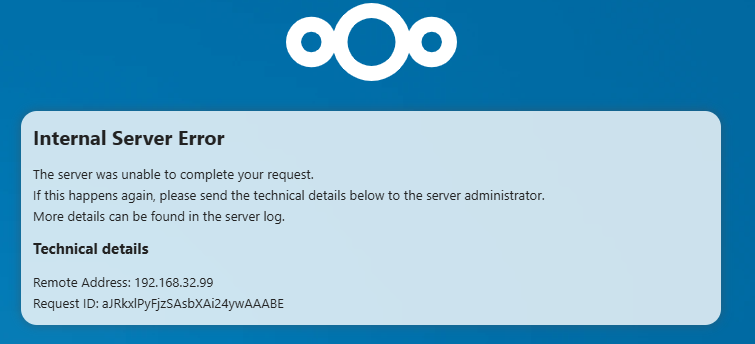
After upgrading from 30.0.13 to 31.0.7, downloading files through direct links copied from a public shared folder results in an Internal Server Error.
Steps that used to work before:
- Create a public share link to a folder.
- Upload files to that folder.
- Copy the link to a specific file inside the shared folder (from the public interface).
- Paste and open that file link in a browser → file downloads after password prompt.
Now, on version 31.0.7, the direct file link results in a 500 Internal Server Error, unless the user first opens the main public link, logs in (if password-protected), and then downloads the file manually.
Steps to replicate it (hint: details matter!):
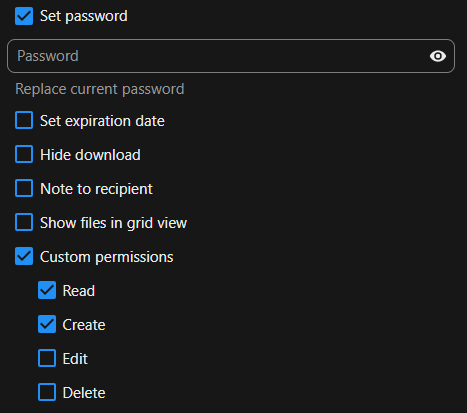
- Share a folder via public link (with or without password).
- Upload a file inside the shared folder.
- Copy the link to the file from the public interface.
- Open that file link directly in an incognito browser window or another device.
- Observe: you receive a 500 Internal Server Error.
Link format change
In version 30, links looked like this:
https://nextcloud-test.com/index.php/s/3JY2MAXw7gncawQ/download?path=%2F&files=NC_31.0.7.txt&downloadStartSecret=96453ds1vs8
Now, in version 31.0.7, the link format is:
https://nextcloud-test.com/public.php/dav/files/3JY2MAXw7gncawQ/NC_31.0.7.txt
Web Browser
Console / Network tab:
|Error|no app in context|Capabilities of OCA\Officeonline\Capabilities took 1.44 seconds to generate.|7 авг. 2025 г., 09:53:19|
|Error|no app in context|Capabilities of OCA\Officeonline\Capabilities took 1.31 seconds to generate.|7 авг. 2025 г., 08:52:24|
|Error|no app in context|Capabilities of OCA\Officeonline\Capabilities took 1.42 seconds to generate.|7 авг. 2025 г., 07:51:07|
|Error|no app in context|Capabilities of OCA\Officeonline\Capabilities took 1.32 seconds to generate.|7 авг. 2025 г., 06:50:24|
Web server / Reverse Proxy
Apache access log (/var/log/httpd/access_log):
192.168.32.99 - - [07/Aug/2025:10:14:25 +0300] "GET /index.php/apps/serverinfo/update HTTP/1.1" 200 252
192.168.32.99 - - [07/Aug/2025:10:14:28 +0300] "GET /index.php/apps/serverinfo/update HTTP/1.1" 200 253
192.168.32.99 - - [07/Aug/2025:10:14:29 +0300] "GET /public.php/dav/files/3JY2MAXw7gncawQ/NC_31.0.7.txt HTTP/1.1" 401 191350
192.168.32.99 - - [07/Aug/2025:10:14:29 +0300] "GET /ocs/v2.php/apps/serverinfo/api/v1//basicdata?format=json HTTP/1.1" 200 168
Apache error log (/var/log/httpd/error_log):
[Thu Aug 07 10:09:11.957598 2025] [access_compat:error] [pid 13121] [client 192.168.100.17:38490] AH01797: client denied by server configuration: /opt/nextcloud/data/.ncdata
[Thu Aug 07 10:09:12.025299 2025] [access_compat:error] [pid 13121] [client 192.168.100.17:38490] AH01797: client denied by server configuration: /opt/nextcloud/data/.ncdata
[Thu Aug 07 10:09:12.088021 2025] [access_compat:error] [pid 13121] [client 192.168.100.17:38490] AH01797: client denied by server configuration: /opt/nextcloud/data/.ncdata
Configuration
Nextcloud config:
sudo -u apache php occ config:list system

{
    "system": {
        "instanceid": "***REMOVED SENSITIVE VALUE***",
        "passwordsalt": "***REMOVED SENSITIVE VALUE***",
        "secret": "***REMOVED SENSITIVE VALUE***",
        "trusted_domains": [
            "nextcloud-test.com"
        ],
        "datadirectory": "***REMOVED SENSITIVE VALUE***",
        "overwrite.cli.url": "https://nextcloud-test.com",
        "dbtype": "mysql",
        "version": "31.0.7.1",
        "dbname": "***REMOVED SENSITIVE VALUE***",
        "dbhost": "***REMOVED SENSITIVE VALUE***",
        "dbport": "",
        "dbtableprefix": "oc_",
        "dbuser": "***REMOVED SENSITIVE VALUE***",
        "dbpassword": "***REMOVED SENSITIVE VALUE***",
        "installed": true,
        "ldapIgnoreNamingRules": false,
        "ldapProviderFactory": "\\OCA\\User_LDAP\\LDAPProviderFactory",
        "mail_smtpmode": "smtp",
        "mail_smtpauthtype": "PLAIN",
        "mail_from_address": "***REMOVED SENSITIVE VALUE***",
        "mail_domain": "***REMOVED SENSITIVE VALUE***",
        "mail_smtphost": "***REMOVED SENSITIVE VALUE***",
        "mail_smtpport": "587",
        "mail_smtpauth": 1,
        "mail_smtpname": "***REMOVED SENSITIVE VALUE***",
        "mail_smtppassword": "***REMOVED SENSITIVE VALUE***",
        "memcache.local": "\\OC\\Memcache\\APCu",
        "maintenance": false,
        "theme": "",
        "loglevel": 3,
        "allow_local_remote_servers": true,
        "session_lifetime": 3600,
        "remember_login_cookie_lifetime": 36000,
        "auto_logout": true,
        "tempdirectory": "\/opt\/nextcloud\/data\/tmp",
        "updater.release.channel": "stable",
        "mysql.utf8mb4": true,
        "app_install_overwrite": [
            "files_retention"
        ],
        "mail_sendmailmode": "smtp",
        "mail_smtpsecure": "tls",
        "default_phone_region": "RU",
        "filelocking.enabled": true,
        "memcache.locking": "\\OC\\Memcache\\Redis",
        "redis": {
            "host": "***REMOVED SENSITIVE VALUE***",
            "port": 0,
            "timeout": 0,
            "password": "***REMOVED SENSITIVE VALUE***"
        }
    }
}
Apps
Installed apps:
sudo -u apache php occ app:list

Enabled:
  - app_api: 5.0.2
  - bruteforcesettings: 4.0.0
  - cloud_federation_api: 1.14.0
  - comments: 1.21.0
  - contactsinteraction: 1.12.0
  - dav: 1.33.0
  - federatedfilesharing: 1.21.0
  - federation: 1.21.0
  - files: 2.3.1
  - files_downloadlimit: 4.0.0
  - files_external: 1.23.0
  - files_pdfviewer: 4.0.0
  - files_reminders: 1.4.0
  - files_retention: 2.0.1
  - files_sharing: 1.23.1
  - firstrunwizard: 4.0.0
  - logreader: 4.0.0
  - lookup_server_connector: 1.19.0
  - nextcloud_announcements: 3.0.0
  - oauth2: 1.19.1
  - officeonline: 3.1.0
  - profile: 1.0.0
  - provisioning_api: 1.21.0
  - recommendations: 4.0.0
  - related_resources: 2.0.0
  - serverinfo: 3.0.0
  - settings: 1.14.0
  - support: 3.0.0
  - systemtags: 1.21.1
  - text: 5.0.0
  - theming: 2.6.1
  - twofactor_backupcodes: 1.20.0
  - updatenotification: 1.21.0
  - user_ldap: 1.22.0
  - user_oidc: 7.3.0
  - viewer: 4.0.0
  - webhook_listeners: 1.2.0
  - workflowengine: 2.13.0
Disabled:
  - activity: 4.0.0 (installed 2.12.1)
  - admin_audit: 1.21.0
  - circles: 31.0.0 (installed 0.17.3)
  - dashboard: 7.11.0 (installed 7.0.0)
  - encryption: 2.19.0
  - files_trashbin: 1.21.0 (installed 1.17.0)
  - files_versions: 1.24.0 (installed 1.5.0)
  - notifications: 4.0.0 (installed 2.8.0)
  - password_policy: 3.0.0 (installed 1.2.2)
  - photos: 4.0.0 (installed 1.1.0)
  - privacy: 3.0.0 (installed 1.4.0)
  - sharebymail: 1.21.0 (installed 1.2.0)
  - survey_client: 3.0.0 (installed 1.0.0)
  - suspicious_login: 9.0.1
  - twofactor_nextcloud_notification: 5.0.0
  - twofactor_totp: 13.0.0-dev.0
  - user_saml: 6.6.0 (installed 6.6.0)
  - user_status: 1.11.0 (installed 1.0.1)
  - weather_status: 1.11.0 (installed 1.0.0)