Issue after update/weekend (11.08.)

Support intro

Sorry to hear you’re facing problems. :slightly_frowning_face:

The community help forum (help.nextcloud.com) is for home and non-enterprise users. Support is provided by other community members on a best effort / “as available” basis. All of those responding are volunteering their time to help you.

If you’re using Nextcloud in a business/critical setting, paid and SLA-based support services can be accessed via portal.nextcloud.com where Nextcloud engineers can help ensure your business keeps running smoothly.

Getting help

In order to help you as efficiently (and quickly!) as possible, please fill in as much of the below requested information as you can.

Before clicking submit: Please check if your query is already addressed via the following resources:

(Utilizing these existing resources is typically faster. It also helps reduce the load on our generous volunteers while elevating the signal to noise ratio of the forums otherwise arising from the same queries being posted repeatedly).

Some or all of the below information will be requested if it isn’t supplied; for fastest response please provide as much as you can. :heart:

The Basics

  • Nextcloud Server version (e.g., 29.x.x):
    • AIO latest
  • Operating system and version (e.g., Ubuntu 24.04):
    • Debian 12/13 (LXC Container, VM and Raspberry Pi 5)
  • Web server and version (e.g, Apache 2.4.25):
    • no Idea, latest
  • Reverse proxy and version _(e.g. nginx 1.27.2)
    • Nginx 2.13.4
  • PHP version (e.g, 8.3):
    • no Idea
  • Is this the first time you’ve seen this error? (Yes / No):
    • Yes
  • When did this problem seem to first start?
    • 8th or 9th November
  • Installation method (e.g. AlO, NCP, Bare Metal/Archive, etc.)
    • AIO
  • Are you using CloudfIare, mod_security, or similar? (Yes / No)
    • Yes

Summary of the issue you are facing:

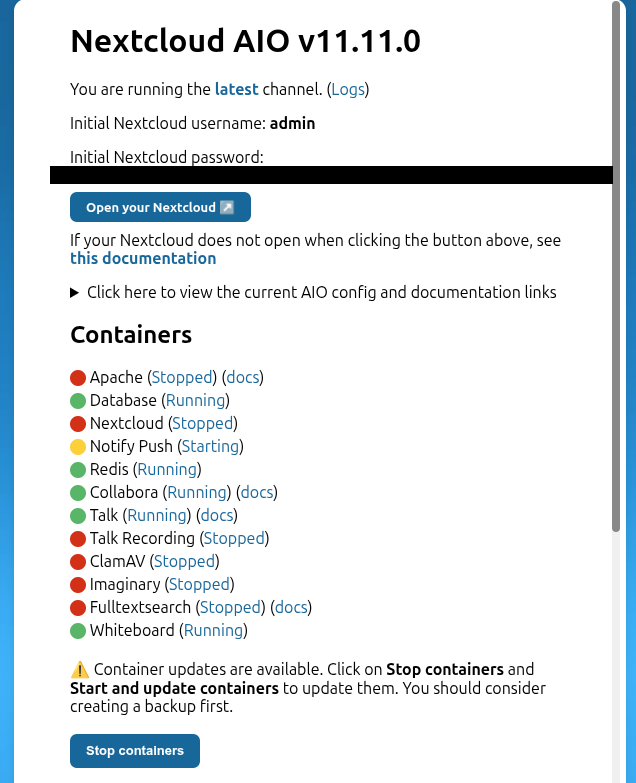
I installed Nextcloud AIO in a Debian LXC container running Proxmox using Docker Compose and am using a mount to my TrueNAS server for storage. This worked perfectly until last weekend, when suddenly the server wouldn’t even start Docker. A restart didn’t fix the problem. So, I simply updated Debian from version 12 to 13, since I wanted to upgrade to the newer version anyway. After restarting Docker, most of the containers from the Compose script worked again (Immich, Nginx, etc.), but Crafty and Nextcloud AIO were causing Compose to crash. So, I commented them out for now. I’ve now moved Crafty into another LXC container. However, Nextcloud is a different story. I want to use the AIO version because of its direct reverse proxy implementation and Notes functionality. But it’s not working there. Since I didn’t want to permanently affect my other containers, I looked into setting up another LXC container with Debian and Docker. I ran into problems there, as it wouldn’t even start. Then I tested it on a Raspberry Pi 5. I completely reinstalled Debian, installed Docker, and encountered problems and errors with Portainer, but ignored them. Starting Nextcloud AIO seemed to work until I got a “Slim Application Error.” The same thing happened with a Debian VM in Proxmox. Ideally, I’d like to just reinstall it in the first LXC container where all my other Docker containers are running and the Nextcloud configuration should still be there. But I’m just frustrated right now and don’t have the energy to figure this out on my own, so I’m asking for help. I’m somewhat tech-savvy, but due to personal commitments, I don’t have all day to dedicate to it.

Therefore, my main question is this: Which method do you recommend? Should I reinstall Nextcloud AIO on the LXC container with the other containers, use a separate LXC container, or use a VM with Docker or Nextcloud itself? Unfortunately, I don’t know what makes the most sense in my situation, and before I test something that might not be suitable for my server environment, I’d like to ask what the best approach is.

Steps to replicate it (hint: details matter!):

I will provide this later, depending on which method I am to use.

Log entries

I will provide this later, depending on which method I am to use.

Tips for increasing the likelihood of a response

  • I’m using a Proxmox server with 6 cores and 12 threads. It has 64 GB of RAM and already has 6 LXC containers and 1 VM running (including the Docker container).

Log entries are most important to identify the reason, specially after an OS upgrade.

Please insert paragraphs in your issue-decription to make it more readable.

looks like you’ve been bitten by this here CVE-2025-52881: fd reopening causes issues with AppArmor profiles (`open sysctl net.ipv4.ip_unprivileged_port_start file: reopen fd 8: permission denied`) · Issue #4968 · opencontainers/runc · GitHub … we’re all suffering

See: AIO NC does no longer start: Slim Application Error - #15 by szaimen

TL;DR, either downgrade Docker to the previous version or upgrade AIO to 12.0.0 using the ‘beta’ tag.

Side note: (although that’s likely not an issue in this specific case) Sometimes, there are also incompatibilities between Docker and LXC, since both rely on some of the same kernel features such as namespaces and cgroups This overlap is one of the main reasons why running Docker inside LXC containers is generally not recommended. :wink:

I think I’ve just encountered another error that I was trying to fix in the LXC container in Docker.

First, I wanted to update the system:

apt-get update
apt-get upgrade -y

When Portainer started causing errors, I looked online to find out why and made the necessary changes:

systemctl edit docker.service

```
[Service]
Environment=DOCKER_MIN_API_VERSION=1.24
```

systemctl daemon-reexec
systemctl daemon-reload
systemctl restart docker

docker restart portainer

Once Portainer was working again, I adjusted my Docker Compose to add the Nextcloud AIO container back to it:

  nextcloud-aio-mastercontainer:
    image: nextcloud/all-in-one:latest
    container_name: nextcloud-aio-mastercontainer
    init: true
    restart: always
    volumes:
      - nextcloud_aio_mastercontainer:/mnt/docker-aio-config
      - /var/run/docker.sock:/var/run/docker.sock:ro
      # Sessions lokal speichern (nicht auf NFS!)
      - /opt/nextcloud-aio-sessions:/mnt/docker-aio-config/session
    network_mode: bridge
    ports:
      - 8080:8080
    environment:
      APACHE_PORT: 11000
      APACHE_IP_BINDING: 0.0.0.0
      APACHE_ADDITIONAL_NETWORK: frontend_net
      NEXTCLOUD_DATADIR: /mnt/nextcloud/data

volumes:
  model-cache:
  nextcloud_aio_mastercontainer:
    name: nextcloud_aio_mastercontainer

Now I’m getting this error:

sudo: /etc/sudo.conf is owned by uid 100000, should be 0
sudo: /usr/bin/sudo must be owned by uid 0 and have the setuid bit set
Trying to fix docker.sock permissions internally...
Creating docker group internally with id 996

Further information I have that might help is that the LXC container is a privileged container (Unprivileged container: No).

Unfortunately, I can’t really help with that, but it looks like the system’s file ownership is somehow broken due to a UID/GID mapping issue. To me, this looks suspiciously like the kind of issue that may arise when running one container environment in another.

However, since it was working before the system upgrade, which normally also updates the Docker packages, I would try downgrading the Docker version. See: AIO NC does no longer start: Slim Application Error - #14 by bb77

If that doesn’t help, unfortunately I’m out of ideas, but perhaps someone else running AIO in a similar setup can suggest something.

Okay, since it was recommended to me: I now have a Debian 12 VM with Docker. I ran Compose there and it worked. I was even able to select the containers to be used in the web UI. However, they apparently didn’t start correctly. Here are the logs:

collabora:

wsd-00007-00010 2025-11-14 00:58:17.871244 +0100 [ coolwsd ] ERR  enterMountingNS, root mount failed: Permission denied| common/JailUtil.cpp:79
wsd-00007-00010 2025-11-14 00:58:17.871328 +0100 [ coolwsd ] ERR  creating usernamespace for mount user failed.| wsd/COOLWSD.cpp:1254
wsd-00007-00007 2025-11-14 00:58:18.859383 +0100 [ coolwsd ] WRN  File not found: Private key file: /etc/coolwsd/proof_key
No proof-key will be present in discovery.
If you need to use WOPI security, generate an RSA key using this command:
    sudo coolconfig generate-proof-key
or if your config dir is not /etc, you can run ssh-keygen manually:
    ssh-keygen -t rsa -N "" -m PEM -f "/etc/coolwsd/proof_key"
Note: the proof_key file must be readable by the coolwsd process.| wsd/ProofKey.cpp:149
coolforkit version details: 25.04.6.2 - eaa2d03190
Init vcl
preload: merged xmlsecurity ucpchelp1 wpftwriter wpftcalc wpftimpress wpftdraw msforms cached1 vbaswobj swd sw ucppkg1 sm msword slideshow pdfimport sdui sd scriptframe protocolhandler dlgprov solver pricing date vbaobj scd sc ucpdav1 pcr pdffilter ldapbe2 log migrationoo2 sdd deploymentgui smd cui dbase animcore t602filter flash flat PresentationMinimizer invocation stocservices acc sw_writerfilter io reflection scn dba calc sdbt bootstrap dbaxml dbpool2 scfilt introspection mysql_jdbc uuresolver cairocanvas writer binaryurp LanguageTool bib storagefd namingservice svgfilter graphicfilter ucpcmis1 analysis migrationoo3 invocadapt mozbootstrap hwp textconversiondlgs proxyfac
Disabled: cmdmail rptxml rptui rpt dbp dbu abp odbc sdbc2 
Preload textencodings
Allowlisted languages: de_DE en_GB en_US es_ES fr_FR it nl pt_BR pt_PT ru 
Preloading local dictionaries: de-DE en-US fr-FR it-IT nl-NL pt-BR ru-RU en-GB it-CH nl-BE pt-PT es-ES 
Preloading local thesauri: de-DE en-US fr-FR it-IT pt-BR ru-RU en-GB it-CH pt-PT es-ES 
Preloading local hyphenators: de-DE en-US fr-FR it-IT nl-NL pt-BR ru-RU en-GB it-CH nl-BE pt-PT es-ES 
Preloading breakiterator
Preload icons
Preload short cut accelerators
Preload languages
Preload fonts
Preload config
frk-00015-00015 2025-11-14 00:58:24.933114 +0100 [ coolforkit-caps ] WRN  The systemplate directory [/opt/cool/systemplate] is read-only, and at least [/opt/cool/systemplate//etc/passwd] is out-of-date. Will have to clone dynamic elements of systemplate to the jails. To restore optimal performance, make sure the files in [/opt/cool/systemplate/etc] are up-to-date.| common/JailUtil.cpp:586
frk-00015-00015 2025-11-14 00:58:24.933179 +0100 [ coolforkit-caps ] WRN  Failed to update the dynamic files in [/opt/cool/systemplate]. Will clone dynamic elements of systemplate to the jails.| common/JailUtil.cpp:529
frk-00015-00015 2025-11-14 00:58:24.933836 +0100 [ forkit ] WRN  The systemplate directory [/opt/cool/systemplate] is read-only, and at least [/opt/cool/systemplate//etc/passwd] is out-of-date. Will have to clone dynamic elements of systemplate to the jails. To restore optimal performance, make sure the files in [/opt/cool/systemplate/etc] are up-to-date.| common/JailUtil.cpp:586
office version details: { "ProductName": "Collabora Office", "ProductVersion": "25.04", "ProductExtension": ".6.2", "BuildId": "a0121119948a9a89f4c699cd4550f9ddb2ec577a", "BuildConfig": "'--enable-hardening-flags' '--enable-mpl-subset' '--with-vendor=Collabora' '--disable-community-flavor' '--with-branding=icon-themes/galaxy/brand_cp' '--with-system-dicts' '--with-myspell-dicts' '--with-system-zlib' '--disable-poppler' '--enable-cairo-rgba' '--without-system-cairo' '--without-system-fontconfig' '--without-system-freetype' '--without-system-graphite' '--without-system-harfbuzz' '--without-system-openssl' '--without-system-libpng' '--without-system-libxml' '--without-system-jpeg' '--without-system-expat' '--without-system-curl' '--without-system-icu' '--without-system-nss' '--without-system-jars' '--without-system-postgresql' '--without-java' '--without-junit' '--without-help' '--with-linker-hash-style=both' '--with-fonts' '--with-docrepair-fonts' '--enable-noto-font' '--with-galleries=no' '--with-theme=colibre colibre_svg' '--with-external-thes-dir=/usr/share/mythes' '--with-external-hyph-dir=/usr/share/hyphen' '--with-external-dict-dir=/usr/share/hunspell' '--disable-dbus' '--enable-extension-integration' '--disable-odk' '--disable-kf5' '--disable-gtk3' '--disable-qt5' '--disable-gstreamer-1-0' '--disable-evolution2' '--disable-gio' '--disable-gui' '--disable-scripting-beanshell' '--disable-scripting-javascript' '--disable-ext-wiki-publisher' '--disable-report-builder' '--disable-ext-nlpsolver' '--disable-sdremote' '--disable-sdremote-bluetooth' '--disable-postgresql-sdbc' '--disable-firebird-sdbc' '--disable-randr' '--enable-epm' '--enable-python=internal' '--disable-online-update' '--disable-dconf' '--enable-mergelibs' '--with-package-format=deb rpm' '--enable-release-build' '--with-lang=ar bg ca cs da de el en-US en-GB eo es eu fi fr gl he hr hu id is it ja ko lo nb nl oc pl pt pt-BR sq ru sk sl sv tr uk vi zh-CN zh-TW' '--disable-lotuswordpro' '--disable-lpsolve' '--enable-symbols' '--enable-sal-log' '--without-templates' '--with-buildconfig-recorded' '--srcdir=/opt/collaboraoffice/debugsource' '--enable-option-checking=fatal' 'PKG_CONFIG_PATH=/opt/rh/devtoolset-12/root/usr/lib64/pkgconfig'" }
Ready to accept connections on port 9980.
frk-00015-00015 2025-11-14 00:58:27.028434 +0100 [ forkit ] WRN  The systemplate directory [/opt/cool/systemplate] is read-only, and at least [/opt/cool/systemplate//etc/passwd] is out-of-date. Will have to clone dynamic elements of systemplate to the jails. To restore optimal performance, make sure the files in [/opt/cool/systemplate/etc] are up-to-date.| common/JailUtil.cpp:586
frk-00015-00015 2025-11-14 00:58:27.031310 +0100 [ forkit ] WRN  The systemplate directory [/opt/cool/systemplate] is read-only, and at least [/opt/cool/systemplate//etc/passwd] is out-of-date. Will have to clone dynamic elements of systemplate to the jails. To restore optimal performance, make sure the files in [/opt/cool/systemplate/etc] are up-to-date.| common/JailUtil.cpp:586
frk-00015-00015 2025-11-14 00:58:27.034634 +0100 [ forkit ] WRN  The systemplate directory [/opt/cool/systemplate] is read-only, and at least [/opt/cool/systemplate//etc/passwd] is out-of-date. Will have to clone dynamic elements of systemplate to the jails. To restore optimal performance, make sure the files in [/opt/cool/systemplate/etc] are up-to-date.| common/JailUtil.cpp:586
wsd-00007-00028 2025-11-14 00:58:27.342231 +0100 [ remotefontconfig_poll ] ERR  Remote config server has response status code: 502 (Bad Gateway)| wsd/RemoteConfig.cpp:133
wsd-00007-00028 2025-11-14 00:59:28.001530 +0100 [ remotefontconfig_poll ] ERR  Remote config server has response status code: 502 (Bad Gateway)| wsd/RemoteConfig.cpp:133

database:

2025-11-14 01:05:52.127 CET [13] LOG:  all server processes terminated; reinitializing
2025-11-14 01:05:52.136 CET [703] LOG:  database system shutdown was interrupted; last known up at 2025-11-14 01:05:52 CET
2025-11-14 01:05:52.212 CET [703] LOG:  database system was not properly shut down; automatic recovery in progress
2025-11-14 01:05:52.215 CET [703] LOG:  redo starts at 0/1916428
2025-11-14 01:05:52.215 CET [703] LOG:  invalid record length at 0/1916460: expected at least 24, got 0
2025-11-14 01:05:52.215 CET [703] LOG:  redo done at 0/1916428 system usage: CPU: user: 0.00 s, system: 0.00 s, elapsed: 0.00 s
2025-11-14 01:05:52.220 CET [704] LOG:  checkpoint starting: end-of-recovery immediate wait
2025-11-14 01:05:52.220 CET [704] PANIC:  could not write to file "pg_logical/replorigin_checkpoint.tmp": No space left on device
2025-11-14 01:05:52.221 CET [13] LOG:  checkpointer process (PID 704) was terminated by signal 6: Aborted
2025-11-14 01:05:52.221 CET [13] LOG:  terminating any other active server processes

domaincheck:

2025-11-13 23:55:15: (../src/server.c.1971) server started (lighttpd/1.4.82)

mastercontainer:

Trying to fix docker.sock permissions internally...
Creating docker group internally with id 994
Initial startup of Nextcloud All-in-One complete!
You should be able to open the Nextcloud AIO Interface now on port 8080 of this server!
E.g. https://internal.ip.of.this.server:8080
⚠️ Important: do always use an ip-address if you access this port and not a domain as HSTS might block access to it later!
If your server has port 80 and 8443 open and you point a domain to your server, you can get a valid certificate automatically by opening the Nextcloud AIO Interface via:
https://your-domain-that-points-to-this-server.tld:8443
/usr/lib/python3.12/site-packages/supervisor/options.py:13: UserWarning: pkg_resources is deprecated as an API. See https://setuptools.pypa.io/en/latest/pkg_resources.html. The pkg_resources package is slated for removal as early as 2025-11-30. Refrain from using this package or pin to Setuptools<81.
  import pkg_resources
[Thu Nov 13 23:53:14.007316 2025] [mpm_event:notice] [pid 149:tid 149] AH00489: Apache/2.4.65 (Unix) OpenSSL/3.5.4 configured -- resuming normal operations
[Thu Nov 13 23:53:14.007624 2025] [core:notice] [pid 149:tid 149] AH00094: Command line: 'httpd -D FOREGROUND'
[13-Nov-2025 23:53:14] NOTICE: fpm is running, pid 155
[13-Nov-2025 23:53:14] NOTICE: ready to handle connections
INF INF INF INF INF INF INF INF ts=1763077994.0297346 INF INF INF INF INF INF INF INF ts=1763077994.0297346 msg=maxprocs: Leaving GOMAXPROCS=4: CPU quota undefined
INF INF INF INF INF INF INF INF ts=1763077994.029876 INF INF INF INF INF INF INF INF ts=1763077994.029876 msg=GOMEMLIMIT is updated INF INF INF INF INF INF INF INF ts=1763077994.029876 INF INF INF INF INF INF INF INF ts=1763077994.029876 msg=GOMEMLIMIT is updated package=github.com/KimMachineGun/automemlimit/memlimit INF INF INF INF INF INF INF INF ts=1763077994.029876 INF INF INF INF INF INF INF INF ts=1763077994.029876 msg=GOMEMLIMIT is updated INF INF INF INF INF INF INF INF ts=1763077994.029876 INF INF INF INF INF INF INF INF ts=1763077994.029876 msg=GOMEMLIMIT is updated package=github.com/KimMachineGun/automemlimit/memlimit GOMEMLIMIT=7488641433 INF INF INF INF INF INF INF INF ts=1763077994.029876 INF INF INF INF INF INF INF INF ts=1763077994.029876 msg=GOMEMLIMIT is updated INF INF INF INF INF INF INF INF ts=1763077994.029876 INF INF INF INF INF INF INF INF ts=1763077994.029876 msg=GOMEMLIMIT is updated package=github.com/KimMachineGun/automemlimit/memlimit INF INF INF INF INF INF INF INF ts=1763077994.029876 INF INF INF INF INF INF INF INF ts=1763077994.029876 msg=GOMEMLIMIT is updated INF INF INF INF INF INF INF INF ts=1763077994.029876 INF INF INF INF INF INF INF INF ts=1763077994.029876 msg=GOMEMLIMIT is updated package=github.com/KimMachineGun/automemlimit/memlimit GOMEMLIMIT=7488641433 previous=9223372036854776000
INF INF INF INF INF INF INF INF ts=1763077994.029909 INF INF INF INF INF INF INF INF ts=1763077994.029909 msg=using config from file INF INF INF INF INF INF INF INF ts=1763077994.029909 INF INF INF INF INF INF INF INF ts=1763077994.029909 msg=using config from file file=/Caddyfile
INF INF INF INF INF INF INF INF ts=1763077994.03113 INF INF INF INF INF INF INF INF ts=1763077994.03113 msg=adapted config to JSON INF INF INF INF INF INF INF INF ts=1763077994.03113 INF INF INF INF INF INF INF INF ts=1763077994.03113 msg=adapted config to JSON adapter=caddyfile
INF INF INF INF INF INF INF INF ts=1763077994.0328195 INF INF INF INF INF INF INF INF ts=1763077994.0328195 msg=serving initial configuration
NOTICE: PHP message: Could not start domaincheck container: Client error: `POST http://127.0.0.1/v1.41/networks/frontend_net/connect` resulted in a `404 Not Found` response:
network frontend_net not found 
NOTICE: PHP message: The response of the connection attempt to "https://-------------:443" was: error code: 502
NOTICE: PHP message: Expected was: f9005c500509b0f42c8dc954244f0fd69ca75ee8e59d0bf0
NOTICE: PHP message: The error message was: 
NOTICE: PHP message: Please follow https://github.com/nextcloud/all-in-one/blob/main/reverse-proxy.md#how-to-debug in order to debug things!
NOTICE: PHP message: Slim Application Error
Type: Exception
Code: 0
Message: Could not create container nextcloud-aio-clamav: {"message":"failed to copy files: write /var/lib/docker/volumes/nextcloud_aio_clamav/_data/main.cvd: no space left on device"}
File: /var/www/docker-aio/php/src/Docker/DockerActionManager.php

9
Trace: #0 /var/www/docker-aio/php/src/Controller/DockerController.php(40): AIO\Docker\DockerActionManager->CreateContainer(Object(AIO\Container\Container))
#1 /var/www/docker-aio/php/src/Controller/DockerController.php(27): AIO\Controller\DockerController->PerformRecursiveContainerStart('nextcloud-aio-c...', true)
#2 /var/www/docker-aio/php/src/Controller/DockerController.php(27): AIO\Controller\DockerController->PerformRecursiveContainerStart('nextcloud-aio-n...', true)
#3 /var/www/docker-aio/php/src/Controller/DockerController.php(221): AIO\Controller\DockerController->PerformRecursiveContainerStart('nextcloud-aio-a...', true)
#4 /var/www/docker-aio/php/src/Controller/DockerController.php(201): AIO\Controller\DockerController->startTopContainer(true)
#5 /var/www/docker-aio/php/vendor/slim/slim/Slim/Handlers/Strategies/RequestResponse.php(39): AIO\Controller\DockerController->StartContainer(Object(GuzzleHttp\Psr7\ServerRequest), Object(GuzzleHttp\Psr7\Response), Array)
#6 /var/www/docker-aio/php/vendor/slim/slim/Slim/Routing/Route.php(362): Slim\Handlers\Strategies\RequestResponse->__invoke(Array, Object(GuzzleHttp\Psr7\ServerRequest), Object(GuzzleHttp\Psr7\Response), Array)
#7 /var/www/docker-aio/php/vendor/slim/slim/Slim/MiddlewareDispatcher.php(73): Slim\Routing\Route->handle(Object(GuzzleHttp\Psr7\ServerRequest))
#8 /var/www/docker-aio/php/vendor/slim/slim/Slim/MiddlewareDispatcher.php(73): Slim\MiddlewareDispatcher->handle(Object(GuzzleHttp\Psr7\ServerRequest))
#9 /var/www/docker-aio/php/vendor/slim/slim/Slim/Routing/Route.php(321): Slim\MiddlewareDispatcher->handle(Object(GuzzleHttp\Psr7\ServerRequest))
#10 /var/www/docker-aio/php/vendor/slim/slim/Slim/Routing/RouteRunner.php(74): Slim\Routing\Route->run(Object(GuzzleHttp\Psr7\ServerRequest))
#11 /var/www/docker-aio/php/vendor/slim/csrf/src/Guard.php(482): Slim\Routing\RouteRunner->handle(Object(GuzzleHttp\Psr7\ServerRequest))
#12 /var/www/docker-aio/php/vendor/slim/slim/Slim/MiddlewareDispatcher.php(178): Slim\Csrf\Guard->process(Object(GuzzleHttp\Psr7\ServerRequest), Object(Slim\Routing\RouteRunner))
#13 /var/www/docker-aio/php/vendor/slim/twig-view/src/TwigMiddleware.php(117): Psr\Http\Server\RequestHandlerInterface@anonymous->handle(Object(GuzzleHttp\Psr7\ServerRequest))
#14 /var/www/docker-aio/php/vendor/slim/slim/Slim/MiddlewareDispatcher.php(129): Slim\Views\TwigMiddleware->process(Object(GuzzleHttp\Psr7\ServerRequest), Object(Psr\Http\Server\RequestHandlerInterface@anonymous))
#15 /var/www/docker-aio/php/src/Middleware/AuthMiddleware.php(36): Psr\Http\Server\RequestHandlerInterface@anonymous->handle(Object(GuzzleHttp\Psr7\ServerRequest))
#16 /var/www/docker-aio/php/vendor/slim/slim/Slim/MiddlewareDispatcher.php(283): AIO\Middleware\AuthMiddleware->__invoke(Object(GuzzleHttp\Psr7\ServerRequest), Object(Psr\Http\Server\RequestHandlerInterface@anonymous))
#17 /var/www/docker-aio/php/vendor/slim/slim/Slim/Middleware/ErrorMiddleware.php(77): Psr\Http\Server\RequestHandlerInterface@anonymous->handle(Object(GuzzleHttp\Psr7\ServerRequest))
#18 /var/www/docker-aio/php/vendor/slim/slim/Slim/MiddlewareDispatcher.php(129): Slim\Middleware\ErrorMiddleware->process(Object(GuzzleHttp\Psr7\ServerRequest), Object(Psr\Http\Server\RequestHandlerInterface@anonymous))
#19 /var/www/docker-aio/php/vendor/slim/slim/Slim/MiddlewareDispatcher.php(73): Psr\Http\Server\RequestHandlerInterface@anonymous->handle(Object(GuzzleHttp\Psr7\ServerRequest))
#20 /var/www/docker-aio/php/vendor/slim/slim/Slim/App.php(209): Slim\MiddlewareDispatcher->handle(Object(GuzzleHttp\Psr7\ServerRequest))
#21 /var/www/docker-aio/php/vendor/slim/slim/Slim/App.php(193): Slim\App->handle(Object(GuzzleHttp\Psr7\ServerRequest))
#22 /var/www/docker-aio/php/public/index.php(198): Slim\App->run()
#23 {main}
Tips: To display error details in HTTP response set "displayErrorDetails" to true in the ErrorHandler constructor.

notify-push:

nc: getaddrinfo for host "nextcloud-aio-nextcloud" port 9001: Name does not resolve
Waiting for Nextcloud to start...
nc: getaddrinfo for host "nextcloud-aio-nextcloud" port 9001: Name does not resolve
Waiting for Nextcloud to start...

redis:

Memory overcommit is disabled but necessary for safe operation
See https://github.com/nextcloud/all-in-one/discussions/1731 how to enable overcommit
Redis has started
8:C 14 Nov 2025 01:00:19.104 # WARNING Memory overcommit must be enabled! Without it, a background save or replication may fail under low memory condition. Being disabled, it can also cause failures without low memory condition, see https://github.com/jemalloc/jemalloc/issues/1328. To fix this issue add 'vm.overcommit_memory = 1' to /etc/sysctl.conf and then reboot or run the command 'sysctl vm.overcommit_memory=1' for this to take effect.
55:C 14 Nov 2025 01:08:55.931 # Write error while saving DB to the disk(fflush): No space left on device
8:M 14 Nov 2025 01:08:56.030 # Background saving error
56:C 14 Nov 2025 01:09:01.045 # Write error while saving DB to the disk(fflush): No space left on device
8:M 14 Nov 2025 01:09:01.145 # Background saving error

talk:

++ hostname -i
++ grep -oP '[0-9]+\.[0-9]+\.[0-9]+\.[0-9]+'
++ head -1
+ IPv4_ADDRESS_TALK_RELAY=172.19.0.4
++ dig nextcloud-aio-talk IN A +short +search
++ grep '^[0-9.]\+$'
++ sort
++ head -n1
+ IPv4_ADDRESS_TALK=172.19.0.4
++ dig nextcloud-aio-talk AAAA +short +search
++ grep '^[0-9a-f:]\+$'
++ sort
++ head -n1
+ IPv6_ADDRESS_TALK=
+ set +x
+ IP_BINDING=::
+ grep -q 1 /sys/module/ipv6/parameters/disable
+ grep -q 1 /proc/sys/net/ipv6/conf/all/disable_ipv6
+ grep -q 1 /proc/sys/net/ipv6/conf/default/disable_ipv6
+ set +x
/usr/lib/python3.12/site-packages/supervisor/options.py:13: UserWarning: pkg_resources is deprecated as an API. See https://setuptools.pypa.io/en/latest/pkg_resources.html. The pkg_resources package is slated for removal as early as 2025-11-30. Refrain from using this package or pin to Setuptools<81.
  import pkg_resources
Janus version: 1303 (1.3.3)
Janus commit: 07c61050038c7d745013fae8bc8e99d7365c31f1
Compiled on:  Fri Oct 24 08:03:33 UTC 2025
Logger plugins folder: /usr/local/lib/janus/loggers
[42] 2025/11/14 00:58:32.878274 [INF] Starting nats-server
[42] 2025/11/14 00:58:32.878464 [INF]   Version:  2.12.1
[42] 2025/11/14 00:58:32.878465 [INF]   Git:      [fab5f99]
[42] 2025/11/14 00:58:32.878465 [INF]   Name:     NCPG6OSZ2UIWHDCSAEOCAZIYMG63AOYHED2OD3W3S3M74FQRUKLQOZNR
[42] 2025/11/14 00:58:32.878465 [INF]   ID:       NCPG6OSZ2UIWHDCSAEOCAZIYMG63AOYHED2OD3W3S3M74FQRUKLQOZNR
[42] 2025/11/14 00:58:32.878465 [INF] Using configuration file: /etc/nats.conf (sha256:bfa037b94ac399931a51e64559d5b8b099a1777b0832b8f5c14fee855e33b59c)
---------------------------------------------------
  Starting Meetecho Janus (WebRTC Server) v1.3.3
[42] 2025/11/14 00:58:32.879139 [INF] Listening for client connections on 127.0.0.1:4222
[42] 2025/11/14 00:58:32.879239 [INF] Server is ready
---------------------------------------------------
Checking command line arguments...
Debug/log level is 3
Debug/log timestamps are disabled
Debug/log colors are disabled
[WARN] Janus is deployed on a private address (172.19.0.4) but you didn't specify any STUN server! Expect trouble if this is supposed to work over the internet and not just in a LAN...
main.go:161: Starting up version 2.0.4~docker/go1.25.0 as pid 44
main.go:168: Using a maximum of 4 CPUs
[WARN] libcurl not available, Streaming plugin will not have RTSP support
[WARN] libogg not available, Streaming plugin will not have file-based Opus streaming
[ERR] [plugins/janus_streaming.c:janus_streaming_init:2784] Can't add 'ondemand' mountpoint 'file-ondemand-sample', unsupported format (we only support raw mu-Law and a-Law files right now)
natsclient.go:108: Connection established to nats://127.0.0.1:4222 (NCPG6OSZ2UIWHDCSAEOCAZIYMG63AOYHED2OD3W3S3M74FQRUKLQOZNR)
grpc_common.go:176: WARNING: No GRPC server certificate and/or key configured, running unencrypted
grpc_common.go:178: WARNING: No GRPC CA configured, expecting unencrypted connections
backend_storage_static.go:82: Backend backend-1 added for https://-------------/
hub.go:243: Using a maximum of 8 concurrent backend connections per host
hub.go:250: Using a timeout of 10s for backend connections
hub.go:283: No trusted proxies configured, only allowing for [127.0.0.0/8, 10.0.0.0/8, 172.16.0.0/12, 192.168.0.0/16]
hub.go:324: Not using GeoIP database
hub.go:402: No candidates allowlist
hub.go:413: No candidates blocklist
mcu_common.go:110: Maximum bandwidth 1048576 bits/sec per publishing stream
mcu_common.go:117: Maximum bandwidth 2097152 bits/sec per screensharing stream
mcu_janus.go:164: Using a timeout of 10s for MCU requests
mcu_janus.go:176: No candidates allowlist
mcu_janus.go:188: No candidates blocklist
main.go:265: Could not initialize janus MCU (dial tcp 127.0.0.1:8188: connect: connection refused) will retry in 1s
[WARN] No Unix Sockets server started, giving up...
[WARN] The 'janus.transport.pfunix' plugin could not be initialized
Exec: /opt/eturnal/erts-15.2.6/bin/erlexec -noinput +Bd -boot /opt/eturnal/releases/1.12.2/start -mode embedded -boot_var SYSTEM_LIB_DIR /opt/eturnal/lib -config /opt/eturnal/releases/1.12.2/sys.config -args_file /opt/eturnal/releases/1.12.2/vm.args -erl_epmd_port 3470 -start_epmd false -- foreground
Root: /opt/eturnal

/opt/eturnal
mcu_common.go:110: Maximum bandwidth 1048576 bits/sec per publishing stream
mcu_common.go:117: Maximum bandwidth 2097152 bits/sec per screensharing stream
mcu_janus.go:164: Using a timeout of 10s for MCU requests
mcu_janus.go:176: No candidates allowlist
mcu_janus.go:188: No candidates blocklist
mcu_janus.go:369: Connected to Janus WebRTC Server 1.3.3 by Meetecho s.r.l.
mcu_janus.go:377: Found JANUS VideoRoom plugin 0.0.10 by Meetecho s.r.l.
mcu_janus.go:382: Data channels are supported
mcu_janus.go:386: Full-Trickle is enabled
mcu_janus.go:393: Created Janus session 7514307209365238
mcu_janus.go:400: Created Janus handle 5108030946550121
main.go:297: Using janus MCU
hub.go:454: Using a timeout of 10s for MCU requests
backend_server.go:112: No IPs configured for the stats endpoint, only allowing access from 127.0.0.1
main.go:378: Listening on 0.0.0.0:8081

whiteboard:

nc: getaddrinfo for host "nextcloud-aio-redis" port 6379: Name does not resolve
Waiting for redis to start...
nc: getaddrinfo for host "nextcloud-aio-redis" port 6379: Name does not resolve
Waiting for redis to start...
Connection to nextcloud-aio-redis (172.19.0.8) 6379 port [tcp/redis] succeeded!
> whiteboard@1.3.0 server:start
> node websocket_server/main.js
[dotenv@17.2.3] injecting env (0) from .env -- tip: ⚙️  write to custom object with { processEnv: myObject }
Creating Redis client with URL: redis://:a5309c180b2f1b243463bf009b4ce5ba139d665057bbbc4a@nextcloud-aio-redis/0
WebSocket compression enabled
Setting up Redis Streams adapter
Redis Streams adapter set up successfully
Server initialized with redis storage strategy
Metrics disabled
Listening on port: 3002 (all interfaces)
Server started successfully on port 3002

Yeah but there’s still that Slim Application Error in the logs…

In this particular case, I think it doesn’t matter whether you’re using Debian 12 or 13, or an LXC or a VM, except that the problem apparently manifests itself differently, or perhaps there were additional problems in the LXC. However, none of this changes the fact that AIO 11.11.0 is not compatible with the latest Docker version.

So either downgarde Docker to the previous version and put the packages on hold as I described here: AIO NC does no longer start: Slim Application Error - #14 by bb77

Alternatively, you could install the AIO 12.0.0 beta. However, I’m not sure whether everything, especially Full Text Search and ClamAV, is already running smoothly in that version.

If you want to be on the safe side, downgrade Docker and then set the Docker packages on hold using apt-mark hold until AIO 12.0.0 is officially released. Once it’s available, upgrade AIO, then apt-mark unhold the packages and update Docker.

Hey,

This seems to be the underlying issue. So no space left on device.

1 Like

Oh, I overlooked that one.

@Johnephen In case you’re rather short on resources, you might want to reconsider whether you really need ClamAV, as it not only requires additional disk space but also additional RAM during operation. And overall, it’s not exactly beneficial for system performance. :wink:

I tried it as described there:

sudo apt install docker-ce=5:23.0.6-1~debian.12~bookworm \
docker-ce-cli=5:23.0.6-1~debian.12~bookworm \
docker-ce-rootless-extras=5:23.0.6-1~debian.12~bookworm

sudo apt-mark hold docker-ce docker-ce-cli docker-ce-rootless-extras

docker compose down
reboot now
docker compose up --detach --remove-orphans

But now even the Nextcloud and Apache containers won’t start anymore:

Logs Mastercontainer:

Trying to fix docker.sock permissions internally...
Creating docker group internally with id 994
Initial startup of Nextcloud All-in-One complete!
You should be able to open the Nextcloud AIO Interface now on port 8080 of this server!
E.g. https://internal.ip.of.this.server:8080
⚠️ Important: do always use an ip-address if you access this port and not a domain as HSTS might block access to it later!
If your server has port 80 and 8443 open and you point a domain to your server, you can get a valid certificate automatically by opening the Nextcloud AIO Interface via:
https://your-domain-that-points-to-this-server.tld:8443
/usr/lib/python3.12/site-packages/supervisor/options.py:13: UserWarning: pkg_resources is deprecated as an API. See https://setuptools.pypa.io/en/latest/pkg_resources.html. The pkg_resources package is slated for removal as early as 2025-11-30. Refrain from using this package or pin to Setuptools<81.
  import pkg_resources
[Fri Nov 14 23:59:46.286475 2025] [mpm_event:notice] [pid 149:tid 149] AH00489: Apache/2.4.65 (Unix) OpenSSL/3.5.4 configured -- resuming normal operations
[Fri Nov 14 23:59:46.286821 2025] [core:notice] [pid 149:tid 149] AH00094: Command line: 'httpd -D FOREGROUND'
[14-Nov-2025 23:59:46] NOTICE: fpm is running, pid 154
[14-Nov-2025 23:59:46] NOTICE: ready to handle connections
INF INF INF INF INF INF INF INF ts=1763164786.310451 INF INF INF INF INF INF INF INF ts=1763164786.310451 msg=maxprocs: Leaving GOMAXPROCS=4: CPU quota undefined
INF INF INF INF INF INF INF INF ts=1763164786.3105903 INF INF INF INF INF INF INF INF ts=1763164786.3105903 msg=GOMEMLIMIT is updated INF INF INF INF INF INF INF INF ts=1763164786.3105903 INF INF INF INF INF INF INF INF ts=1763164786.3105903 msg=GOMEMLIMIT is updated package=github.com/KimMachineGun/automemlimit/memlimit INF INF INF INF INF INF INF INF ts=1763164786.3105903 INF INF INF INF INF INF INF INF ts=1763164786.3105903 msg=GOMEMLIMIT is updated INF INF INF INF INF INF INF INF ts=1763164786.3105903 INF INF INF INF INF INF INF INF ts=1763164786.3105903 msg=GOMEMLIMIT is updated package=github.com/KimMachineGun/automemlimit/memlimit GOMEMLIMIT=15087428812 INF INF INF INF INF INF INF INF ts=1763164786.3105903 INF INF INF INF INF INF INF INF ts=1763164786.3105903 msg=GOMEMLIMIT is updated INF INF INF INF INF INF INF INF ts=1763164786.3105903 INF INF INF INF INF INF INF INF ts=1763164786.3105903 msg=GOMEMLIMIT is updated package=github.com/KimMachineGun/automemlimit/memlimit INF INF INF INF INF INF INF INF ts=1763164786.3105903 INF INF INF INF INF INF INF INF ts=1763164786.3105903 msg=GOMEMLIMIT is updated INF INF INF INF INF INF INF INF ts=1763164786.3105903 INF INF INF INF INF INF INF INF ts=1763164786.3105903 msg=GOMEMLIMIT is updated package=github.com/KimMachineGun/automemlimit/memlimit GOMEMLIMIT=15087428812 previous=9223372036854776000
INF INF INF INF INF INF INF INF ts=1763164786.31062 INF INF INF INF INF INF INF INF ts=1763164786.31062 msg=using config from file INF INF INF INF INF INF INF INF ts=1763164786.31062 INF INF INF INF INF INF INF INF ts=1763164786.31062 msg=using config from file file=/Caddyfile
INF INF INF INF INF INF INF INF ts=1763164786.311451 INF INF INF INF INF INF INF INF ts=1763164786.311451 msg=adapted config to JSON INF INF INF INF INF INF INF INF ts=1763164786.311451 INF INF INF INF INF INF INF INF ts=1763164786.311451 msg=adapted config to JSON adapter=caddyfile
INF INF INF INF INF INF INF INF ts=1763164786.3124743 INF INF INF INF INF INF INF INF ts=1763164786.3124743 msg=serving initial configuration
NOTICE: PHP message: Slim Application Error
Type: Exception
Code: 0
Message: Could not create container nextcloud-aio-nextcloud: {"message":"No such image: ghcr.io/nextcloud-releases/aio-nextcloud:latest"}
File: /var/www/docker-aio/php/src/Docker/DockerActionManager.php

9
Trace: #0 /var/www/docker-aio/php/src/Controller/DockerController.php(40): AIO\Docker\DockerActionManager->CreateContainer(Object(AIO\Container\Container))
#1 /var/www/docker-aio/php/src/Controller/DockerController.php(27): AIO\Controller\DockerController->PerformRecursiveContainerStart('nextcloud-aio-n...', true)
#2 /var/www/docker-aio/php/src/Controller/DockerController.php(221): AIO\Controller\DockerController->PerformRecursiveContainerStart('nextcloud-aio-a...', true)
#3 /var/www/docker-aio/php/src/Controller/DockerController.php(201): AIO\Controller\DockerController->startTopContainer(true)
#4 /var/www/docker-aio/php/vendor/slim/slim/Slim/Handlers/Strategies/RequestResponse.php(39): AIO\Controller\DockerController->StartContainer(Object(GuzzleHttp\Psr7\ServerRequest), Object(GuzzleHttp\Psr7\Response), Array)
#5 /var/www/docker-aio/php/vendor/slim/slim/Slim/Routing/Route.php(362): Slim\Handlers\Strategies\RequestResponse->__invoke(Array, Object(GuzzleHttp\Psr7\ServerRequest), Object(GuzzleHttp\Psr7\Response), Array)
#6 /var/www/docker-aio/php/vendor/slim/slim/Slim/MiddlewareDispatcher.php(73): Slim\Routing\Route->handle(Object(GuzzleHttp\Psr7\ServerRequest))
#7 /var/www/docker-aio/php/vendor/slim/slim/Slim/MiddlewareDispatcher.php(73): Slim\MiddlewareDispatcher->handle(Object(GuzzleHttp\Psr7\ServerRequest))
#8 /var/www/docker-aio/php/vendor/slim/slim/Slim/Routing/Route.php(321): Slim\MiddlewareDispatcher->handle(Object(GuzzleHttp\Psr7\ServerRequest))
#9 /var/www/docker-aio/php/vendor/slim/slim/Slim/Routing/RouteRunner.php(74): Slim\Routing\Route->run(Object(GuzzleHttp\Psr7\ServerRequest))
#10 /var/www/docker-aio/php/vendor/slim/csrf/src/Guard.php(482): Slim\Routing\RouteRunner->handle(Object(GuzzleHttp\Psr7\ServerRequest))
#11 /var/www/docker-aio/php/vendor/slim/slim/Slim/MiddlewareDispatcher.php(178): Slim\Csrf\Guard->process(Object(GuzzleHttp\Psr7\ServerRequest), Object(Slim\Routing\RouteRunner))
#12 /var/www/docker-aio/php/vendor/slim/twig-view/src/TwigMiddleware.php(117): Psr\Http\Server\RequestHandlerInterface@anonymous->handle(Object(GuzzleHttp\Psr7\ServerRequest))
#13 /var/www/docker-aio/php/vendor/slim/slim/Slim/MiddlewareDispatcher.php(129): Slim\Views\TwigMiddleware->process(Object(GuzzleHttp\Psr7\ServerRequest), Object(Psr\Http\Server\RequestHandlerInterface@anonymous))
#14 /var/www/docker-aio/php/src/Middleware/AuthMiddleware.php(36): Psr\Http\Server\RequestHandlerInterface@anonymous->handle(Object(GuzzleHttp\Psr7\ServerRequest))
#15 /var/www/docker-aio/php/vendor/slim/slim/Slim/MiddlewareDispatcher.php(283): AIO\Middleware\AuthMiddleware->__invoke(Object(GuzzleHttp\Psr7\ServerRequest), Object(Psr\Http\Server\RequestHandlerInterface@anonymous))
#16 /var/www/docker-aio/php/vendor/slim/slim/Slim/Middleware/ErrorMiddleware.php(77): Psr\Http\Server\RequestHandlerInterface@anonymous->handle(Object(GuzzleHttp\Psr7\ServerRequest))
#17 /var/www/docker-aio/php/vendor/slim/slim/Slim/MiddlewareDispatcher.php(129): Slim\Middleware\ErrorMiddleware->process(Object(GuzzleHttp\Psr7\ServerRequest), Object(Psr\Http\Server\RequestHandlerInterface@anonymous))
#18 /var/www/docker-aio/php/vendor/slim/slim/Slim/MiddlewareDispatcher.php(73): Psr\Http\Server\RequestHandlerInterface@anonymous->handle(Object(GuzzleHttp\Psr7\ServerRequest))
#19 /var/www/docker-aio/php/vendor/slim/slim/Slim/App.php(209): Slim\MiddlewareDispatcher->handle(Object(GuzzleHttp\Psr7\ServerRequest))
#20 /var/www/docker-aio/php/vendor/slim/slim/Slim/App.php(193): Slim\App->handle(Object(GuzzleHttp\Psr7\ServerRequest))
#21 /var/www/docker-aio/php/public/index.php(198): Slim\App->run()
#22 {main}
Tips: To display error details in HTTP response set "displayErrorDetails" to true in the ErrorHandler constructor.

Version 23.0.6 is very old and it was this version that I used when I wrote the notes that I pasted in the othe thread. It was only meant as an example of how you can generally downgrade packages, hence the warning I posted.

The idea behind the instructions is that you use the apt-cache policy command to list all available package versions in order to find the correct one to install.

apt-cache policy docker-ce
docker-ce:
  Installed: 5:29.0.1-1~debian.12~bookworm
  Candidate: 5:29.0.1-1~debian.12~bookworm
  Version table:
 *** 5:29.0.1-1~debian.12~bookworm 500
        500 https://download.docker.com/linux/debian bookworm/stable amd64 Packages
        100 /var/lib/dpkg/status
     5:29.0.0-1~debian.12~bookworm 500
        500 https://download.docker.com/linux/debian bookworm/stable amd64 Packages
     5:28.5.2-1~debian.12~bookworm 500
        500 https://download.docker.com/linux/debian bookworm/stable amd64 Packages
     5:28.5.1-1~debian.12~bookworm 500
        500 https://download.docker.com/linux/debian bookworm/stable amd64 Packages
     5:28.5.0-1~debian.12~bookworm 500
        500 https://download.docker.com/linux/debian bookworm/stable amd64 Packages

The last version before the API change was 28.5.2, which then would result in:

sudo apt install docker-ce=5:28.5.2-1~debian.12~bookworm \
docker-ce-cli=5:28.5.2-1~debian.12~bookworm \
docker-ce-rootless-extras=5:28.5.2-1~debian.12~bookworm

Ok, I guess I did that wrong. I updated it to the version you recommended.

sudo apt install docker-ce=5:28.5.2-1~debian.12~bookworm \
                 docker-ce-cli=5:28.5.2-1~debian.12~bookworm \
                 docker-ce-rootless-extras=5:28.5.2-1~debian.12~bookworm

root@docker:~# docker --version
Docker version 28.5.2, build ecc6942

But Nextcloud is still unhappy.

Creating docker group internally with id 994
Initial startup of Nextcloud All-in-One complete!
You should be able to open the Nextcloud AIO Interface now on port 8080 of this server!
E.g. https://internal.ip.of.this.server:8080
⚠️ Important: do always use an ip-address if you access this port and not a domain as HSTS might block access to it later!
If your server has port 80 and 8443 open and you point a domain to your server, you can get a valid certificate automatically by opening the Nextcloud AIO Interface via:
https://your-domain-that-points-to-this-server.tld:8443
/usr/lib/python3.12/site-packages/supervisor/options.py:13: UserWarning: pkg_resources is deprecated as an API. See https://setuptools.pypa.io/en/latest/pkg_resources.html. The pkg_resources package is slated for removal as early as 2025-11-30. Refrain from using this package or pin to Setuptools<81.
  import pkg_resources
[Sat Nov 15 16:24:12.761074 2025] [mpm_event:notice] [pid 147:tid 147] AH00489: Apache/2.4.65 (Unix) OpenSSL/3.5.4 configured -- resuming normal operations
[Sat Nov 15 16:24:12.761324 2025] [core:notice] [pid 147:tid 147] AH00094: Command line: 'httpd -D FOREGROUND'
[15-Nov-2025 16:24:12] NOTICE: fpm is running, pid 153
[15-Nov-2025 16:24:12] NOTICE: ready to handle connections
INF INF INF INF INF INF INF INF ts=1763223852.782226 INF INF INF INF INF INF INF INF ts=1763223852.782226 msg=maxprocs: Leaving GOMAXPROCS=4: CPU quota undefined
INF INF INF INF INF INF INF INF ts=1763223852.7823594 INF INF INF INF INF INF INF INF ts=1763223852.7823594 msg=GOMEMLIMIT is updated INF INF INF INF INF INF INF INF ts=1763223852.7823594 INF INF INF INF INF INF INF INF ts=1763223852.7823594 msg=GOMEMLIMIT is updated package=github.com/KimMachineGun/automemlimit/memlimit INF INF INF INF INF INF INF INF ts=1763223852.7823594 INF INF INF INF INF INF INF INF ts=1763223852.7823594 msg=GOMEMLIMIT is updated INF INF INF INF INF INF INF INF ts=1763223852.7823594 INF INF INF INF INF INF INF INF ts=1763223852.7823594 msg=GOMEMLIMIT is updated package=github.com/KimMachineGun/automemlimit/memlimit GOMEMLIMIT=15087428812 INF INF INF INF INF INF INF INF ts=1763223852.7823594 INF INF INF INF INF INF INF INF ts=1763223852.7823594 msg=GOMEMLIMIT is updated INF INF INF INF INF INF INF INF ts=1763223852.7823594 INF INF INF INF INF INF INF INF ts=1763223852.7823594 msg=GOMEMLIMIT is updated package=github.com/KimMachineGun/automemlimit/memlimit INF INF INF INF INF INF INF INF ts=1763223852.7823594 INF INF INF INF INF INF INF INF ts=1763223852.7823594 msg=GOMEMLIMIT is updated INF INF INF INF INF INF INF INF ts=1763223852.7823594 INF INF INF INF INF INF INF INF ts=1763223852.7823594 msg=GOMEMLIMIT is updated package=github.com/KimMachineGun/automemlimit/memlimit GOMEMLIMIT=15087428812 previous=9223372036854776000
INF INF INF INF INF INF INF INF ts=1763223852.7823973 INF INF INF INF INF INF INF INF ts=1763223852.7823973 msg=using config from file INF INF INF INF INF INF INF INF ts=1763223852.7823973 INF INF INF INF INF INF INF INF ts=1763223852.7823973 msg=using config from file file=/Caddyfile
INF INF INF INF INF INF INF INF ts=1763223852.7833033 INF INF INF INF INF INF INF INF ts=1763223852.7833033 msg=adapted config to JSON INF INF INF INF INF INF INF INF ts=1763223852.7833033 INF INF INF INF INF INF INF INF ts=1763223852.7833033 msg=adapted config to JSON adapter=caddyfile
INF INF INF INF INF INF INF INF ts=1763223852.7844005 INF INF INF INF INF INF INF INF ts=1763223852.7844005 msg=serving initial configuration
NOTICE: PHP message: Slim Application Error
Type: Exception
Code: 0
Message: Could not create container nextcloud-aio-nextcloud: {"message":"No such image: ghcr.io/nextcloud-releases/aio-nextcloud:latest"}
File: /var/www/docker-aio/php/src/Docker/DockerActionManager.php

9
Trace: #0 /var/www/docker-aio/php/src/Controller/DockerController.php(40): AIO\Docker\DockerActionManager->CreateContainer(Object(AIO\Container\Container))
#1 /var/www/docker-aio/php/src/Controller/DockerController.php(27): AIO\Controller\DockerController->PerformRecursiveContainerStart('nextcloud-aio-n...', true)
#2 /var/www/docker-aio/php/src/Controller/DockerController.php(221): AIO\Controller\DockerController->PerformRecursiveContainerStart('nextcloud-aio-a...', true)
#3 /var/www/docker-aio/php/src/Controller/DockerController.php(201): AIO\Controller\DockerController->startTopContainer(true)
#4 /var/www/docker-aio/php/vendor/slim/slim/Slim/Handlers/Strategies/RequestResponse.php(39): AIO\Controller\DockerController->StartContainer(Object(GuzzleHttp\Psr7\ServerRequest), Object(GuzzleHttp\Psr7\Response), Array)
#5 /var/www/docker-aio/php/vendor/slim/slim/Slim/Routing/Route.php(362): Slim\Handlers\Strategies\RequestResponse->__invoke(Array, Object(GuzzleHttp\Psr7\ServerRequest), Object(GuzzleHttp\Psr7\Response), Array)
#6 /var/www/docker-aio/php/vendor/slim/slim/Slim/MiddlewareDispatcher.php(73): Slim\Routing\Route->handle(Object(GuzzleHttp\Psr7\ServerRequest))
#7 /var/www/docker-aio/php/vendor/slim/slim/Slim/MiddlewareDispatcher.php(73): Slim\MiddlewareDispatcher->handle(Object(GuzzleHttp\Psr7\ServerRequest))
#8 /var/www/docker-aio/php/vendor/slim/slim/Slim/Routing/Route.php(321): Slim\MiddlewareDispatcher->handle(Object(GuzzleHttp\Psr7\ServerRequest))
#9 /var/www/docker-aio/php/vendor/slim/slim/Slim/Routing/RouteRunner.php(74): Slim\Routing\Route->run(Object(GuzzleHttp\Psr7\ServerRequest))
#10 /var/www/docker-aio/php/vendor/slim/csrf/src/Guard.php(482): Slim\Routing\RouteRunner->handle(Object(GuzzleHttp\Psr7\ServerRequest))
#11 /var/www/docker-aio/php/vendor/slim/slim/Slim/MiddlewareDispatcher.php(178): Slim\Csrf\Guard->process(Object(GuzzleHttp\Psr7\ServerRequest), Object(Slim\Routing\RouteRunner))
#12 /var/www/docker-aio/php/vendor/slim/twig-view/src/TwigMiddleware.php(117): Psr\Http\Server\RequestHandlerInterface@anonymous->handle(Object(GuzzleHttp\Psr7\ServerRequest))
#13 /var/www/docker-aio/php/vendor/slim/slim/Slim/MiddlewareDispatcher.php(129): Slim\Views\TwigMiddleware->process(Object(GuzzleHttp\Psr7\ServerRequest), Object(Psr\Http\Server\RequestHandlerInterface@anonymous))
#14 /var/www/docker-aio/php/src/Middleware/AuthMiddleware.php(36): Psr\Http\Server\RequestHandlerInterface@anonymous->handle(Object(GuzzleHttp\Psr7\ServerRequest))
#15 /var/www/docker-aio/php/vendor/slim/slim/Slim/MiddlewareDispatcher.php(283): AIO\Middleware\AuthMiddleware->__invoke(Object(GuzzleHttp\Psr7\ServerRequest), Object(Psr\Http\Server\RequestHandlerInterface@anonymous))
#16 /var/www/docker-aio/php/vendor/slim/slim/Slim/Middleware/ErrorMiddleware.php(77): Psr\Http\Server\RequestHandlerInterface@anonymous->handle(Object(GuzzleHttp\Psr7\ServerRequest))
#17 /var/www/docker-aio/php/vendor/slim/slim/Slim/MiddlewareDispatcher.php(129): Slim\Middleware\ErrorMiddleware->process(Object(GuzzleHttp\Psr7\ServerRequest), Object(Psr\Http\Server\RequestHandlerInterface@anonymous))
#18 /var/www/docker-aio/php/vendor/slim/slim/Slim/MiddlewareDispatcher.php(73): Psr\Http\Server\RequestHandlerInterface@anonymous->handle(Object(GuzzleHttp\Psr7\ServerRequest))
#19 /var/www/docker-aio/php/vendor/slim/slim/Slim/App.php(209): Slim\MiddlewareDispatcher->handle(Object(GuzzleHttp\Psr7\ServerRequest))
#20 /var/www/docker-aio/php/vendor/slim/slim/Slim/App.php(193): Slim\App->handle(Object(GuzzleHttp\Psr7\ServerRequest))
#21 /var/www/docker-aio/php/public/index.php(198): Slim\App->run()
#22 {main}
Tips: To display error details in HTTP response set "displayErrorDetails" to true in the ErrorHandler constructor.
[15-Nov-2025 16:32:04] NOTICE: Terminating ...
[15-Nov-2025 16:32:04] NOTICE: exiting, bye-bye!
[Sat Nov 15 16:32:06.993956 2025] [mpm_event:notice] [pid 147:tid 147] AH00491: caught SIGTERM, shutting down
Initial startup of Nextcloud All-in-One complete!
You should be able to open the Nextcloud AIO Interface now on port 8080 of this server!
E.g. https://internal.ip.of.this.server:8080
⚠️ Important: do always use an ip-address if you access this port and not a domain as HSTS might block access to it later!
If your server has port 80 and 8443 open and you point a domain to your server, you can get a valid certificate automatically by opening the Nextcloud AIO Interface via:
https://your-domain-that-points-to-this-server.tld:8443
/usr/lib/python3.12/site-packages/supervisor/options.py:13: UserWarning: pkg_resources is deprecated as an API. See https://setuptools.pypa.io/en/latest/pkg_resources.html. The pkg_resources package is slated for removal as early as 2025-11-30. Refrain from using this package or pin to Setuptools<81.
  import pkg_resources
INF INF INF INF INF INF INF INF ts=1763227958.0534937 INF INF INF INF INF INF INF INF ts=1763227958.0534937 msg=maxprocs: Leaving GOMAXPROCS=4: CPU quota undefined
INF INF INF INF INF INF INF INF ts=1763227958.0541925 INF INF INF INF INF INF INF INF ts=1763227958.0541925 msg=GOMEMLIMIT is updated INF INF INF INF INF INF INF INF ts=1763227958.0541925 INF INF INF INF INF INF INF INF ts=1763227958.0541925 msg=GOMEMLIMIT is updated package=github.com/KimMachineGun/automemlimit/memlimit INF INF INF INF INF INF INF INF ts=1763227958.0541925 INF INF INF INF INF INF INF INF ts=1763227958.0541925 msg=GOMEMLIMIT is updated INF INF INF INF INF INF INF INF ts=1763227958.0541925 INF INF INF INF INF INF INF INF ts=1763227958.0541925 msg=GOMEMLIMIT is updated package=github.com/KimMachineGun/automemlimit/memlimit GOMEMLIMIT=12573359308 INF INF INF INF INF INF INF INF ts=1763227958.0541925 INF INF INF INF INF INF INF INF ts=1763227958.0541925 msg=GOMEMLIMIT is updated INF INF INF INF INF INF INF INF ts=1763227958.0541925 INF INF INF INF INF INF INF INF ts=1763227958.0541925 msg=GOMEMLIMIT is updated package=github.com/KimMachineGun/automemlimit/memlimit INF INF INF INF INF INF INF INF ts=1763227958.0541925 INF INF INF INF INF INF INF INF ts=1763227958.0541925 msg=GOMEMLIMIT is updated INF INF INF INF INF INF INF INF ts=1763227958.0541925 INF INF INF INF INF INF INF INF ts=1763227958.0541925 msg=GOMEMLIMIT is updated package=github.com/KimMachineGun/automemlimit/memlimit GOMEMLIMIT=12573359308 previous=9223372036854776000
INF INF INF INF INF INF INF INF ts=1763227958.0542421 INF INF INF INF INF INF INF INF ts=1763227958.0542421 msg=using config from file INF INF INF INF INF INF INF INF ts=1763227958.0542421 INF INF INF INF INF INF INF INF ts=1763227958.0542421 msg=using config from file file=/Caddyfile
INF INF INF INF INF INF INF INF ts=1763227958.0630326 INF INF INF INF INF INF INF INF ts=1763227958.0630326 msg=adapted config to JSON INF INF INF INF INF INF INF INF ts=1763227958.0630326 INF INF INF INF INF INF INF INF ts=1763227958.0630326 msg=adapted config to JSON adapter=caddyfile
INF INF INF INF INF INF INF INF ts=1763227958.0812364 INF INF INF INF INF INF INF INF ts=1763227958.0812364 msg=serving initial configuration
[Sat Nov 15 17:32:38.118798 2025] [mpm_event:notice] [pid 139:tid 139] AH00489: Apache/2.4.65 (Unix) OpenSSL/3.5.4 configured -- resuming normal operations
[Sat Nov 15 17:32:38.119065 2025] [core:notice] [pid 139:tid 139] AH00094: Command line: 'httpd -D FOREGROUND'
[15-Nov-2025 17:32:38] NOTICE: fpm is running, pid 145
[15-Nov-2025 17:32:38] NOTICE: ready to handle connections
NOTICE: PHP message: Slim Application Error
Type: Exception
Code: 0
Message: Could not create container nextcloud-aio-nextcloud: {"message":"No such image: ghcr.io/nextcloud-releases/aio-nextcloud:latest"}
File: /var/www/docker-aio/php/src/Docker/DockerActionManager.php

9
Trace: #0 /var/www/docker-aio/php/src/Controller/DockerController.php(40): AIO\Docker\DockerActionManager->CreateContainer(Object(AIO\Container\Container))
#1 /var/www/docker-aio/php/src/Controller/DockerController.php(27): AIO\Controller\DockerController->PerformRecursiveContainerStart('nextcloud-aio-n...', true)
#2 /var/www/docker-aio/php/src/Controller/DockerController.php(221): AIO\Controller\DockerController->PerformRecursiveContainerStart('nextcloud-aio-a...', true)
#3 /var/www/docker-aio/php/src/Controller/DockerController.php(201): AIO\Controller\DockerController->startTopContainer(true)
#4 /var/www/docker-aio/php/vendor/slim/slim/Slim/Handlers/Strategies/RequestResponse.php(39): AIO\Controller\DockerController->StartContainer(Object(GuzzleHttp\Psr7\ServerRequest), Object(GuzzleHttp\Psr7\Response), Array)
#5 /var/www/docker-aio/php/vendor/slim/slim/Slim/Routing/Route.php(362): Slim\Handlers\Strategies\RequestResponse->__invoke(Array, Object(GuzzleHttp\Psr7\ServerRequest), Object(GuzzleHttp\Psr7\Response), Array)
#6 /var/www/docker-aio/php/vendor/slim/slim/Slim/MiddlewareDispatcher.php(73): Slim\Routing\Route->handle(Object(GuzzleHttp\Psr7\ServerRequest))
#7 /var/www/docker-aio/php/vendor/slim/slim/Slim/MiddlewareDispatcher.php(73): Slim\MiddlewareDispatcher->handle(Object(GuzzleHttp\Psr7\ServerRequest))
#8 /var/www/docker-aio/php/vendor/slim/slim/Slim/Routing/Route.php(321): Slim\MiddlewareDispatcher->handle(Object(GuzzleHttp\Psr7\ServerRequest))
#9 /var/www/docker-aio/php/vendor/slim/slim/Slim/Routing/RouteRunner.php(74): Slim\Routing\Route->run(Object(GuzzleHttp\Psr7\ServerRequest))
#10 /var/www/docker-aio/php/vendor/slim/csrf/src/Guard.php(482): Slim\Routing\RouteRunner->handle(Object(GuzzleHttp\Psr7\ServerRequest))
#11 /var/www/docker-aio/php/vendor/slim/slim/Slim/MiddlewareDispatcher.php(178): Slim\Csrf\Guard->process(Object(GuzzleHttp\Psr7\ServerRequest), Object(Slim\Routing\RouteRunner))
#12 /var/www/docker-aio/php/vendor/slim/twig-view/src/TwigMiddleware.php(117): Psr\Http\Server\RequestHandlerInterface@anonymous->handle(Object(GuzzleHttp\Psr7\ServerRequest))
#13 /var/www/docker-aio/php/vendor/slim/slim/Slim/MiddlewareDispatcher.php(129): Slim\Views\TwigMiddleware->process(Object(GuzzleHttp\Psr7\ServerRequest), Object(Psr\Http\Server\RequestHandlerInterface@anonymous))
#14 /var/www/docker-aio/php/src/Middleware/AuthMiddleware.php(36): Psr\Http\Server\RequestHandlerInterface@anonymous->handle(Object(GuzzleHttp\Psr7\ServerRequest))
#15 /var/www/docker-aio/php/vendor/slim/slim/Slim/MiddlewareDispatcher.php(283): AIO\Middleware\AuthMiddleware->__invoke(Object(GuzzleHttp\Psr7\ServerRequest), Object(Psr\Http\Server\RequestHandlerInterface@anonymous))
#16 /var/www/docker-aio/php/vendor/slim/slim/Slim/Middleware/ErrorMiddleware.php(77): Psr\Http\Server\RequestHandlerInterface@anonymous->handle(Object(GuzzleHttp\Psr7\ServerRequest))
#17 /var/www/docker-aio/php/vendor/slim/slim/Slim/MiddlewareDispatcher.php(129): Slim\Middleware\ErrorMiddleware->process(Object(GuzzleHttp\Psr7\ServerRequest), Object(Psr\Http\Server\RequestHandlerInterface@anonymous))
#18 /var/www/docker-aio/php/vendor/slim/slim/Slim/MiddlewareDispatcher.php(73): Psr\Http\Server\RequestHandlerInterface@anonymous->handle(Object(GuzzleHttp\Psr7\ServerRequest))
#19 /var/www/docker-aio/php/vendor/slim/slim/Slim/App.php(209): Slim\MiddlewareDispatcher->handle(Object(GuzzleHttp\Psr7\ServerRequest))
#20 /var/www/docker-aio/php/vendor/slim/slim/Slim/App.php(193): Slim\App->handle(Object(GuzzleHttp\Psr7\ServerRequest))
#21 /var/www/docker-aio/php/public/index.php(198): Slim\App->run()
#22 {main}
Tips: To display error details in HTTP response set "displayErrorDetails" to true in the ErrorHandler constructor.

Hey, I recently ran into a similar issue. I restored from a borg backup, and I was running into this same exact error (referring to Slim Application Error “No such image”). I believe what is going on here is the mastercontainer thinks the sub-container image exists, but it either exists and is bad, or doesn’t exist at all.

In order to fix the issue, I stopped all containers, deleted all NC images EXCEPT FOR THE AIO MASTERCONTAINER IMAGE, then started only the mastercontainer image. I then logged into the NC web GUI and clicked on “start and update all containers”. Then AIO was happy :slight_smile: