I’d like to introduce IntraVox, a relatively new open-source app for Nextcloud that focuses on building intranet-style pages inside Nextcloud.
IntraVox is designed to complement existing Nextcloud features like Collectives — not replace them.
What IntraVox aims to do
• Create structured intranet pages (team spaces, department hubs, project portals)
• Combine narrative content with widgets (text, media, files, search, etc.)
• Add a lightweight communication layer on top of collaboration
A recent addition is the News Widget, which allows organisations to:
• Publish internal announcements in a central, visible way
• Keep pages dynamic instead of static
• Reduce reliance on broadcast emails
• Place news in context (teams, departments, projects)
The app has been in the App Store for a short time and is still evolving quickly.
That’s why I’d really appreciate community feedback, especially on:
• Use cases you would (or would not) use this for
• Missing widgets or functionality
• Overlap or integration ideas with existing Nextcloud apps
• Performance, UX, or conceptual concerns
I’ve been following this app for a few weeks now and I have a question:
Are there any plans to allow PDF files to be embedded in a page?
This app could be fantastic, thanks!!
I considered implementing the Smart picker like in Collectives. However I think that is more for collaboration scenario’s what IntraVox not is. Embedding pdf’s should than also include other type of documents I guess. I will think about it.
Just stumbled upon the IntraVox app, in my search to host some “blogpostlike” CMS system on a Nextcloud instance where the unauthenticated users would find a “wordpress-like” public page (with limited editor posibilities allowed for not-logged in guests and a moderated way to allow logged in users to contribute).
From what I see, IntraVox seems to be a good solution to do that?
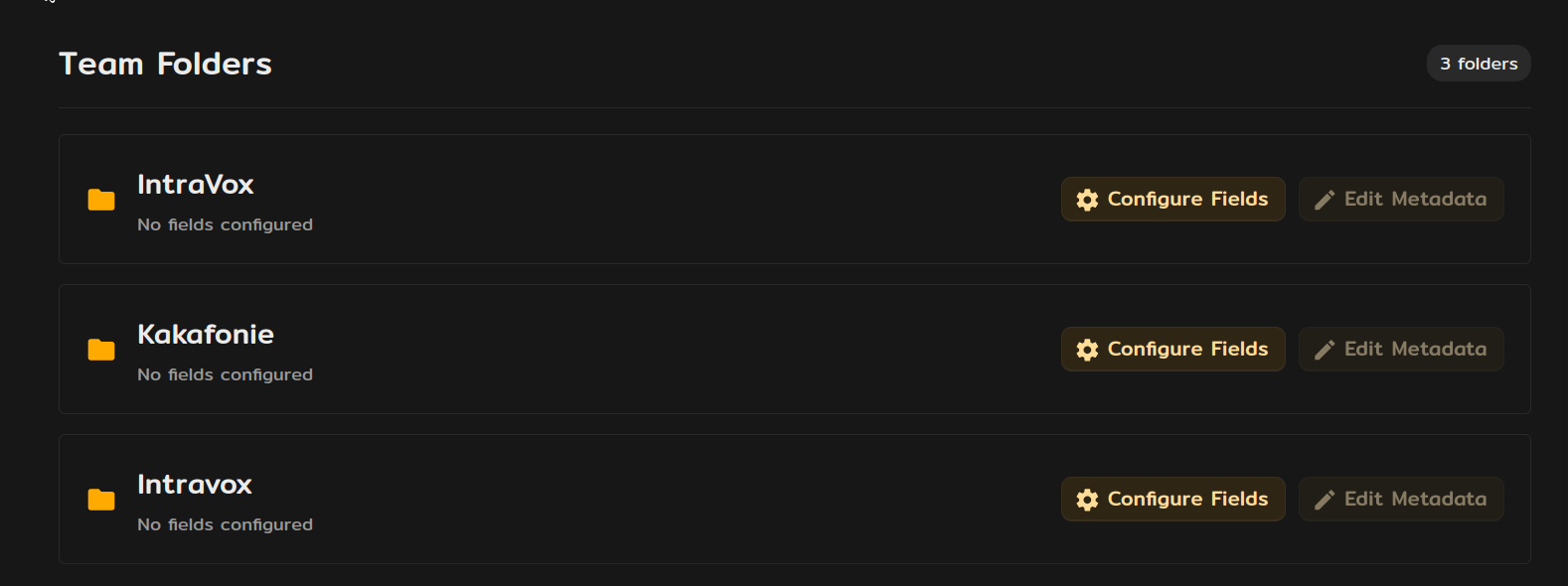
However, I do run into some setup issues related to permissions I suppose in the installation scripts of either IntraVox, MetaVox or the GroupFolders App. When I try to install the demo data (NL + EN) I read “Setup failed: Could not access the IntraVox Team Folder. Please check file system permissions.”
Ah yes, that was installed, but I did not create a Team Folder for IntraVox… but now I did. Only, I also created Teams folders in MetaVox. In Team Folder I could not (re)create a folder created in MetaVox, but it is not possible to remove the folder in MetaVox. A bit struggling, but I hope it will become clear to me before my set deadline arrives…
And BTW when I run occ groupfolders:list I only see the groupfolders created in the Team Folder app, but not the ones created in the MetaVox app. (and occ does not have a command:
$ docc -vvv metavox:list
In Application.php line 678:
[Symfony\Component\Console\Exception\NamespaceNotFoundException]
There are no commands defined in the “metavox” namespace.
In MetaVox you cannot create (team) folders. You create a Team Folder in the Team Folder app. From within MetaVox you can assign metadata to the team folders and which metadata should be available for the files within that team folder.
There something went wrong, I suppose, also see post Opensuse vs Nextcloud-AIO Docker user wwwrun vs www-data - #3 by OmeLuuk where I noted that something was off in my setup on the host (where user 33 was unknown) and I changed somethings (setting permissions and ownership to my known wwwrun:www combo). Then on install of IntaVox somehow the shared folder was made and I also manually created one. which all three showed up in MetaVox, in spite of not being currently present in “Team Folders” app. This may be due to another issue which - as far as I see - is still open: Deleted directories re-appearing in team folders · Issue #3890 · nextcloud/groupfolders · GitHub .
To (re)start with a clean slate, I need to re-really-delete the no longer existing groupfolders that still appear in MetaVox. This has to be done - I suppose - on database level, but since AIO I haven’t touched the Nextcloud database. So no idea on how to fix that in the tables (not documented as I would expect too).
$ occ groupfolders:expire Removed 0 expired trashbin items $ occ groupfolders:create -vvv IntraVox A Folder with the name IntraVox already exists
I ran a grep -ilsR Kakafonie . on the /cloud folder, but that took too long and stalled, failed to find a mention. And just to be sure I also issued find / -name "IntraVox" -type d on the host machine (nowhere on my 4TB host, a directory was found with this name). But since I am running AIO, maybe I should check somewhere in a container somehow?
Best option would be - I suppose - to dig into the database and remove some records there. But where to look for these?
The odd thing is (that is why I suspected the ownership of the Nextcloud data dir) that the error thrown reads
This error keeps coming up, now probably because the shared folder exists but does not exist…
(from the json raw error log:
"app": "intravox",
  "method": "GET",
  "url": "/apps/intravox/api/export/languages",
  "scriptName": "/index.php",
  "message": "Failed to get pages from language folder: Groupfolder 'IntraVox' not accessible: Groupfolder 'IntraVox' not accessible.",
And in my logs: [intravox] Error: Failed to get groupfolder object: /__groupfolders/1 from ? by …
{“reqId”:“#SOMETHING#”,“level”:3,“time”:“2026-06-21T02:59:54+00:00”,“remoteAddr”:“”,“user”:“–”,“app”:“intravox”,“method”:“”,“url”:“–”,“scriptName”:“/var/www/html/cron.php”,“message”:“Failed to get groupfolder object: /__groupfolders/1”,“userAgent”:“–”,“version”:“33.0.5.1”,“occ_command”:[“/var/www/html/cron.php”],“data”:{“app”:“intravox”},“id”:“#SOMETHING#”}
What you’re hitting isn’t an IntraVox or MetaVox bug per se — it’s a groupfolders database/storage mismatch, and the trigger is almost certainly the file-ownership issue you mentioned earlier. The signs line up exactly:
groupfolders:create IntraVox → “already exists” means the row is still in the oc_group_folders table.
groupfolders:list → “No folders configured” means the groupfolders app can’t actually read the backing storage for that folder.
Failed to get groupfolder object: /__groupfolders/1 confirms Nextcloud can’t access the storage dir — which is what blocks IntraVox’s setup with “Could not access the IntraVox Team Folder.”
The “ghost” folders in MetaVox are stale rows from that same table being shown when the groupfolders API errors out. They’ll disappear once the DB is cleaned up.
Suggested fix, in order:
1. Fix permissions first. Inside the nextcloud-aio-nextcloud container, check who owns the data dir and the __groupfolders storage. AIO normally runs as www-data — the wwwrun:www you saw is unusual, so let me know where that came from (custom image / openSUSE base?). Then:
occ files:scan-app-data
occ maintenance:repair
2. Inspect the actual DB state (don’t trust the empty groupfolders:list):
SELECT folder_id, mount_point, storage_id FROM oc_group_folders WHERE mount_point='IntraVox';
SELECT fileid, path FROM oc_filecache WHERE path LIKE '__groupfolders/%' LIMIT 10;
3. Reconcile:
If the storage is actually present and it was only a permissions problem → after fixing ownership, run occ files:scan --all.
If rows exist but the storage is genuinely gone → remove the orphaned rows from oc_group_folders, oc_group_folders_groups, oc_group_folders_acl, and the matching __groupfolders/<id> entries in oc_filecache.
4. Then re-runocc intravox:setup (or reinstall the demo data). Once groupfolders:list shows IntraVox again, the ghost folders in MetaVox will be gone too.
If you can open a GitHub issue on the IntraVox repo with the output of groupfolders:list, the SQL results above, and your exact AIO/ownership setup, I’ll use it to make the apps fail more gracefully (clear error instead of the generic one, and filtering out these ghost entries). Thanks!
Yeah, that seems about right. And in your opinion (I know it is another app than the one you are responsible for) would this be an situation the available groupfolder commands should take care of? Like in:
occ groupfolders:delete <folder_id> [-f|--force] → delete a Team folder and all its contents. When groupfolder does no longer exist in the __groupfolder directory structure also remove the orphaned registration in the groupfolder table.
occ groupfolders:expire → trigger file version and trashbin expiration (see Nextcloud docs for versioning and Nextcloud docs for the trash bin for details). When the expired groupfolder is effectively non existent on disk, also expire and remove (mark as deleted) the database records for the expired groupfolder.
occ groupfolders:list → list configured Team folders. When (database) registrations of groupfolder is found but no groupfolder on disk, do show these group folders with their IDs in a special fashion (like #CORRUPTED#) to allow the user-initiated complete deletion of a partially deleted group folder OR a - as good as is can be - restoration of the groupfolder structure and privilleges with placement of placeholders for files (like empty files) and directory structure
occ groupfolders:remake <name> → recreate a previously corrupted Team folder structure and privilleges with placement of placeholders for files (like empty files) and directory structure based on database registration
I know, these are outside the scope of this thread.
Agreed… to a certain extend. Because when the installation of demo data cannot find a groupfolder object (on disk) but finds the datastructure in the database, it should imho give the user the option to (re)create the found groupfolder on disk as it is found in the database, at least the part that are needed to install the demo data (and set permissions accordingly database setting and/or overrule them with the set permissions as given in the instal demo page).
As stated elsewhere: the wwwrun:www is specific for the apache user on openSUSE and the www-data user/group did not exist. For cosmetic purposes this user www-data is created with that UID/GID 33 as is present in the container. And the data dir is set to this owner/group (and permissions are set, 640 for files, 750 for directories).
Generic steps to fix different known errors (in which the groupfolder incident is not yet included).
Which are possible dangerous and intrusive ways to fix this situation for a normal user. If these actions could be performed by means of some occ groupfolder:repair --all command that would be preferrable, greatly beneficial and user friendly.
I will try to fix it that way indeed. Let you know how that will turn out.
Without a github account I cannot do that, but I can provide what I have here. As stated above, imho this could be a situation you could gracefully fix once the IntraVox group folder is registered (in database) but not on disk (just recreate/restore after confirmation by user - or “always”, no questions asked).
Thanks for the thorough write-up — and glad you got it working in the end. Just to close the loop on the root cause for anyone reading along:
The trouble was never really an IntraVox or MetaVox bug, but a file-ownership mismatch in your environment. On openSUSE the web server runs as wwwrun:www, whereas the container images (and most Nextcloud setups) assume www-data. Because of that, the __groupfolders/<id>/files directory on disk wasn’t readable/writable by the web server user, even though the oc_group_folders row existed. IntraVox is simply the first app that tries to write into the team folder, so it’s where the mismatch surfaced first — but Group Folders itself was already in an inconsistent state underneath.
On your three suggestions:
occ groupfolders:repair --all / orphan detection / #CORRUPTED# listing — I fully agree these would be valuable, but as you noted yourself, that belongs in the Group Folders app upstream, not in IntraVox/MetaVox. The DB<->disk reconciliation can only be done safely by the app that owns those records. The right place for that is a feature request on the groupfolders repo.
Auto-recreate the team folder when the DB row exists but the disk folder is missing — I’m deliberately not doing this in IntraVox. In your case the storage wasn’t actually missing; it was inaccessible due to permissions. If IntraVox silently re-created the folder, it could mask a real permissions/ownership problem (or, worse, create a second orphaned structure) instead of surfacing it. The safer behaviour is to fail loudly and point at the permissions, which is what you correctly ended up fixing.
MetaVox showing “ghost” folders — those are the same orphaned/inaccessible Group Folders rows; once the underlying Group Folders state is clean they disappear. MetaVox reflects what Group Folders reports, by design.
So the practical guidance for openSUSE (or any non-www-data setup) is: make sure the data directory — including __groupfolders/ — is owned by and writable for whatever user PHP/Apache actually runs as, before installing the demo data.
Re: GitHub issues — you don’t need a paid account, a free GitHub account is enough to open issues, and you’re very welcome to file one (for IntraVox-specific things) or upvote one on the Group Folders repo for the repair tooling.
Thanks again for the detailed feedback — this kind of report is genuinely useful.
 App: IntraVox - Apps - App Store - Nextcloud
 Documentation: GitHub - nextcloud/IntraVox
 News Widget docs: https://github.com/nextcloud/IntraVox/blob/main/docs/NEWS_WIDGET.md