How to setup NextCloud on Linux while running a VPN?

The Basics

  • Nextcloud Server version (e.g., 29.x.x):
    • Nextcloud AIO v11.8.8
  • Operating system and version (e.g., Ubuntu 24.04):
    • Debian 12
  • Web server and version (e.g, Apache 2.4.25):
    • AIO installation with docker
  • Reverse proxy and version _(e.g. nginx 1.27.2)
    • NA
  • PHP version (e.g, 8.3):
    • NA
  • Is this the first time you’ve seen this error? (Yes / No):
    • Yes
  • When did this problem seem to first start?
    • At installation
  • Installation method (e.g. AlO, NCP, Bare Metal/Archive, etc.)
    • AIO
  • Are you using CloudfIare, mod_security, or similar? (Yes / No)
    • No

Summary of the issue you are facing:

I am trying to setup a NextCloud server on my Linux machine that I am running a VPN on.

The way I am going about it is that:

I made a DDNS account on deSEC and got a domain for that, installed it using ddclient and checked it with ping and it’s up and running.

Now the problem happens when i try to enter this domain in the setup page of NextCloud.

I get this error:

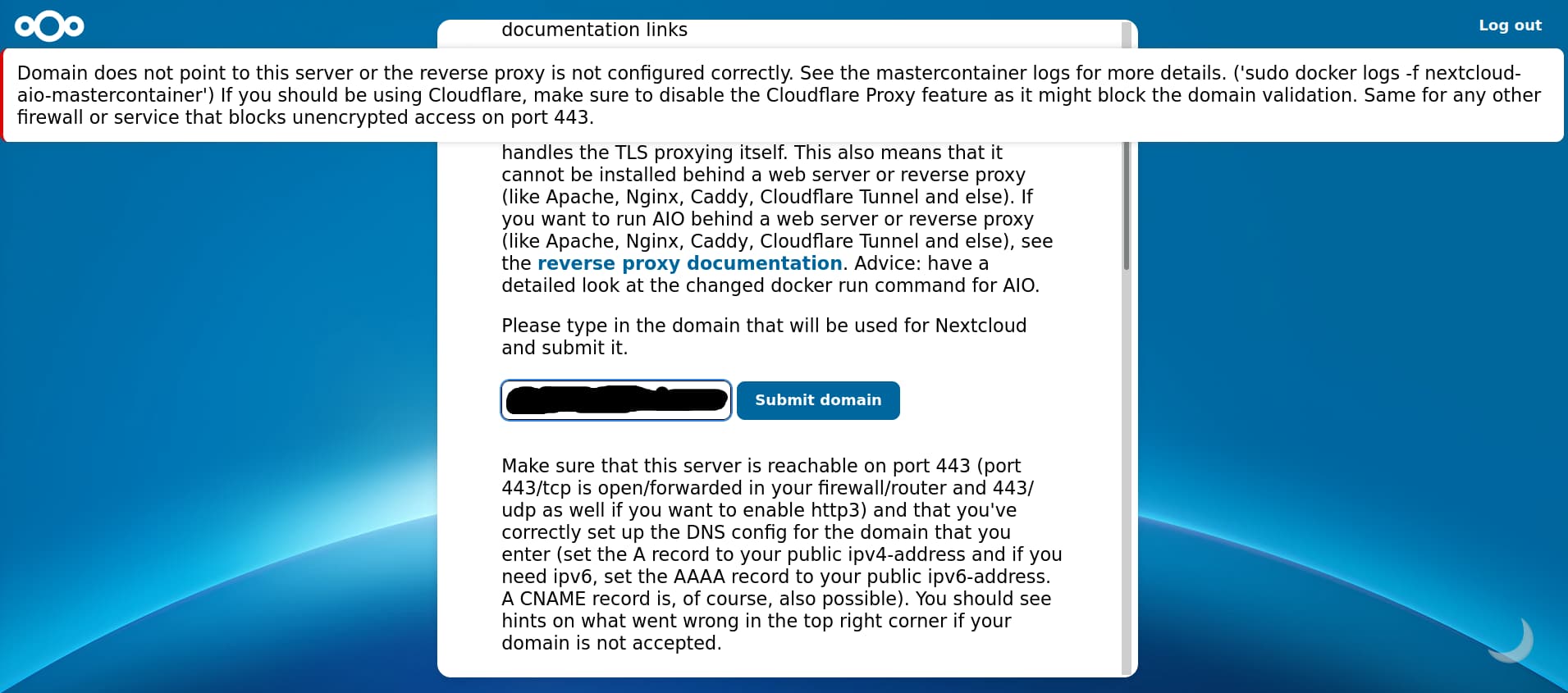
Domain does not point to this server or the reverse proxy is not configured correctly. See the mastercontainer logs for more details. (‘sudo docker logs -f nextcloud-aio-mastercontainer’) If you should be using Cloudflare, make sure to disable the Cloudflare Proxy feature as it might block the domain validation. Same for any other firewall or service that blocks unencrypted access on port 443.

Also attached in the image:

Nextcloud AIO

Now how can I overcome this error and get to the next page successfully?

Info that might help:

  • I am using Debian 12.

  • And the NextCloud will be installed on my main computer that has a running VPN on it that I don’t want to disconnect.

  • The VPN provider offer port forwarding but i can’t select a specific port

Steps to replicate it (hint: details matter!):

  1. Install Next cloud using the steps from the official github repo:
    GitHub - nextcloud/all-in-one: 📦 The official Nextcloud installation method. Provides easy deployment and maintenance with most features included in this one Nextcloud instance.
    The installation process is completed successfully and easily and i can access the Setup page through https://localhost:8080

  2. After opening the very first page of the wizard and entering my domain that i created successfully using deSEC and tested it using: ping nc.myexample.domain

  3. I get this error:
    Domain does not point to this server or the reverse proxy is not configured correctly. See the mastercontainer logs for more details. (‘sudo docker logs -f nextcloud-aio-mastercontainer’) If you should be using Cloudflare, make sure to disable the Cloudflare Proxy feature as it might block the domain validation. Same for any other firewall or service that blocks unencrypted access on port 443.

Log entries

Nextcloud

Please provide the log entries from your Nextcloud log that are generated during the time of problem (via the Copy raw option from Administration settings->Logging screen or from your nextcloud.log located in your data directory). Feel free to use a pastebin/gist service if necessary.

Not applicable as i haven't finished the wizard yet

Web Browser

If the problem is related to the Web interface, open your browser inspector Console and Network tabs while refreshing (reloading) and reproducing the problem. Provide any relevant output/errors here that appear.

NA

Web server / Reverse Proxy

The output of your Apache/nginx/system log in /var/log/____:

NA

Configuration


The “Log files”:
This is the closest thing to a “log file” i could found in my case by running this command in the terminal:

docker logs -f nextcloud-aio-mastercontainer

The output:

Trying to fix docker.sock permissions internally...
Creating docker group internally with id 135
...+......+....................+.+......+...+..+.........+.+.........+.....+......+...+......+....+++++++++++++++++++++++++++++++++++++++++++++*...+.....+...+.+......+...+.....+...+....+........................+.....+......+......+..........+.....+++++++++++++++++++++++++++++++++++++++++++++*......+........+.........+.+........+.......+...+.........+........+.......+...............+.................+...+.+.....+.+........+......+...................+......+.........+..................+..+......+.........+.......+..............+......+................+............+...+.......................................+.........+......+........+.......+...+..+...+++++
.....+.........+.....+.......+.....+....+......+++++++++++++++++++++++++++++++++++++++++++++*..+....+...+...+............+...+...+.....+....+..+++++++++++++++++++++++++++++++++++++++++++++*...........+.........+......+...............+....+..+.......+...+...+..+........................+.........+.+...+.......................+.........+...+.+..+....+.........+..........................+...+.......+........+++++
-----
Initial startup of Nextcloud All-in-One complete!
You should be able to open the Nextcloud AIO Interface now on port 8080 of this server!
E.g. https://internal.ip.of.this.server:8080
⚠️ Important: do always use an ip-address if you access this port and not a domain as HSTS might block access to it later!

If your server has port 80 and 8443 open and you point a domain to your server, you can get a valid certificate automatically by opening the Nextcloud AIO Interface via:
https://your-domain-that-points-to-this-server.tld:8443
/usr/lib/python3.12/site-packages/supervisor/options.py:13: UserWarning: pkg_resources is deprecated as an API. See https://setuptools.pypa.io/en/latest/pkg_resources.html. The pkg_resources package is slated for removal as early as 2025-11-30. Refrain from using this package or pin to Setuptools<81.
  import pkg_resources
{"level":"info","ts":1758373617.5402346,"msg":"maxprocs: Leaving GOMAXPROCS=8: CPU quota undefined"}
{"level":"info","ts":1758373617.5404062,"msg":"GOMEMLIMIT is updated","package":"github.com/KimMachineGun/automemlimit/memlimit","GOMEMLIMIT":22582473523,"previous":9223372036854775807}
{"level":"info","ts":1758373617.540444,"msg":"using config from file","file":"/Caddyfile"}
{"level":"info","ts":1758373617.5417027,"msg":"adapted config to JSON","adapter":"caddyfile"}
{"level":"info","ts":1758373617.543201,"msg":"serving initial configuration"}
[Sat Sep 20 13:06:57.655984 2025] [mpm_event:notice] [pid 171:tid 171] AH00489: Apache/2.4.65 (Unix) OpenSSL/3.5.2 configured -- resuming normal operations
[Sat Sep 20 13:06:57.656064 2025] [core:notice] [pid 171:tid 171] AH00094: Command line: 'httpd -D FOREGROUND'
[20-Sep-2025 13:06:57] NOTICE: fpm is running, pid 176
[20-Sep-2025 13:06:57] NOTICE: ready to handle connections
Deleting duplicate sessions
NOTICE: PHP message: The response of the connection attempt to "http://my.domain55name.dedyn.io:443" was: 
NOTICE: PHP message: Expected was: b1c...................................f
NOTICE: PHP message: The error message was: Operation timed out after 10001 milliseconds with 0 bytes received
NOTICE: PHP message: The response of the connection attempt to "http://my.domain55name.dedyn.io:443" was: 
NOTICE: PHP message: Expected was: b1c...................................f
NOTICE: PHP message: The error message was: Operation timed out after 10002 milliseconds with 0 bytes received
NOTICE: PHP message: The response of the connection attempt to "http://my.domain55name.dedyn.io:443" was: 
NOTICE: PHP message: Expected was: b1c...................................f
NOTICE: PHP message: The error message was: Operation timed out after 10001 milliseconds with 0 bytes received
NOTICE: PHP message: The response of the connection attempt to "http://my.domain55name.dedyn.io:443" was: 
NOTICE: PHP message: Expected was: b1c...................................f
NOTICE: PHP message: The error message was: Operation timed out after 10002 milliseconds with 0 bytes received
NOTICE: PHP message: The response of the connection attempt to "http://my.domain55name.dedyn.io:443" was: 
NOTICE: PHP message: Expected was: b1c...................................f
NOTICE: PHP message: The error message was: Operation timed out after 10002 milliseconds with 0 bytes received
NOTICE: PHP message: The response of the connection attempt to "http://my.domain55name.dedyn.io:443" was: 
NOTICE: PHP message: Expected was: b1c...................................f
NOTICE: PHP message: The error message was: Operation timed out after 10002 milliseconds with 0 bytes received
NOTICE: PHP message: The response of the connection attempt to "http://my.domain55name.dedyn.io:443" was: 
NOTICE: PHP message: Expected was: b1c...................................f
NOTICE: PHP message: The error message was: Operation timed out after 10002 milliseconds with 0 bytes received
NOTICE: PHP message: The response of the connection attempt to "http://my.domain55name.dedyn.io:443" was: 
NOTICE: PHP message: Expected was: b1c...................................f
NOTICE: PHP message: The error message was: Operation timed out after 10002 milliseconds with 0 bytes received
NOTICE: PHP message: The response of the connection attempt to "http://my.domain55name.dedyn.io:443" was: 
NOTICE: PHP message: Expected was: b1c...................................f
NOTICE: PHP message: The error message was: Operation timed out after 10002 milliseconds with 0 bytes received
NOTICE: PHP message: The response of the connection attempt to "http://my.domain55name.dedyn.io:443" was: 
NOTICE: PHP message: Expected was: b1c...................................f
NOTICE: PHP message: The error message was: Operation timed out after 10002 milliseconds with 0 bytes received
Deleting duplicate sessions
NOTICE: PHP message: The response of the connection attempt to "http://my.domain55name.dedyn.io:443" was: 
NOTICE: PHP message: Expected was: b1c...................................f
NOTICE: PHP message: The error message was: Operation timed out after 10002 milliseconds with 0 bytes received
NOTICE: PHP message: Could not get digest of container nextcloud-releases/aio-domaincheck:latest cURL error 6: Could not resolve host: ghcr.io (see https://curl.haxx.se/libcurl/c/libcurl-errors.html) for https://ghcr.io/token?scope=repository:nextcloud-releases/aio-domaincheck:pull
NOTICE: PHP message: Not pulling the ghcr.io/nextcloud-releases/aio-domaincheck image for the nextcloud-aio-domaincheck container because the registry does not seem to be reachable.
NOTICE: PHP message: Could not get digest of container nextcloud-releases/all-in-one:latest cURL error 6: Could not resolve host: ghcr.io (see https://curl.haxx.se/libcurl/c/libcurl-errors.html) for https://ghcr.io/token?scope=repository:nextcloud-releases/all-in-one:pull
NOTICE: PHP message: Could not get digest of container nextcloud-releases/aio-domaincheck:latest cURL error 6: Could not resolve host: ghcr.io (see https://curl.haxx.se/libcurl/c/libcurl-errors.html) for https://ghcr.io/token?scope=repository:nextcloud-releases/aio-domaincheck:pull
NOTICE: PHP message: Not pulling the ghcr.io/nextcloud-releases/aio-domaincheck image for the nextcloud-aio-domaincheck container because the registry does not seem to be reachable.
NOTICE: PHP message: Could not get digest of container nextcloud-releases/all-in-one:latest cURL error 6: Could not resolve host: ghcr.io (see https://curl.haxx.se/libcurl/c/libcurl-errors.html) for https://ghcr.io/token?scope=repository:nextcloud-releases/all-in-one:pull
Deleting duplicate sessions
NOTICE: PHP message: The response of the connection attempt to "http://my.domain55name.dedyn.io:443" was: 
NOTICE: PHP message: Expected was: b1c...................................f
NOTICE: PHP message: The error message was: Operation timed out after 10001 milliseconds with 0 bytes received
NOTICE: PHP message: The response of the connection attempt to "http://my.domain55name.dedyn.io:443" was: 
NOTICE: PHP message: Expected was: b1c...................................f
NOTICE: PHP message: The error message was: Operation timed out after 10002 milliseconds with 0 bytes received
NOTICE: PHP message: The response of the connection attempt to "http://my.domain55name.dedyn.io:443" was: 
NOTICE: PHP message: Expected was: b1c...................................f
NOTICE: PHP message: The error message was: Operation timed out after 10001 milliseconds with 0 bytes received
Deleting duplicate sessions
NOTICE: PHP message: The response of the connection attempt to "http://my.domain55name.dedyn.io:443" was: 
NOTICE: PHP message: Expected was: b1c...................................f
NOTICE: PHP message: The error message was: Operation timed out after 10003 milliseconds with 0 bytes received
NOTICE: PHP message: The response of the connection attempt to "http://my.domain55name.dedyn.io:443" was: 
NOTICE: PHP message: Expected was: b1c...................................f
NOTICE: PHP message: The error message was: Operation timed out after 10002 milliseconds with 0 bytes received


Please reply to me soon and feel free to ask for any extra details you need.

Thanks in advance.
Did you follow the instruction of the error massage and open ports 80 and 443 on the router and firewall and forward then to the Nextcloud computer?

I never would do that. I would use the physical Debian Server only as a Virtual Machines Host (using KVM/QEMU) and install two seperate virtual Machines (also Debian). One as VPN-Server and the other one for my Nextcloud. Also Proxmox might be a good choise.

But well its your choise.

1 Like

Yes I did open the ports in the ufw and still the same error

Okay please give me more details i am really new to this
I don’t have another physical machine it’s just my laptop that i use for my personal and work stuff.
I need a next cloud server so i can eaisly and securley sync the most important stuff from my phone to that cloud.
I am willing to learn and do what you are suggesting but explain more in easy terms.
What do i need to implement the system you are suggesting exactly? Hardware and software wise.
Do i need another computer or a rasperi pi for this ?
Why do i need 2 virtual machines ? why not just one ?
And what are the specs of that machine ?
Would i still be able to run a commercial vpn on it like proton or mullvad or not ?
And the most important question of them all
What can i do to run the next cloud on my current computer without having to spend any more money on a new server ? (Without having to turn off the commercial vpn i am running currently)

So you want to install Nextcloud on a Notebook you are using as your only Computer? This is possible but by no means recommended.

Also installing a Cloud in a KVM/QEMU Virtual Machine on a Notebook using WIFI to connet to LAN and WAN is nothing i would recommend. The KVM/QEMU Host shall be connected by CAT-Cable to the LAN and WAN.

I’m afraid you can’t do anything useful that I could recommend without having to spend any more money. I am sorry, but i simply wont do what you have in mind.

You don’t even tell us what mobile OS you are using, like Android, iOS. One option to sync easily and securley the most important stuff from any Android phone is rsync. But the question is: do you use Android?

Just for syncing or even better backup your mobile phone data you don’t need a cloud server. That would be a bit like shooting sparrows with cannons.

Hello @anon34916986,

I had similar thoughts and found there maybe 1000 solutions to address this and similar issues depending on what you want to achieve exactly.

I had the idea (but did not carry it out completely) to actually rent a virtual private server (only few bucks a year, you do not need a big one). Then, you add another VPN between your machine and the VPS and forward any incoming traffic on certain ports of your VPS to the VPN-connected machine. Adding a fallback should be possible as well (some sort of informational page “this page is currently not available. Please come back soon”).

This was the most direct answer to your question. I am with adelaar that it might really be a bad option and maybe other options fit your use case better (syncthing?)

If you really want to go the route, you should verify, that another machine on your LAN can access the nextcloud first (in fact checking your config and firewall). Then, you can stepwise enlarge the scope over your router (checking port forwarding) and then global addresses.

Chris

Android
The thing is i have more than one smartphone 2 at the moment that i use both and want to have a simillar experince to the google cloud
I want to be able to sync contacts
To sync Joplin backup with each phone and the laptop as well
To make automatic backups to certain important folders
Sync a certain documents folder on my laptop with both phones to have any file added to that certain folder be changed on both phones or if i add a file from one phone to that folder then it syncs again with everything else
And so on
It’s a simple system
I don’t know why you guys are making this seem more difficult than it should be
I understand that it’s not “ideal” and that i should have a seprate device or a rasberipi to use as that “cloud” but i can’t have that at the moment.
And even if that was possible
I still would like a solution to such case
There has to be a way
Why not ?

Hello @christianlupus
Thanks for your reply
So that “VPS” can i make that myself ?
The point also is not just the money, it’s that i am trying to make every thing as local and private as possible i really care about privacy and that’s why i am trying to selfhost that cloud myself
Another thing is, from what i understood from what you suggested is that the VPS would be an intermediator between my phone and the cloud which is my laptop
So why do i need that ? Why can’t i access the ddns that i created to connect to my server ?
It’s up and running, why do i need the VPS ?

I can’t create that cloud as mentioned i am stuck at the page where i enter the domain
I opened all the ports requested from the firewall but still the same error.
And regarding why do i need a cloud in the first place it’s as i mentioned here:
The thing is i have more than one smartphone 2 at the moment that i use both and want to have a simillar experince to the google cloud
I want to be able to sync contacts
To sync Joplin backup with each phone and the laptop as well
To make automatic backups to certain important folders
Sync a certain documents folder on my laptop with both phones to have any file added to that certain folder be changed on both phones or if i add a file from one phone to that folder then it syncs again with everything else
And so on. In a nutshell i want to have the cloud experience the google drive, contacts, docs, etc.. experience

I agree with you 100% on this issue. I do it exactly the same way. But to make that really good, stable and secure, i was willing to spend some money für separate Hardware, and do this NOT on my daily use Notebook.

That you want to do it on your daily use Notebook is the point i disagree with you.

1 Like

No, as I said, this is a rented piece of hardware on the net. So, you effectively rent a tiny fraction of a big server by a hosting company.

That is not the point here. The data is still on the machine you control. But once you want to go in the big www, you are no longer local. You need to accept that you cannot act a an internet service provider and roll out a private net of cables all over the world (at least not practically).

As I said, you do not need it. It might be more convenient but as I said, there are maybe 1000 options out there.
The VPS makes you completely independent of dDNS as it tends to be brittle. You get a static IP (which is an assumption on many server instances). But you can (given the hardware of yours allows this and your ISP does not block access to your end point and you ghet a valid IPv4 and …) to circumvent this.

OK, this is more than you wrote in the first post. I will not argue with you here. Just wanted to give you alternatives in case this is too much effort for too little benefit.

You are struck on a page, so you already try to access it via web interface. From which machine? Via which IP/host name?

You will probably not have one but multiple filewalls to think of. Which one are you talking about? On which machine is it? Where is port forwarding enabled?

@adelaar I got it now brother thanks
So let me start over with you
How did you do it ?
Is there a specific configuration
Please tell me the steps
1-The hardware “ingredients” that i would need
2-What are the exact steps
like:
1-Install debian
2-Install a certain list of prerequisites
3- ….
etc.
But the result i want so we are completely on the same page
A server that i can connect to reliably and securely and that is also ALWAYS connected to Mullvad or Proton VPN
Is that result possible ?
Thanks in advance

Yes exactly i followed the All In One installation (AIO) guide from the Github for Linux and managed to successfully install the Docker container and the next cloud AIO
Then I:
1.Opened my web browser
2.Entered https://localhost:8080
3.Accessed the page i added in the post
4.My ip is dynamic for 2 reasons:
1.It’s a residential internet and by default it always change
2.I am always using a vpn for my privacy so again that means my IP can change constantly
So to overcome the need for a fixed IP address that is needed in that page
I went to the alternative solution which is to create and use a Dynamic DNS (DDNS)
I created one using this service: deSEC
5.I entered that created domain in the requested field as in the picture here:

6.Then i clicked Submit Domain
7.Finally i get this error:
”Domain does not point to this server or the reverse proxy is not configured correctly. See the mastercontainer logs for more details. (‘sudo docker logs -f nextcloud-aio-mastercontainer’) If you should be using Cloudflare, make sure to disable the Cloudflare Proxy feature as it might block the domain validation. Same for any other firewall or service that blocks unencrypted access on port 443.”
8.I tried to fix it by opening the firewall app in linux and setting an exception for the mentioned ports 443, 80 and 8080
But that doesn’t make any differnce
Then i tried to turn off the VPN
But again this didn’t make any difference

And finally to exactly answer your question:

The main machine
The same machine
All of what i mentioned here is happening on the same computer the one i am using for my daily use that has vpn on it and has the docker with the next cloud intaller on it and the one i am trying to set the nextcloud on as the “Server” or the “Cloud”
And regarding port forwarding
The VPN has port forwarding but it doesn’t allow me to select which port to open
So now you have all the details
(If you need anything else please ask)
What should i do now ?
Where do i go from here ?
I know it’s not ideal but let’s say i want to create a system like this
How would that be possible ?
There has to be a way
P.S
I forget to mention that i installed the DDNS or connected the domain i created with my system using an app for linux called ddclient in the Debian repo.

Excuse me if some of my terms are not as accurate as possible but i am new to self hosting and doing my best to learn

Actually my ISP offer this service
A fixed IP
But which is more “private” to rent the VPS from a 3rd party provider or from my ISP ?

Do you know any other option rather than using the VPS?
If so please let me know
And thanks for your time

The VPN should be of no issue unless you pipe all traffic through the VPN. So, have a look at ip route and check what is the default route. If it is the regular modem (and NOT the VPN), you are good and can completely ignore the VPN stuff ATM.

There you are. The installation already warns you, that you have a problem in your configuration. This is the first thing you have to fix.

OK, let’s look at your current situation. I guess you have this kind of setup:

    flowchart LR
         subgraph R["Commercial Router"]
           Accesspoint <--> Switch <--> Router <--> Modem
         end
         Laptop <--> Accesspoint
         Modem <--> ISP <--> Internet@{shape: odd}

Am I correct?
The firewall you configure in the main machine (aka your laptop) is defining what kinds of packages are accepted by the machine. So, you allow (if configured correctly) that any machine connected to the accesspoint (be it by WiFi or through the switch) can send in packages on the requested ports. You can check this by another machine on your network and trying to access with curl or even a web browser.

The problem is the router. We have more devices on earth that are in the internet than there are IPv4 addresses. Thus, we need to share. This is called NAT:

In fact, if you send out a package from your laptop (e.g. you want to browse a certain website), the router replaces the IP address of your laptop (probably something like 192.168.x.y) to a global IP address (of your account, let’s say it was 1.2.3.4 for the meantime). Any server will then think the request comes from 1.2.3.4. They know nothing of the 192.168.x.0 net. Instead they send their answer to 1.2.3.4. The router receives the package and understands that the connection involved was originally 192.168.x.y (the router keeps track of all connection it establishes). It then redirects internally the package.

Now, your problem is the way in. Receiving a package on e.g. port 80 without a prior connection in the routing table, the router does by definition not know where to redirect the package to. So, it is discarded/rejected. Connection is not possible from the outside to the internal net. You have to set up a port forwarding in the router. This tells the router (statically, independent of any existing connections in the router) to redirect incoming packages on port 80 (e.g.) to 192.168.x.y port 8081. Then, you can the packages to the laptop (if it is powered up). Answer packages will again be masqueraded, so the requesting client on the internet sees only the 1.2.3.4 and think it is talking to 1.2.3.4 only.

So, first setup the router of yours before continuing any further. You need some way in.

Or do you want to send the NC traffic through the VPN? Then you need an option to get the public IP of the VPN tunnel plus a port forwarding through the tunnel (I doubt this is possible with many of the VPN offers out there).

This would make your life easier in general but will not help with the router topic. However, you will probably get better support by the ISP to setup port forwarding (as this is the main reason to go for fixed IPs).


I will not elaborate all and the list is by far not complete and there are variants to each of these options. Also not all might be doable or feasible. Instead, I will give you just a few options and let you do the math to calculate the variants possible

Where is my data stored?

  1. In the cloud (S3 object storage)
  2. On a VPS
  3. On-prem internal storage
  4. On-prem in iSCSI or similar
  5. On-prem as local S3 (minIO or similar)

Where are the NC files stored?

  1. In the cloud
  2. On a VPS
  3. On-prem internal
  4. On-prem in a VM
  5. On-prem in a SAN

Where is the DB running?

  1. Cloud service
  2. locally, same host
  3. On-prem on dedicated host

How about misc services (like Redis,…)?

  1. In Cloud container
  2. Local
  3. Dedicated server?

How are the software components installed

  1. Bare metal
  2. Containerization
  3. VM
  4. SaaS

How to access the Machine

  1. Static IP, directly
  2. Static IP with HTTP redirect
  3. DDNS + Remote Proxy
  4. DDNS + Remote redirect
  5. DDNS + Port forwarding
  6. DDNS + direct access
  7. VPN

This is ridiculous as it will not help you much. Many of these options will not fit your use case or are not possible for you. Also, not all are related to networking. I just want to show you that it is not that simple to boil down.

Depends what perfomance you expect to get. You can even start with an Raspbery Pi 4/5 and a special Nextcloud Image for that. Its not verry fast but works well if you don’t need much speed for large amounts of Data to transfer into your Nextcloud.

Well in my eyes that makes no sense. Why a server shall be ALWAYS connected to Mullvad or Proton VPN??? A server shall be reachable from Internet. You want to sync your calendar or adressbook from everywhere. If not you don’t want that, you need to connect the server not to the Internet at all.

If you don’t want an Nextcloud reachable from Internet you can installation method with self signet certificates and configure your Router or firewall to block all access from Nextcloud to Internet, except for needed updates for nextcloud and hosting Server OS.

That way you can acces your Nextcloud only from within your LAN or (if you have installed) a VPN, like Wireguard on your Router or Firewall.

But thats not my way and not what i ever did. I would keep my LAN itself protected with a dedicated Firewall like OPNsense or pfsense. Then place the Nextcloud into a seperat LAN segment (vlan). The Server (eg Debian or Raspbian) shall be accessed via ssh only from another LAN segment (where your Notebook is inside). ufw on server will help with that and shall be also active (at least if there are other servers in the LAN segment of the Nextcloud, because what happend inside a LAN-Segment does not care a dedicated Firewall like OPNsense). SSH only available with preshared Keys and 2FA (TOTP). Similar Nextcloud Login. No login without 2FA. Ofcause Nextcloud shall not be available for port TCP 80 access (http), but only 443 (https).

@christianlupus Thanks a lot for your precious time Christian I really appreciate it. Excuse me for my late reply. The past 2 weeks were tough.

I am going to answer your questions/follow your instructions point by point below.


1-

I have checked using this command:

ip route show

The output seems to show that all the traffic is going through the VPN:

default via 10.98.0.x dev tun0 proto static metric 50
default via 100.85.0.x dev pvpnksintrf1 proto static metric 98
default via 192.168.1.x dev wlp3s0 proto dhcp src 192.168.1.x metric 600
10.98.0.0/16 dev tun0 proto kernel scope link src 10.98.0.x metric 50
100.85.0.0/24 dev pvpnksintrf1 proto kernel scope link src 100.85.0.x metric 98
172.17.0.0/16 dev docker0 proto kernel scope link src 172.17.x.x linkdown
172.18.0.0/16 dev br-<redacted> proto kernel scope link src 172.18.x.x
[REDACTED_PUBLIC_IP] via 192.168.1.x dev wlp3s0 proto static metric 50
192.168.1.0/24 dev wlp3s0 proto kernel scope link src 192.168.1.x metric 600
192.168.1.x dev wlp3s0 proto static scope link metric 50

Is that helpful to you for debugging ?
What can we do with this info ?


2-

The other devices on the same network are also connected to a vpn,
Would they be able to access the machine through curl ?
+
What should i curl ?
curl “what?”
Should I curl the DDNS that i set ?
Or what ?
And can i curl with Termux from an android phone ?


3-

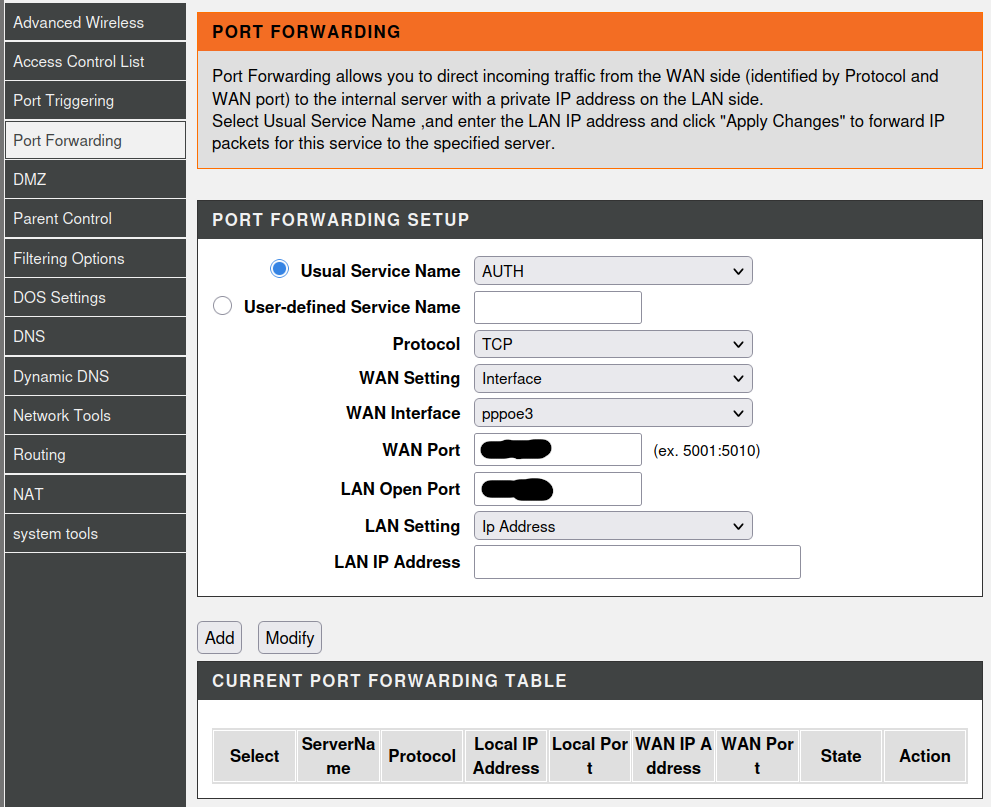
So this is the Port Forwarding page on my router managing interface:

What should i enter in it ?
And would that make any difference taking into consideration that all my traffic is going through the VPN ?


4-

I am thinking if the problem in the VPN
Is there a way to exclude Next Cloud from the VPN ?
So that way if we use the port forwarding way from the router things should work successfully.
Is that possible ?
If it’s possible please give me the exact steps.


5-

Can I use 5 and 6 in the case we managed to exclude NC successfully from the VPN ?


6-

The last question is now what ?
Please give me clear steps on the next possible solutions as i am really really determined to make this work and i feel that i am very close to a solution but unfortunately my networking knowledge is not strong enough yet.


Thanks again for your help, I really really appreciate it.
Also if there is other forums that can help me with this please suggest if you know.

OK, here we see some stuff. Your normal internet connection is this one

default via 192.168.1.x dev wlp3s0 proto dhcp src 192.168.1.x metric 600
[REDACTED_PUBLIC_IP] via 192.168.1.x dev wlp3s0 proto static metric 50
192.168.1.0/24 dev wlp3s0 proto kernel scope link src 192.168.1.x metric 600
192.168.1.x dev wlp3s0 proto static scope link metric 50

The REDACTED_PUBLIC_IP is probably not yours but the one from Proton VPN. Also the last line might have a different x for the IP (I guess 192.168.1.1) then in the other lines (where it is your local network device’s IP.

In any case, looking at the default routes, it seems that your VPN is forcing all traffic through the tunnel:

default via 10.98.0.x dev tun0 proto static metric 50
default via 100.85.0.x dev pvpnksintrf1 proto static metric 98
default via 192.168.1.x dev wlp3s0 proto dhcp src 192.168.1.x metric 600

The first line is the tunnel with lowest metric (aka highest priority). There is a second (medium prioritized) route, a quick glance said something about a kill switch that will probably avoid non-VPN traffic by simply dropping all packages there. Only then, the default route is present (which is never used in fact).

Long story short: You are in a bad situation. I see the following logical solutions:

  • You configure the VPN to prevent taking over all networking traffic
  • You use a dedicated (separate) hardware to run the NC locally
  • You use a local router (e.g. a raspberry pi or similar) to act as reverse proxy/NAT to somehow circumvent the routing rules
  • You run all traffic dedicatedly through the VPN (including NC)
  • You might want to look into adding virtual network adapters and adopting the network rules there [1]

Please be warned: trying to trick the VPN into thinking everything should go through the tunnel and somehow bypassing it might be brittle. There will be a cat-and-mouse game between you, your OS, and the VPN on who will be dictating the routing table. Restarting the VPN will make this even more of a challenge.

So, I am changing my opinion and agree with other folks: Use a dedicated hardware (either locally or rented remotely) additionally. It does not need to be high power or such but it will safe you from nasty issues. You can do the stuff if you know what is going up but this required much deeper knowledge about the routing process. I tried a simpler setup with custom conditional routing and it always was not really working stable.


As you should first fix the VPN problem, the rest is just a quick answer:

  1. You could curl http://192.168.1.x to see if the NC is actually reacting. Similar for https. But as long as VPN blocks not much of benefit from it.
  2. Add a service with user defined name (e.g. http), with TCP on your default WAN settings with port 80 to LAN port 80 on IP 192.168.1.x. The same for https with ports 443. This will only work if you manage to route traffic correctly.
  3. As written: There are options but these go way deeper and you have to intentionally break the routing of your VPN. Not done in 3 lines without thorough testing.
  4. No, these are exclusive. Either you have a modem (6) or a combined modem+router where you need to use port forwarding (5).

I do not know why you want to have the VPN. Maybe it might be feasible to turn around the problem and install e.g. a virtual machine that runs on the hardware with VPN inside the VM. Then your host was not affected and you could use NC on the host (docker) normally. Whatever needs the VPN would go into the VM. Just an idea.

@christianlupus Okay christian thanks for your help so far
At this point i will delay this project for a while till i build a server
Now i would like to delete the post but can’t find a button to do so
Can you please tell me how ?

You (as a normal user) cannot hide a topic. The mods can, however. I would avoid this removal, as it might contain relevant information for you (for later) or any other person looking for a similar question. If you find information not to be disclosed, we can hide that, though.

1 Like