I am using NC on Hetzner and I have a large, powerful server available, where I want to set up the High Performance Backend for Talk using docker.
I have already consulted the “How to” page, but my problem is that the server is under a network where only 80 and 443 ports are allowed.
For other services, I manage to get them creating DNS A records https://foo.mydomain.org and then uses Apache reverse web proxy ( ProxyPass / ProxyPassReverse) to map them to docker services running on the host, like Collabora online, LimeSurvey and others.
How should I proceed to use the same set-up for the High Performance Backend (STUN/TURN/SIGNALING) ?
- Which docker container (I don’t need NC itself, that is on Hetzner) )?
- Better to use a single DNS
talk.mydomain.org and then proxy https://talk.mydomain.org/stun, https://talk.mydomain.org/turn and https://talk.mydomain.org/signaling or use directly 3 different DNS A records (stun.mydomain.org,…) ?
- How to configure the apache virtual site config file? Would be
ProxyPass , ProxyPassReverse and RequestHeader be enough ?
Why can’t you use other ports with Hetzner?
no, hetzner is fine, it is our server (where to put the HPB) that is on a secured network with only 80/443
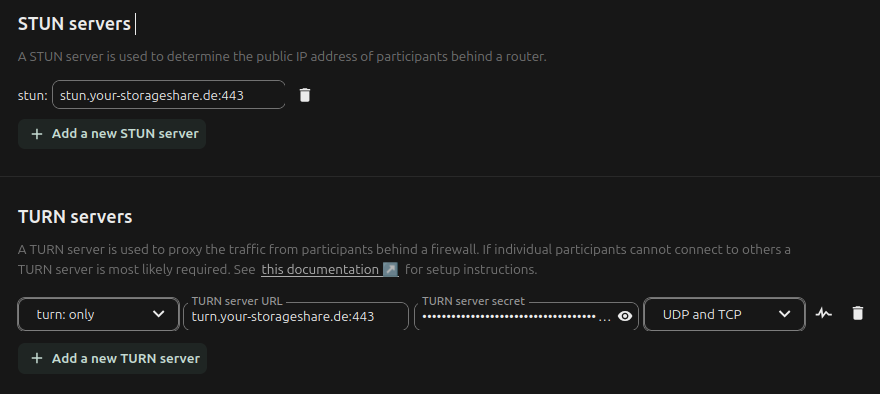
However I have discovered that Hetzner already provide preconfigured stun/turn server, so I need to care only about the signaling server
It SEEMS all working, the signaling server responds on curl and I got all greens on the NC Talk admin interface, but calls don’t work (they do work without the HPB server).
I am starting thinking that there is a conflict between the STUN/TURN server used in the docker image - that chatgpt tell me I can’t use as on my server I already have 443 port used - and the STUN/TURN server provided by Hetzner.
On the NC amin interface I have:
How should I set the Docker talk container (I am using ghcr.io/nextcloud-releases/aio-talk:latest) to tell it that for signaling server it doesn’t need to use the provided STUN/TURN server but use instead those provided by Hetzner ?
Currently I have :
cat /opt/nextcloud-talk-hpb/docker-compose.yml
services:
  talk-hpb:
    image: ghcr.io/nextcloud-releases/aio-talk:latest
    container_name: nextcloud-talk-hpb
    restart: unless-stopped
    environment:
      - NC_DOMAIN=nc.mydomain.fr
      # TALK_PORT is used by the container config; for HPB-only it can stay at 3478.
      - TALK_PORT=3478
      - TURN_SECRET=xxxx
      - SIGNALING_SECRET=yyyy
      - INTERNAL_SECRET=zzzzz
    ports:
      # host_port:container_port (container listens on 8081 for signaling)
      # 8090 is the port on the host (must be free), 8081 is the port that the container is using (doesn't matter if used by other container or the host)
      - "127.0.0.1:8090:8081"
cat /etc/apache2/sites-enabled/signal.mydomain.fr.conf
<IfModule mod_ssl.c>
<VirtualHost *:443>
    ServerName signal.mydomain.fr

    ProxyRequests Off
    ProxyPreserveHost On

    # WebSocket upgrade handling
    RewriteEngine On
    RewriteCond %{HTTP:Upgrade} =websocket [NC]
    RewriteRule /(.*)  ws://127.0.0.1:8090/$1  [P,L]

    # Forward everything to NC Talk AOI container
    ProxyPass        / http://127.0.0.1:8090/ retry=0
    ProxyPassReverse / http://127.0.0.1:8090/

    # Tell the app the original protocol/host
    RequestHeader set X-Forwarded-Proto "https"
    RequestHeader set X-Forwarded-Host  "signal.beta-lorraine.fr"

    SSLCertificateFile /etc/letsencrypt/live/signal.mydomain.fr/fullchain.pem
    SSLCertificateKeyFile /etc/letsencrypt/live/signal.mydomain.fr/privkey.pem
    Include /etc/letsencrypt/options-ssl-apache.conf
</VirtualHost>
</IfModule>
I would just rent a 11 euro VPS from hetnzer for the HPB.
The general purpose CCX13 with 2 dedicated cores and 8GB RAM is probably “good enough” for 25 to 50 concurrent viewers. Granted, I know nothing about your setup or requirements.
Unfortunately, I don’t think you’re going to be able to get this to work on port 80/443. Could be wrong, but my understanding is the HPB requires other ports.
Yes, after a lot of test that is.. it seems that the issue is with the media server embedded in the HPB container (Janus I think) that requires other ports.. I’ll likely go for the way you suggested (cheap VPS on Hetzner)…