Hello,
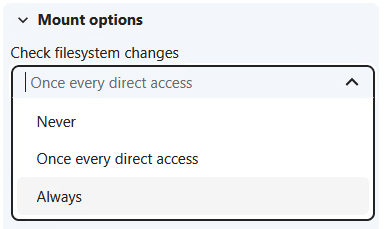
Starting with version 33 (I think), the graphic interface to add external storage has changed with respect to the screenshots in the documentation. But more important, there seems to be a new option to check filesystem changes.
There are now three options available:
- Never
- Once every direct access
- Always
All documentation I could find are always referring to Never and Once every direct access. Does anybody know how the Always option is working? If it matters, I am using the Local type of external storage.
Thanks a lot for your support!
Best regards,
Paul
The dropdown is a new UI for the existing per-mount option filesystem_check_changes, which has three values: 0 = Never, 1 = Once every direct access, 2 = Always. The meaning of the values is defined in the server source (IWatcher interface of the Files/Cache API): 1 checks the underlying filesystem once per request for each file, 2 checks on every access.
The practical difference between the two active modes is narrow. In the watcher implementation, “once per direct access” stats each path at most once per request - repeated access to the same path within that request reuses the result. “Always” re-checks the storage every time, even several times within one request. My read: Always buys a small correctness gain (changes happening mid-request are seen) at the cost of extra stat calls, so for most setups “once every direct access” is the sensible choice.
Two points from the admin manual (External Storage section, “Detecting changes made outside Nextcloud”) matter more than the choice between 1 and 2:
- The option only controls what the server does when a WebDAV PROPFIND reaches it. It starts no background polling and does not change how desktop or mobile clients behave.
- Clients rely on etag propagation, so changes made deep in the tree outside Nextcloud can still be missed.
If outside changes need to show up reliably, the manual recommends occ files_external:notify for SMB/CIFS, and for other backends a cron job with occ files_external:scan (mount ID via occ files_external:list). One caveat from the same page: rescans cannot reliably detect renames - a renamed entry looks like a delete plus a create, and shares, tags, comments and activity history of the old entry are lost. Renames should be done through Nextcloud itself.
Partly written with AI assistance.