Support intro
Sorry to hear you’re facing problems. 
The community help forum (help.nextcloud.com) is for home and non-enterprise users. Support is provided by other community members on a best effort / “as available” basis. All of those responding are volunteering their time to help you.
If you’re using Nextcloud in a business/critical setting, paid and SLA-based support services can be accessed via portal.nextcloud.com where Nextcloud engineers can help ensure your business keeps running smoothly.
Getting help
In order to help you as efficiently (and quickly!) as possible, please fill in as much of the below requested information as you can.
Before clicking submit: Please check if your query is already addressed via the following resources:
- Official documentation (searchable and regularly updated)
- How to topics and FAQs
- Forum search
(Utilizing these existing resources is typically faster. It also helps reduce the load on our generous volunteers while elevating the signal to noise ratio of the forums otherwise arising from the same queries being posted repeatedly).
- Nextcloud Server version (e.g., 29.x.x):
nextcloud 30.0.1.2| NextcloudPi version v1.55.3
- Operating system and version (e.g., Ubuntu 24.04):
-
Armbian-unofficial 24.8.2 Bookworm \l . 6.6.45-current-bcm2711 (aarch64)(debian)
-
- Web server and version (e.g, Apache 2.4.25):
Apache/2.4.65 (Debian)
- Reverse proxy and version _(e.g. nginx 1.27.2)
- not sure, and don’t know how to check, of if I’ve set it up yet.
- PHP version (e.g, 8.3):
8.3.12
- Is this the first time you’ve seen this error? (Yes / No):
- yes
- When did this problem seem to first start?
- fresh install
- Installation method (e.g. AlO, NCP, Bare Metal/Archive, etc.)
- nextcloudpi image
- Are you using CloudfIare, mod_security, or similar? (Yes / No)
- no
Summary of the issue you are facing:
history- I’ve tried a few tutorials for installing nextcloud on my pi, but could never get my sata doc to to allow me to write to it. I’d get these 2 errors “Unknown error during upload” and “Operation is blocked by access control”. I spent days troubleshooting permissions, many different instructions, and even tried some AIs out, no luck
Today- I tried nextcloudpi, everything seemed to work, but still couldn’t write to it. I tested my doc on my main pc, had to change the permissions, and I could write to it. Put it back into the pi, and could finally write to it, and could verify it on other devices.
the bug: in the files section, if I click on “External Storage”, then click on the folder for the drive, it returns:
“External mount error
There was an error with this external storage. Do you want to review this mount point config in the settings page?”
if I f5 refresh, it has no problem. If I go to the settings page, do nothing, and return to “External storage” it also works fine. If I access the drive through “All files” it works fine too.
This seems to be an old bug External storage broke - #4 by negimeister
Steps to replicate it (hint: details matter!):
-
in the web portal, in files
-
click “External storage”
-
click your folder (for me it’s crucial500)
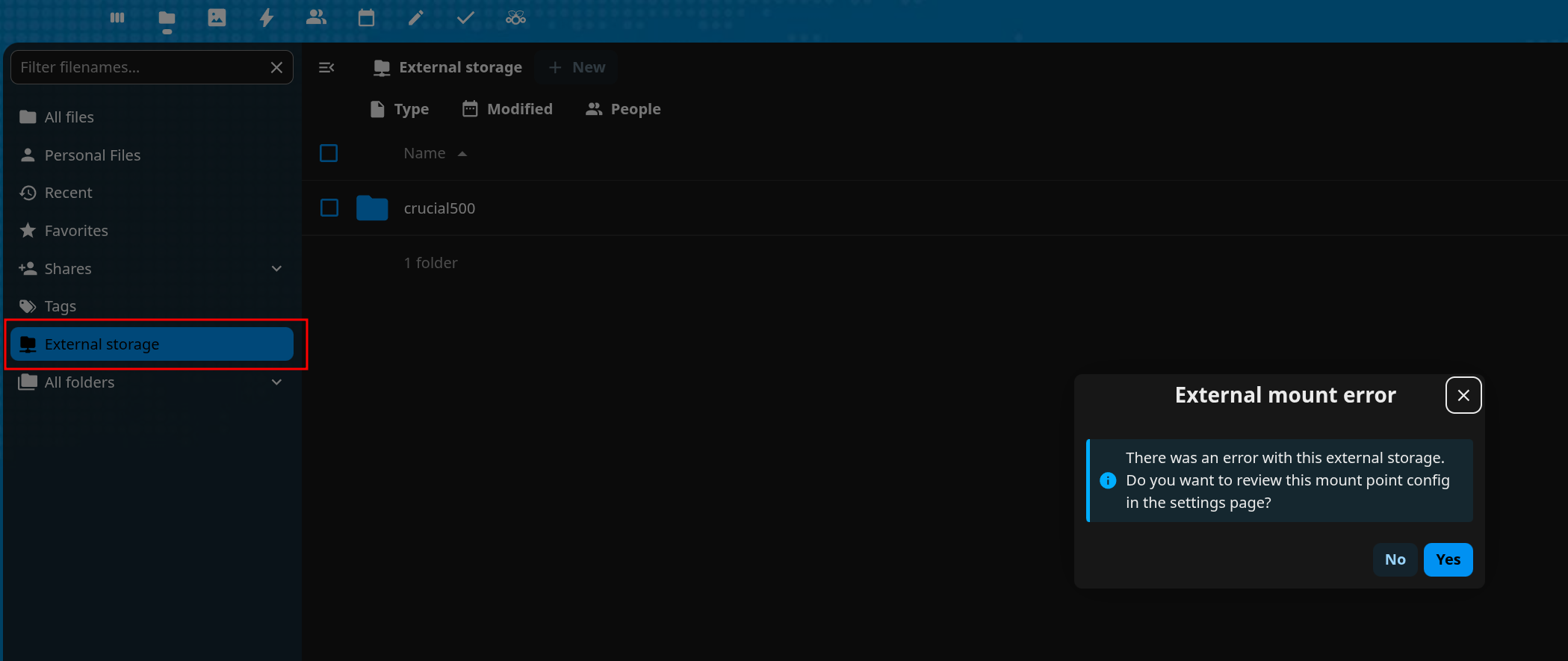
this also happens if you go “back” after successfully getting into the folder
Log entries
Nextcloud
{"reqId":"YV71VN7hc0F1NsfIW0J0",
  "level":3,
  "time":"2025-11-15T22:35:01+00:00",
  "remoteAddr":"",
  "user":"--",
  "app":"cron",
  "method":"",
  "url":"--",
  "message":"Failed to connect to the database: An exception occurred in the driver: SQLSTATE[HY000] [2002] No such file or directory",
  "userAgent":"--",
  "version":"30.0.1.2",
  "exception":{"Exception":"Doctrine\\DBAL\\Exception",
  "Message":"Failed to connect to the database: An exception occurred in the driver: SQLSTATE[HY000] [2002] No such file or directory",
  "Code":2002,
  "Trace":[{"file":"/var/www/nextcloud/3rdparty/doctrine/dbal/src/Connection.php",
  "line":453,
  "function":"connect",
  "class":"OC\\DB\\Connection",
  "type":"->"},
{"file":"/var/www/nextcloud/3rdparty/doctrine/dbal/src/Connection.php",
  "line":411,
  "function":"getDatabasePlatformVersion",
  "class":"Doctrine\\DBAL\\Connection",
  "type":"->"},
{"file":"/var/www/nextcloud/3rdparty/doctrine/dbal/src/Connection.php",
  "line":318,
  "function":"detectDatabasePlatform",
  "class":"Doctrine\\DBAL\\Connection",
  "type":"->"},
{"file":"/var/www/nextcloud/lib/private/DB/Connection.php",
  "line":899,
  "function":"getDatabasePlatform",
  "class":"Doctrine\\DBAL\\Connection",
  "type":"->"},
{"file":"/var/www/nextcloud/lib/private/DB/ConnectionAdapter.php",
  "line":235,
  "function":"getDatabaseProvider",
  "class":"OC\\DB\\Connection",
  "type":"->"},
{"file":"/var/www/nextcloud/lib/private/DB/QueryBuilder/QueryBuilder.php",
  "line":96,
  "function":"getDatabaseProvider",
  "class":"OC\\DB\\ConnectionAdapter",
  "type":"->"},
{"file":"/var/www/nextcloud/lib/private/AppConfig.php",
  "line":1211,
  "function":"expr",
  "class":"OC\\DB\\QueryBuilder\\QueryBuilder",
  "type":"->"},
{"file":"/var/www/nextcloud/lib/private/AppConfig.php",
  "line":237,
  "function":"loadConfig",
  "class":"OC\\AppConfig",
  "type":"->"},
{"file":"/var/www/nextcloud/lib/private/AppConfig.php",
  "line":1351,
  "function":"searchValues",
  "class":"OC\\AppConfig",
  "type":"->"},
{"file":"/var/www/nextcloud/lib/private/App/AppManager.php",
  "line":126,
  "function":"getValues",
  "class":"OC\\AppConfig",
  "type":"->"},
{"file":"/var/www/nextcloud/lib/private/App/AppManager.php",
  "line":147,
  "function":"getInstalledAppsValues",
  "class":"OC\\App\\AppManager",
  "type":"->"},
{"file":"/var/www/nextcloud/lib/private/legacy/OC_App.php",
  "line":191,
  "function":"getInstalledApps",
  "class":"OC\\App\\AppManager",
  "type":"->"},
{"file":"/var/www/nextcloud/lib/private/AppFramework/Bootstrap/Coordinator.php",
  "line":48,
  "function":"getEnabledApps",
  "class":"OC_App",
  "type":"::"},
{"file":"/var/www/nextcloud/lib/base.php",
  "line":657,
  "function":"runInitialRegistration",
  "class":"OC\\AppFramework\\Bootstrap\\Coordinator",
  "type":"->"},
{"file":"/var/www/nextcloud/lib/base.php",
  "line":1132,
  "function":"init",
  "class":"OC",
  "type":"::"},
{"file":"/var/www/nextcloud/cron.php",
  "line":24,
  "args":["/var/www/nextcloud/lib/base.php"],
  "function":"require_once"}],
  "File":"/var/www/nextcloud/lib/private/DB/Connection.php",
  "Line":233,
  "message":"Failed to connect to the database: An exception occurred in the driver: SQLSTATE[HY000] [2002] No such file or directory",
  "exception":[],
  "CustomMessage":"Failed to connect to the database: An exception occurred in the driver: SQLSTATE[HY000] [2002] No such file or directory"},
  "id":"691911e61784b"}
Web Browser
If the problem is related to the Web interface, open your browser inspector Console and Network tabs while refreshing (reloading) and reproducing the problem. Provide any relevant output/errors here that appear.
- I may be unskilled, but I don’t see anything in particular that I can point at
Web server / Reverse Proxy
The output of your Apache/nginx/system log in /var/log/____:
- when going as root to find files inside, I can’t find that directory. The error logs directly in Apache2 show nothing related to these issues (they are very short)
Configuration
Nextcloud
The output of your config.php file from /path/to/nextcloud:
$CONFIG = array (
  'passwordsalt' => '',
  'secret' => '',
  'trusted_domains' =>
  array (
    0 => 'localhost',
    7 => 'nextcloudpi',
    5 => 'nextcloudpi.local',
    8 => 'nextcloudpi.lan',
    3 => 'nextcloudpi',
    1 => '',
    14 => 'nextcloudpi',
    11 => '',
  ),
  'datadirectory' => '/media/USBdrive/ncdata/data',
  'dbtype' => 'mysql',
  'version' => '30.0.1.2',
  'overwrite.cli.url' => 'https://nextcloudpi/',
  'dbname' => 'nextcloud',
  'dbhost' => 'localhost',
  'dbport' => '',
  'dbtableprefix' => 'oc_',
  'mysql.utf8mb4' => true,
  'dbuser' => 'ncadmin',
  'dbpassword' => '',
  'installed' => true,
  'instanceid' => '',
  'memcache.local' => '\\OC\\Memcache\\Redis',
  'memcache.locking' => '\\OC\\Memcache\\Redis',
  'redis' =>
  array (
    'host' => '/var/run/redis/redis.sock',
    'port' => 0,
    'timeout' => 0.0,
    'password' => '',
  ),
  'tempdirectory' => '/media/USBdrive/ncdata/data/tmp',
  'mail_smtpmode' => 'sendmail',
  'mail_smtpauthtype' => 'LOGIN',
  'mail_from_address' => 'noreply',
  'mail_domain' => 'nextcloudpi.com',
  'preview_max_x' => '2048',
  'preview_max_y' => '2048',
  'jpeg_quality' => '60',
  'overwriteprotocol' => 'https',
  'maintenance' => false,
  'logfile' => '/media/USBdrive/ncdata/data/nextcloud.log',
  'trusted_proxies' =>
  array (
    11 => '127.0.0.1',
    12 => '::1',
    14 => '127.0.1.1',
  ),
  'loglevel' => '2',
  'log_type' => 'file',
);
Apps
The output of occ app:list (if possible).
-can’t find this