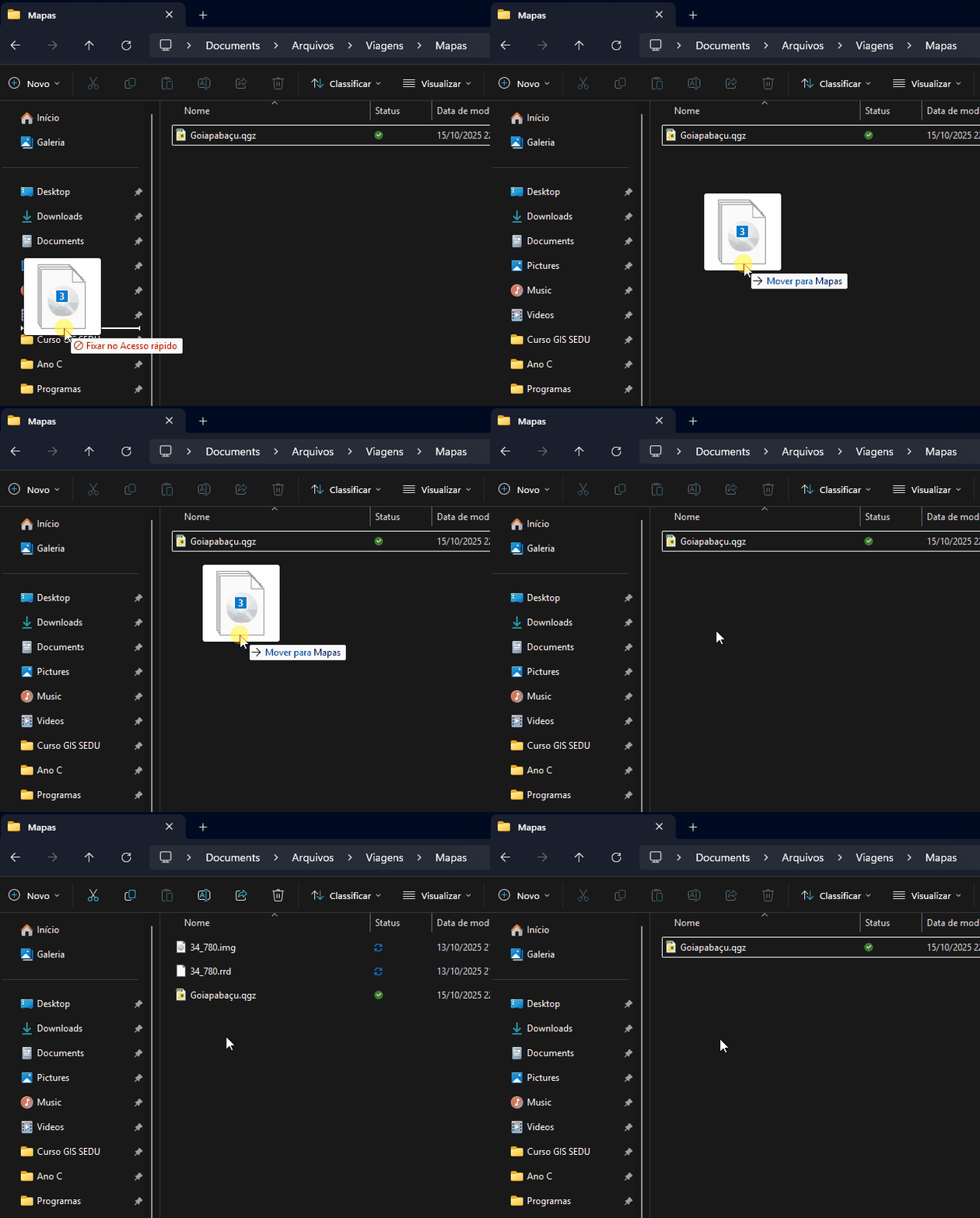
This usually happens when the Nextcloud desktop client gets out of sync with the server and mistakenly flags files as deleted or untracked. It’s often seen in version 4.0.1 when moving or renaming files locally. The good news is, it’s fixable with a few quick checks.
First, open your Nextcloud desktop client and click the tray icon → View sync activity. Check if those files are listed as “deleted remotely” or “not allowed.”
If they are, pause syncing right away to stop any more deletions. Then, log in to your Nextcloud web interface and go to the Deleted files section; you’ll probably find them there and can restore them easily.
After restoring, go to your Nextcloud client settings → General, and make sure “Ask confirmation before deleting files” is turned on, that prevents accidental removals like this in the future. It’s also a good idea to rename files that have special characters (like “ç” or “ã”) before syncing, since Windows and Nextcloud sometimes interpret these differently.
Finally, update the desktop client to the latest version (4.1 or higher). The update fixes a known bug that caused local file deletions when moving or renaming files while syncing. Once you’re updated and resynced, the issue should stop completely.
The files go to the Windows Recycle Bin immediately after being synced, but not to Nextcloud.
I tested it in other folders on the computer, such as the Desktop or Documents, copying different files but with the same extensions, and the same thing happens.
The latest client version available to me is 4.0.1.
There are no problems sending directly via browser.
Okay. It seems that when these files are moved (ctrl+x and ctrl+v) from an unsynchronized folder to a synchronized folder, they are deleted. If I just copy and paste, they synchronize normally.
I tried playing with other file formats, but the problem only occurs with these specific ones (.igw, .img and .rrd - rasters from a GIS software).
I uninstalled the previous version on the original computer and installed version 4.1.0 Alpha of the client.
Great testing, that really helps narrow it down. What you’re seeing makes sense: the issue seems to happen only when files are moved (cut + paste) into a synced folder, and only for specific extensions like .igw, .img, and .rrd. These formats are often large or use special file-locking mechanisms in GIS software, which the Nextcloud client may interpret as “file deleted” during the move operation.
Since you already tried version 4.1.0 Alpha, that’s actually good, it includes fixes for several Windows file event issues. I’d suggest keeping that version for now and monitoring whether the problem persists after a full resync.
If it persists, you can try one additional step >>
Open your Nextcloud client settings → Advanced, and enable “Log file sync errors to file”, then perform the same move action again. That will capture the exact sync event sequence. You can then share the log on the Nextcloud GitHub issue tracker, this looks like the kind of edge case the dev team would want to review.
For now, copying instead of moving is the safest workaround until the fix is included in a stable release.
I experienced similar things, now with pdf files. I think anyone can replicate it by downloading this file: https://www.aisc.org/globalassets/product-files-not-searched/publications/standards/a360-22w.pdf and then move it from desktop into any folders in the nextcloud sync. It only work once tho, after that, I can move the file into the folder. Copying will always work. Copying the file, then moving the copy will also work. This may be related to dates error/timing or something that confuse nextcloud client into acting as if the moved file is an already existing file, then it compares to the remote, then delete local file because it doesn’t exist in the remote.
I don’t think this is related to this “Files vanish….” problem as this occurs only from versiom 32, with only .xls-files only under __groupfolders (not the default NC data structure).
Did @Nedi checked already the logfiles on the server ánd the logfiles on the client to see exactly what happens? I think this is a starting point to dig.
I checked log files, local and remote recycle bin, server log files, client log files, each of them doesn’t log the event. The only trace of the event was in the toolbar sync list, it shows as “you add [this file]” but the icon only shows X symbol (no file symbol, just cross). This is the first time I got the error, from the specific files that I copied. Maybe @Mornsgrans can explain what file- and folder permissions that is relevant, that a wrong permission can do something like this?
I have client 4.0.2 and it has just picked random folder and files from my system and just moved them into the Mac trash (no pattern, but full folders and files from the same folder). When I open them in the trash it downloads them, then the sync kicks in after a few seconds and the file is gone. No trace, nothing it just vanishes. They can’t be found.
I have to admit, after using Owncloud / Nextcloud for more then 9 years. This is the worst Bug I have ever encountered. I think I will stop using nextcloud and move to a different service. The basic core functionallity is not working anymore: reliabel File Sync.
I don’t know what else mightbe deleted quietly in the background. I have some backups, but now it is even hard to tell what was delted, because there is no pattern.
I experience the same issue. Videos and Pictures folder contents are being deleted, immediately after restoring them. At least this seams to be the bug, I was looking for.
Client 4.0.4.20251215 (Win11)
You can give a thumbs up if you have the same problem, only add a comment if you have information to share. Make sure you are in the same situation (same OS, use of VFS yes/no, …).
If you can reliably reproduce an error, this can be very helpful for the developers.
Yes, this is very concerning. It is not clear, if that is really something general for everybody, or there are just certain conditions that trigger this problem. In case of a general problem, why there are no tests in place to check for such problems.
I’ve the same problem with 4.0.6 (and earlier versions) but with PDFs/any other files. Tried to find “Ask confirmation before deleting files” but this option does not exist. Also, I do not find the Advanced settings to enable “Log file sync errors to file”. Do these options exist in the Windows Desktop Client?
After upgrading to 5.0.0 nightly (windows-20260202.msi) the problem still persists and the before mentioned settings are still not visible.
check if that really matches your situation, e.g. do you have this since client version 3.10? Can you reproduce the same steps as in the original post, …?
If not, it might be something different that should be addressed in a different issue. It is not sure why not everybody seems to be affected, so the issue templates are important, used apps, use of external storage, etc.