file can't be located issue with android client.

Support intro

Sorry to hear you’re facing problems. :slightly_frowning_face:

The community help forum (help.nextcloud.com) is for home and non-enterprise users. Support is provided by other community members on a best effort / “as available” basis. All of those responding are volunteering their time to help you.

If you’re using Nextcloud in a business/critical setting, paid and SLA-based support services can be accessed via portal.nextcloud.com where Nextcloud engineers can help ensure your business keeps running smoothly.

Getting help

In order to help you as efficiently (and quickly!) as possible, please fill in as much of the below requested information as you can.

Before clicking submit: Please check if your query is already addressed via the following resources:

(Utilizing these existing resources is typically faster. It also helps reduce the load on our generous volunteers while elevating the signal to noise ratio of the forums otherwise arising from the same queries being posted repeatedly).

Some or all of the below information will be requested if it isn’t supplied; for fastest response please provide as much as you can. :heart:

The Basics

  • Nextcloud Server version (e.g., 29.x.x):
  • Operating system and version (e.g., Ubuntu 24.04):
    • Unraid 7.2.0/Debian 13/Android 15
  • Web server and version (e.g, Apache 2.4.25):
    • MySQl 8.4.4
  • Reverse proxy and version _(e.g. nginx 1.27.2)
  • Is this the first time you’ve seen this error? (Yes / No):
    • yes
  • When did this problem seem to first start?
    • just when i was setting up the backup folder of my new phone
  • Installation method (e.g. AlO, NCP, Bare Metal/Archive, etc.)
    • docker on unraid
  • Are you using CloudfIare, mod_security, or similar? (Yes / No)
    • no

Summary of the issue you are facing:

I’m trying to sync my photos, screenshot and documents folder from my new brand Nothing Phone 3a pro to manage it with my Debian 13. I can see the folders, i can sync the files from the phone but when i trying to manage on my PC the didn’t sync and says:
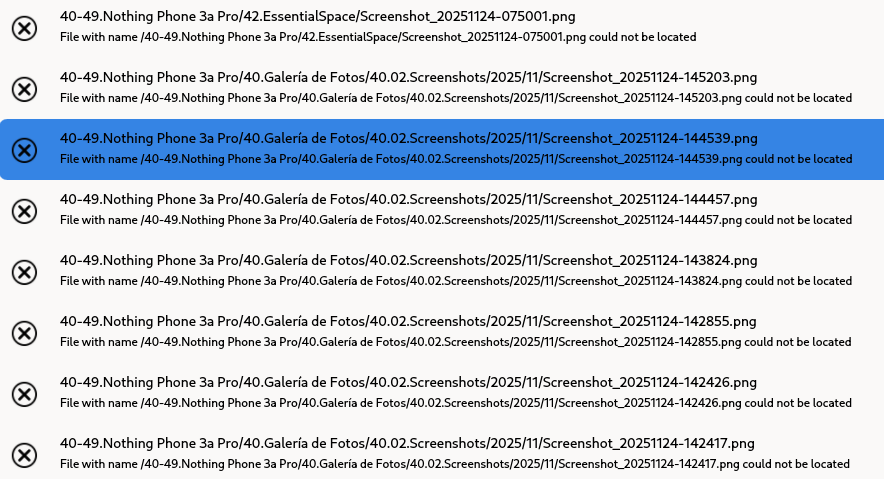
I have reconstruct the nexcloud container from scratch, i’m using the official container. I have reinstall Debian, and the android app. I have manage permissions and i’m facing this all the time. I have notice it sync the first time i change the folder name, but just this time after i have the same issue.

The files seems to be on the server, at least i can see them. But, when i try to download the server says: the file is not on the server and it disappears.

Log entries

I don’t have any log of this. I just have this advertising on the desktop client. I can paste the logs of the entire server if needed but i don’t see the point, since there are no info on them.

Configuration

Nextcloud

The output of occ config:list system or similar is best, but, if not possible, the contents of your config.php file from /path/to/nextcloud is fine (make sure to remove any identifiable information!):

<?php
$CONFIG = array (
  'htaccess.RewriteBase' => '/',
  'memcache.local' => '\\OC\\Memcache\\APCu',
  'apps_paths' => 
  array (
    0 => 
    array (
      'path' => '/var/www/html/apps',
      'url' => '/apps',
      'writable' => false,
    ),
    1 => 
    array (
      'path' => '/var/www/html/custom_apps',
      'url' => '/custom_apps',
      'writable' => true,
    ),
  ),
  'upgrade.disable-web' => true,
  'instanceid' => 'xxxxxxx',
  'passwordsalt' => 'xxxxxx',
  'secret' => 'xxxxxxxxx',
  'trusted_domains' => 
  array (
    0 => 'xxxxxxxxxxxxxxxxx',
    1 => 'xxxxxxxxxxxxxxxxxxxxxxxxxxx',
  ),
  'datadirectory' => '/var/www/html/data',
  'dbtype' => 'mysql',
  'version' => '32.0.2.2',
  'overwrite.cli.url' => 'hxxxxxxxxxxxxx',
  'overwritehost' => 'nxxxxxxxxxxxxxx',
  'overwriteprotocol' => 'https',
  'maintenance_window_start' => 1,
  'maintenance_window_end' => 5,
  'dbname' => 'nextcloud',
  'dbhost' => '1xx.1xx.0.xxx:3xxx',
  'dbtableprefix' => 'oc_',
  'mysql.utf8mb4' => true,
  'dbuser' => 'xxxxxxx',
  'dbpassword' => 'xxxxxxxxxx',
  'installed' => true,
  'maintenance' => false,
  'memcache.locking' => '\\OC\\Memcache\\Redis',
  'redis' => 
  array (
    'host' => '192.168.0.231',
    'port' => 6379,
  ),
  'default_phone_region' => 'ES',
  'bulkupload.enabled' => false,
  'mail_from_address' => 'xxxxxxxxxxxxxxxx',
  'mail_smtpmode' => 'smtp',
  'mail_sendmailmode' => 'smtp',
  'mail_domain' => 'xxxxxxxxxxxxxxxxxx',
  'mail_smtphost' => 'xxxxxxxxxxxxxxxxxxxxxxx',
  'mail_smtpport' => 'xxxxxxxxx',
  'mail_smtpauth' => true,
  'mail_smtpname' => 'xxxxxxxxxxxxxxxxxxx',
  'mail_smtppassword' => 'xxxxxxxxxxxxxxxxxxxxx',
  'trusted_proxies' => 
  array (
    0 => '1xx.xxxx.xxxx..xxx',
  ),
  'forwarded_for_headers' => 
  array (
    0 => 'HTTP_X_FORWARDED_FOR',
  ),
  'loglevel' => 2,
);

Apps

The output of occ app:list (if possible).

I just have active documents, notes, calendar and photos. It is a brand new installation.

thanks! I hope this can help me.

thanks to all in advance.

Sync from your phone how? Can you be more specific?

Also, what other scenarios have you tried for comparison? For example, can you create a file in the Web UI and successfully see it (and open it) in your Desktop client?

Hi! And thank you for answer my question.

I have been doing many tests and now I have given up. I don’t understand what is happening. I will try to be as specific as I can. I have an Unraid server, with the official image perfectly well configured and with no further use, its brand new. I have a Nothing Phone 3a Pro with Android 15 and a Debian PC as client, with more than enough power and capacity. Everything is perfectly up to date and the configurations are well done. I have put a lot of effort on that.

I installed Nextcloud on my server and after some tuning, as usual, everything works correctly. I have my data on my server and the Debian client can connect, and sync, without problems. Even Obsidian does a live update. Everything is fine. Also from the mobile client, once I install it, no problem. I can manage folder and files from the android nextcloud client.

However, when on my mobile client, I configure the folder storage/emulated/0/DCIM/Camera (my camera’s photo folder) to automatically upload to, let’s say, 40-49.Nothing Phone/40.Photo Gallery/40.01.Camera Photos, then it uploads the photo, it is on the server and can be seen, but it does not sync; the desktop client tells me that the file cannot be located and when, the android client tells me that there is an error, and when i try to download it from the server Nextcloud says that it is not there and then it disappears. If, by any chance, I change the folder name to any other, nevermind, then it syncs, but it only happens once. After, it behaves exactly the same and if I don’t update the path, it also does not work, obviously.

This is quite specific and this behavior is strange. I have run this tests because i’m not a sysadmin specilist, so my knoledge is quite limitated. So I have not found the solution and although it bothers me, Google does the fix for me. But I think it is a shame not to be able to manage my own files.

My bet is there are some weird interaction or even a possible malfunction on the android client. I don’t know.

Anyways, thank you. I hope i can bring some light to this.

What about the files themselves? - Did you check your file system on OS-level, whether the uploaded pictures still are in the folder (but not visible in Browser and clients)?
Did you check the trash folder, whether the files had been removed. In the OS file system you will find removed files in subfolder username/files_trashbin.

Hi!

Thanks. Yes, I had. This is not the issue. The folder structure (year/month) is present and synced. Is the file the issue.

The path is: I made an photo with my phone that is stored on camera folder → it is supposed to be uploaded → the server show it on its own structure → the Debian Client says (as show my shot) the file can’t be located. In fact. I think it has not be, neither, on the server and it is just a link.

I had check if they’re are in the trash. But is not the case. The files are on the file structure in the phone as expected.

Thanks for answering and thinking with me.

Are you checking on the underlying filesystem (at the OS level) on the server to verify existence?

This only impacts folders uploaded to the server using the Android client’s Auto upload/Instant upload functionality, correct?

Do any log entries appear (during the time period the files seem to disappear) on the server when this happens?

For completeness please:

  • post your merged config (output of occ config:list system not just config.php)
  • output of occ app:list
  • Your Docker Compose file

Hi everyone,

As asked, i paste all the outputs.
In response to your question, yes, that is correct. The files are created on my phone and appear to be uploaded to the server (I can see them listed and even open them), but if I try to download them manually, they vanish with an error (that is not present in the logs) of the server saying the file isn’t here.

They also do not synchronize with my desktop OS. The folder structure from the phone is replicated, but the photos are missing. If I rename the folder, the photo syncs, but only for that specific instance.

As requested, here is my system information and configuration.

1. Output of occ config:list system

JSON

{
    "system": {
        "htaccess.RewriteBase": "\/",
        "memcache.local": "\\OC\\Memcache\\APCu",
        "apps_paths": [
            {
                "path": "\/var\/www\/html\/apps",
                "url": "\/apps",
                "writable": false
            },
            {
                "path": "\/var\/www\/html\/custom_apps",
                "url": "\/custom_apps",
                "writable": true
            }
        ],
        "upgrade.disable-web": true,
        "passwordsalt": "***REMOVED SENSITIVE VALUE***",
        "secret": "***REMOVED SENSITIVE VALUE***",
        "trusted_domains": [
            "nextcloud.example.com",
            "www.nextcloud.example.com"
        ],
        "datadirectory": "***REMOVED SENSITIVE VALUE***",
        "dbtype": "mysql",
        "version": "32.0.2.2",
        "overwrite.cli.url": "https:\/\/nextcloud.example.com",
        "overwritehost": "nextcloud.example.com",
        "overwriteprotocol": "https",
        "maintenance_window_start": 2,
        "dbname": "***REMOVED SENSITIVE VALUE***",
        "dbhost": "***REMOVED SENSITIVE VALUE***",
        "dbport": "",
        "dbtableprefix": "oc_",
        "mysql.utf8mb4": true,
        "dbuser": "***REMOVED SENSITIVE VALUE***",
        "dbpassword": "***REMOVED SENSITIVE VALUE***",
        "installed": true,
        "default_phone_region": "ES",
        "bulkupload.enabled": false,
        "maintenance": false,
        "mail_from_address": "***REMOVED SENSITIVE VALUE***",
        "mail_smtpmode": "smtp",
        "mail_sendmailmode": "smtp",
        "mail_domain": "***REMOVED SENSITIVE VALUE***",
        "mail_smtphost": "***REMOVED SENSITIVE VALUE***",
        "mail_smtpport": "587",
        "mail_smtpauth": true,
        "mail_smtpname": "***REMOVED SENSITIVE VALUE***",
        "mail_smtppassword": "***REMOVED SENSITIVE VALUE***",
        "app_install_overwrite": [],
        "loglevel": 0,
        "instanceid": "***REMOVED SENSITIVE VALUE***"
    }
}

2. Output of occ app:list

Plaintext

Enabled:
  - activity: 5.0.0-dev.0
  - bruteforcesettings: 5.0.0-dev.0
  - calendar: 6.1.0
  - circles: 32.0.0
  - cloud_federation_api: 1.16.0
  - comments: 1.22.0
  - contactsinteraction: 1.13.1
  - dashboard: 7.12.0
  - dav: 1.34.2
  - federatedfilesharing: 1.22.0
  - federation: 1.22.0
  - files: 2.4.0
  - files_downloadlimit: 5.0.0-dev.0
  - files_pdfviewer: 5.0.0-dev.0
  - files_reminders: 1.5.0
  - files_sharing: 1.24.1
  - files_trashbin: 1.22.0
  - files_versions: 1.25.0
  - firstrunwizard: 5.0.0-dev.0
  - logreader: 5.0.0-dev.0
  - lookup_server_connector: 1.20.0
  - nextcloud_announcements: 4.0.0-dev.0
  - notes: 4.12.4
  - notifications: 5.0.0-dev.0
  - oauth2: 1.20.0
  - password_policy: 4.0.0-dev.0
  - privacy: 4.0.0-dev.0
  - profile: 1.1.0
  - provisioning_api: 1.22.0
  - recommendations: 5.0.0-dev.0
  - related_resources: 3.0.0-dev.0
  - serverinfo: 4.0.0-dev.0
  - settings: 1.15.1
  - sharebymail: 1.22.0
  - support: 4.0.0-dev.0
  - survey_client: 4.0.0-dev.0
  - systemtags: 1.22.0
  - text: 6.0.1
  - theming: 2.7.0
  - twofactor_backupcodes: 1.21.0
  - updatenotification: 1.22.0
  - user_status: 1.12.0
  - viewer: 5.0.0-dev.0
  - weather_status: 1.12.0
  - webhook_listeners: 1.3.0
  - workflowengine: 2.14.0
Disabled:
  - admin_audit: 1.22.0
  - app_api: 32.0.0 (installed 32.0.0)
  - encryption: 2.20.0
  - files_external: 1.24.0
  - photos: 5.0.0-dev.1 (installed 5.0.0-dev.1)
  - suspicious_login: 10.0.0-dev.0
  - twofactor_nextcloud_notification: 6.0.0-dev.0
  - twofactor_totp: 14.0.0
  - user_ldap: 1.23.0

3. Docker Compose file (generated from unRAID container)

YAML

version: "3.6"
services:
  nextcloud:
    command:
      - "apache2-foreground"
    container_name: "nextcloud"
    entrypoint:
      - "/entrypoint.sh"
    environment:
      - "MYSQL_HOST=[DB_HOST]"
      - "MYSQL_PASSWORD=[REDACTED]"
      - "MYSQL_DATABASE=[REDACTED]"
      - "MYSQL_USER=[DB_USER]"
      - "PHP_UPLOAD_LIMIT=0"
      - "NEXTCLOUD_ADMIN_USER=[ADMIN_USER]"
      - "TZ=Europe/Paris"
      - "HOST_OS=Unraid"
      - "HOST_HOSTNAME=[HOSTNAME]"
      - "HOST_CONTAINERNAME=nextcloud"
      - "NEXTCLOUD_ADMIN_PASSWORD=[REDACTED]"
      - "PATH=/usr/local/sbin:/usr/local/bin:/usr/sbin:/usr/bin:/sbin:/bin"
      - "PHPIZE_DEPS=autoconf \t\tdpkg-dev \t\tfile \t\tg++ \t\tgcc \t\tlibc-dev \t\tmake \t\tpkg-config\
        \ \t\tre2c"
      - "PHP_INI_DIR=/usr/local/etc/php"
      - "APACHE_CONFDIR=/etc/apache2"
      - "APACHE_ENVVARS=/etc/apache2/envvars"
      - "PHP_CFLAGS=-fstack-protector-strong -fpic -fpie -O2 -D_LARGEFILE_SOURCE -D_FILE_OFFSET_BITS=64"
      - "PHP_CPPFLAGS=-fstack-protector-strong -fpic -fpie -O2 -D_LARGEFILE_SOURCE -D_FILE_OFFSET_BITS=64"
      - "PHP_LDFLAGS=-Wl,-O1 -pie"
      - "PHP_VERSION=8.3.28"
      - "PHP_MEMORY_LIMIT=512M"
      - "PHP_OPCACHE_MEMORY_CONSUMPTION=128"
      - "APACHE_BODY_LIMIT=1073741824"
      - "NEXTCLOUD_VERSION=32.0.2"
    hostname: "nextcloud-container"
    image: "nextcloud:latest"
    ipc: "private"
    logging:
      driver: "json-file"
      options:
        max-file: "1"
        max-size: "50m"
    network_mode: "bridge"
    ports:
      - "8282:80/tcp"
    volumes:
      - "/mnt/user/appdata/nextcloud/custom-apps:/var/www/html/custom_apps"
      - "/mnt/user/appdata/nextcloud/nextcloud-config:/var/www/html/config"
      - "/mnt/user/appdata/nextcloud/nextcloud-data:/var/www/html/data"
      # Note: The volume below appears to be an internal docker volume managed by unRAID/Docker
      - "d24cc35270c6395bb3e28f474ba6632213b059f7189d0b201409ef6871c6eaeb:/var/www/html"
    working_dir: "/var/www/html"

volumes:
  d24cc35270c6395bb3e28f474ba6632213b059f7189d0b201409ef6871c6eaeb:
    external: true

Thanks in advance for your help!

This topic was automatically closed 90 days after the last reply. New replies are no longer allowed.