Please note: I know about the potential security issues of Imagick, but my NC instance is not accessible from the internet. Please refrain from suggesting that I shouldn’t use Imagick. Thank you very much!
Nextcloud Server version (e.g., 29.x.x): 34.0.4
Operating system and version: NextcloudPi v1.58.0
Web server and version (e.g, Apache 2.4.25): Apache/2.4.68 (Debian)
PHP version (e.g, 8.3): PHP 8.4.25
Is this the first time you’ve seen this error? No
When did this problem seem to first start? Since the start of the NC instance
Installation method: NextcloudPi-Image
Are you using CloudfIare, mod_security, or similar? No
Summary of the issue: Ever since the start of the NC instance I see the error »PHP Imagick module | The PHP module “imagick” is not enabled although the theming app is. For favicon generation to work correctly, you need to install and enable this module.« Because I use the App Memories, which for certain functionalities requires Imagick, I finally would like to use Imagick.
So I installed Imagick and Imagemagick by the following commands (found commands after extensive online search):
sudo apt-get install imagemagick imagemagick-6-doc imagemagick-7-doc
sudo apt install php8.4-imagick libmagickcore-dev libmagickwand-dev -y
Because this didn’t make the error in the administrator overview go away, I uninstalled and purged ImageMagick and PHP-Imagick:
sudo apt remove imagemagick
sudo apt remove php-imagick
Then install them again using:
sudo apt install php-imagick imagemagick
I checked if the Imagick module was enabled - it indeed is:
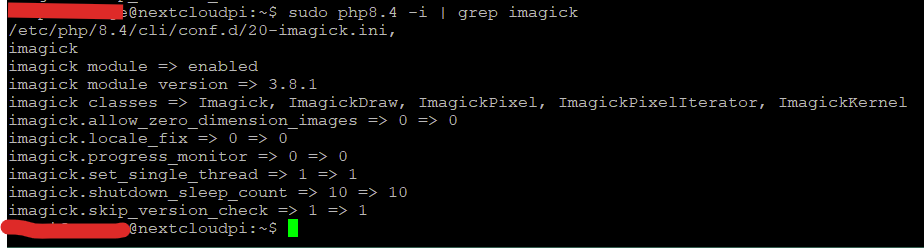
But the error did not go away.
Then I reloaded Apache2. But the error did not go away.
Then I rebooted the Raspberry Pi. But the error did not go away.
The Memories app also says, the Imagick module was not available.
I’m at my wits’ end. I would appreciate, if someone could help me with this matter. Thanks in advance!