Hi, thanks for the reply.
What are the hardware specs of your server?
5 Cores, 10 Threads Intel Xeon, 10 GB RAM, 100 GB On-Board SSD Drive.
VPS server (so, yes not bare metal) on LXD
You mentioned using the Mac desktop client — what version of macOS and Nextcloud client are you using?
Up to date (Mac actualizes these automatically whenever updates are available). Although, it gives me error when trying to fetch updates right now!
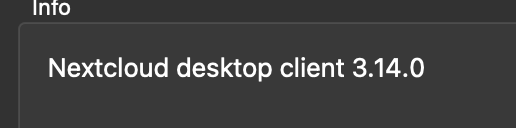
This is what I have installed.
Sleep is not the issue, I am actively working in the machine while that happens
Do you have access to any logs from the server side?
Tons of these:
Mar 24 13:54:11 inubes.app udisksd[3580446]: Error statting none: No such file or directory
Some of these:
Mar 24 13:53:11 inubes.app sshd[4122064]: Connection reset by authenticating user admin 92.255.85.107 port 53068 [preauth]
When upload starts, I get these additionally:
Mar 24 14:00:09 inubes.app systemd[1]: run-docker-runtime\x2drunc-moby-9b92a5cf568d95a36b4bd438c849cd2bc8389e11c2d701eb84b49df792b3eba3-runc.j6PC1B.mount: Deactivated successfully.
░░ Subject: Unit succeeded
░░ Defined-By: systemd
░░ Support: http://www.ubuntu.com/support
░░
░░ The unit run-docker-runtime\x2drunc-moby-9b92a5cf568d95a36b4bd438c849cd2bc8389e11c2d701eb84b49df792b3eba3-runc.j6PC1B.mount has successfully entered the 'dead' state.
- Fine-tuning PHP upload limits inside AIO (via admin panel)
Where do I do that? I do not appear to have such setting in the admin. I found this I can't find where is the upload max file size on nextcloud - #3 by Horia_Costache, just want to confirm that is what I have to do? (So, as constant, not admin setting?)
Also, I already have Upload max size: 16 GB, that should be enough for a 3gb file?
As for NGINX proxy, since this is AIO, I do not have anything else but AIO handling everything. (used the convenience script Run the command below in order to start the container on Linux and without a web server or reverse proxy (like Apache, Nginx, Caddy, Cloudflare Tunnel and else) already in place:)