Encrypted metadata setup error!

Some or all of the below information will be requested if it isn’t supplied; for fastest response please provide as much as you can
. :heart:

* Nextcloud Server version:

  • `Nextcloud 33.0.0`
    * Operating system and version:
  • `#1 SMP PREEMPT Debian 1:6.12.62-1+rpt1~bookworm (2026-01-19)`
    * Web server and version:
  • `Server version: Apache/2.4.66 (Debian)`
    * Reverse proxy and version:
  • `nginx version: openresty/1.27.1.2`
    * PHP version:
  • `PHP 8.4.18 (cli) (built: Feb 24 2026 19:12:53) (NTS)`
    * Is this the first time you’ve seen this error? (Yes / No):
  • `yes`
    * When did this problem seem to first start?
  • `prob direct after installation`
    * Installation method _(e.g. AlO, NCP, Bare Metal/Archive, etc.)_
  • `OMV Container`
    * Are you using CloudfIare, mod_security, or similar? _(Yes / No)_
  • `nope`

Configuration

Nextcloud

```
{
“system”: {
“instanceid”: “***REMOVED SENSITIVE VALUE***”,
“version”: “33.0.0.16”,
“loglevel”: 3,
“log_rotate_size”: 262144,
“maintenance”: false,
“maintenance_window_start”: 3,
“default_locale”: “DE_CH”,
“default_phone_region”: “CH”,
“datadirectory”: “***REMOVED SENSITIVE VALUE***”,
“memcache.local”: “\\OC\\Memcache\\APCu”,
“memcache.distributed”: “\\OC\\Memcache\\Redis”,
“memcache.locking”: “\\OC\\Memcache\\Redis”,
“redis”: {
“host”: “***REMOVED SENSITIVE VALUE***”,
“password”: “***REMOVED SENSITIVE VALUE***”,
“port”: 6379
},
“upgrade.disable-web”: true,
“passwordsalt”: “***REMOVED SENSITIVE VALUE***”,
“secret”: “***REMOVED SENSITIVE VALUE***”,
“dbtype”: “mysql”,
“mysql.utf8mb4”: true,
“dbhost”: “***REMOVED SENSITIVE VALUE***”,
“dbport”: “”,
“dbuser”: “***REMOVED SENSITIVE VALUE***”,
“dbname”: “***REMOVED SENSITIVE VALUE***”,
“dbpassword”: “***REMOVED SENSITIVE VALUE***”,
“dbtableprefix”: “oc_”,
“htaccess.RewriteBase”: “\/”,
“trusted_domains”: [
“srv-nas-pi.kingma:8080”,
“office.kingma.ch”,
“office.king.ma”
],
“overwrite.cli.url”: “https:\/\/office.kingma.ch”,
“overwriteprotocol”: “https”,
“apps_paths”: [
{
“path”: “\/var\/www\/html\/apps”,
“url”: “\/apps”,
“writable”: false
},
{
“path”: “\/var\/www\/html\/custom_apps”,
“url”: “\/custom_apps”,
“writable”: true
}
],
“mail_smtpmode”: “smtp”,
“mail_sendmailmode”: “smtp”,
“mail_from_address”: “***REMOVED SENSITIVE VALUE***”,
“mail_domain”: “***REMOVED SENSITIVE VALUE***”,
“mail_smtphost”: “***REMOVED SENSITIVE VALUE***”,
“mail_smtpport”: “465”,
“mail_smpttimeout”: 30,
“installed”: true,
“mail_smtpauth”: true,
“mail_smtpname”: “***REMOVED SENSITIVE VALUE***”,
“mail_smtppassword”: “***REMOVED SENSITIVE VALUE***”,
“mail_smtpsecure”: “ssl”,
“app_install_overwrite”: []
}
}
```

Apps

Enabled:

  • activity: 6.0.0-dev.0
  • admin_audit: 1.23.0
  • bookmarks: 16.1.3
  • brewmemo: 0.6.0
  • bruteforcesettings: 6.0.0-dev.0
  • calendar: 6.2.1
  • circles: 33.0.0
  • cloud_federation_api: 1.17.0
  • comments: 1.23.0
  • contacts: 8.4.0
  • contactsinteraction: 1.14.1
  • cookbook: 0.11.6
  • dashboard: 7.13.0
  • dav: 1.36.0
  • encryption: 2.21.0
  • end_to_end_encryption: 2.0.0
  • federatedfilesharing: 1.23.0
  • federation: 1.23.0
  • files: 2.5.0
  • files_downloadlimit: 5.1.0-dev.0
  • files_external: 1.25.1
  • files_pdfviewer: 6.0.0-dev.0
  • files_reminders: 1.6.0
  • files_sharing: 1.25.2
  • files_trashbin: 1.23.0
  • files_versions: 1.26.0
  • firstrunwizard: 6.0.0-dev.0
  • fulltextsearch: 33.0.0
  • groupfolders: 21.0.6
  • logreader: 6.0.0
  • lookup_server_connector: 1.21.0
  • nextcloud_announcements: 5.0.0
  • notes: 4.13.0
  • notifications: 6.0.0
  • oauth2: 1.21.0
  • onlyoffice: 10.0.0
  • password_policy: 5.0.0-dev.0
  • photos: 6.0.0-dev.0
  • privacy: 5.0.0-dev.0
  • profile: 1.2.0
  • provisioning_api: 1.23.0
  • recommendations: 6.0.0-dev.0
  • related_resources: 4.0.0-dev.0
  • richdocuments: 10.1.0
  • serverinfo: 5.0.0-dev.0
  • settings: 1.16.0
  • sharebymail: 1.23.0
  • support: 5.0.0
  • survey_client: 5.0.0-dev.0
  • suspicious_login: 11.0.0-dev.0
  • systemtags: 1.23.0
  • text: 7.0.0-dev.3
  • theming: 2.8.0
  • twofactor_backupcodes: 1.22.0
  • twofactor_nextcloud_notification: 7.0.0
  • twofactor_totp: 15.0.0-dev.0
  • updatenotification: 1.23.0
  • user_status: 1.13.0
  • viewer: 6.0.0-dev.0
  • weather_status: 1.13.0
  • webhook_listeners: 1.5.0
  • workflowengine: 2.15.0
    Disabled:
  • app_api: 33.0.0 (installed 32.0.0)
  • camerarawpreviews: 0.8.8 (installed 0.8.8)
  • documentserver_community: 0.2.1 (installed 0.2.1)
  • keeweb: 0.6.22 (installed 0.6.22)
  • user_ldap: 1.24.0 (installed 1.22.0)

Summary of the issue you are facing:
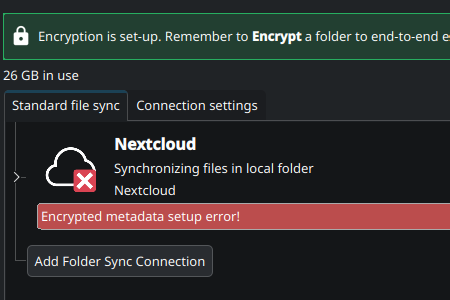
I’ve created a debug archive but I cannot upload archives here.

EDIT: On the WebGUI the folder can no long be opened, copied or deleted.

Steps to replicate it (hint: details matter!):

  1. Setup encryption on a folder
  2. Install Nextcloud Desktop client on a new Fedura workstation
  3. Enter encryption passphrase

Log entries

Nextcloud

Please provide the log entries from your Nextcloud log that are generated during the time of problem (via the *Copy raw* option fro
m *Administration settings->Logging* screen or from your `nextcloud.log` located in your data directory). Feel free to use a pasteb
in/gist service if necessary.
```
There are no errors in Adminstration settings → loggingg
```

same happens on windows & mac with the latest nextcloud:latest docker update here

e2ee plugin shows its up to date, no obvious errors logged in the gui…

ok. I stopped putting my trust in e2ee for the time being. I cannot have trusted files getting inaccesible. Will continue using cryptomator. that seems to work reliably. Luckily I had just stuff copied of from Cryptomator to the nextcloud e2ee folder.

Btw the only way to remove the e2ee folder is to go (ssh) to the server and remove the one from data/<user>/files/<enctrypted folder> . Something is serious borked.

Same error here (Nextcloud 33.0.0); recently installed via docker (latest).
I am interested in a working and stable solution.
Is there a fix already ongoing?

Hi folks,I investigated further in this topic.
The server never sees the request to store the encrypted file.
Instead the client seems to have an “Incorrect version -1” and a resulting “Could not parse/create metadataKey!” (See also the following client log).

Client: Nextcloud Desktop-Client Version 4.0.7 (Windows); Update channel: stable

Best regards
bonnie

2026-03-17 21:10:17:852 [ info nextcloud.sync.accessmanager C:\Users\User\AppData\Local\Temp\windows-37833\client-building\desktop\src\libsync\accessmanager.cpp:72 ]: 2 “” “https://nextcloud.domain.de/ocs/v2.php/apps/end_to_end_encryption/api/v2/meta-data/313?format=json” has X-Request-ID “7b3a3379-44de-4474-880f-cf24c427e7bd”
2026-03-17 21:10:17:852 [ info nextcloud.sync.networkjob C:\Users\User\AppData\Local\Temp\windows-37833\client-building\desktop\src\libsync\abstractnetworkjob.cpp:382 ]: OCC::GetMetadataApiJob created for “https://nextcloud.domain.de” + “ocs/v2.php/apps/end_to_end_encryption/api/v2/meta-data/313” “”
2026-03-17 21:10:17:918 [ info nextcloud.sync.credentials.webflow C:\Users\User\AppData\Local\Temp\windows-37833\client-building\desktop\src\gui\creds\webflowcredentials.cpp:411 ]: request finished QUrl(“https://nextcloud.domain.de/ocs/v2.php/apps/end_to_end_encryption/api/v2/meta-data/313?format=json”) with request id “7b3a3379-44de-4474-880f-cf24c427e7bd”2026-03-17 21:10:17:918 [ warning nextcloud.sync.clientsideencryption.metadata C:\Users\User\AppData\Local\Temp\windows-37833\client-building\desktop\src\libsync\foldermetadata.cpp:118 ]: Could not setup metadata. Incorrect version -1
2026-03-17 21:10:17:918 [ warning nextcloud.sync.clientsideencryption.metadata C:\Users\User\AppData\Local\Temp\windows-37833\client-building\desktop\src\libsync\foldermetadata.cpp:107 ]: Failed to setup FolderMetadata. Could not parse/create metadataKey!
2026-03-17 21:10:17:918 [ warning nextcloud.sync.propagator.encryptedfoldermetadatahandler C:\Users\User\AppData\Local\Temp\windows-37833\client-building\desktop\src\libsync\encryptedfoldermetadatahandler.cpp:189 ]: Error parsing or decrypting metadata for folder “doc”
2026-03-17 21:10:17:918 [ warning nextcloud.sync.propagator.upload C:\Users\User\AppData\Local\Temp\windows-37833\client-building\desktop\src\libsync\propagateupload.cpp:243 ]: Error setting up encryption.
2026-03-17 21:10:17:918 [ warning nextcloud.sync.propagator C:\Users\User\AppData\Local\Temp\windows-37833\client-building\desktop\src\libsync\owncloudpropagator.cpp:280 ]: Could not complete propagation of “doc/filename.jpg” by OCC::PropagateUploadFileV1(0x211bdede0c0) with status OCC::SyncFileItem::FatalError and error: “Verschlüsselte Datei konnte nicht hochgeladen werden.”
2026-03-17 21:10:17:920 [ warning nextcloud.gui.activity C:\Users\User\AppData\Local\Temp\windows-37833\client-building\desktop\src\gui\tray\usermodel.cpp:905 ]: Item “doc/filename.jpg” retrieved resulted in “Verschlüsselte Datei konnte nicht hochgeladen werden.”
2026-03-17 21:10:17:920 [ info nextcloud.gui.activity C:\Users\User\AppData\Local\Temp\windows-37833\client-building\desktop\src\gui\tray\usermodel.cpp:851 ]: Item “doc/filename.jpg” retrieved resulted in error “Verschlüsselte Datei konnte nicht hochgeladen werden.”
2026-03-17 21:10:17:920 [ warning nextcloud.gui.activity C:\Users\User\AppData\Local\Temp\windows-37833\client-building\desktop\src\gui\tray\activitylistmodel.cpp:602 ]: Error successfully added to the notification list: OCC::ActivityListModel::ErrorType::SyncError “doc/filename.jpg” “Verschlüsselte Datei konnte nicht hochgeladen werden.” OCC::SyncResult::Undefined OCC::SyncFileItem::FatalError
2026-03-17 21:10:17:920 [ warning nextcloud.sync.localdiscoverytracker C:\Users\User\AppData\Local\Temp\windows-37833\client-building\desktop\src\libsync\localdiscoverytracker.cpp:70 ]: inserted error item “doc/filename.jpg”

Same here. All of a sudden the client started syncing folders I explicitly excluded before and screwed up encryption, with the same error as @bonnie . I was minding my business in the Deck app while this happened.

Now I spin up a live distro to get a clean environment, set the client up, same error. I’m starting to get a bit worried.

To be more precise, Android apps (old or new) seem to work, desktop apps (old or new) don’t. I have no idea what do except completely erase the server at this point.

Today I got an automatic update to nextcloud desktop client version 4.0.8 and tried the e2ee feature: It looks like it works!

I will do more testing, but I think, the bug is fixed. Thanks to the people who got it working again!

It is, same for me. Apparently the problem was Nextcloud for Android 33 switching to a new format for e2ee folders metadata, 4.0.8 on desktop caught up.

Hi this still isnt fixed

NC 33 docker (debian) was previously using E2ee for months

windows desktop & 2 x windows laptops, macbook pro, android….

After these issues i ditched e2ee and for the past few weeks just been using non encrypted, but after seeing the comments here that 4.0.8 fixed it all, well its not fixed.

removed all folders from all devices (kept a master copy)

emptied deleted files from profiles on nextcloud web

on my desktop windows 11 (4.0.8) , recreated folder structures as encrypted and synced, all shows healthy, i can add/remove/delete and Nextcloud shows NO errors, so yep the main machine is all fine.

on both laptops & macbook (all running 4.0.8) NOTHING syncs, all give the error and “endrypted metadata” is still there.

So yep 1 Machine (the machine that creates the files, seems OK, but no other devices can sync the data) and all are configured with the E2ee phrase.

so if using a single device, fine

if syncing multiple = fail

android also crashes app when trying to open a file.

OP has created a bug report:

and in this topic nothing was mentioned about interactions with the E2EE with android. Perhaps a different issue?

There is also another bug report where people report that 4.0.8 fixes the issue for them:

If you can share your experience with the developers, this would be helpful. They don’t check here on the forum and use mostly github for tracking issues.

Yeh thanks it does work fine on the single device that enabled the encrypted folder, just not any other device can sync.

I’ve gone back to no encrypted again for now until / if it can be fixed

Perhaps, but it may be related. I can tell you for sure that on Android version 3.35 newly encrypted folders have metadata version 2.0, then after upgrading to 33 and uploading something to that folder it gets updated to 2.1. Maybe something similar happens when mixing desktop clients 4.0.8 and <4.0.8? I haven’t tested it.

Side rant: maybe things like this are worth mentioning in the changelog, instead of making the bot write “bug fixes and performace improvements” for every release.

Sure if you see problems, don’t hesitate to check on the bug tracker, open a ticket if you have problems (especially when you can reproduce them).