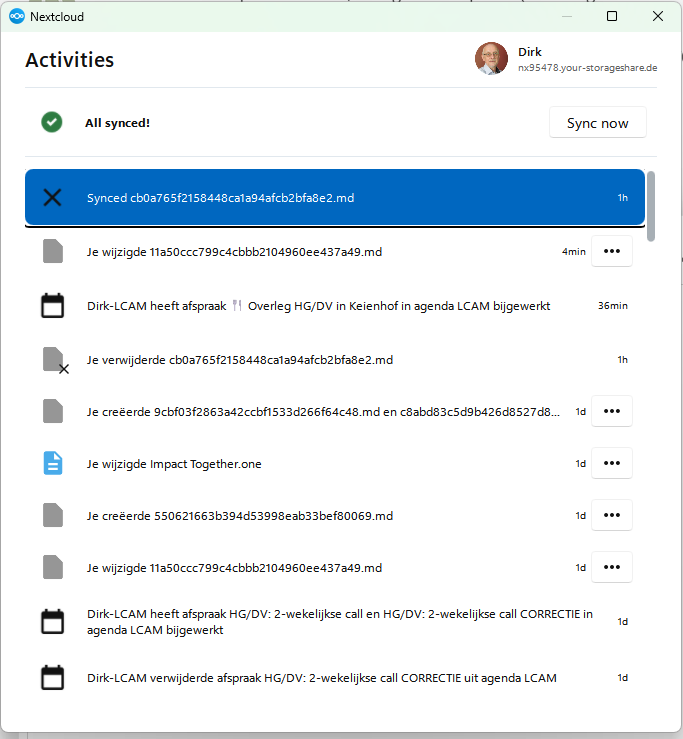
I notice that since some time (since last upgrade?) the Windows desktop client no longer shows functions like pause/resume, configuration options (to manage connections) etc. It only shows a list of “Actvities”.
I am running NC Hub version 33.0.6 and Desktop version 34.0.1.20260804 of 06/08/2026 on my PC and laptop. They show the same problem.
They started to redesign the user interface. The pause/resume can be found a bit more down in the menu when you open the settings. I think parts was to unify the appearance over different OS but on Windows a few were complaining that things got more complicated.
You can check the bug tracker, if issues were already reported, and if not add your problem. E.g. if something is really broken, if stuff have been moved around in the menus, if that makes common actions much more difficult, this might be as well something to point out and find some solutions.
Today I did an upgrade to Nextcloud Desktop-Client Version 34.0.3. I have the same problem on Windows 11.
I cannot find any function to connect to a third Server. It is some weeks ago, to connect to two Servers was without difficulty.
Even on the NextCloud icon in the tray mention by DirkV there is no setting to connect to an account.
What to do ?
I am using Nextcloud Desktop Client Version 34.0.3 on 2 laptops - HP and Lenovo, both with Windows 11 - 8 GB RAM and 16 GB RAM respectively.
Since recent versions (~33.0.*) It has now become impossible to add new server accounts to the client, whereas previously, it was possible to do so.
When I access “Nextcloud Desktop” from the Taskbar or the Menu, only one account is listed (the first one added to the client) AND there is no way to “add” “remove” etc any other account.
I think that in order to add accounts I will have to UNINSTALL the client v34.*, install a really OLD client version like 3.15.*, then add new server accounts, after which I update to the current client version.
For me, it works on a left click on the sync icon (not the right click!) in Windows 11!!
Having like this two menus depending on left or right click, I didn’t expect that. If you see the settings page with the accounts, it would perhaps be good to be able to add there an account as well.