Desktop client on ubuntu: Ignoring my exclusions?

I have a development folder synced, but I don’t want the compilation folders and artifacts to be synchronized, so I created a exclusions file in the root of the share.

The shared folder name is: /home/sergio/Desarrollos
The exclusions file named: .sync-exclude.lst
This is the relevant part of the file:

...
# ─── ESPHome ──────────────────────────────────────────────────────────────────
**/.esphome/build/
**/.esphome/.espressif/
...

Folders that always upload are, for example: /home/sergio/Desarrollos/Embedded/esphome-living-display-1/.esphome/build

Whenever I do a compilation, those folders and their contents are fully uploaded.
I’ve tried anything. Closing the client and removing the folders in the server. Removing the logs files and database from the share.
When the client is started again it syncs all the content, including the excluded folders.
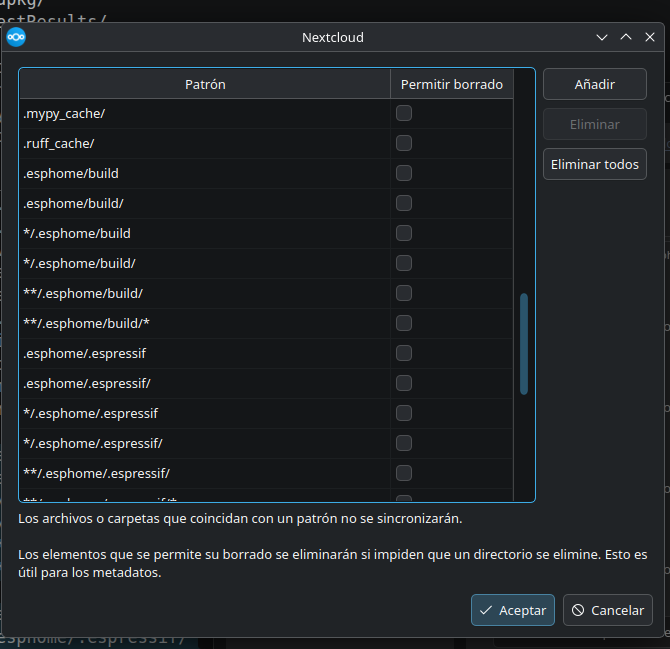
I’ve also checked that opening the configuration in the UI and going settings β†’ share β†’ edit exclusions the window that opens has all my entries there.

Is a problem in how I enter the exclusion for a subfolder? (the **). Without that, subfolders and files that had β€œ.” (like file.main.bak) weren’t excluded.
I also tried adding **/.esphome/build/*, but it didn’t work.

I’m running the latest stable versiΓ³n from the official repo. (33.0.5)

Edit: I’ve added all the combinations I could think of:

.esphome/build
.esphome/build/
*/.esphome/build
*/.esphome/build/
**/.esphome/build/
**/.esphome/build/*

.esphome/.espressif
.esphome/.espressif/
*/.esphome/.espressif
*/.esphome/.espressif/
**/.esphome/.espressif/
**/.esphome/.espressif/*

With no success.

Showing on the interface:

could you be specific?

the official files client app is here Download and install Nextcloud as suggested on the official website:

Yes, please see my edit.

A tail sample on what is currently going on:

11:01:00||Embedded/esphome-living-display-1/.esphome/.espressif/service_d92d8f1e/lvgl__lvgl_9.5.0_184e5325/src/draw/lv_draw.h|8|1|1781254014|9698dfc806e1cf30bdfbb36f74fdc01f|12654|01259249ocpo0zgiuijt|13||201|0|0|2bf824d8-ddfe-499c-8aeb-1b593a548942|
11:01:00||Embedded/esphome-living-display-1/.esphome/.espressif/service_d92d8f1e/lvgl__lvgl_9.5.0_184e5325/src/draw/lv_draw_3d.c|8|1|1781254014|21058a5db3b4bdd2efe86f2cc649426a|1447|01259250ocpo0zgiuijt|13||201|0|0|40b9a056-05fb-4667-8cdb-43f71894fa1a|
11:01:00||Embedded/esphome-living-display-1/.esphome/.espressif/service_d92d8f1e/lvgl__lvgl_9.5.0_184e5325/src/draw/lv_draw_3d.h|8|1|1781254014|52bde77631fba7d4cedaec1d7e92e413|1417|01259251ocpo0zgiuijt|13||201|0|0|ec15be90-134e-44ba-b409-799407784eeb|
11:01:00||Embedded/esphome-living-display-1/.esphome/.espressif/service_d92d8f1e/lvgl__lvgl_9.5.0_184e5325/src/draw/lv_draw_arc.c|8|1|1781254014|028e18aae7772425eb34bec4d0d27204|7079|01259252ocpo0zgiuijt|13||201|0|0|5fe4f131-a428-45e7-908a-be75feebbe35|
11:01:01||Embedded/esphome-living-display-1/.esphome/.espressif/service_d92d8f1e/lvgl__lvgl_9.5.0_184e5325/src/draw/lv_draw_arc.h|8|1|1781254014|7f7491e848add8cd0d0687983cb930b5|3018|01259253ocpo0zgiuijt|13||201|0|0|8a7b27f1-e0e3-435a-89ad-3b2eba0e8992|
11:01:01||Embedded/esphome-living-display-1/.esphome/.espressif/service_d92d8f1e/lvgl__lvgl_9.5.0_184e5325/src/draw/lv_draw_blur.c|8|1|1781254014|caa1ac8163160f1bc9fa5c455adcde42|1447|01259254ocpo0zgiuijt|13||201|0|0|bac10ed8-2660-4705-a294-49a41717c576|
11:01:01||Embedded/esphome-living-display-1/.esphome/.espressif/service_d92d8f1e/lvgl__lvgl_9.5.0_184e5325/src/draw/lv_draw_blur.h|8|1|1781254014|6bf9348f95ebd310fa4536dea6d7d517|1691|01259255ocpo0zgiuijt|13||201|0|0|6f9a6b9d-ad12-4e27-8073-d2b921f6c7e8|
11:01:01||Embedded/esphome-living-display-1/.esphome/.espressif/service_d92d8f1e/lvgl__lvgl_9.5.0_184e5325/src/draw/lv_draw_buf.c|8|1|1781254014|69e3eaeae05214cec0a70044212f38a8|21647|01259256ocpo0zgiuijt|13||201|0|0|258d1d69-f72e-42fd-9977-ea3256f8a02a|
11:01:02||Embedded/esphome-living-display-1/.esphome/.espressif/service_d92d8f1e/lvgl__lvgl_9.5.0_184e5325/src/draw/lv_draw_buf.h|8|1|1781254014|3a433b035194f8759a2a4b012d52acad|15337|01259257ocpo0zgiuijt|13||201|0|0|bd46b8fb-3479-4f98-b6a6-523a1d632cc0|
11:01:02||Embedded/esphome-living-display-1/.esphome/.espressif/service_d92d8f1e/lvgl__lvgl_9.5.0_184e5325/src/draw/lv_draw_buf_private.h|8|1|1781254014|9e2d09a088f76e551868cdfed907c81a|1067|01259258ocpo0zgiuijt|13||201|0|0|01e32f2f-6fdc-4b4e-8779-a99714a5e3c7|
11:01:02||Embedded/esphome-living-display-1/.esphome/.espressif/service_d92d8f1e/lvgl__lvgl_9.5.0_184e5325/src/draw/lv_draw_image.c|8|1|1781254014|c028ca0d9173b3ba6b0f9313f32da2c2|14201|01259259ocpo0zgiuijt|13||201|0|0|3b7dd5ed-9c50-42ee-8fc4-b428fd17de73|
11:01:03||Embedded/esphome-living-display-1/.esphome/.espressif/service_d92d8f1e/lvgl__lvgl_9.5.0_184e5325/src/draw/lv_draw_image.h|8|1|1781254014|7ed52a9e7a243fe389accbe9edcdb607|5920|01259260ocpo0zgiuijt|13||201|0|0|26636252-ea51-489e-9a68-91b3dfc92cf7|

Uploading 1.1G of artifacts. :face_with_peeking_eye:

@SeRiusMe thanks for that :+1:

I should have been more specific :man_facepalming: sorry, I meant which version of the client you’re using. this is the official client package β†’ Download and install Nextcloud

The first thing it complains when starting to look at the share from fresh start, is that it finds a folder at the 1st level that it exceeds 500MB in size.
I’m mentioning it in case it’s possible that after that it becomes β€œdumb” and stops applying exclusions.

First, thanks for your help.

Yep I’ve added the official repository with: sudo add-apt-repository ppa:nextcloud-devs/client

So:

$ dpkg -l | grep nextcloud
ii  dolphin-nextcloud:amd64                             33.0.5-20260520.155241.2bb7ca6f2b-1.0~resolute1 amd64        Nextcloud integration for Dolphin
ii  libnextcloudsync0:amd64                             33.0.5-20260520.155241.2bb7ca6f2b-1.0~resolute1 amd64        Nextcloud folder synchronization - libraries
ii  nextcloud-desktop                                   33.0.5-20260520.155241.2bb7ca6f2b-1.0~resolute1 amd64        Nextcloud folder synchronization tool
ii  nextcloud-desktop-common                            33.0.5-20260520.155241.2bb7ca6f2b-1.0~resolute1 all          Nextcloud folder synchronization - common data
ii  nextcloud-desktop-l10n                              33.0.5-20260520.155241.2bb7ca6f2b-1.0~resolute1 all          Nextcloud folder synchronization - localization

$ apt-cache policy nextcloud-desktop
nextcloud-desktop:
  Instalados: 33.0.5-20260520.155241.2bb7ca6f2b-1.0~resolute1
  Candidato:  33.0.5-20260520.155241.2bb7ca6f2b-1.0~resolute1
  Tabla de versiΓ³n:
 *** 33.0.5-20260520.155241.2bb7ca6f2b-1.0~resolute1 500
        500 https://ppa.launchpadcontent.net/nextcloud-devs/client/ubuntu resolute/main amd64 Packages
        100 /var/lib/dpkg/status
     4.0.6-1 500
        500 http://es.archive.ubuntu.com/ubuntu resolute/universe amd64 Packages

I had the ubuntu one before (4.0.6), but I purged it before installing the official.

When I create a folder /home/sergio/Desarrollos/Embedded/esphome-living-display-1/.esphome/build/:

11:26:23||Embedded/esphome-living-display-1/.esphome/build|8|1|1781263581||4096|01260112ocpo0zgiuijt|13|Se produjo un error inesperado. Intente sincronizar de nuevo o contacte con el administrador del servidor si el problema persiste.|201|0|0|adaca361-2c9e-4285-be50-af5657e14f37|

An unexpected error occurred. Please try synchronizing again or contact your server administrator if the problem persists.

The folder gets synced.

Then a create a file inside:

11:26:54||Embedded/esphome-living-display-1/.esphome/build/Archivo de texto.txt|8|1|1781263611|edb2947879ab164a5024f5554f1dd95c|0|01260113ocpo0zgiuijt|13||201|0|0|e1a8b474-6666-4705-b7f8-213173f60b57|

Is there any documentation on the specification of the exclusions? Follows github, glob,…?

OK, I arrived to the conclusion that:

  1. The github double asterisk style does nothing.
  2. The desktop client compares only to the name of the element. So FolderA/FolderB does not work because he finds only in FolderB instead of on the complete path.

Test. Exclusions created => effect:

badfolder/ => works .../.esphome/badfolder does not sync.
badfile.txt => works .../.esphome/badfolder/badfile.txt does not sync.
.badfolder/ => works
.badfile.txt => works
.esphome/reallybadfolder/ => DOES NOT WORK -> Syncs
**/.esphome/terrificfolder/ => DOES NOT WORK -> Syncs
esphome-living-display-1/evilfolder/ => DOES NOT WORK -> Syncs

I suppose that I’m not the only one who has arrived to that conclusion, but I could not find enough info on it.

This should be implemented, because one can’t exclude globally folders like β€œbuild”. In this case (ESPHome builds) seems clear that should be excluded, but there are some other platforms where build would exclude code.
Now I have to realize how to get this done.

well done :+1:

probably, so an issue request on the devs GitHub would be the best option, as the devs don’t usually hang out on the community forum

please consider placing an issue request on the devs GitHub

The problem is that there is not enough documentation about the exclusion, that I’m still not sure if it’s me that I’m doing something wrong.
Now I’m looking at the source code to realize how this works, and I found that this is managed in two ways, depending on presence of trailing slashes, forcing the comparison to be different. Something named β€œfull path pattern”.

Could be a bug/regression in 33 in csync_exclude.cpp.