Operating system and version (e.g., Ubuntu 24.04):
Linux 6.1.0-37
Web server and version (e.g, Apache 2.4.25):
nginx
PHP version (e.g, 8.3):
8.2.28
Is this the first time you’ve seen this error? (Yes / No):
yes
When did this problem seem to first start?
since “heavy use” of deck
Are you using CloudfIare, mod_security, or similar? (Yes / No)
no
We use Nextcloud Deck. Unfortunately, we have a bug: It happens with certain cards in certain boards that a tag cannot be deleted. Clicking on the x simply does nothing.
If you open the dropdown and add another tag, you can then also delete that one and the other. But as soon as you click into another board and back again, the deleted tag is there again.
I have also noticed that the tag is “frozen”, so if I rename the tag in the board settings, this renaming does not take effect. But only in the cards where it cannot be deleted.
The behavior is consistent once it has occurred. Unfortunately, I have not yet found out how to reproduce such a “broken card”.
It occurs in a board with just 2 lists, but 27 tags.
My hope is that it is a similar known problem and a solution already exists.
My only workaround is to manually recreate the card, but that is very impractical and time consuming.
Thank you already!
This is my first post, I hope I’ve been good so far
Sometimes there are also duplicate tags, if you delete one of them both disappear. Or neither of them. So there is something wrong.
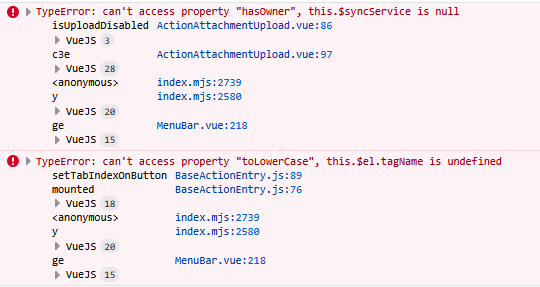
I have seen these errors with “examine”:
Move this card to board 2 using the right-click function
The tags on the card can no longer be deleted until you move the card back to the board in which it was created.
Depending on your point of view, this can also be defined as “intentional”, but if so, it is very poorly implemented:
Because the tags that belong to board 2 can be added and removed. You can still see the cross. And this can also be clicked, but only once you have added a tag from Board 2. But after reloading it is there again. But if the tags have the same name, it gets totally “wild” and the UI can’t handle it anymore.
I will create an issue in the Deck-Github, there I will describe possible solution ideas or wishes