Nothing is known about your installation, but if you are able to access your dievice via ssh, what does stop you from checking users/sudoers/passwords?
Read comments/discussions too:
https://help.nextcloud.com/t/how-to-add-user-to-sudoers/147655/8?u=geow
I read it. On top op de login screen of my raspberry pi it says: Debian GNU/Linux 12 nextcloudpi tty1. So it asks for my nextcloudpi credentials and I don’t know how to look those up with ssh. Please, can you tell me exactly in what file that is. I also don’t know if it helps to make users via the webgui in my PC, because they don’t seem to work on the physical pi.
TBH I would have to look it up too, so for now Ieave it to you; it’s a goo***-search user accounts, passwords sudo
One hint
sudo cat /etc/shadow
will show you users with hashed passwords.
So set up your ssh on webui:4443 boot your system and use your ssh login credentials on your starting boot prompt.
( of course I assume it is a standard ncp installation, no other server appliance running.)
In my case it is just https://nextcloudpi.local . If I try “nextcloudpi.local:4443” the credentials won’t work. If I try “nextcloudpi:4443” the website cannot be found.
You get the login screen to go to your nc admin account (ncp) or to your user account.
Than try https://<ip-number>:4443
You shouild get a login window to get your ncp account webui, same in function as the ncp-config command on cli.
Yes, I used the one without 4443. I was just responding to your comment 
About with ip address and 4443, I indeed get a login screen, but there the normal credentials do not work.
No, there you would need the wired long credential from the activation page, you than may change it afterwards. So you have user ncp with two passwords for two different logins.
Thank you!! Now I understand it and I could login. I must have logged in in the 4443 website ealier, but this afternoon I couldn’t find “ssh”  so that was wat was causing it. Tomorrow I might try changing ssh passwords, now that I am more confident.
Another note: SSH appears not being enabled in the 4443 website! More confusion
This webui is not very keen in showing the state of configuration, but it i usable to do the settings and get some messages about success or error. I prefer ncp-config command an cli.
In the beginning it is puzzling with so much accounts and passwords, but that is even the joy with beginnings, something new one never has been/known before.
So I took a look at the Nextcloudpi Panel (the one with 4443) today. I expected the nc-admin password to change the password for the Nextcloudpi Panel, but it seems to be changing the password of the user of the Dashboard (just the https://nextcloudpi.local). So where do you change the password on https://nextcloudpi:4443 of the npc user that wants to login into the 4443-site? Thank you! Ps. I didn’t come as far as changing the ssh credentials today. First I want to make sure that I understand how to change the login for the 4443-site.
Thank you!!
Please - read the docs
Menu Configuration-Reference for Backups, Config, Networking, Security, System, Tools, Updates
Even some may be dated, the docs are worth reading more than once, bookmark them, they are grown up like a bunch of kids.
Happy reading!
I read it and I used nc-passw and I tried deleting cookies and cash from the web browser, but it keeps logging in with the really long password in the 4443-website. The nc-passw is changed for the nextcloudpi.local, not for nextcloudpi.local:4443. So only the really long password works there. Is that normal?
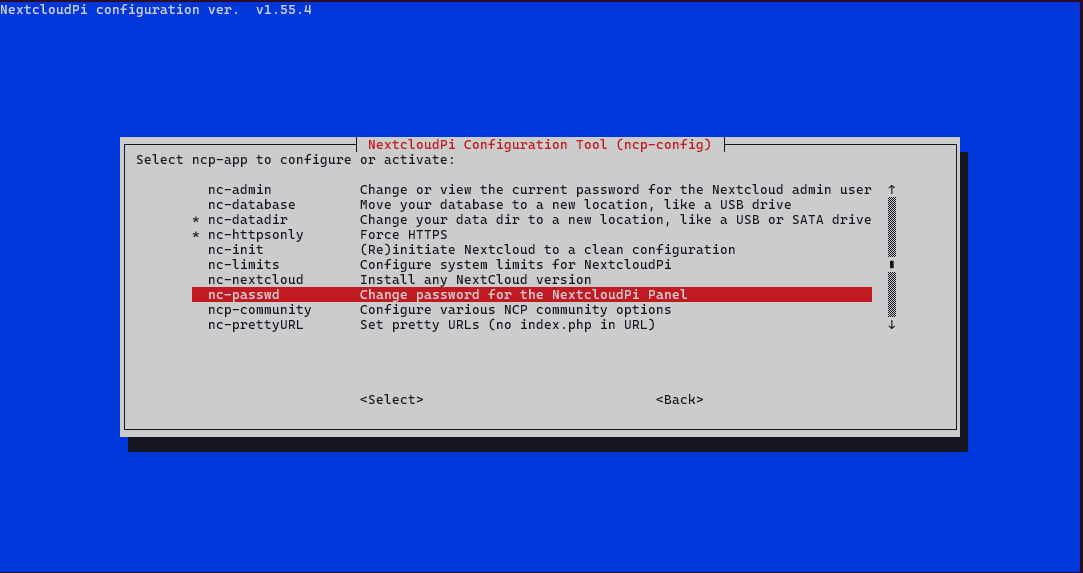
Sorry to say but you are wrong. In nextcloudpi.local:4443 I can only log in with the long password although it is set up correctly in ncp-config/ncp-password/ncp-admin. If I log into nextcloudpi.local with the admin credentials I get to change admin things, but not like with nextcloudpi.local:4443. Never mind.
No problem, if I would be wrong, it would be nice being corrected.
But here I stay as I cite the situation of a standard setup as documented.
On activation page you get two credentials for user ncp these credentials aim at different logins, the first, if I remember right, is the webui:4443 login to the nextcloudpi setup; you may change this credential at left-hand menu config nc-passwd (NCP-Passwort if German language chosen). The second one is for login on nextcloud accounts, here the admin account, this credential may be changed in this account or at the left-hand menu config nc-admin (stays nc-admin if German language chosen) in webui:4443.
And please, don’t change keyboard layouts dealing with login prompts. 