Support intro
Sorry to hear you’re facing problems. 
The community help forum (help.nextcloud.com) is for home and non-enterprise users. Support is provided by other community members on a best effort / “as available” basis. All of those responding are volunteering their time to help you.
If you’re using Nextcloud in a business/critical setting, paid and SLA-based support services can be accessed via portal.nextcloud.com where Nextcloud engineers can help ensure your business keeps running smoothly.
Getting help
In order to help you as efficiently (and quickly!) as possible, please fill in as much of the below requested information as you can.
Before clicking submit: Please check if your query is already addressed via the following resources:
- Official documentation (searchable and regularly updated)
- How to topics and FAQs
- Forum search
(Utilizing these existing resources is typically faster. It also helps reduce the load on our generous volunteers while elevating the signal to noise ratio of the forums otherwise arising from the same queries being posted repeatedly).
Hello Together, this is my first post here and my knowledge of either Nextcloud itself and the inner workings of webservers (especially as a hosted package with Plesk) is limited. So I hope you forgive me if I miss something.
The Basics
- Nextcloud Server version (e.g., 29.x.x):
32.0.2
- Operating system and version (e.g., Ubuntu 24.04):
Ubuntu 22.02 LTS
- Web server and version (e.g, Apache 2.4.25):
- Apache 2.4.52-1ubuntu4.16
- Reverse proxy and version _(e.g. nginx 1.27.2)
nginx1.28.0.3-v.ubuntu.22.04+p18.0.75.0+t251120.0856
- PHP version (e.g, 8.3):
8.3.29
- Is this the first time you’ve seen this error? (Yes / No):
yes
- When did this problem seem to first start?
After an update from NC31 to NC32
- Installation method (e.g. AlO, NCP, Bare Metal/Archive, etc.)
Installation through Plesk Extension
- Are you using CloudfIare, mod_security, or similar? (Yes / No)
No
Summary of the issue you are facing:
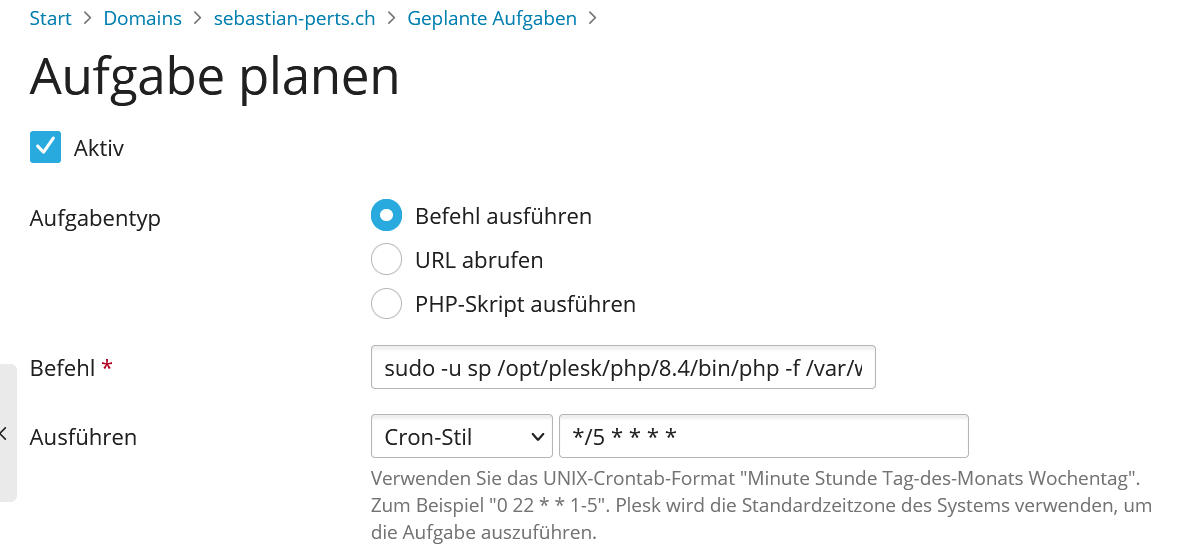
Since an upgrade from NC31 to 32 the adminpanel shows the warning “Some jobs have not been executed since vor einem Monat. Please consider increasing the execution frequency”. The nextcloud instance runs on a hosted virtual server and I have access to it through SSH and Plesk. The cron job calling the cron.php was created using the “Planned Tasks” Feature of Plesk and runs without error according to Plesk and also did work fine this way since it was originally installed. The task is created as using a PHP-script and calls "cloud.mydomain.com/nextcloud/cron.php” with the arguments “php -f -d memory_limit=1024M” and the cron timing */5 * * * *. But NC insists with the warning, that some jobs did not run.
If I deactivate the task in Plesk the Nextcloud shows a different error concerning the cron itself not being executed for x Minutes after a while. So it seems to me that the cron call is executed, but does not do all the things it should do. I have read other threads here (like this one Cronjob with Plesk (once again) ) and there it is written, that the commands one has to use through Plesk are now different. But this commands don’t work in my system, I get the error in Plesk that sudo is not found. If I don’t use sudo in that command, it gives an error to the path “/opt/plesk/php/8.3/php”. I checked that path using ssh, that path is correct and the php file is in it. So I am currently not able to find the reason for this, especially since it worked when it was originally installed with Nextcloud 30.
Configuration
Nextcloud
The output of occ config:list system or similar is best, but, if not possible, the contents of your config.php file from /path/to/nextcloud is fine (make sure to remove any identifiable information!):
<?php
$CONFIG = array (
  'passwordsalt' => 'XXXX',
  'secret' => 'XXXX',
  'trusted_domains' =>
  array (
    0 => 'localhost',
    1 => 'cloud.mydomain.com',
  ),
  'datadirectory' => '/var/www/vhosts/mydomain.com/.nextcloud/data/0f10f4328a05',
  'dbtype' => 'mysql',
  'version' => '32.0.3.2',
  'overwrite.cli.url' => 'http://localhost',
  'dbname' => 'nextcloud_***REDACTED***',
  'dbhost' => 'localhost:3306',
  'dbport' => '',
  'dbtableprefix' => 'oc_',
  'mysql.utf8mb4' => true,
  'dbuser' => 'ncuser_e5ebe8af',
  'dbpassword' => '***REDACTED***',
  'installed' => true,
  'instanceid' => 'oc***REDACTED***',
  'defaultapp' => 'files',
  'maintenance_window_start' => 0,
  'forbidden_filename_basenames' =>
  array (
    0 => 'con',
    1 => 'prn',
    2 => 'aux',
    3 => 'nul',
    4 => 'com0',
    5 => 'com1',
    6 => 'com2',
    7 => 'com3',
    8 => 'com4',
    9 => 'com5',
    10 => 'com6',
    11 => 'com7',
    12 => 'com8',
    13 => 'com9',
    14 => 'com¹',
    15 => 'com²',
    16 => 'com³',
    17 => 'lpt0',
    18 => 'lpt1',
    19 => 'lpt2',
    20 => 'lpt3',
    21 => 'lpt4',
    22 => 'lpt5',
    23 => 'lpt6',
    24 => 'lpt7',
    25 => 'lpt8',
    26 => 'lpt9',
    27 => 'lpt¹',
    28 => 'lpt²',
    29 => 'lpt³',
  ),
  'forbidden_filename_characters' =>
  array (
    0 => '<',
    1 => '>',
    2 => ':',
    3 => '"',
    4 => '|',
    5 => '?',
    6 => '*',
    7 => '\\',
    8 => '/',
  ),
  'forbidden_filename_extensions' =>
  array (
    0 => ' ',
    1 => '.',
    2 => '.filepart',
    3 => '.part',
  ),
  'loglevel' => 2,
  'maintenance' => false,
  'theme' => '',
  'updater.secret' => 'XXXXX',
);
I hope someone has any idea, where to search or how to solve it.
Thanks in advance.