Hello,
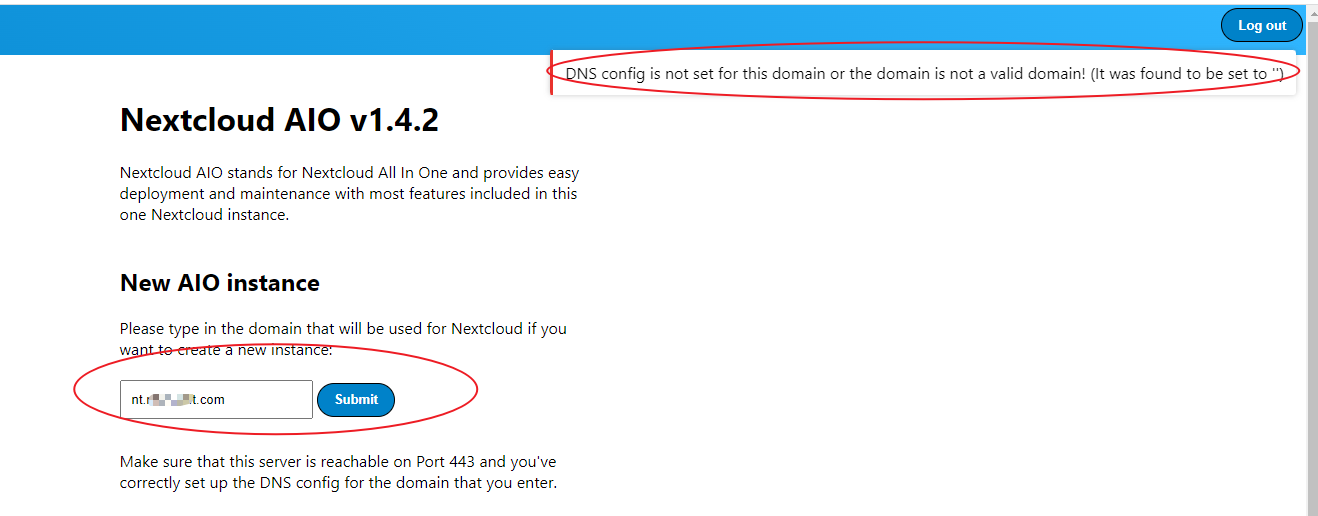
I just installed Nextcloud AIO via Docker, when I open browser and type servername nt.mydomain.com and click submit to continue installation, but got error:
DNS config is not set for this domain or the domain is not a valid domain! (It was found to be set to ‘’)
Hi Szaimen,
Sorry for the trouble, another question:
I’d like running Nextcloud in my internal network, so when I added a internal A record in my local DNS Server and type Nextcloud servername: nt.mydomain.com then click submit, I got error:
It seems like the ip-address is set to an internal or reserved ip-address. This is not supported. (It was found to be set to ‘192.168.13.164’)
Hi Szaimen,
Thanks for your replied.
I am a newbie for Docker so the question is stupid, I checked the document as you mentioned, for options 1:
" 1. run aio behind a reverse proxy only open port 80, the domain that you want to use needs to point to your public ip-address, do not open port 443, set up a dns-server like pi-hole and use it as dns-server in your network, set a custom dns record for this domain and point it to the internal ip-address of your reverse proxy, set the dns-server in docker-config.json to the internal ip of the dns server → now everything should work."
Do you know how to find and modify the file “docker-config.json” ?
sudo docker run -it \
--name nextcloud-aio-mastercontainer \
--restart always \
-p 8080:8080 \
-e APACHE_PORT=11000 \
--volume nextcloud_aio_mastercontainer:/mnt/docker-aio-config \
--volume /var/run/docker.sock:/var/run/docker.sock:ro \
nextcloud/all-in-one:latest
Also I use Nginx as reverse proxy in my Ubuntu server and the configuration is:
server {
listen 80;
server_name nt.mydomain.com;
location / {
proxy_pass http://localhost:11000;
rewrite ^/server/(.*) /$1 break;
proxy_set_header Host $host;
proxy_set_header X-Real-IP $remote_addr;
proxy_set_header X-Forwarded-For $proxy_add_x_forwarded_for;
client_max_body_size 0;
# Websocket
proxy_http_version 1.1;
proxy_set_header Upgrade $http_upgrade;
# proxy_set_header Connection $connection_upgrade;
}
}
I commented "proxy_set_header Connection $connection_upgrade" because if I added it will got error:
[emerg] 201866#201866: unknown "connection_upgrade" variable
So when I access nt.mydomain.com from browser I got the code as below:

Another questions: Can I install reverse proxy and Nextcloud AIO in the same server? AIO is as containers, Nginx reverse proxy not container.
I don't know what went wrong.