@Mark_Khor_I welcome to the community 
it seems you’ve misunderstood the OP’s issue which refers to SMTP mail setup
your issue refers to the admin users mail address:
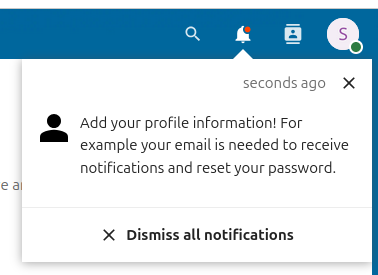
did you dismiss this very obvious notification upon fresh install/first login:
@Mark_Khor_I welcome to the community
it seems you’ve misunderstood the OP’s issue which refers to SMTP mail setup
your issue refers to the admin users mail address:
did you dismiss this very obvious notification upon fresh install/first login:
So after nothing in this thread did the trick for me, I just tested switching from SSL to STARTTLS (my Mailprovider has ports for both). This somehow now works for me. I also use a completely different adress for the admin account and there is no problem.
I spent 2 hours. You saved me.
Thank you. I’ve done the same on my server. I’ve switched from SSL to none/STARTTLS and changed the smtp port from 993 to 25, and it works now. I use the same email address than the one in the admin account.
well, we’re struggling with this as well nothing described in here seems to help and there’s nothing in logs. We’ve been playing with this for hours enabling debug mode on and off.
by the way our settings are as follows:" ‘mail_from_address’ => ‘noreply’,
‘mail_smtpmode’ => ‘smtp’,
‘mail_sendmailmode’ => ‘smtp’,
‘mail_domain’ => ‘domain.org’,
‘mail_smtphost’ => ‘smtp.domain.org’,
‘mail_smtpport’ => ‘25’,
‘maintenance_window_start’ => ‘1’,"
another thing… it took us more than 24 hours to resolve all the warnings and errors encountered after deployment of your official latest Docker container. That’s not cool. Folder permissions issues just to name the few.
OK, the issue was on our side.
UPDATE: Our apologise.
We’ve run ‘tail -f /var/log/mail.log’ to keep showing logs in Postfix in real time as mails were attempted to be dispatched. by NextCloud.
The Nextcloud admin account had e-mail address set to a non existing address noreply@domain.com.
The Postfix at domain.com considered itself as final destination as it was domain owner, since the noreply account obviously was not present it rejected the email.
We recommend:
I tried all of the above and non of it seemed to work for me. On my initial install of my Nextcloud i decieded not to install the Mails APP. Later during my fixing process i then installed the Mails APP. After that SMTP started miracly working. Maybe this helps someone.
I was trying to send via postfix on localhost without authentication, maillog gave a hint:
lost connection after STARTTLS from localhost[127.0.0.1]
the solution for me:
postconf smtpd_tls_security_level=none
I just want to underline, that omitting the mail-address in the admin-setting leads to this error as well.
Since one has to provide the credentials of the admin in the email-settings and might get lost in the different mailserver, port and password settings, one might easily misunderstand the definition of the admin mail-account as optional.
@nextcloud-team: Maybe its worth to check the existence of a mail-address for the admin and to give a hint, if it is missing - or, if it is missing, automatically synchronize the mail-address of the general settings and the account settings of the admin.
31.0.2
I tried all of the above and it didn’t help
including my administrator email installed
‘mail_smtptimeout’ => 30, - Internal Server Error
And also version 30.0.6 is installed in parallel
and on version 30.0.6 everything works great
I just installed version 31.0.1 to check and everything works
miracles
I re-downloaded version 30.0.2 from here http
I did not install the mail app
and everything worked miraculously
I tried all of the above and it didn’t help.
In my case I switched from linuxserverio to the aio container.
The linuxserverio was working with SSL and port 587 but the aio container worked in my case only with none/STARTTLS on port 587.
To use SSL my mail provider also offers the port 465 and that did the trick.
It works for ALL SELFSIGNED email servers! Thanks a lot!
This is exactly the problem. Thank you @Mark_Khor_I this was my problem as well.
Set an email adres for the admin account and this problem goes away.
No @scubamuc @Mark_Khor_I nailed it. The error message is not very helpful but not setting an email for the admin users causes exactly this problem. It seems not related but it is.
I think this is those kind of problems that should be covered in the documentation.
out of the box the admin account is created without an email address. This should be pointed out somewhere preferable in the test email page.
Thx. This solved the problem for me, I didn’t fill in an admin e-mail in the admin profile. After doing this, it worked.
Fixed it for me. Personal Settings → email , fixed my issue also.
This topic was automatically closed 8 days after the last reply. New replies are no longer allowed.