The Basics
- Nextcloud Server version (e.g., 29.x.x):
33.07
- Operating system and version (e.g., Ubuntu 24.04):
Debian-13.6
- Web server and version (e.g, Apache 2.4.25):
- dunno
- Reverse proxy and version _(e.g. nginx 1.27.2)
HAproxy on pfSense in front of docker-compose stack
- PHP version (e.g, 8.3):
replace me
- Is this the first time you’ve seen this error? (Yes / No):
No
- When did this problem seem to first start?
since trying to install app-api-proxy
- Installation method (e.g. AlO, NCP, Bare Metal/Archive, etc.)
docker-compose
- Are you using CloudfIare, mod_security, or similar? (Yes / No)
no
Summary of the issue you are facing:
I think I have the same issue as in Nextcloud-appapi-harp | stop at "Init step" | certificate verify failed
(it’s closed otherwise I would have continued there …)
I have valid letsencrypt-certs for the URL of that stack so it seems I shouldn’t have a missing CA certificate or so.
I am unsure about the config of the HAproxy in front of my dc-stack, couldn’t find an example config at GitHub - nextcloud/HaRP: Fast Proxy for AppAPI(Nextcloud 32+) · GitHub , for example.
But it should work, I see logs in the appapi-harp container generated when accessing an URL like https://nctest.my.tld/exapps/something
https://nctest.my.tld is running with a valid LE-Cert, so I don’t know right now.
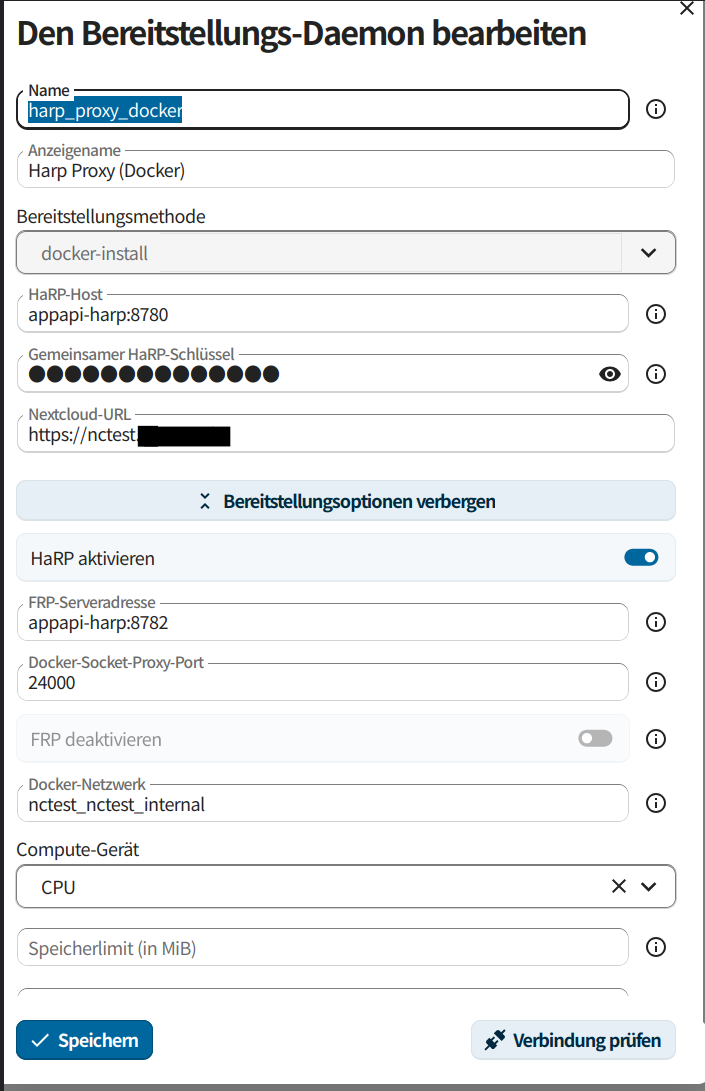
Steps to replicate it (hint: details matter!):
-
install appapi-harp as docker container beside the nextcloud-container
-
configure everything as documented (env variables, URL, secret etc
-
test connectivity in NC: daemon replies OK
-
test deployment: only 4/6 steps OK
Log entries
docker logs --follow nc_app_test-deploy
HP_SHARED_KEY is set, creating /frpc.toml configuration file...
Directory /certs/frp not found. Creating configuration without TLS certificates.
Starting frpc in the background...
Starting application: python3 main.py
2026-07-28 10:11:14.460 [I] [sub/root.go:142] start frpc service for config file [/frpc.toml]
2026-07-28 10:11:14.461 [I] [client/service.go:295] try to connect to server...
2026-07-28 10:11:14.461 [W] [client/service.go:298] connect to server error: session shutdown
Started
2026-07-28 10:11:16.493 [I] [client/service.go:295] try to connect to server...
2026-07-28 10:11:16.494 [W] [client/service.go:298] connect to server error: EOF
INFO:     Started server process [1]
INFO:     Waiting for application startup.
TRACE:    ASGI [1] Started scope={'type': 'lifespan', 'asgi': {'version': '3.0', 'spec_version': '2.0'}, 'state': {}}
TRACE:    ASGI [1] Receive {'type': 'lifespan.startup'}
TRACE:    ASGI [1] Send {'type': 'lifespan.startup.complete'}
INFO:     Application startup complete.
INFO:     Uvicorn running on unix socket /tmp/exapp.sock (Press CTRL+C to quit)
2026-07-28 10:11:20.917 [I] [client/service.go:295] try to connect to server...
2026-07-28 10:11:20.920 [W] [client/service.go:298] connect to server error: write tcp 192.168.240.8:58278->192.168.240.5:8782: write: connection reset by peer
HP_SHARED_KEY is set, creating /frpc.toml configuration file...
Found /certs/frp directory. Creating configuration with TLS certificates.
Starting frpc in the background...
Starting application: python3 main.py
2026-07-28 10:11:26.214 [I] [sub/root.go:142] start frpc service for config file [/frpc.toml]
2026-07-28 10:11:26.214 [I] [client/service.go:295] try to connect to server...
2026-07-28 10:11:26.219 [I] [client/service.go:287] [5aa1cad3912abe2e] login to server success, get run id [5aa1cad3912abe2e]
2026-07-28 10:11:26.219 [I] [proxy/proxy_manager.go:173] [5aa1cad3912abe2e] proxy added: [test-deploy]
2026-07-28 10:11:26.220 [I] [client/control.go:168] [5aa1cad3912abe2e] [test-deploy] start proxy success
Started
INFO:     Started server process [1]
INFO:     Waiting for application startup.
TRACE:    ASGI [1] Started scope={'type': 'lifespan', 'asgi': {'version': '3.0', 'spec_version': '2.0'}, 'state': {}}
TRACE:    ASGI [1] Receive {'type': 'lifespan.startup'}
TRACE:    ASGI [1] Send {'type': 'lifespan.startup.complete'}
INFO:     Application startup complete.
INFO:     Uvicorn running on unix socket /tmp/exapp.sock (Press CTRL+C to quit)
TRACE:    HTTP connection made
TRACE:    ASGI [2] Started scope={'type': 'http', 'asgi': {'version': '3.0', 'spec_version': '2.3'}, 'http_version': '1.1', 'server': ('/tmp/exapp.sock', None), 'client': None, 'scheme': 'http', 'root_path': '', 'headers': '<...>', 'state': {}, 'method': 'GET', 'path': '/heartbeat', 'raw_path': b'/heartbeat', 'query_string': b''}
TRACE:    ASGI [2] Send {'type': 'http.response.start', 'status': 200, 'headers': '<...>'}
Heartbeat was called
INFO:      - "GET /heartbeat HTTP/1.1" 200 OK
TRACE:    ASGI [2] Send {'type': 'http.response.body', 'body': '<15 bytes>'}
TRACE:    ASGI [2] Completed
TRACE:    ASGI [3] Started scope={'type': 'http', 'asgi': {'version': '3.0', 'spec_version': '2.3'}, 'http_version': '1.1', 'server': ('/tmp/exapp.sock', None), 'client': None, 'scheme': 'http', 'root_path': '', 'headers': '<...>', 'state': {}, 'method': 'POST', 'path': '/init', 'raw_path': b'/init', 'query_string': b''}
Init was called
TRACE:    ASGI [3] Send {'type': 'http.response.start', 'status': 200, 'headers': '<...>'}
INFO:      - "POST /init HTTP/1.1" 200 OK
TRACE:    ASGI [3] Send {'type': 'http.response.body', 'body': '<2 bytes>'}
Try default url to report the init status: https://nctest.my.tld
[503] Service Unavailable <request: PUT /ocs/v1.php/apps/app_api/ex-app/status>

ERROR occurred! Can't report the ExApp status to the Nextcloud instance.
Try send request using HTTP instead of HTTPS: http://nctest.my.tld
Unsuccessful. Can not determine correct URL of the Nextcloud instance.
TRACE:    ASGI [3] Completed
TRACE:    HTTP connection lost
Configuration
docker-compose:
networks:
  nctest_internal:
  default:
    driver: bridge
    ipam:
      driver: default
      config:
        - subnet: "192.168.160.0/20"
          gateway: "192.168.160.1"

volumes:
  nctest_app:
  nctest_data:
  nctest_postgres17_db:
  nctest_pgadmin_data:

services:

  postgres_db:
  #postgres17_db:
    image: postgres:17-alpine
    restart: on-failure
    volumes:
      - nctest_postgres17_db:/var/lib/postgresql/data:Z
    env_file:
      - pg_db.env
    healthcheck:
      test: "PGPASSWORD=$$POSTGRES_PASSWORD pg_isready -h 127.0.0.1 -U nextcloud -d nextcloud"
    command: postgres -c 'max_connections=300'
    networks:
      - nctest_internal
  app:
    image: nextcloud:${NEXTCLOUD_VERSION:-33}
    depends_on:
      postgres_db:
        condition: service_healthy
      redis:
        condition: service_healthy
    ports:
      - '8085:80'
    volumes:
      - nctest_app:/var/www/html
      - nctest_data:/var/www/html/data
      - ./000-default.conf:/etc/apache2/sites-available/000-default.conf
      - ./opcache-recommended.ini:/usr/local/etc/php/conf.d/opcache-recommended.ini
    environment:
      - PHP_MEMORY_LIMIT=2048M
    env_file:
      - pg_db.env
    healthcheck:
      test: ["CMD", "curl", "-f", "http://localhost/status.php"]
      interval: "30s"      # alle 30 Sekunden prüfen
      timeout: "10s"       # max. 10 Sekunden auf Antwort warten
      retries: "3"         # nach 3 Fehlversuchen gilt der Container als unhealthy
      start_period: "1m"   # Wartezeit nach dem Start, bevor geprüft wird
    networks:
      - nctest_internal
      - default
    restart: always

  cron:
    depends_on:
      postgres_db:
        condition: service_healthy
      redis:
        condition: service_started
    image: nextcloud:${NEXTCLOUD_VERSION:-32}
    restart: always
    volumes:
      - nctest_app:/var/www/html
      - nctest_data:/var/www/html/data
      - ./000-default.conf:/etc/apache2/sites-available/000-default.conf
      - ./opcache-recommended.ini:/usr/local/etc/php/conf.d/opcache-recommended.ini
    entrypoint: /cron.sh
    networks:
      - nctest_internal

  redis:
    image: redis
    healthcheck:
      test: ["CMD", "redis-cli", "ping"]
      interval: 5s
      timeout: 30s
      retries: 50
    networks:
      - nctest_internal

  appapi-harp:
    image: ghcr.io/nextcloud/nextcloud-appapi-harp:release
    restart: unless-stopped
    #network_mode: host
    networks:
      - default
      - nctest_internal
    environment:
      - HP_SHARED_KEY="dummyxxx"
      - NC_INSTANCE_URL=https://nctest.my.tld
      - HP_TRUSTED_PROXY_IPS=192.168.220.254
      - HP_BLACKLIST_COUNT=300
      #- HP_LOG_LEVEL=debug
      - HP_LOG_LEVEL=info
    volumes:
      - /var/run/docker.sock:/var/run/docker.sock
      - ./harp-certs:/certs
    ports:
      - "8780:8780"
      - "8782:8782"
Nextcloud
The output of occ config:list system or similar is best, but, if not possible, the contents of your config.php file from /path/to/nextcloud is fine (make sure to remove any identifiable information!):
{
    "system": {
        "instanceid": "***REMOVED SENSITIVE VALUE***",
        "passwordsalt": "***REMOVED SENSITIVE VALUE***",
        "trusted_domains": [
            "192.168.220.222",
            "nctest.my.tld"
        ],
        "datadirectory": "***REMOVED SENSITIVE VALUE***",
        "dbtype": "pgsql",
        "version": "33.0.7.1",
        "dbname": "***REMOVED SENSITIVE VALUE***",
        "dbhost": "***REMOVED SENSITIVE VALUE***",
        "dbtableprefix": "oc_",
        "dbuser": "***REMOVED SENSITIVE VALUE***",
        "dbpassword": "***REMOVED SENSITIVE VALUE***",
        "default_phone_region": "AT",
        "installed": true,
        "default_timezone": "Europe\/Vienna",
        "logtimezone": "Europe\/Vienna",
        "trusted_proxies": "***REMOVED SENSITIVE VALUE***",
        "theme": "",
        "mail_smtpmode": "smtp",
        "mail_from_address": "***REMOVED SENSITIVE VALUE***",
        "mail_domain": "***REMOVED SENSITIVE VALUE***",
        "mail_smtpauthtype": "PLAIN",
        "mail_smtpauth": 1,
        "mail_smtphost": "***REMOVED SENSITIVE VALUE***",
        "mail_smtpport": "587",
        "mail_smtpname": "***REMOVED SENSITIVE VALUE***",
        "mail_smtppassword": "***REMOVED SENSITIVE VALUE***",
        "mail_smtpsecure": "tls",
        "mail_smtptimeout": 30,
        "forcessl": true,
        "loglevel": 2,
        "log_type": "file",
        "logfile": "\/data\/nextcloud.log",
        "log_type_audit": "file",
        "logfile_audit": "\/var\/www\/html\/data\/audit.log",
        "log_rotate_size": 314572800,
        "log.condition": {
            "apps": [
                "admin_audit"
            ]
        },
        "secret": "***REMOVED SENSITIVE VALUE***",
        "maintenance": false,
        "trashbin_retention_obligation": "auto",
        "appstore.experimental.enabled": false,
        "activity_expire_days": "90",
        "mysql.utf8mb4": true,
        "filelocking.enabled": true,
        "memcache.distributed": "\\OC\\Memcache\\Redis",
        "memcache.locking": "\\OC\\Memcache\\Redis",
        "memcache.local": "\\OC\\Memcache\\APCu",
        "redis": {
            "host": "***REMOVED SENSITIVE VALUE***",
            "port": 6379,
            "timeout": 0,
            "password": "***REMOVED SENSITIVE VALUE***"
        },
        "auth.bruteforce.protection.enabled": true,
        "overwrite.cli.url": "https:\/\/cloud.my.tld",
        "has_rebuilt_cache": true,
        "app_install_overwrite": [
            "user_external",
            "maps",
            "mail_roundcube",
            "to_gif_example"
        ],
        "maintenance_window_start": 1,
        "allow_local_remote_servers": "1"
    }
}
haproxy on pfsense
ACLs:
acl			nctest	var(txn.txnhost) -m beg -i nctest.my.tld
acl			url_nc_exapps	var(txn.txnpath) -m beg -i /exapps
http-response set-header X-Robots-Tag "noindex,nofollow"  if  nctest aclcrt_frontend_ssl_offload_for_external_services-copy

use_backend nextcloud-harp-daemon_ipvANY  if  nctest url_nc_exapps aclcrt_frontend_ssl_offload_for_external_services-copy

use_backend nctest_ipvANY  if  nctest aclcrt_frontend_ssl_offload_for_external_services-copy
backends:
backend nextcloud-harp-daemon_ipvANY
	mode			http
	id			121
	log			global
	timeout connect		30000
	timeout server		30000
	retries			3
	load-server-state-from-file	global
	server			nc-harp 192.168.220.222:8780 id 118 check inter 1000

backend nctest_ipvANY
	mode			http
	id			117
	log			global
	http-check		send meth GET uri /index.php/login ver HTTP/1.1\r\nHost:\ nctest.my.tld\r\nAccept:\ */*
	timeout connect		30000
	timeout server		30000
	retries			3
	load-server-state-from-file	global
	option			httpchk
	server			nctest 192.168.220.222:8085 id 118 check inter 1000
