Hi there!
I am having a similar issue.
My deploy is a local instance running behind a proxy server (as well as an nginx reverse proxy as suggested in the docs and it is working just fine).
Firstly I have deployed the AIO successfully in a windows host machine with the following exact same docker compose file:
######## SERVICES ########
##########################
services:

######## NEXTCLOUD AIO MASTERCONTAINER ########
# https://github.com/nextcloud/all-in-one/blob/main/compose.yaml
# https://hub.docker.com/r/nextcloud/all-in-one
# https://github.com/nextcloud/all-in-one/
#
# The AIO interface can only be reached locally at httpS://ip-of.the-host:8080
# only ports 80 and 443 need to be opened on the router/firewall
################################################
  nextcloud-aio-mastercontainer:
    image: nextcloud/all-in-one:latest
    #image: nextcloud/all-in-one:beta
    init: true
    restart: always
    container_name: nextcloud-aio-mastercontainer # This line is not allowed to be changed as otherwise AIO will not work correctly
    volumes:
      - nextcloud_aio_mastercontainer:/mnt/docker-aio-config # This line is not allowed to be changed as otherwise the built-in backup solution will not work
      - /var/run/docker.sock:/var/run/docker.sock:ro # (LINUX) May be changed on macOS, Windows or docker rootless. See the applicable documentation. If adjusting, don't forget to also set 'WATCHTOWER_DOCKER_SOCKET_PATH'!
    ports:
#      - 80:80 # Can be removed when running behind a web server or reverse proxy (like Apache, Nginx, Cloudflare Tunnel and else). See https://github.com/nextcloud/all-in-one/blob/main/reverse-proxy.md
      - 8080:8080
#      - 8443:8443 # Can be removed when running behind a web server or reverse proxy (like Apache, Nginx, Cloudflare Tunnel and else). See https://github.com/nextcloud/all-in-one/blob/main/reverse-proxy.md
    environment: # Is needed when using any of the options below
      # AIO_DISABLE_BACKUP_SECTION: false # Setting this to true allows to hide the backup section in the AIO interface. See https://github.com/nextcloud/all-in-one#how-to-disable-the-backup-section
      # AIO_COMMUNITY_CONTAINERS: # With this variable, you can add community containers very easily. See https://github.com/nextcloud/all-in-one/tree/main/community-containers#community-containers
      APACHE_PORT: 11000 # Is needed when running behind a web server or reverse proxy (like Apache, Nginx, Cloudflare Tunnel and else). See https://github.com/nextcloud/all-in-one/blob/main/reverse-proxy.md
      APACHE_IP_BINDING: 0.0.0.0 # Should be set when running behind a web server or reverse proxy (like Apache, Nginx, Cloudflare Tunnel and else) that is running on the same host. See https://github.com/nextcloud/all-in-one/blob/main/reverse-proxy.md.  If set to 0.0.0.0 the apache will listen to all http requests, no matter what their target ip address is
      APACHE_ADDITIONAL_NETWORK: nextcloud-aio # (Optional) Connect the apache container to an additional docker network. Needed when behind a web server or reverse proxy (like Apache, Nginx, Caddy, Cloudflare Tunnel and else) running in a different docker network on same server. See https://github.com/nextcloud/all-in-one/blob/main/reverse-proxy.md
      SKIP_DOMAIN_VALIDATION: false   # https://github.com/nextcloud/all-in-one#how-to-skip-the-domain-validation
      # AIO_DISABLE_BACKUP_SECTION: false # Setting this to true allows to hide the backup section in the AIO interface. See https://github.com/nextcloud/all-in-one#how-to-disable-the-backup-section
      # BORG_RETENTION_POLICY:--keep-within=7d --keep-weekly=4 --keep-monthly=6 # Allows to adjust borgs retention policy. See https://github.com/nextcloud/all-in-one#how-to-adjust-borgs-retention-policy
      # COLLABORA_SECCOMP_DISABLED: false # Setting this to true allows to disable Collabora's Seccomp feature. See https://github.com/nextcloud/all-in-one#how-to-disable-collaboras-seccomp-feature
      NEXTCLOUD_DATADIR: /mnt/ncdata # Allows to set the host directory for Nextcloud's datadir. ⚠️⚠️⚠️ Warning: do not set or adjust this value after the initial Nextcloud installation is done! See https://github.com/nextcloud/all-in-one#how-to-change-the-default-location-of-nextclouds-datadir
      NEXTCLOUD_MOUNT: /mnt/ncdata2 # Allows the Nextcloud container to access the chosen directory on the host. See https://github.com/nextcloud/all-in-one#how-to-allow-the-nextcloud-container-to-access-directories-on-the-host
      NEXTCLOUD_UPLOAD_LIMIT: 10G # Can be adjusted if you need more. See https://github.com/nextcloud/all-in-one#how-to-adjust-the-upload-limit-for-nextcloud
      # NC_TRUSTED_PROXIES: 172.18.0.2  # this is the reverse proxy ip address in the docker network !
      NEXTCLOUD_MAX_TIME: 7200 # Can be adjusted if you need more. See https://github.com/nextcloud/all-in-one#how-to-adjust-the-max-execution-time-for-nextcloud
      # NEXTCLOUD_MEMORY_LIMIT: 512M # Can be adjusted if you need more. See https://github.com/nextcloud/all-in-one#how-to-adjust-the-php-memory-limit-for-nextcloud
      # NEXTCLOUD_TRUSTED_CACERTS_DIR: /etc/ssl/private # CA certificates in this directory will be trusted by the OS of the nexcloud container (Useful e.g. for LDAPS) See See https://github.com/nextcloud/all-in-one#how-to-trust-user-defined-certification-authorities-ca
      # NEXTCLOUD_STARTUP_APPS: deck twofactor_totp tasks calendar contacts notes # Allows to modify the Nextcloud apps that are installed on starting AIO the first time. See https://github.com/nextcloud/all-in-one#how-to-change-the-nextcloud-apps-that-are-installed-on-the-first-startup
      # NEXTCLOUD_ADDITIONAL_APKS: "imagemagick py3-img2pdf mhonarc pandoc tiff-tools unoconv wkhtmltopdf pdf2svg pdftk" # This allows to add additional packages to the Nextcloud container permanently. Default is imagemagick but can be overwritten by modifying this value. See https://github.com/nextcloud/all-in-one#how-to-add-os-packages-permanently-to-the-nextcloud-container
      NEXTCLOUD_ADDITIONAL_APKS: imagemagick # This allows to add additional packages to the Nextcloud container permanently. Default is imagemagick but can be overwritten by modifying this value. See https://github.com/nextcloud/all-in-one#how-to-add-os-packages-permanently-to-the-nextcloud-container
      NEXTCLOUD_ADDITIONAL_PHP_EXTENSIONS: imagick # This allows to add additional php extensions to the Nextcloud container permanently. Default is imagick but can be overwritten by modifying this value. See https://github.com/nextcloud/all-in-one#how-to-add-php-extensions-permanently-to-the-nextcloud-container
      # NEXTCLOUD_ENABLE_DRI_DEVICE: true # This allows to enable the /dev/dri device in the Nextcloud container. ⚠️⚠️⚠️ Warning: this only works if the '/dev/dri' device is present on the host! If it should not exist on your host, don't set this to true as otherwise the Nextcloud container will fail to start! See https://github.com/nextcloud/all-in-one#how-to-enable-hardware-transcoding-for-nextcloud
      # NEXTCLOUD_KEEP_DISABLED_APPS: false # Setting this to true will keep Nextcloud apps that are disabled in the AIO interface and not uninstall them if they should be installed. See https://github.com/nextcloud/all-in-one#how-to-keep-disabled-apps
      # TALK_PORT: 3478 # This allows to adjust the port that the talk container is using. See https://github.com/nextcloud/all-in-one#how-to-adjust-the-talk-port
      # WATCHTOWER_DOCKER_SOCKET_PATH: /var/run/docker.sock # Needs to be specified if the docker socket on the host is not located in the default '/var/run/docker.sock'. Otherwise mastercontainer updates will fail. For macos it needs to be '/var/run/docker.sock'
      HTTP_PROXY: "http://125.1.1.xxx:3128"
      HTTPS_PROXY: "https://125.1.1.xxx:3128"
      http_proxy: "http://125.1.1.xxx:3128"
      https_proxy: "https://125.1.1xxx:3128"

    dns:
      - 10.100.xxx.yyy
      - 10.100.xxx.zzz
      - 8.8.8.8
      - 8.8.4.4
    networks: # Is needed when you want to create the nextcloud-aio network with ipv6-support using this file, see the network config at the bottom of the file
      - nextcloud-aio # Is needed when you want to create the nextcloud-aio network with ipv6-support using this file, see the network config at the bottom of the file
    # security_opt: ["label:disable"] # Is needed when using SELinux

################ PROXY & CERTIFICATES ################
####################### NGINX #######################
  nginx:
    container_name: nginx
    image: nginx:1.25.3
    restart: always
    ports:
      - 80:80
      - 443:443
    volumes:
      - ./config_files/nginx/nginx.conf:/etc/nginx/nginx.conf
      - ./config_files/nginx/conf.d/default.conf:/etc/nginx/conf.d/default.con
      - ./config_files/cert:/etc/ssl/private

    networks: # Is needed when you want to create the nextcloud-aio network with ipv6-support using this file, see the network config at the bottom of the file
      - nextcloud-aio
    # security_opt: ["label:disable"] # Is needed when using SELinux


######## VOLUMES #########
##########################
volumes:
  nextcloud_aio_mastercontainer:
    name: nextcloud_aio_mastercontainer # This line is not allowed to be changed as otherwise the built-in backup solution will not work

######## NETWORK #########
##########################
# Optional: If you need ipv6, follow step 1 and 2 of https://github.com/nextcloud/all-in-one/blob/main/docker-ipv6-support.md first and then uncomment the below config in order to activate ipv6 for the internal nextcloud-aio network.
networks:
 nextcloud-aio:
   name: nextcloud-aio # This line is not allowed to be changed as otherwise the created network will not be used by the other containers of AIO
   driver: bridge
   enable_ipv6: false
#     ipam:
#       driver: default
#       config:
#         - subnet: fd12:3456:789a:2::/64 # IPv6 subnet to use
Now i am moving to a more powerfull hardware with Ubuntu linux in the same network with the same proxy server but i can’ make the proxy work.
In my linux host machine i have configured the proxy with:
-
The HTTP_PROXY, http_proxy, HTTPS_PROXY and https_proxy env variables in the compose
-
Also, the /etc/docker/daemon.json
{
  "dns": ["10.100.xxx.yy0", "10.100.xxx.yy1", "8.8.8.8", "8.8.4.4"],
  "proxies": {
    "http-proxy": "http://125.1.1.xxx:3128",
    "https-proxy": "https://125.1.1.xxx:3128",
  }
}
- And also, the
/etc/systemd/system/docker.service.d/proxy.conf
[Service]
Environment="HTTP_PROXY=http://125.1.1.xxx:3128"
Environment="http_proxy=http://125.1.1.xxx:3128"
Environment="HTTPS_PROXY=https://125.1.1.xxx:3128"
Environment="https_proxy=https://125.1.1.xxx:3128"
If i check the docker host configs with sudo systemctl cat docker I can see it configured properly:
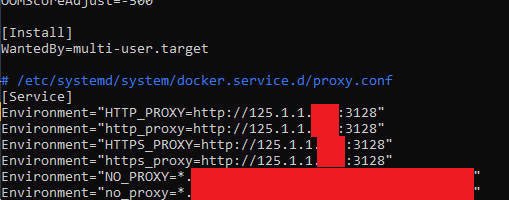
- The docker is configured for being used rootless
So, with this environment if i just launch the docker compose up -d the installation proceeds just fine, all the containers are being downloaded without any issues and if i try a wget (to http and https) from within the mastercontainer i get:
$ docker exec -it nextcloud-aio-mastercontainer wget http://google.com

--2024-11-22 01:37:38--  http://google.com/
Connecting to 125.1.1.xxx:3128... connected.
Proxy request sent, awaiting response... 301 Moved Permanently
Location: http://www.google.com/ [following]
--2024-11-22 01:37:38--  http://www.google.com/
Reusing existing connection to 125.1.1.xxx:3128.
Proxy request sent, awaiting response... 200 OK
Length: unspecified [text/html]
Saving to: 'index.html'

index.html                                            [ <=>                                                                                                       ]  19.56K  --.-KB/s    in 0.03s

2024-11-22 01:37:38 (721 KB/s) - 'index.html' saved [20026]
Now, if i try to do the same but from the inside of nextcloud-aio-nextcloud container i have no connection:
$ docker exec -it nextcloud-aio-mastercontainer wget http://google.com

Connecting to google.com (142.251.133.46:80)
wget: can't connect to remote host (142.251.133.46): Operation timed out
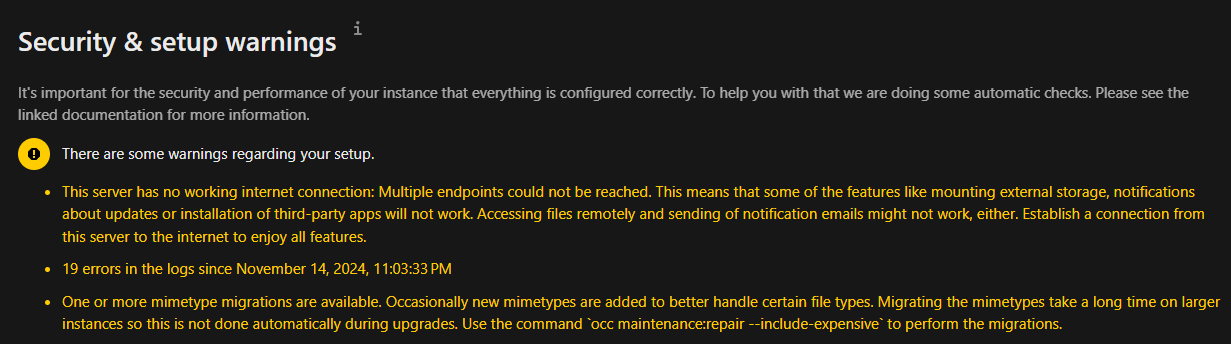
Also the nextcloud interface is telling me the same in the logs:
Now, if i manually export the proxy env vars within the nextcloud-aio-nextcloud container everython works just fine:
~ # wget http://google.com
Connecting to 125.1.1.xxx:3128 (125.1.1.xxx:3128)
saving to 'index.html'
index.html           100% |*****************************************************************************************************************************************************| 19956  0:00:00 ETA
'index.html' saved
In the AIO interface, i can see all the containers are in green and running just fine besides the notify-push which gives me the following error in the logs:
Connection to nextcloud-aio-nextcloud (172.19.0.12) 9001 port [tcp/*] succeeded!
The notify_push binary was not found.
Most likely is DNS resolution not working correctly.
You can try to fix this by configuring a DNS server globally in dockers daemon.json.
See https://dockerlabs.collabnix.com/intermediate/networking/Configuring_DNS.html
Afterwards a restart of docker should automatically resolve this.
Additionally, make sure to disable VPN software that might be running on your server
Also check your firewall if it blocks connections to github
If it should still not work afterwards, feel free to create a new thread at https://github.com/nextcloud/all-in-one/discussions/new?category=questions and post the Nextcloud container logs there.
So… in summary, seems that:
- The mastercontainer DNS and proxy servers are getting the correct configurations
- The DNS server is configured correctly in all the containers (wget to google.con is resolving the ip address always)
- Only the proxy configs are not boing passed from mastercontainer to the rest of the container services.
- I see the exact same behavior using the stable and beta branches.
- As I understand, manually setting the proxy env vars inside the nextcloud-aio-nextcloud will be not permanent, am i right?
Anyone can help me to understand what is happening and how to make it work?
Thank you very much!!