Support intro
Sorry to hear you’re facing problems. 
The community help forum (help.nextcloud.com) is for home and non-enterprise users. Support is provided by other community members on a best effort / “as available” basis. All of those responding are volunteering their time to help you.
If you’re using Nextcloud in a business/critical setting, paid and SLA-based support services can be accessed via portal.nextcloud.com where Nextcloud engineers can help ensure your business keeps running smoothly.
Getting help
In order to help you as efficiently (and quickly!) as possible, please fill in as much of the below requested information as you can.
Before clicking submit: Please check if your query is already addressed via the following resources:
- Official documentation (searchable and regularly updated)
- How to topics and FAQs
- Forum search
(Utilizing these existing resources is typically faster. It also helps reduce the load on our generous volunteers while elevating the signal to noise ratio of the forums otherwise arising from the same queries being posted repeatedly).
Some or all of the below information will be requested if it isn’t supplied; for fastest response please provide as much as you can. 
The Basics
- Nextcloud Server version (e.g., 29.x.x):
AIO v11.7.0- ghcr.io/nextcloud-releases/all-in-one:latest
- Operating system and version (e.g., Ubuntu 24.04):
Rocky Linux 10- up-to-date on 11.09.2025
- Web server and version (e.g, Apache 2.4.25):
AIO v11.7.0
- Reverse proxy and version _(e.g. nginx 1.27.2)
Nginx Proxy Manager- jc21/nginx-proxy-manager:latest
- PHP version (e.g, 8.3):
AIO v11.7.0
- Is this the first time you’ve seen this error? (Yes / No):
Yes. I checked it online, but I could not resolve this issue with previous occurences.
- When did this problem seem to first start?
While installing my new docker instance.
- Installation method (e.g. AlO, NCP, Bare Metal/Archive, etc.)
AIO behind Nginx Proxy Manager - docker
- Are you using CloudfIare, mod_security, or similar? (Yes / No)
Yes, Cloudflare for certificates, but not externally exposed. All internal hosted.
Summary of the issue you are facing:
I tried to install Nextcloud AIO behind a Nginx Proxy Manager on my local network to get valid Let’s Encrypt certificates and securly connect to my devices. I tried to set it up as simple as possible for the beginning, no redis, no portainer, no unneccesary containers. Just to get thinks running and test a bit the perfomance:
Here is my folder structure:
————————————–-
/opt/nextcloud/
│── docker-compose.yml # stack definition
│
├── npm/
│ ├── data/ # persistent storage for Nginx Proxy Manager
│ └── letsencrypt/ # SSL certs handled by NPM
│
├── ncdata/ # Nextcloud user data
Here is my docker-compose.yml:
————————————–———
services:
# Nginx Proxy Manager
nginx-proxy-manager:
image: jc21/nginx-proxy-manager:latest
container_name: nginx-proxy-manager
restart: unless-stopped
ports:
- “80:80” # HTTP
- “443:443” # HTTPS
- “81:81” # Admin UI
environment:
- DISABLE_IPV6=true
volumes:
- /opt/nextcloud/npm/data:/data:z
- /opt/nextcloud/npm/letsencrypt:/etc/letsencrypt:z
labels:
com.centurylinklabs.watchtower.enable: “true”
networks:
- frontend
- backend
# Nextcloud AIO mastercontainer
nextcloud-aio-mastercontainer:
image: ghcr.io/nextcloud-releases/all-in-one:latest
container_name: nextcloud-aio-mastercontainer
init: true
restart: always
networks:
- backend
volumes:
- nextcloud_aio_mastercontainer:/mnt/docker-aio-config
- /var/run/docker.sock:/var/run/docker.sock:ro
- /opt/nextcloud/ncdata:/nextcloud/ncdata:z
ports:
- “8080:8080”
environment:
APACHE_PORT: 11000
NEXTCLOUD_DATADIR: /nextcloud/ncdata
NEXTCLOUD_UPLOAD_LIMIT: 1028G
NEXTCLOUD_MAX_TIME: 7200
NEXTCLOUD_MEMORY_LIMIT: 512M
NEXTCLOUD_ENABLE_DRI_DEVICE: “true”
SKIP_DOMAIN_VALIDATION: “false”
TALK_PORT: 3478
labels:
com.centurylinklabs.watchtower.enable: “false” # don’t auto-update Nextcloud
ulimits:
nofile:
soft: 65536
hard: 262144
# Watchtower
watchtower:
image: containrrr/watchtower:latest
container_name: watchtower
restart: unless-stopped
volumes:
- /var/run/docker.sock:/var/run/docker.sock:ro
command: --cleanup --label-enable --interval 86400
labels:
com.centurylinklabs.watchtower.enable: “false”
volumes:
nextcloud_aio_mastercontainer:
name: nextcloud_aio_mastercontainer
networks:
frontend:
driver: bridge
backend:
driver: bridge
I also successfully set up Cloudflare:
—————————————————

A - domainname.domian to internal IP xxx.xxx.xxx.xxx
CNAME - * to domainname.domian
(API Token was created with the right permissions)
And Let’s Encrypt inside of my NPM: (works perfectly)
—————————————————
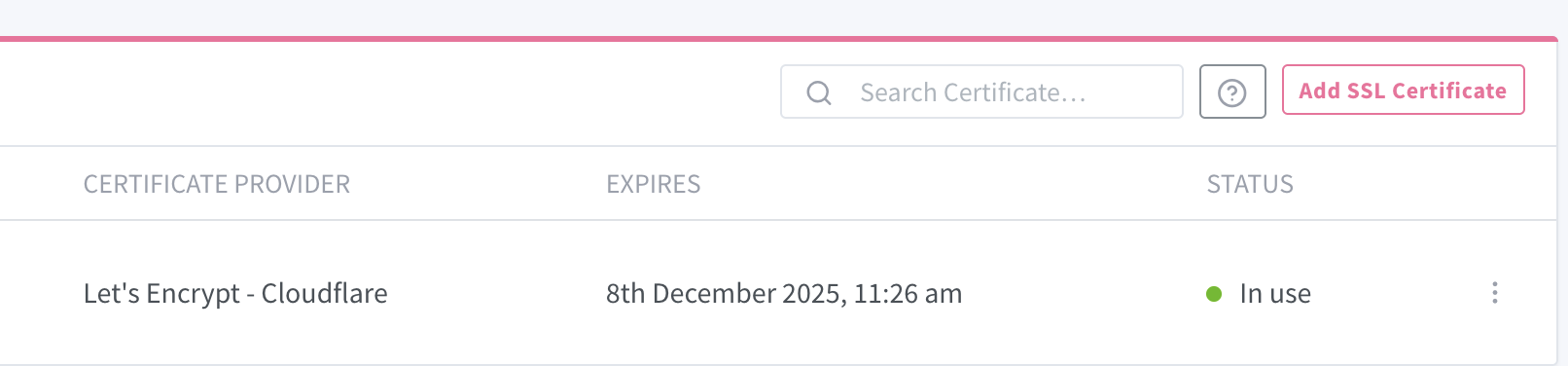
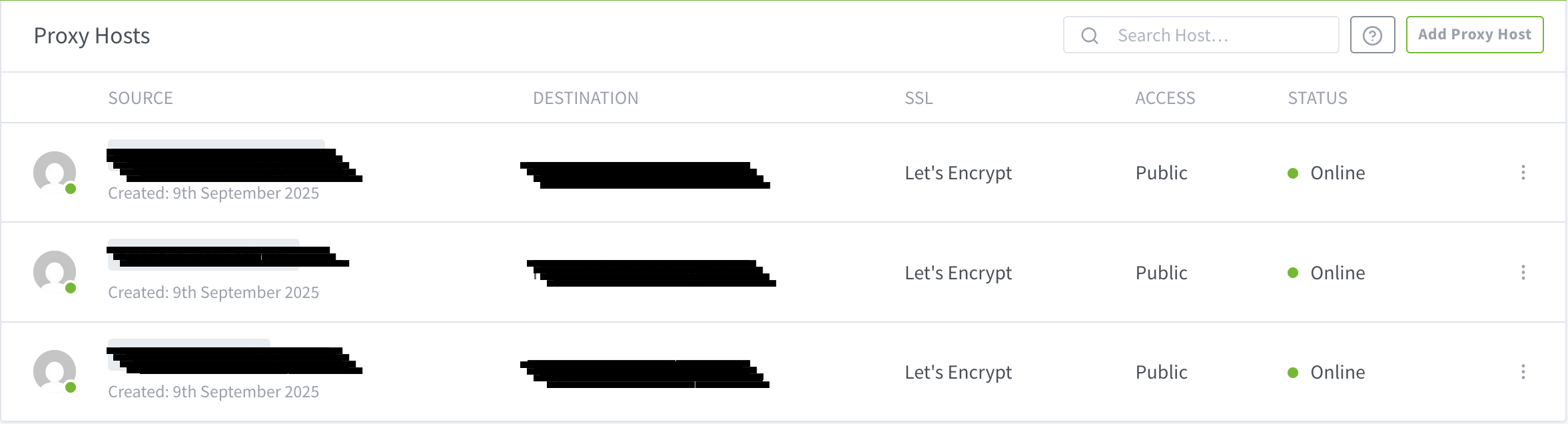
The entries are also working fine. If open them they respond immediately:
https://nextcloud-aio.domainname.domian to IP + Port 8080 (WEB GUI Access)
https://nextcloud.domainname.domian to IP + Port 11000 (Apache Expose for domain)
(All this works fine)
But I still getting this error:
DNS config is not set for this domain or the domain is not a valid domain! (It was found to be set to ‘’)
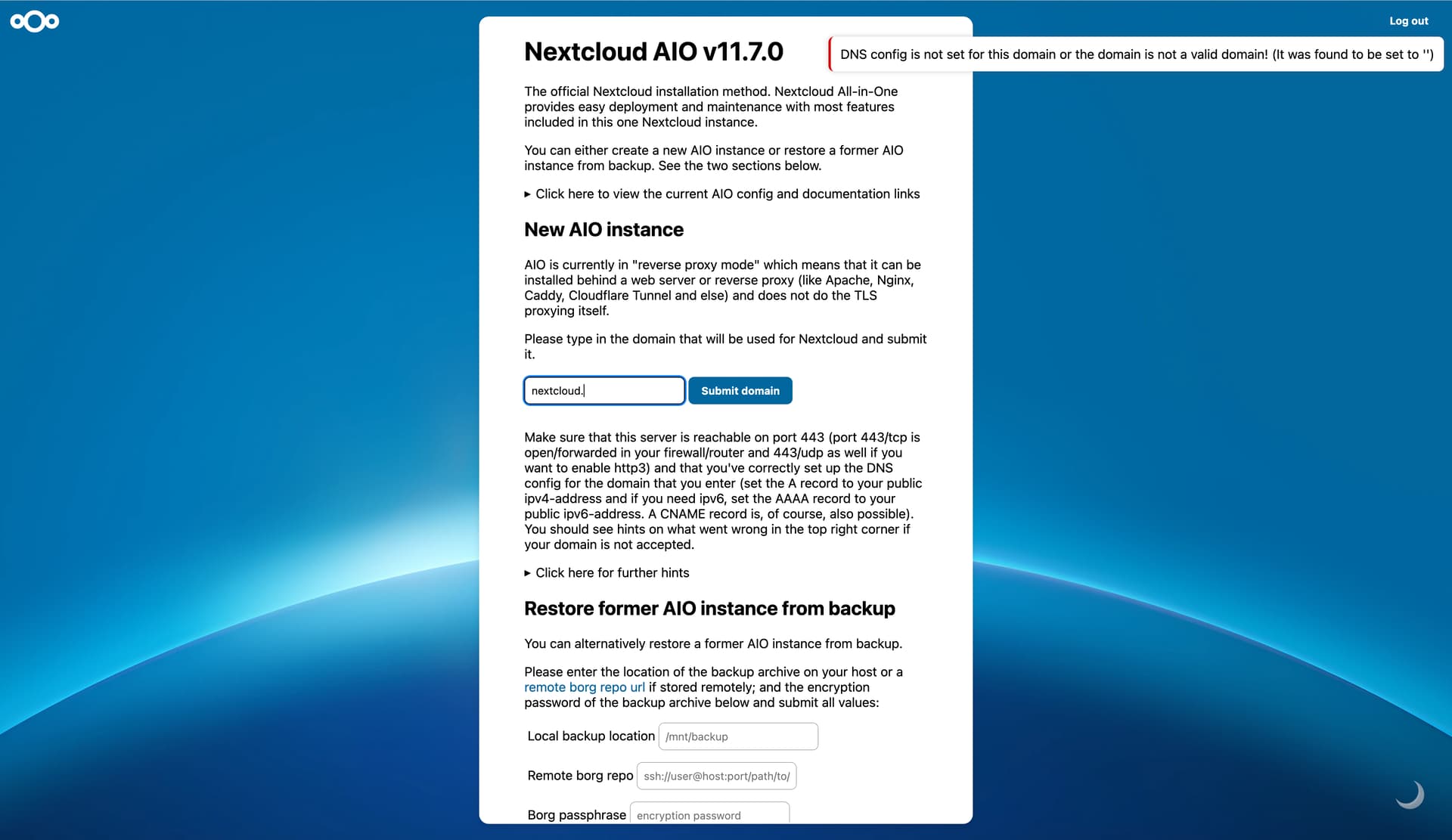
I tried to resolve it with the closed threads here:
Sadly without success. DNS works perfect for me. If I search for any of this DNS names they open immediately.
The containers itself have been running for quite some time now. I restarted them and rebooted the entire system a few times.
xxx@nextcloud-docker-01:/opt/nextcloud$ docker compose ps
NAME IMAGE COMMAND SERVICE CREATED STATUS PORTS
nextcloud-aio-mastercontainer ghcr.io/nextcloud-releases/all-in-one:latest “/start.sh” nextcloud-aio-mastercontainer 43 hours ago Up 6 hours (healthy) 80/tcp, 8443/tcp, 9000/tcp, 0.0.0.0:8080->8080/tcp, [::]:8080->8080/tcp
nginx-proxy-manager jc21/nginx-proxy-manager:latest “/init” nginx-proxy-manager 43 hours ago Up 6 hours 0.0.0.0:80-81->80-81/tcp, [::]:80-81->80-81/tcp, 0.0.0.0:443->443/tcp, [::]:443->443/tcp
watchtower containrrr/watchtower:latest “/watchtower --clean…” watchtower 43 hours ago Up 6 hours (healthy) 8080/tcp
xxx@nextcloud-docker-01:/opt/nextcloud$
Do you guys have an idea to fix this issue?
Steps to replicate it (hint: details matter!):
- No steps required, failed at installation.
Log entries
Nextcloud
Please provide the log entries from your Nextcloud log that are generated during the time of problem (via the Copy raw option from Administration settings->Logging screen or from your nextcloud.log located in your data directory). Feel free to use a pastebin/gist service if necessary.
user@<HOSTNAME>:/opt/nextcloud$ docker compose logs -f nextcloud-aio-mastercontainer
nextcloud-aio-mastercontainer  | Trying to fix docker.sock permissions internally...
nextcloud-aio-mastercontainer  | Creating docker group internally with id 990
nextcloud-aio-mastercontainer  | Initial startup of Nextcloud All-in-One complete!
nextcloud-aio-mastercontainer  | You should be able to open the Nextcloud AIO Interface now on port 8080 of this server!
nextcloud-aio-mastercontainer  | E.g. https://<IP_ADDRESS>:8080
nextcloud-aio-mastercontainer  | ⚠️ Important: do always use an ip-address if you access this port and not a domain as HSTS might block access to it later!
nextcloud-aio-mastercontainer  |
nextcloud-aio-mastercontainer  | If your server has port 80 and 8443 open and you point a domain to your server, you can get a valid certificate automatically by opening the Nextcloud AIO Interface via:
nextcloud-aio-mastercontainer  | https://<DOMAIN>:8443
nextcloud-aio-mastercontainer  | /usr/lib/python3.12/site-packages/supervisor/options.py:13: UserWarning: pkg_resources is deprecated as an API. See https://setuptools.pypa.io/en/latest/pkg_resources.html. The pkg_resources package is slated for removal as early as 2025-11-30. Refrain from using this package or pin to Setuptools<81.
nextcloud-aio-mastercontainer  |   import pkg_resources
nextcloud-aio-mastercontainer  | [Tue Sep 09 12:16:54.484866 2025] [mpm_event:notice] [pid 149:tid 149] AH00489: Apache/2.4.65 (Unix) OpenSSL/3.5.2 configured -- resuming normal operations
nextcloud-aio-mastercontainer  | [Tue Sep 09 12:16:54.484907 2025] [core:notice] [pid 149:tid 149] AH00094: Command line: 'httpd -D FOREGROUND'
nextcloud-aio-mastercontainer  | [09-Sep-2025 12:16:54] NOTICE: fpm is running, pid 155
nextcloud-aio-mastercontainer  | [09-Sep-2025 12:16:54] NOTICE: ready to handle connections
nextcloud-aio-mastercontainer  | {"level":"info","ts":1757420214.4934554,"msg":"maxprocs: Leaving GOMAXPROCS=4: CPU quota undefined"}
nextcloud-aio-mastercontainer  | {"level":"info","ts":1757420214.4936264,"msg":"GOMEMLIMIT is updated","package":"github.com/KimMachineGun/automemlimit/memlimit","GOMEMLIMIT":14845553049,"previous":9223372036854775807}
nextcloud-aio-mastercontainer  | {"level":"info","ts":1757420214.4936569,"msg":"using config from file","file":"/Caddyfile"}
nextcloud-aio-mastercontainer  | {"level":"info","ts":1757420214.494826,"msg":"adapted config to JSON","adapter":"caddyfile"}
nextcloud-aio-mastercontainer  | {"level":"info","ts":1757420214.4965577,"msg":"serving initial configuration"}
nextcloud-aio-mastercontainer  | Deleting duplicate sessions
nextcloud-aio-mastercontainer  | Deleting duplicate sessions
nextcloud-aio-mastercontainer  | [09-Sep-2025 12:33:05] NOTICE: Terminating ...
nextcloud-aio-mastercontainer  | [09-Sep-2025 12:33:05] NOTICE: exiting, bye-bye!
nextcloud-aio-mastercontainer  | [Tue Sep 09 12:33:08.101685 2025] [mpm_event:notice] [pid 149:tid 149] AH00491: caught SIGTERM, shutting down
...
(next sections repeat similar startup/shutdown logs, Apache notices, fpm ready messages, domain/IP placeholders applied)
...
nextcloud-aio-mastercontainer  | [Thu Sep 11 01:00:23] NOTICE: fpm is running, pid 145
nextcloud-aio-mastercontainer  | [11-Sep-2025 01:00:23] NOTICE: ready to handle connections
nextcloud-aio-mastercontainer  | nextcloud-aio-domaincheck
nextcloud-aio-mastercontainer  | Total reclaimed space: 0B
nextcloud-aio-mastercontainer  | Deleting duplicate sessions
Web Browser
If the problem is related to the Web interface, open your browser inspector Console and Network tabs while refreshing (reloading) and reproducing the problem. Provide any relevant output/errors here that appear.
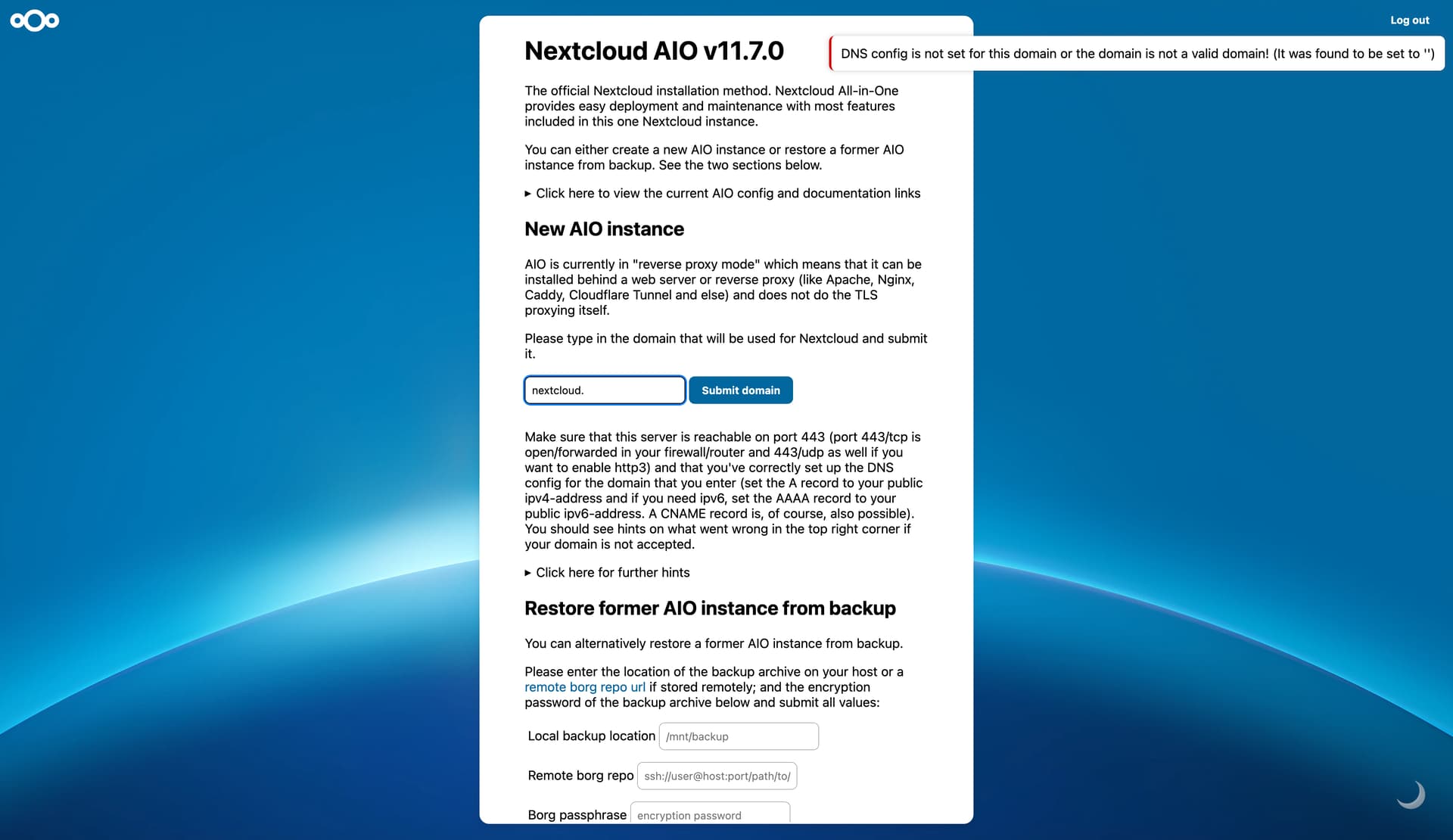
I removed my domain, but its this error as shown in the title.
Web server / Reverse Proxy
The output of your Apache/nginx/system log in /var/log/____:
user@<HOSTNAME>:/opt/nextcloud$ docker compose logs -f nginx-proxy-manager
nginx-proxy-manager  |  _   _ ____  __  __
nginx-proxy-manager  | | \ | |  _ \|  \/  |
nginx-proxy-manager  | |  \| | |_) | |\/| |
nginx-proxy-manager  | | |\  |  __/| |  | |
nginx-proxy-manager  | |_| \_|_|   |_|  |_|
nginx-proxy-manager  | -------------------------------------
nginx-proxy-manager  | User:  npm PUID:0 ID:0 GROUP:0
nginx-proxy-manager  | Group: npm PGID:0 ID:0
nginx-proxy-manager  | -------------------------------------
nginx-proxy-manager  |
nginx-proxy-manager  | ❯ Starting nginx ...
nginx-proxy-manager  | ❯ Starting backend ...
nginx-proxy-manager  | [9/11/2025] [1:00:21 AM] [Global   ] › ℹ  info      Using Sqlite: /data/database.sqlite
nginx-proxy-manager  | [9/11/2025] [1:00:22 AM] [Migrate  ] › ℹ  info      Current database version: none
nginx-proxy-manager  | [9/11/2025] [1:00:22 AM] [Global   ] › ⬤  debug     CMD: [ -f '/etc/letsencrypt/credentials/credentials-1' ] || { mkdir -p /etc/letsencrypt/credentials 2> /dev/null; echo '# Cloudflare API token
nginx-proxy-manager  | dns_cloudflare_api_token=<REDACTED_TOKEN>' > '/etc/letsencrypt/credentials/credentials-1' && chmod 600 '/etc/letsencrypt/credentials/credentials-1'; }
nginx-proxy-manager  | [9/11/2025] [1:00:22 AM] [Certbot  ] › ▶  start     Installing cloudflare...
nginx-proxy-manager  | [9/11/2025] [1:00:22 AM] [Global   ] › ⬤  debug     CMD: . /opt/certbot/bin/activate && pip install --no-cache-dir acme==$(certbot --version | grep -Eo '[0-9](\.[0-9]+)+') certbot-dns-cloudflare==$(certbot --version | grep -Eo '[0-9](\.[0-9]+)+')  && deactivate
nginx-proxy-manager  | [9/11/2025] [1:00:23 AM] [Certbot  ] › ☒  complete  Installed cloudflare
nginx-proxy-manager  | [9/11/2025] [1:00:23 AM] [Setup    ] › ℹ  info      Added Certbot plugins cloudflare
nginx-proxy-manager  | [9/11/2025] [1:00:23 AM] [Setup    ] › ℹ  info      Logrotate Timer initialized
nginx-proxy-manager  | [9/11/2025] [1:00:23 AM] [Global   ] › ⬤  debug     CMD: logrotate /etc/logrotate.d/nginx-proxy-manager
nginx-proxy-manager  | [9/11/2025] [1:00:23 AM] [Setup    ] › ℹ  info      Logrotate completed.
nginx-proxy-manager  | [9/11/2025] [1:00:23 AM] [Global   ] › ℹ  info      IP Ranges fetch is enabled
nginx-proxy-manager  | [9/11/2025] [1:00:23 AM] [IP Ranges] › ℹ  info      Fetching IP Ranges from online services...
nginx-proxy-manager  | [9/11/2025] [1:00:23 AM] [IP Ranges] › ℹ  info      Fetching https://ip-ranges.amazonaws.com/ip-ranges.json
nginx-proxy-manager  | [9/11/2025] [1:00:24 AM] [IP Ranges] › ℹ  info      Fetching https://www.cloudflare.com/ips-v4
nginx-proxy-manager  | [9/11/2025] [1:00:24 AM] [IP Ranges] › ℹ  info      Fetching https://www.cloudflare.com/ips-v6
nginx-proxy-manager  | [9/11/2025] [1:00:24 AM] [SSL      ] › ℹ  info      Let's Encrypt Renewal Timer initialized
nginx-proxy-manager  | [9/11/2025] [1:00:24 AM] [SSL      ] › ℹ  info      Renewing SSL certs expiring within 30 days ...
nginx-proxy-manager  | [9/11/2025] [1:00:24 AM] [IP Ranges] › ℹ  info      IP Ranges Renewal Timer initialized
nginx-proxy-manager  | [9/11/2025] [1:00:24 AM] [Global   ] › ℹ  info      Backend PID 176 listening on port 3000 ...
nginx-proxy-manager  | [9/11/2025] [1:00:24 AM] [SSL      ] › ℹ  info      Completed SSL cert renew process
nginx-proxy-manager  | [9/11/2025] [2:00:24 AM] [SSL      ] › ℹ  info      Renewing SSL certs expiring within 30 days ...
nginx-proxy-manager  | [9/11/2025] [2:00:24 AM] [SSL      ] › ℹ  info      Completed SSL cert renew process
nginx-proxy-manager  | [9/11/2025] [3:00:24 AM] [SSL      ] › ℹ  info      Renewing SSL certs expiring within 30 days ...
nginx-proxy-manager  | [9/11/2025] [3:00:24 AM] [SSL      ] › ℹ  info      Completed SSL cert renew process
nginx-proxy-manager  | [9/11/2025] [4:00:24 AM] [SSL      ] › ℹ  info      Renewing SSL certs expiring within 30 days ...
nginx-proxy-manager  | [9/11/2025] [4:00:24 AM] [SSL      ] › ℹ  info      Completed SSL cert renew process
nginx-proxy-manager  | [9/11/2025] [5:00:24 AM] [SSL      ] › ℹ  info      Renewing SSL certs expiring within 30 days ...
nginx-proxy-manager  | [9/11/2025] [5:00:24 AM] [SSL      ] › ℹ  info      Completed SSL cert renew process
nginx-proxy-manager  | [9/11/2025] [6:00:24 AM] [SSL      ] › ℹ  info      Renewing SSL certs expiring within 30 days ...
nginx-proxy-manager  | [9/11/2025] [6:00:24 AM] [SSL      ] › ℹ  info      Completed SSL cert renew process
Configuration
Nextcloud
The output of occ config:list system or similar is best, but, if not possible, the contents of your config.php file from /path/to/nextcloud is fine (make sure to remove any identifiable information!):
AIO in container, listed above :)
Apps
The output of occ app:list (if possible).
Tips for increasing the likelihood of a response
- Use the
preformatted textformatting option in the editor for all log entries and configuration output. - If screenshots are useful, feel free to include them.
- If possible, also include key error output in text form so it can be searched for.
- Try to edit log output only minimally (if at all) so that it can be ran through analyzers / formatters by those trying to help you.