Administration settings not showing via an https connection.

I seem to have a weird issue that I cannot resolve.
I have just installed the docker container of the Nextcloud latest community image.
Nextcloud 34.0.3 - Apache.

Access to Nextcloud is via an HAProxy in https mode, and all seems to be working except that I cannot see the Administration settings using the default admin account.

(NB: There are other websites and facilities that are working just fine behind the HAProxy)

If I connect via http, bypassing the HAProxy I can then see the Administration settings.

See images below.

I am using a Mariadb cluster, and have added the following to the Nextcloud config.php file.
The values below have been sanitised.

‘trusted_domains’ =>
array (
0 => ‘x.x.x.x:48080’,
1 => ‘example.com:10443’,
),
‘trusted_proxies’ =>
array (
0 => ‘x.x.x.x’, → IP address of the HaProxy.
),
‘forwarded_for_headers’ =>
array (
0 => ‘HTTP_X_FORWARDED’,
1 => ‘HTTP_FORWARDED_FOR’,
),
‘allowed_admin_ranges’ =>
array (
0 => ‘x.x.x.x/24’, → local LAN address range.
),

overwrite.cli.url’ => ‘https://example.com:10443’,

The below is via an http connection.
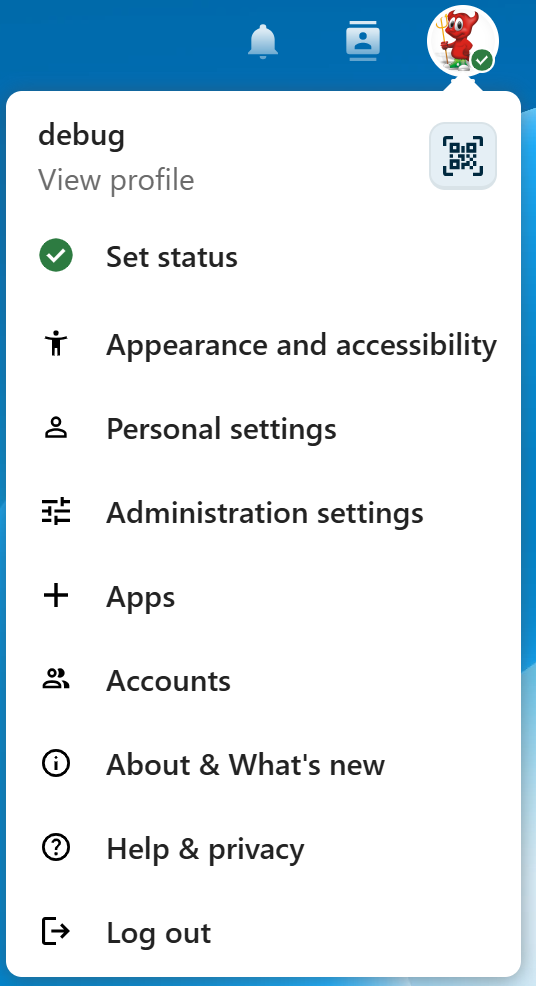
The below is via an https connection through an Haproxy.

There are no other Apps installed, just the vanilla Nextcloud.

So all seems to work in https mode except for not having access to the Administration settings.

Thanking you in anticipation.

Hello Cuello!
I checked the code on nextcloud git, as I was not sure if it would use the forwarded client IP from the trusted headers, but it does (it should).

I see that your trusted headers are wrong though - almost like you mixed them together :face_with_hand_over_mouth:

'forwarded_for_headers' => [
    'HTTP_X_FORWARDED_FOR', // you forgot "_X_"
    'HTTP_FORWARDED',  // remove _FOR
],

When you get the right client IPs forwarded to nextcloud, it will start evaluating your local IPs successfully, at least that is my theory. Since the headers have been incorrect, nextcloud has very likely never shown your real IP to begin with, and has fallen back to using the HAProxy ip.

Give it a go, let me know how it goes

Hi denNorske,

Thanks for the quick response, much appreciated.

I have changed the entries as you have suggested, but it made no difference.

I actually originally cut and pasted the entry from the example config file.

My system does not have internet access, and all I see in the logs is the following:

ConnectExceptioncURL error 7: Failed to connect to edri.org port 443 after 0 ms: Could not connect to server (see libcurl - Error Codes ) for https://edri.org.

I have other php systems (like Backdrop and Drupal) configured in the same manner without any issues.

Thanks for your help…

See Using the image behind a reverse proxy and specifying the server host and protocol.

Also, when checking your config use occ config:list system rather than looking at the config.php file, since the images all use multiple/merged config file as described here.

Ah Yes, I keep forgetting that the system includes other files. Good point.

But the good news is that I got it working now.

I reverted the entry:

‘forwarded_for_headers’ => [‘HTTP_X_FORWARDED’, ‘HTTP_FORWARDED_FOR’],

and I also added in the “allowed_admin_ranges” the IP range of the docker network addresses.

array (
0 => ‘x.x.x.0/24’, → Local LAN
1 => ‘172.x.x.0/24’, → Docker IP range
),

Thanks you both for your valuable assistance.

The example isn’t meant to be used literally since it’s only for scenarios where one needs to customize the headers being sent by their reverse proxy. :slight_smile: But I do see how the text can be confusing. I’ll clean that up now since I’m looking at it.

In most cases the default value for forwarded_for_headers is already reasonable… unless you’re doing something unusual.

EDIT: Done - docs(config): clarify forwarded_for_headers configuration by joshtrichards · Pull Request #63542 · nextcloud/server · GitHub