Support intro
Sorry to hear you’re facing problems. 
The community help forum (help.nextcloud.com) is for home and non-enterprise users. Support is provided by other community members on a best effort / “as available” basis. All of those responding are volunteering their time to help you.
If you’re using Nextcloud in a business/critical setting, paid and SLA-based support services can be accessed via portal.nextcloud.com where Nextcloud engineers can help ensure your business keeps running smoothly.
Getting help
In order to help you as efficiently (and quickly!) as possible, please fill in as much of the below requested information as you can.
Before clicking submit: Please check if your query is already addressed via the following resources:
- Official documentation (searchable and regularly updated)
- How to topics and FAQs
- Forum search
(Utilizing these existing resources is typically faster. It also helps reduce the load on our generous volunteers while elevating the signal to noise ratio of the forums otherwise arising from the same queries being posted repeatedly).
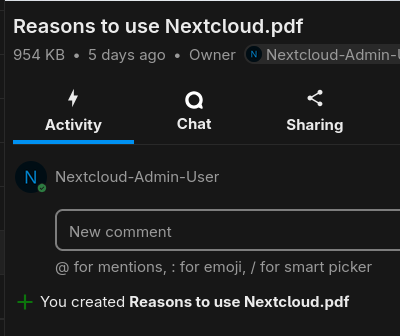
Hello everybody, I’m wondering if it possibile to attach a comment to a file (like pdf or an image) in nextcloud for unshared files.
On the web (some also in this forum) I can find reference to the possibility to add a comment in the side panel that opens when click on “details”, but it does not show up in mine. For shared files I can open a talk conversation, but this is not what I want.
I’m self-hosting the latest NC AIO, with talk app installed.
- Nextcloud Server version :
31
- Installation method
AIO
Also, I’m a user of an instance at my workplace where the talk app is not installed.
In both the cases there is no “comments” section in details side panel in files.
Was a feature that has been removed in recent updates? Why? Is it possibile to restore it?
Thankyou for any answer.