Sorry to hear you’re facing problems. 
The community help forum (help.nextcloud.com) is for home and non-enterprise users. Support is provided by other community members on a best effort / “as available” basis. All of those responding are volunteering their time to help you.
If you’re using Nextcloud in a business/critical setting, paid and SLA-based support services can be accessed via portal.nextcloud.com where Nextcloud engineers can help ensure your business keeps running smoothly.
Getting help
In order to help you as efficiently (and quickly!) as possible, please fill in as much of the below requested information as you can.
Before clicking submit: Please check if your query is already addressed via the following resources:
- Official documentation (searchable and regularly updated)
- How to topics and FAQs
- Forum search
Hello dear Nextcloud community,
I’m currently helping an association for people with disabilities (especially visual impairments) set up and customize a Nextcloud instance for their organization.
There are various special requirements regarding accessibility. Some of them were quite easy to implement, while others turned out to be more difficult.
At the moment, I’m trying to fulfill the request to make the icons and text in the top menu bar significantly larger—with proper spacing—so that users can see and use them more easily. Unfortunately, I’m having a hard time finding a good solution for this. I couldn’t find anything “out of the box,” or maybe I just missed it.
I’ve tried using custom CSS and a bit of ChatGPT assistance to achieve a good result, but so far without much success. Either it looks bad, negatively affects responsiveness, or both.
Does anyone have a good idea, a helpful hint, or know of a Nextcloud app that could make this easier to implement?
The Basics
- Nextcloud Storage Box by Hetzner
- Nextcloud Server version (e.g., 29.x.x):
Version 31.0.8
- PHP version (e.g, 8.3):
8.3.24
Because a picture says more than a thousand words, here’s a screenshot showing what it currently looks like and what exactly I mean:
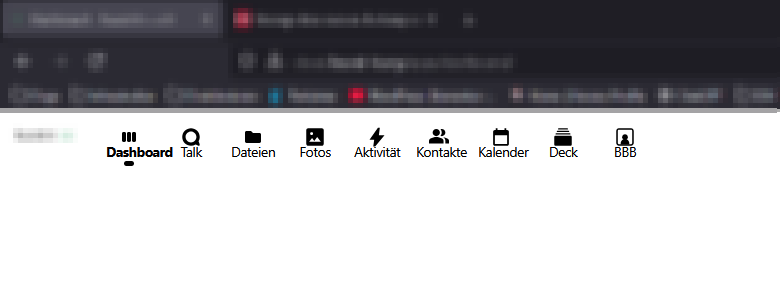
Below is the CSS file I put together with ChatGPT and a bit of trial and error:
:root {
    --menu-icon-size: 40px;       /* Size of the icons */
    --menu-label-font-size: 14px; /* Font size of the labels */
    --menu-gap: 12px;             /* Spacing between icon and label */
}

/* Container: height = icon + label + double spacing */
.app-menu-entry[data-v-9736071a] {
    --app-menu-entry-font-size: var(--menu-icon-size) !important;
    height: calc(var(--menu-icon-size) + var(--menu-label-font-size) + var(--menu-gap) * 2) !important;
    display: flex !important;
    flex-direction: column !important;
    justify-content: center !important; /* vertically centered */
    align-items: center !important;
    margin-inline: calc(var(--menu-icon-size) * 0.15) !important; /* horizontal spacing between icons */
}

/* Icon */
.app-menu-entry__icon[data-v-9736071a] {
    font-size: var(--app-menu-entry-font-size) !important;
    line-height: 1 !important;
    margin-bottom: var(--menu-gap) !important; /* spacing between icon and text */
    transition: none !important;
}

/* Label always visible */
.app-menu-entry__label[data-v-9736071a] {
    opacity: 1 !important;           /* always visible */
    position: static !important;
    transform: none !important;
    font-size: var(--menu-label-font-size) !important;
    line-height: 1.2 !important;
    text-align: center !important;
    white-space: normal !important;  /* allow line breaks */
    overflow: visible !important;
    text-overflow: unset !important;
    max-width: 100% !important;
    margin: 0 !important;
    transition: none !important;      /* disable hover animation */
}

/* Hover: slightly bolder text, labels remain visible */
.app-menu-entry:hover .app-menu-entry__label[data-v-9736071a],
.app-menu-entry:focus-within .app-menu-entry__label[data-v-9736071a] {
    font-weight: 600 !important;
    opacity: 1 !important;
}

/* Active icon colored */
.app-menu-entry--active[data-v-9736071a] .app-menu-entry__icon[data-v-9736071a] {
    color: var(--color-primary-element) !important;
}
I hope I’ve provided all the necessary information to help you understand my problem.
I’d be extremely grateful for any specific or general hints that could point me in a helpful direction.
Many thanks in advance and best regards.

