Another favorite: how Gnome Nautilus and Linux Mint’s Nemo file browsers can mount WebDAV file shares, allowing easy file management directly in a Nextcloud account (not done through the Web Browser). This is fantastic when you want to upload entire folders with many sub-folders and files, deeply nested.
In order to do it in Linux Mint 19’s Nemo, first you’ll need to install the software package “davfs2”. Then start Nemo, and under the “File” menu → “Connect to Server…”, you can connect to a Nextcloud server like this:
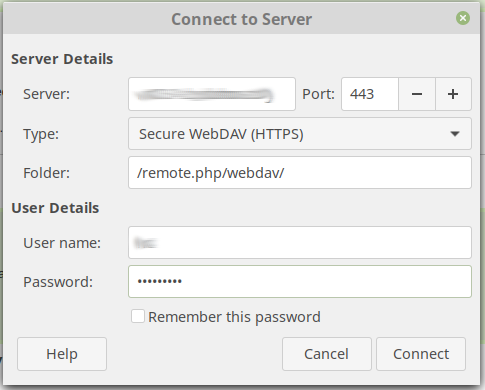
Note: for the Server name, no “https://” is specified at the start.
Tip: Once you successfully mount the WebDAV share, right click it on the left (under the “Network” section), then choose “Add Bookmark”, so you can re-mount it again later, easily.