Worked perfect for me on a synology NAS running mariadb. Thanks so much for the quick howto as I’m not great with DB’s
1 Like
Thank you! This should have been handled by the upgrade script, or documented, provided. Anyway, thanks!
2 Likes
Hello,
i changed everything with this script:
SELECT CONCAT(‘ALTER TABLE `’, TABLE_NAME, ‘` ROW_FORMAT=DYNAMIC;’)
FROM INFORMATION_SCHEMA.TABLES
WHERE ENGINE = ‘InnoDB’;
These are the result:
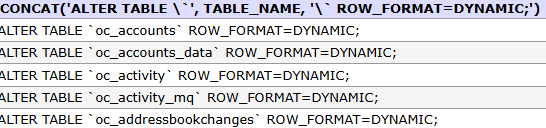
But i still get the warning. Reboot dont help 
Did I forget something?
Thank you
It’s work for me (NC 30 → 31 in debian / proxmox)
Tks ++
Thanks a bunch worked perfectly
I generated a similar SQL syntax error by failing to suppress the column headers, possibly a side effect of removing the -s option (hoping for more verbosity).
I included the -N option on mariadb to suppress column headers, which got things running on my system, resolving Nextcloud’s complaint.
Regarding the verbosity, I got no indication of command progress. However, I was able to see things working by running the following in the mariadb console in a separate terminal, and keeping an eye on row count in the output.
select table_name, row_format from information_schema.tables where table_schema = '$NC_DB_NAME' AND ROW_FORMAT <> 'Dynamic';
This worked beautifully for me after upgrading to 31.0.2 (Hub 10). I had the incorrect row format error, and it fixed it nicely. Thank you!
Hey thanks a lot for this script. Just going to add a few points for those who might not know:
- If you’ve lost your DB_NAME, DB_USER and DB_PASS, these values can be found within nextcloud’s config.php file.
- To check the ROW_FORMAT values of the Tables before running the script, you can manually login to the mariadb. If running docker you would first need to shell into the mariadb container via:
docker exec -it <container_name> /bin/bash. If not using docker then you can skip this step. Login to the mariadb via:mysql -u $DB_USER -p$DB_PASS $DB_NAME. - Check the ROW_FORMAT value via:
select table_name, row_format from information_schema.tables where table_schema = 'nextcloud' and ENGINE = 'InnoDB';I would use this command before and after running shell script just to verify everything is OK; - Shell script provided by @lxto above works great. If using the shell script within bsd, you’ll need to change the bash location to /usr/local/bin/bash. Also if running this within docker, you’ll need to shell into the mysql container and run this script or run it via
sudo docker exec <DB_CONTAINER> ./row_format.sh. - When running the script be patient. It took me a couple of minutes for everything to complete.
Thanks for the script. Made it easy.
2 Likes
Hi,
I’ve ran into this issue after upgrading to 31.0.2.
It seems almost everyone here is running nextcloud with docker.
I don’t use docker, I have a machine with linux 22.04.5, apache 2.4.52 and mariaDB 10.6.21.
I’m using webmin 2.303 for a comfortable administration.
How exactly could I use that script to update that database? (in terminal?) What commands do I need to use? Could someone drive me step-by-step as I’m a linux/mariadb very beginner?
Thank you,
This is correct. Some instances of mine that were fairly old need this script, and other newer ones didn’t.
I fixed the notice using this method with PHPmyadmin.
Does we have to add this to my.cnf or it is not needed?
[mysqld]
innodb_file_format=Barracuda
innodb_file_per_table=1
innodb_large_prefix=ON
Pls help a dummy
I get:
> Enter Password:
> ERROR 2002 (HY000): Can't connect to local MySQL server through socket '/run/mysqld/mysqld.sock' (2)
> ERROR 2002 (HY000): Can't connect to local MySQL server through socket '/run/mysqld/mysqld.sock' (2)
I’m still on IONOS WEBSPACE! With my cloud
how long did the script take to execute for you all? its been over an hour for me and still going.
The “technical basis” and the need to be a front-end and back-end developer are 2 completeley different things. Administrator should not be a developer. And the link to the documentation is wrong. It sends me to dev.mysql.com, not to the official Nextcloud documentation with relevant instructions how to fix this faulty upgrade.
1 Like
What makes you think you need to be a developer, or that changing the ROW format in a database is actually development work? It’s not, it’s called database administration, and the link in the message, if I remember correctly, goes to a page that explains what the different ROW formats are, most likely this one: https://dev.mysql.com/doc/refman/9.0/en/innodb-row-format.html
Could they have created a documentation page with instructions for Nextcloud server admins and linked to that instead? Sure. But it probably wouldn’t have helped less experienced admins all that much either, since Nextcloud is used in so many different environments that it would have been impossible to provide step-by-step instructions for everyone.
Well, if sysadmin has to be also a DBA, this must be an enterprise environment. I think, most cases are home/nonprofit installations.
As far as I remember, for each error or warning Nextcloud provided a link to its own resources. This is the firs time i see a link to a row definition without any example how to change to it.
Anyway, i do not have other choice except trying the script above.
1 Like
As I said, I doubt that it would have been possible to create guides that were comprehensive enough that any home user could solve this on their own without consulting additional resources. But yeah, just linking to some technical documentation aimed mainly at developers is certainly not ideal either 
BTW, I’m not a database admin either, and have only a very rudimentary understanding of how they work, but somehow by searching the forums and googling I managed to get a (very) basic understanding of what this InnoDB ROW format is, and then based on what I found on the internet, a script from an older post here on the forums, and a little help from ChatGPT I managed to put together this script.
1 Like
Yes, this instruction from lxto worked well. But i had to adjust it because in Ubuntu the root user has no password. So, i followed a point of kevdog:
If you’ve lost your DB_NAME, DB_USER and DB_PASS, these values can be found within nextcloud’s config.php file.
1 Like
I have used the script on several Ubuntu and Debian systems with MariaDB and none of them have a root password set. I simply switched to the root shell with sudo -i and ran the script from there. But it should also work if you run it directly with sudo from a normal user account, of course only if that user has the ability to elevate privileges via sudo.
Anyway, this just confirms that it’s not that easy to create the kind of detailed how-to that many home users need. But I agree with you that at least some general information should have been put in the admin docs, and then the message should have linked to that instead of dev.mysql.com. 
bb77
Have you ever seen this in somewhere when running the script
I get:
> Enter Password:
> ERROR 2002 (HY000): Can't connect to local MySQL server through socket '/run/mysqld/mysqld.sock' (2)
> ERROR 2002 (HY000): Can't connect to local MySQL server through socket '/run/mysqld/mysqld.sock' (2)
I’m still on IONOS WEBSPACE! With my cloud