Hey Martin!
Hey Martin!
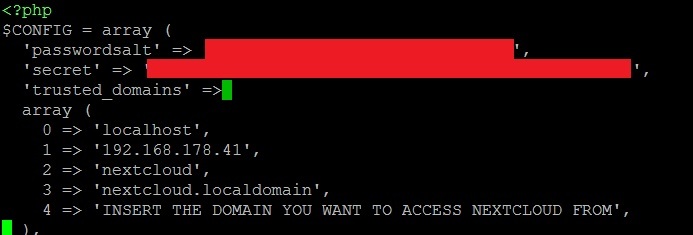
Move to the directory of your Nextcloud installation with the cd command. Usually the path would be /var/www/ and then either /html/nextcloud or just /nextcloud. In the NC folder you"ll find a folder called config. In the config folder you’ll find your config.php. Edit it using nano or any other text editor with the command “sudo nano config.php”. In the beginning of the config file you’ll find the lines you can see on my screenshot. You’ll have to replicate the pattern that is used for your local domain, so you’ll have to create a new line and copy the layout of the one above it 1:1, just changing the line number before the arrow symbol. In that new line you have to add the domain you want to access NC with, save the file and restart apache with the “service apache2 restart” command. After that you should have your domain set as trusted.
Since I assume you’re German and I am, too, feel free to message me if you have any more questions.
- sebastian.klein