My guess is that the snap includes a validator, which parses the config settings and writes the file again to apply any changes it might (or might not) make.
Mine is also set to the reverse proxy’s LAN IP, which would be 192.168.0.1 in your case.
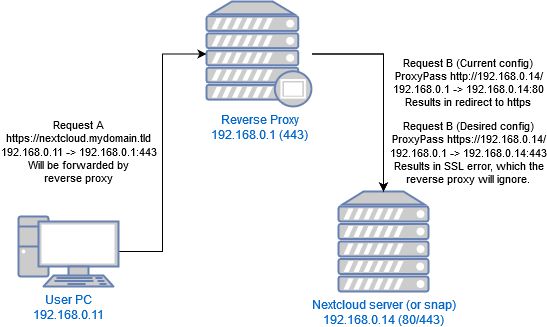
Your reverse proxy is listening on port 443, so that’s where the initial HTTPS connection requests (Request A) go. The proxy forwards each request to the Nextcloud snap via the URL we gave in the ProxyPass directive: http://192.168.0.14/ (Request B).
My container’s Apache expects connections on port 80, and answers directly.
The snap’s Apache configaration might just respond to all requests on port 80 (HTTP) with a redirect to port 443 (HTTPS). The client obediently opens a new request to port 443, which the reverse proxy forwards again to port 80, and we’ve got a loop.
Instead, you’ll need to change the ProxyPass URL to Nextcloud’s HTTPS port (443 by default): https://192.168.0.14/. The snap doesn’t have a valid SSL certificate, but that’s why we have the SSLProxyCheck options off in the reverse proxy’s config.
Edit: I misread the nc log, and thought Nextcloud was on the same box. Also, diagrams.net is the best.