Support intro
Sorry to hear you’re facing problems. 
The community help forum (help.nextcloud.com) is for home and non-enterprise users. Support is provided by other community members on a best effort / “as available” basis. All of those responding are volunteering their time to help you.
If you’re using Nextcloud in a business/critical setting, paid and SLA-based support services can be accessed via portal.nextcloud.com where Nextcloud engineers can help ensure your business keeps running smoothly.
Getting help
In order to help you as efficiently (and quickly!) as possible, please fill in as much of the below requested information as you can.
Before clicking submit: Please check if your query is already addressed via the following resources:
- Official documentation (searchable and regularly updated)
- How to topics and FAQs
- Forum search
(Utilizing these existing resources is typically faster. It also helps reduce the load on our generous volunteers while elevating the signal to noise ratio of the forums otherwise arising from the same queries being posted repeatedly).
Some or all of the below information will be requested if it isn’t supplied; for fastest response please provide as much as you can. 
The Basics
- Nextcloud Server version (e.g., 29.x.x):
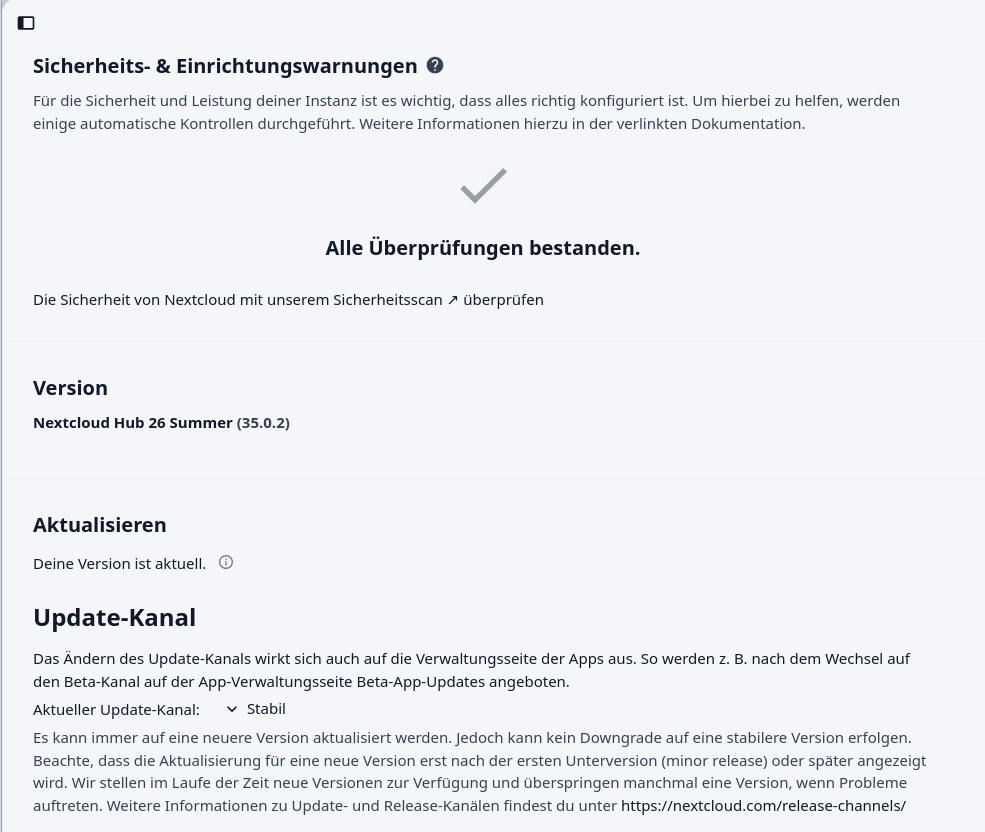
35.0.2
- Operating system and version (e.g., Ubuntu 24.04):
ubuntu-server 26.04.1
- Web server and version (e.g, Apache 2.4.25):
NGinx 1.30
- Reverse proxy and version _(e.g. nginx 1.27.2)
NGinx 1.30
- PHP version (e.g, 8.3):
8.5.11
- Is this the first time you’ve seen this error? (Yes / No):
Yes
- When did this problem seem to first start?
using search function (incl. fulltextsearch elasticsearch!) in 35.0.2
- Installation method (e.g. AlO, NCP, Bare Metal/Archive, etc.)
bare metal
- Are you using CloudfIare, mod_security, or similar? (Yes / No)
No
Summary of the issue you are facing:
chromium based browsers under linux (mx-linux 25.3) such as vivaldi, brave
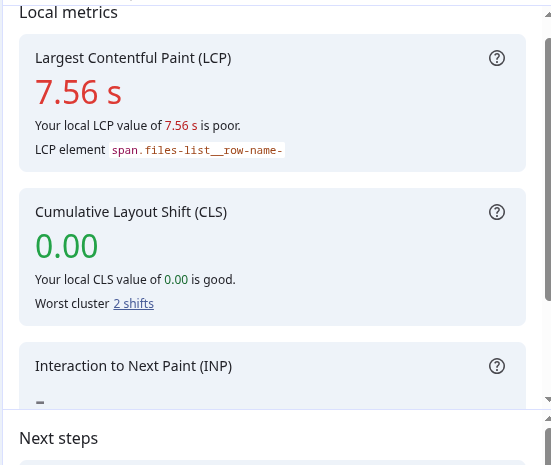
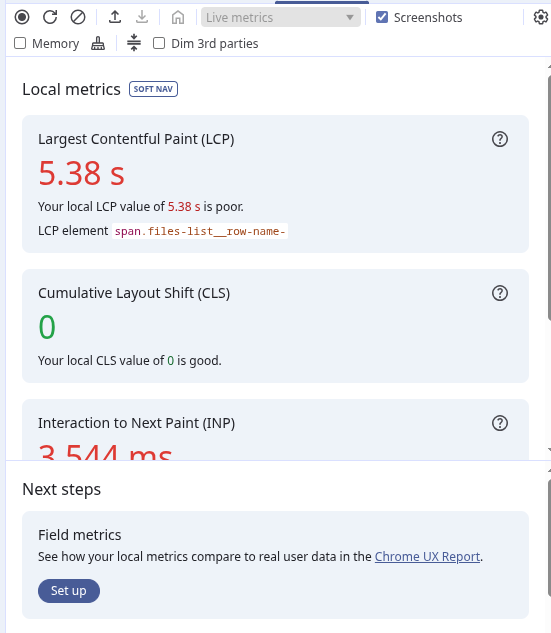
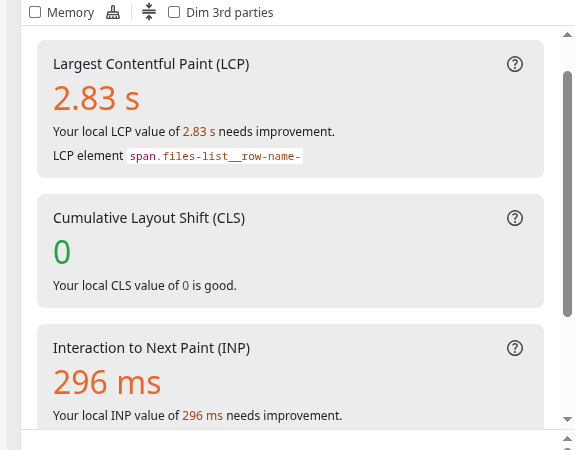
latest downloadable stable versions seems to have a lag in performance with nextcloud 35.0.2
As far as no search function is triggered, all is smooth and fast.
Navigation between files, folders and different apps (calendar, contacts, admin, etc.) is working fine. … until …
… i enter a word into the search bar in WebUI, and klick on one of the hits.
The “new” search function in 35.0.2 behave a little bit different than in older versions before.
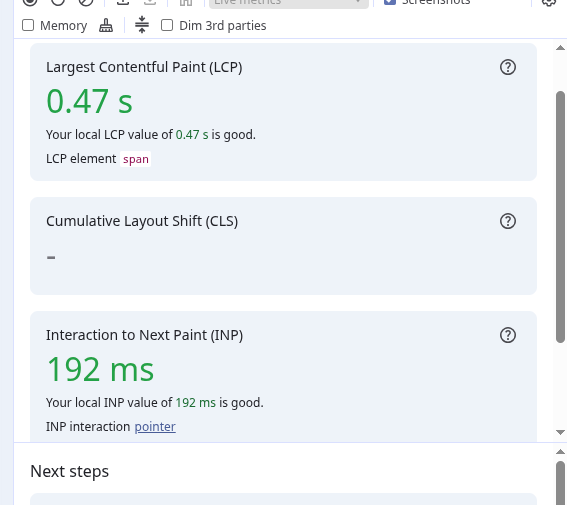
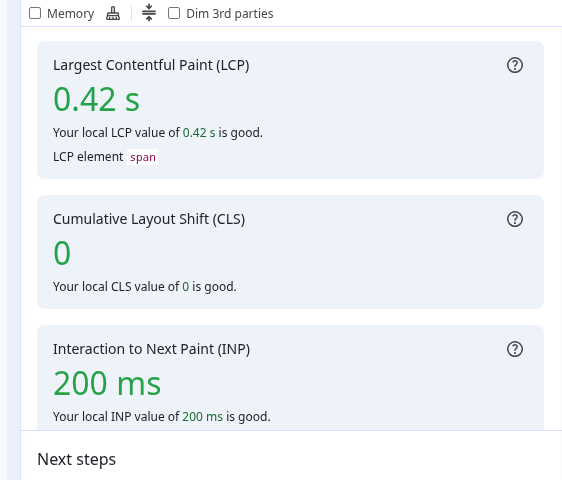
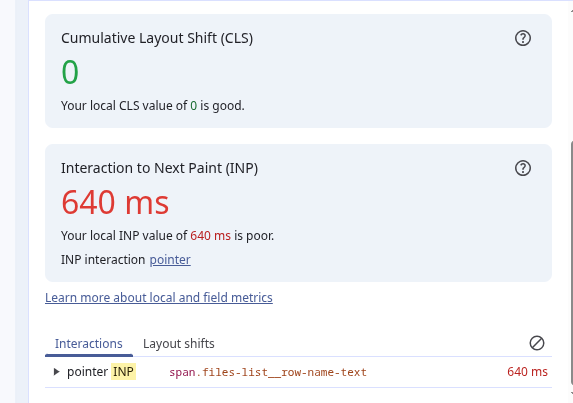
Usually a klick on a found item in earlier versions opened the location very fast, now the toggle needs seconds to follow the click and enter the location. Makes no difference if it is a hit from the fulltextsearch items or just the files items found.
Steps to replicate it (hint: details matter!):
-
use webui of NC 35.0.2 (click on folders, files, etc.) all good
-
use search function in the top of the webui frame (Strg + K)
-
wait until hits come up
-
click on one of the hits
-
wait (longer peroid) for the target coming up
-
after this procedure remark that also navigating in NC webUI becomes very slow, lag in performance (not the search process itself slows down the browser but the click on a hit and later further clicks on buttons etc. in the webui!)
-
restart browser once
-
remark that all is fast and smooth again … until next search is in use
-
same procedure with firefox (esr as well) → absolute no performance issues
search is fast and performant as with chromium browsers in 34.0.x
Log entries
Nextcloud
Please provide the log entries from your Nextcloud log that are generated during the time of problem (via the Copy raw option from Administration settings->Logging screen or from your nextcloud.log located in your data directory). Feel free to use a pastebin/gist service if necessary.
there is no hint in the logs (it seems to be a browser not a server prob)
Web Browser
If the problem is related to the Web interface, open your browser inspector Console and Network tabs while refreshing (reloading) and reproducing the problem. Provide any relevant output/errors here that appear.
opened F12 console in vivaldi but can't see anything about performance, timeouts, etc.
Need help from the community, what i should have to look after
Web server / Reverse Proxy
The output of your Apache/nginx/system log in /var/log/____:
PASTE HERE
Configuration
Nextcloud
The output of occ config:list system or similar is best, but, if not possible, the contents of your config.php file from /path/to/nextcloud is fine (make sure to remove any identifiable information!):
{
    "system": {
        "instanceid": "***REMOVED SENSITIVE VALUE***",
        "serverid": "55",
        "passwordsalt": "***REMOVED SENSITIVE VALUE***",
        "secret": "***REMOVED SENSITIVE VALUE***",
        "trusted_domains": [
            "192.168.55.16",
            "cloud.my.domain",
            "euo.my.domain"
        ],
        "has_internet_connection": true,
        "dns_pinning": false,
        "activity_expire_days": 14,
        "auth.bruteforce.protection.enabled": true,
        "forbidden_filenames": [
            ".htaccess",
            "Thumbs.db",
            "thumbs.db"
        ],
        "forbidden_filename_basenames": [
            "con",
            "prn",
            "aux",
            "nul",
            "com0",
            "com1",
            "com2",
            "com3",
            "com4",
            "com5",
            "com6",
            "com7",
            "com8",
            "com9",
            "com\u00b9",
            "com\u00b2",
            "com\u00b3",
            "lpt0",
            "lpt1",
            "lpt2",
            "lpt3",
            "lpt4",
            "lpt5",
            "lpt6",
            "lpt7",
            "lpt8",
            "lpt9",
            "lpt\u00b9",
            "lpt\u00b2",
            "lpt\u00b3"
        ],
        "forbidden_filename_characters": [
            "<",
            ">",
            ":",
            "\"",
            "|",
            "?",
            "*",
            "\\",
            "\/"
        ],
        "forbidden_filename_extensions": [
            " ",
            ".",
            ".filepart",
            ".part"
        ],
        "trusted_proxies": "***REMOVED SENSITIVE VALUE***",
        "overwritehost": "cloud.my.domain",
        "overwriteconaddr": "^192\\.168\\.55\\.90$",
        "overwriteprotocol": "https",
        "forward_for_headers": [
            "X-Forwarded-For",
            "HTTP_X_FORWARDED_FOR"
        ],
        "datadirectory": "***REMOVED SENSITIVE VALUE***",
        "updatedirectory": "\/home\/www-data\/nextcloud\/updater",
        "upgrade.disable-web": true,
        "overwrite.cli.url": "https:\/\/cloud.my.domain",
        "dbtype": "pgsql",
        "version": "35.0.2.2",
        "dbname": "***REMOVED SENSITIVE VALUE***",
        "dbhost": "***REMOVED SENSITIVE VALUE***",
        "dbport": "",
        "dbtableprefix": "oc_",
        "dbuser": "***REMOVED SENSITIVE VALUE***",
        "dbpassword": "***REMOVED SENSITIVE VALUE***",
        "htaccess.RewriteBase": "\/",
        "logtimezone": "Europe\/Berlin",
        "default_phone_region": "DE",
        "logfile": "\/mnt\/cloud\/data\/nextcloud.log",
        "log_rotate_size": 10485760,
        "cron_log": true,
        "loglevel": 4,
        "0": "logdateformat\" => \"F d, Y H:i:s",
        "installed": true,
        "filesystem_check_changes": 1,
        "quota_include_external_storage": false,
        "skeletondirectory": "",
        "share_folder": "\/Freigaben",
        "knowledgebaseenabled": false,
        "ldapIgnoreNamingRules": false,
        "ldapProviderFactory": "\\OCA\\User_LDAP\\LDAPProviderFactory",
        "ldapUserCleanupInterval": 20,
        "bulkupload.enabled": false,
        "memcache.local": "\\OC\\Memcache\\APCu",
        "memcache.distributed": "\\OC\\Memcache\\Redis",
        "filelocking.enabled": "true",
        "memcache.locking": "\\OC\\Memcache\\Redis",
        "redis": {
            "host": "***REMOVED SENSITIVE VALUE***",
            "port": 0,
            "timeout": 0
        },
        "mail_smtpmode": "sendmail",
        "mail_smtpsecure": "ssl",
        "mail_from_address": "***REMOVED SENSITIVE VALUE***",
        "mail_domain": "***REMOVED SENSITIVE VALUE***",
        "mail_smtphost": "***REMOVED SENSITIVE VALUE***",
        "mail_smtpport": "465",
        "mail_smtptimeout": 10,
        "mail_smtpauth": 0,
        "mail_smtpauthtype": "LOGIN",
        "mail_smtpname": "***REMOVED SENSITIVE VALUE***",
        "mail_smtppassword": "***REMOVED SENSITIVE VALUE***",
        "maintenance": false,
        "integrity.check.disabled": false,
        "updater.release.channel": "stable",
        "enable_previews": true,
        "preview_Movie_path": "\/usr\/bin\/ffmpeg",
        "preview_ffmpeg_path": "\/usr\/bin\/ffmpeg",
        "enabledPreviewProviders": [
            "OC\\Preview\\PNG",
            "OC\\Preview\\JPEG",
            "OC\\Preview\\GIF",
            "OC\\Preview\\BMP",
            "OC\\Preview\\XBitmap",
            "OC\\Preview\\Movie",
            "OC\\Preview\\PDF",
            "OC\\Preview\\TXT",
            "OC\\Preview\\MarkDown",
            "OC\\Preview\\HEIC",
            "OC\\Preview\\OpenDocument",
            "OC\\Preview\\MSOffice2003",
            "OC\\Preview\\MSOfficeDoc",
            "OC\\Preview\\Image",
            "OC\\Preview\\Photoshop",
            "OC\\Preview\\SVG",
            "OC\\Preview\\Font",
            "OC\\Preview\\MKV",
            "OC\\Preview\\MP4",
            "OC\\Preview\\AVI",
            "OC\\Preview\\TIFF"
        ],
        "imaginary_process_documents": false,
        "preview_max_x": 2048,
        "preview_max_y": 2048,
        "preview_max_memory": 4096,
        "preview_max_filesize_image": 256,
        "preview_max_scale_factor": 1,
        "trashbin_retention_obligation": "auto, 2",
        "mail_sendmailmode": "smtp",
        "data-fingerprint": "HIDDEN",
        "eurooffice": {
            "DocumentServerUrl": "https:\/\/euo.my.domain\/",
            "verify_peer_off": true,
            "jwt_header": "Authorization",
            "jwt_secret": "***REMOVED SENSITIVE VALUE***"
        },
        "encryption.legacy_format_support": false,
        "encryption.key_storage_migrated": false,
        "defaultapp": "",
        "theme": "",
        "allow_local_remote_servers": true,
        "files_external_allow_create_new_local": true,
        "simpleSignUpLink.shown": false,
        "memories.exiftool": "\/var\/www\/nextcloud\/apps\/memories\/bin-ext\/exiftool-amd64-glibc",
        "memories.vod.path": "\/var\/www\/nextcloud\/apps\/memories\/bin-ext\/go-vod-amd64",
        "memories.vod.ffmpeg": "\/usr\/bin\/ffmpeg",
        "memories.vod.ffprobe": "\/usr\/bin\/ffprobe",
        "session_keepalive": true,
        "maintenance_window_start": 1,
        "memories.db.triggers.fcu": true,
        "memories.gis_type": 2,
        "memories.index.path.blacklist": ".*\\\/Uploads.*",
        "files.chunked_upload.max_size": 0,
        "memories.vod.disable": false,
        "twofactor_enforced": "true",
        "twofactor_enforced_groups": [
            "admin"
        ],
        "twofactor_enforced_excluded_groups": [
            "Familie",
            "Mediathek_Benutzer",
            "Dom\u00e4nen-Benutzer",
            "Mediathek_Gast",
            "Gast",
            "Mediathek_Admin"
        ]
    }
}
Apps
The output of occ app:list (if possible).
Enabled:
  - activity: 8.0.0
  - admin_audit: 2.0.0
  - app_api: 35.0.0
  - appstore: 2.0.0
  - bookmarks: 17.0.0
  - bruteforcesettings: 8.0.0
  - calendar: 6.6.2
  - circles: 35.0.0
  - cloud_federation_api: 2.0.0
  - comments: 2.0.0
  - contacts: 8.9.1
  - contactsinteraction: 2.0.0
  - dashboard: 8.0.0
  - dav: 2.0.0
  - eurooffice: 11.0.6
  - federatedfilesharing: 2.0.0
  - federation: 2.0.0
  - files: 3.0.0
  - files_automatedtagging: 6.0.1
  - files_downloadlimit: 5.3.0
  - files_external: 2.0.0
  - files_fulltextsearch: 35.0.0
  - files_lock: 35.0.1
  - files_pdfviewer: 8.0.0
  - files_reminders: 2.0.0
  - files_sharing: 2.0.0
  - files_versions: 2.0.0
  - fulltextsearch: 35.0.0
  - fulltextsearch_elasticsearch: 35.0.1
  - gpxpod: 8.4.1
  - groupfolders: 23.0.1
  - integration_immich: 1.5.1
  - logreader: 8.0.0
  - lookup_server_connector: 2.0.0
  - nextcloud_announcements: 7.0.0
  - notes: 6.1.0
  - notifications: 8.0.1
  - notify_push: 1.4.1
  - oauth2: 2.0.0
  - office: 1.1.0
  - password_policy: 7.0.0
  - photos: 8.0.0
  - previewgenerator: 5.15.0
  - privacy: 7.0.0
  - profile: 2.0.0
  - provisioning_api: 2.0.0
  - recommendations: 8.0.0
  - related_resources: 6.0.0
  - serverinfo: 7.0.0
  - settings: 2.0.0
  - sharebymail: 2.0.0
  - sharing: 1.0.4
  - support: 7.0.0
  - suspicious_login: 13.0.0
  - systemtags: 2.0.0
  - tasks: 0.18.1
  - text: 9.0.1
  - theming: 3.0.0
  - theming_customcss: 1.22.0
  - twofactor_backupcodes: 2.0.0
  - twofactor_totp: 17.1.0
  - twofactor_webauthn: 2.7.1
  - updatenotification: 2.0.0
  - user_ldap: 2.0.0
  - user_status: 2.0.0
  - viewer: 8.0.0
  - weather_status: 2.0.0
  - webhook_listeners: 2.0.0
  - workflowengine: 3.0.0
Disabled:
  - encryption: 3.0.1 (installed 2.3.0)
  - files_trashbin: 2.0.0 (installed 1.18.0)
  - firstrunwizard: 8.0.0 (installed 2.3.0)
  - survey_client: 7.0.0 (installed 1.2.0)
  - twofactor_nextcloud_notification: 9.0.0
Tips for increasing the likelihood of a response
- Use the
preformatted textformatting option in the editor for all log entries and configuration output. - If screenshots are useful, feel free to include them.
- If possible, also include key error output in text form so it can be searched for.
- Try to edit log output only minimally (if at all) so that it can be ran through analyzers / formatters by those trying to help you.
I haven’t opened an issue on github yet, because it seems not to be a server prob.
My server CPU and RAM is “calm” on the same time the performance lag occur in browsers like vivaldi, brave (haven’t tested more chromium based browsers)
Vivaldi tested with disabled plugins, extensions
also with hardware acceleration ON/OFF (no diff)
Brave was a fresh install - nothing but defaults.
Firefox ESR tested with and without extensions enabled. (floccus, keepassxc, ublock)
in every moment performant - also after using search function!
NC install seems ok so far